Example: Third-Party Noise Control
This example shows how to keep application logs clear by reducing noisy dependency logger output.
Goal
Preserve useful framework and dependency signals while keeping primary operational events easy to find.
Baseline Setup
import logging
from azure_functions_logging import get_logger, setup_logging

setup_logging(level=logging.INFO, format="json")
logger = get_logger("app")

logger.info("application started")
Add Dependency Level Controls
import logging

logging.getLogger("urllib3").setLevel(logging.WARNING)
logging.getLogger("azure").setLevel(logging.WARNING)
logging.getLogger("azure.core.pipeline.policies.http_logging_policy").setLevel(logging.WARNING)
This suppresses low-value dependency info/debug chatter.
Why It Works
- Python logging is hierarchical.
- Levels can be tuned per logger namespace.
- Your application logger remains at desired visibility level.
Function Example
import azure.functions as func
from azure_functions_logging import JsonFormatter, get_logger, logging_context, setup_logging

setup_logging(functions_formatter=JsonFormatter())
logger = get_logger("orders")

app = func.FunctionApp()


@app.route(route="orders")
def orders(req: func.HttpRequest, context: func.Context) -> func.HttpResponse:
    with logging_context(context):
        request_logger = logger.bind(route="/orders", method=req.method)
        request_logger.info("request started")
        request_logger.info("request completed")
        return func.HttpResponse("ok")
With noise controls, these app events remain visible and query-friendly.
In Application Insights
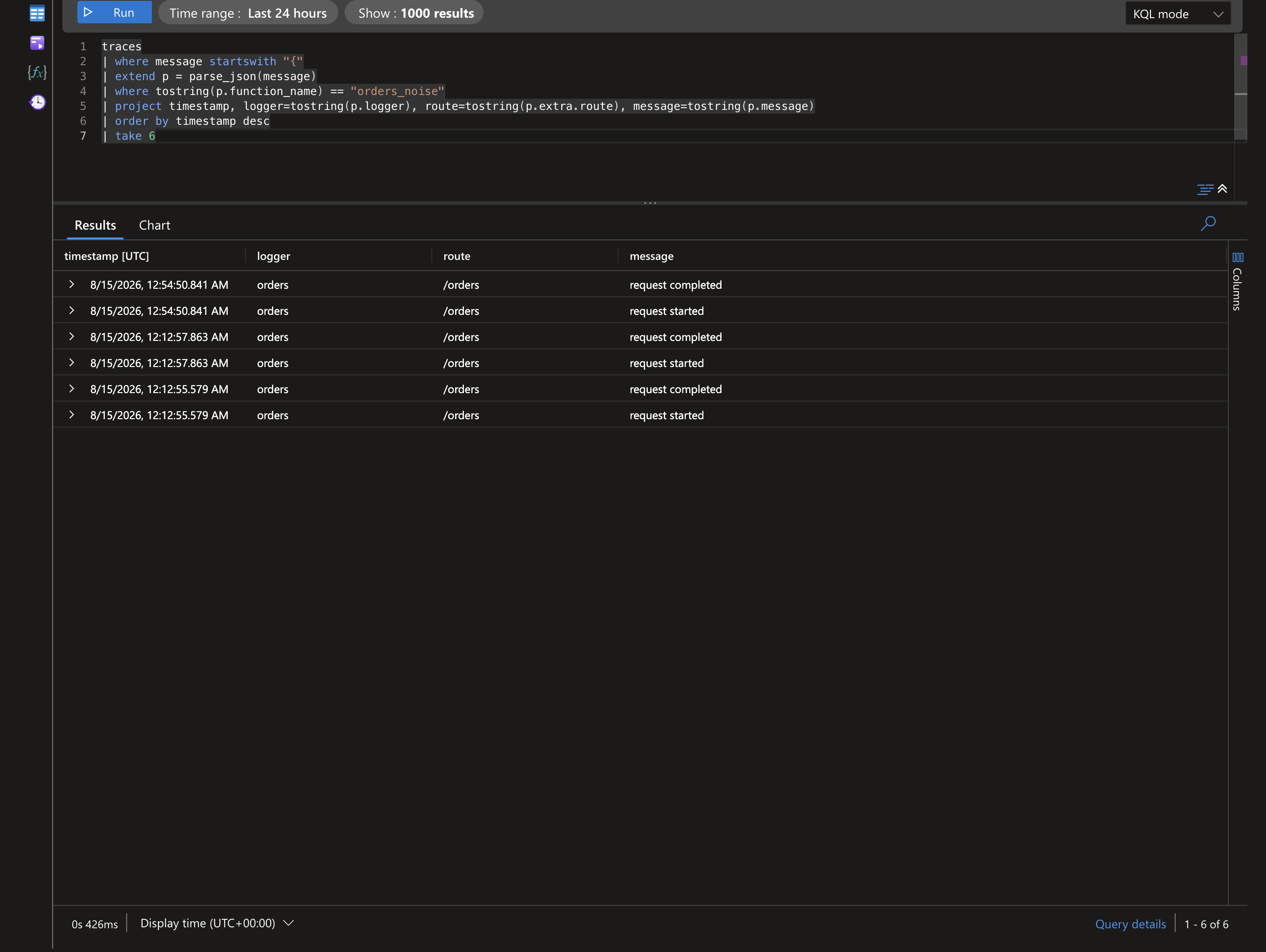
Noise control changes what does not arrive. After deploying and requesting /api/orders, your application events surface cleanly instead of being buried under dependency chatter. In this deployment the structured JSON stays inside the message column, so we parse it with parse_json(message) (see the deployment query guide for the customDimensions-parsed variant).
traces
| where message startswith "{"
| extend p = parse_json(message)
| where tostring(p.function_name) == "orders_noise"
| project timestamp, logger=tostring(p.logger), route=tostring(p.extra.route), message=tostring(p.message)
| order by timestamp desc
| take 6
Result from a real deployed app — clean application lifecycle events, undiluted by urllib3 / azure.core info logs:
To confirm the suppression worked, compare dependency volume before and after tuning:
traces
| where message startswith "{"
| extend p = parse_json(message)
| where timestamp > ago(1h)
| summarize count() by tostring(p.logger)
| order by count_ desc
Suppressed namespaces (urllib3, azure, azure.core.pipeline.policies.http_logging_policy) should drop to warnings-and-above volume, while orders keeps full INFO visibility.
If your pipeline parses the JSON into
customDimensionsinstead, dropparse_json(message)and readcustomDimensions.loggerdirectly.
Suggested Namespace Policies
| Namespace | Suggested Level | Reason |
|---|---|---|
urllib3 |
WARNING |
Reduce connection-level chatter |
azure |
WARNING |
Preserve significant SDK warnings/errors |
azure.core.pipeline.policies.http_logging_policy |
WARNING |
Avoid verbose request/response info |
Progressive Tuning Strategy
- Start with dependency namespaces at
WARNING. - Watch for missing diagnostics.
- Raise specific namespace to
INFOtemporarily during incidents. - Revert after investigation.
Incident Mode Pattern
logging.getLogger("azure").setLevel(logging.INFO)
logger.info("incident mode enabled", reason="sdk investigation")
Use for limited time windows to avoid sustained high-volume noise.
Common Mistakes
- Setting global root to
WARNING, which hides app info logs. - Lowering every dependency to
ERROR, losing valuable warnings. - Forgetting to document temporary tuning changes.
Validation Checklist
After configuration:
- Confirm key app lifecycle logs remain visible.
- Confirm dependency debug/info chatter is reduced.
- Confirm warnings/errors from dependencies still surface.
- Confirm dashboards and alerts still match expected volume.
Pairing with Binding and Context Injection
Noise control is strongest when combined with structured app logs:
with logging_context(context):for invocation correlation.bind()for request-level dimensions.- Namespace level controls for dependency suppression.
This keeps signal density high and triage time low.