Example: JSON Output
Use structured JSON logs when logs are parsed by machines, indexed by platforms, or queried for metrics and alerting.
Goal
Configure JSON output with setup_logging(format="json"), emit structured fields, and parse each line safely.
Baseline Setup
import logging
from azure_functions_logging import get_logger, setup_logging

setup_logging(level=logging.INFO, format="json")
logger = get_logger("orders")

logger.info("service started", service="orders", environment="prod")
Sample JSON Line
A single log event is emitted as one JSON object per line:
{"timestamp":"2026-03-14T10:20:30.123456+00:00","level":"INFO","logger":"orders","message":"service started","invocation_id":null,"function_name":null,"trace_id":null,"span_id":null,"cold_start":null,"host_instance_id":"0d1f2a3b4c5d","exception":null,"extra":{"service":"orders","environment":"prod"}}
Field Breakdown
Top-level fields generated by formatter:
timestamplevelloggermessageinvocation_idfunction_nametrace_idspan_idcold_starthost_instance_id— identifies the worker instance that produced the log (resolved fromWEBSITE_INSTANCE_ID→WEBSITE_POD_NAME→CONTAINER_NAME→socket.gethostname(), ornullif none resolve)exceptionextra
Use extra for application-specific dimensions such as tenant, order ID, and operation type.
Logging Structured Data
logger.info(
    "order accepted",
    order_id="ord-1001",
    tenant_id="tenant-a",
    amount=149.5,
    currency="USD",
)

logger.warning(
    "payment retry",
    order_id="ord-1001",
    attempt=2,
    gateway="stripe",
)
Parsing JSON Logs in Python
import json

line = '{"timestamp":"...","level":"INFO","logger":"orders","message":"order accepted","invocation_id":null,"function_name":null,"trace_id":null,"span_id":null,"cold_start":null,"host_instance_id":"0d1f2a3b4c5d","exception":null,"extra":{"order_id":"ord-1001"}}'

record = json.loads(line)

print(record["level"])
print(record["message"])
print(record["extra"].get("order_id"))
Azure Function Usage Pattern
import azure.functions as func
from azure_functions_logging import JsonFormatter, get_logger, logging_context, setup_logging

setup_logging(functions_formatter=JsonFormatter())
logger = get_logger(__name__)

app = func.FunctionApp()


@app.route(route="orders")
def create_order(req: func.HttpRequest, context: func.Context) -> func.HttpResponse:
    with logging_context(context):
        logger.info("request received", method=req.method, route="/orders")
        return func.HttpResponse("ok", status_code=200)
With context injection, invocation fields are populated for every event in this request context.
In Application Insights
After deploying and requesting /api/orders, query the traces table. In this deployment the structured JSON stays inside the message column, so we parse it with parse_json(message) — top-level fields and extra.* keys are read off the parsed payload (see the deployment query guide for the customDimensions-parsed variant).
traces
| where message startswith "{"
| extend p = parse_json(message)
| where tostring(p.function_name) == "create_order"
| project timestamp, method=tostring(p.extra.method), route=tostring(p.extra.route), message=tostring(p.message)
| order by timestamp desc
| take 5
Result from a real deployed app:
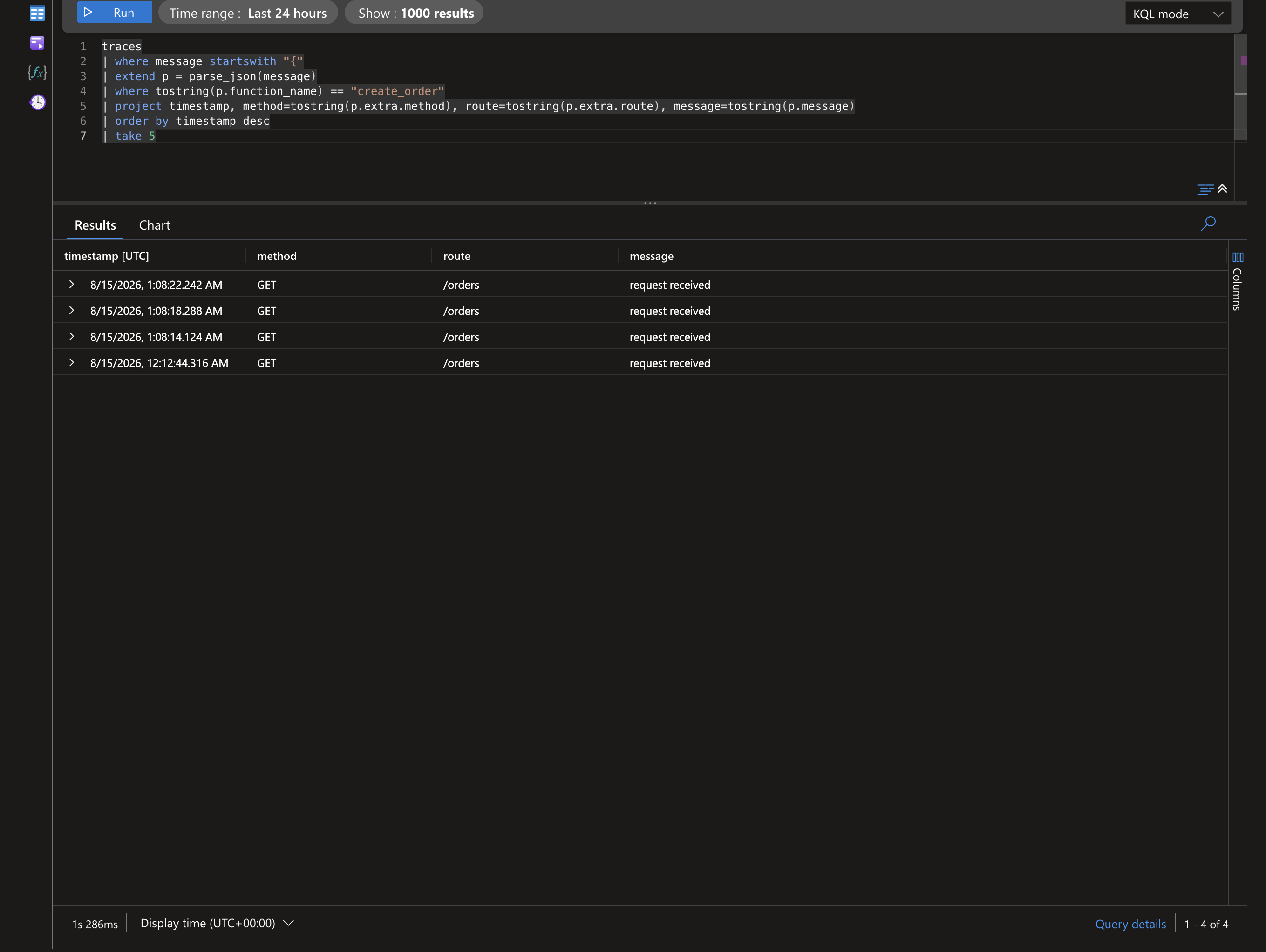
Application-specific dimensions passed as keyword arguments (e.g. order_id, tenant_id) surface the same way under extra.*, so you can slice on p.extra.tenant_id for multi-tenant analysis.
If your pipeline parses the JSON into
customDimensionsinstead, dropparse_json(message)and readcustomDimensions.method/customDimensions.routedirectly.
Production Query Patterns
Typical query dimensions from JSON output:
levelfor error rates.function_namefor function-specific dashboards.cold_startfor startup impact monitoring.extra.tenant_idfor multi-tenant analysis.extra.order_idfor incident correlation.
Reliability Guidelines
- Keep one JSON object per line.
- Keep message concise; push dimensions to structured keys.
- Use stable field names over time.
- Avoid deeply nested extra payloads unless required.
Error Logging in JSON
try:
    1 / 0
except ZeroDivisionError:
    logger.exception("math failure", operation="division", request_id="r-1")
This produces exception text and preserves extra context.
Migration Strategy from Color to JSON
- Start locally with
format="color". - Add structured keys to log calls.
- Switch non-local tiers to
format="json". - Validate parser compatibility in staging.
- Roll out dashboards and alerts using structured fields.
Quick Validation Script
import json
import logging
from azure_functions_logging import get_logger, setup_logging

setup_logging(level=logging.INFO, format="json")
logger = get_logger("validation")
logger.info("json check", run_id="run-20260314")

# Validate line shape in your sink by loading one event as JSON.