Example: host.json Conflict Resolution
This example shows how host-level log policy can suppress application logs and how to fix it safely.
Why This Matters
setup_logging(level=logging.INFO) can still appear broken if host.json is stricter.
Common symptom:
INFOlogs missing in Azure or Core Tools output.WARNINGand above still visible.
Baseline Application Setup
import logging
from azure_functions_logging import get_logger, setup_logging

setup_logging(level=logging.INFO, format="json")
logger = get_logger(__name__)

logger.info("info event")
logger.warning("warning event")
Conflicting host.json
With this host policy:
warningevents appear.infoevents are suppressed.
Corrected host.json
Now both info and warning events are visible.
Function-Specific Override Pattern
You can keep strict defaults and open specific functions:
This is useful when one function needs richer diagnostics.
End-to-End Function Example
import azure.functions as func
from azure_functions_logging import JsonFormatter, get_logger, logging_context, setup_logging

setup_logging(functions_formatter=JsonFormatter())
logger = get_logger("orders")

app = func.FunctionApp()


@app.route(route="orders")
def orders(req: func.HttpRequest, context: func.Context) -> func.HttpResponse:
    with logging_context(context):
        logger.info("orders request started")
        logger.warning("orders validation warning")
        return func.HttpResponse("ok")
If INFO does not appear, inspect host.json first.
In Application Insights
host.json conflicts are visible as missing rows, not error messages. After deploying and requesting /api/orders, query the traces table by log level. In this deployment the structured JSON stays inside the message column, so we parse it with parse_json(message) (see the deployment query guide for the customDimensions-parsed variant).
traces
| where message startswith "{"
| extend p = parse_json(message)
| where tostring(p.function_name) == "orders"
| project timestamp, level=tostring(p.level), invocation_id=tostring(p.invocation_id), message=tostring(p.message)
| order by timestamp desc
| take 6
With the corrected host.json ("default": "Information"), both the INFO and WARNING events appear — this is the real deployed result:
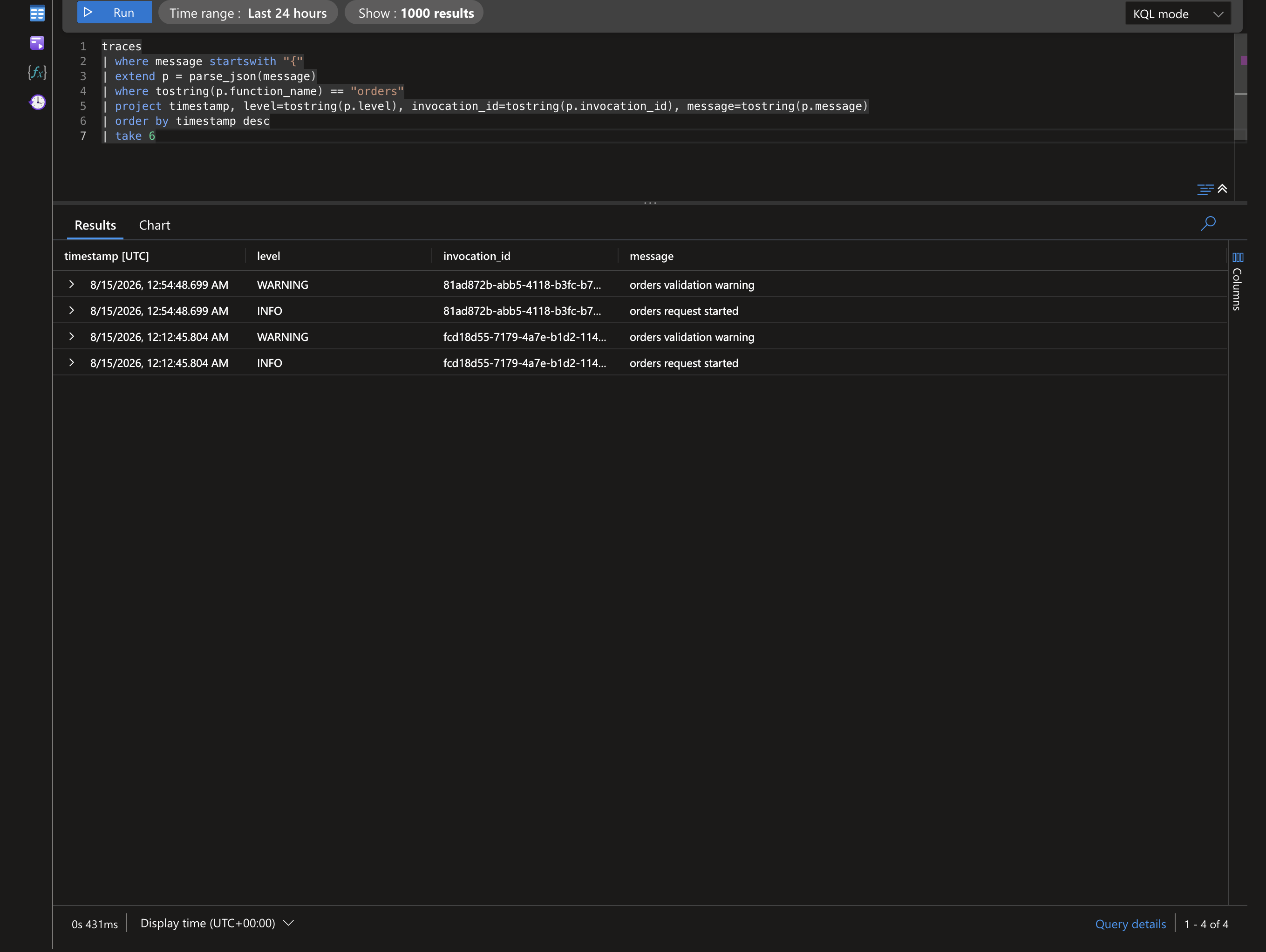
With a conflicting host.json ("default": "Warning"), the INFO line never reaches Application Insights — only the WARNING row is ingested, and the INFO row silently disappears from the result above.
The library's startup conflict warning tells you before you go hunting for these missing rows.
If your pipeline parses the JSON into
customDimensionsinstead, dropparse_json(message)and readcustomDimensions.function_name/severityLeveldirectly.
Validation Checklist
- Verify app setup level.
- Verify host default level.
- Verify function-specific overrides.
- Verify deployment uses expected
host.json. - Verify output sink query is not filtering low levels.
Safety Guidelines
- Avoid globally setting very low host levels in high-volume workloads.
- Prefer per-function overrides when targeted diagnostics are needed.
- Keep JSON logs structured for efficient filtering.
Troubleshooting Matrix
| App Level | Host Default | INFO Visible? |
|---|---|---|
| INFO | Warning | No |
| INFO | Information | Yes |
| DEBUG | Warning | No |
| WARNING | Warning | Yes |
Observability Recommendation
Use this pairing for production:
- App setup:
setup_logging(level=logging.INFO, format="json") - Host default:
Information - Dependency logger overrides:
WARNING
This keeps signal quality high while preserving troubleshooting depth.