Scenario 1: Public Only
The simplest deployment pattern with no VNet integration. All traffic flows over the public internet.
Portal Walkthrough
This section shows the Networking blade for a Consumption (Y1) Function App — the default public-only scenario. PII is masked.
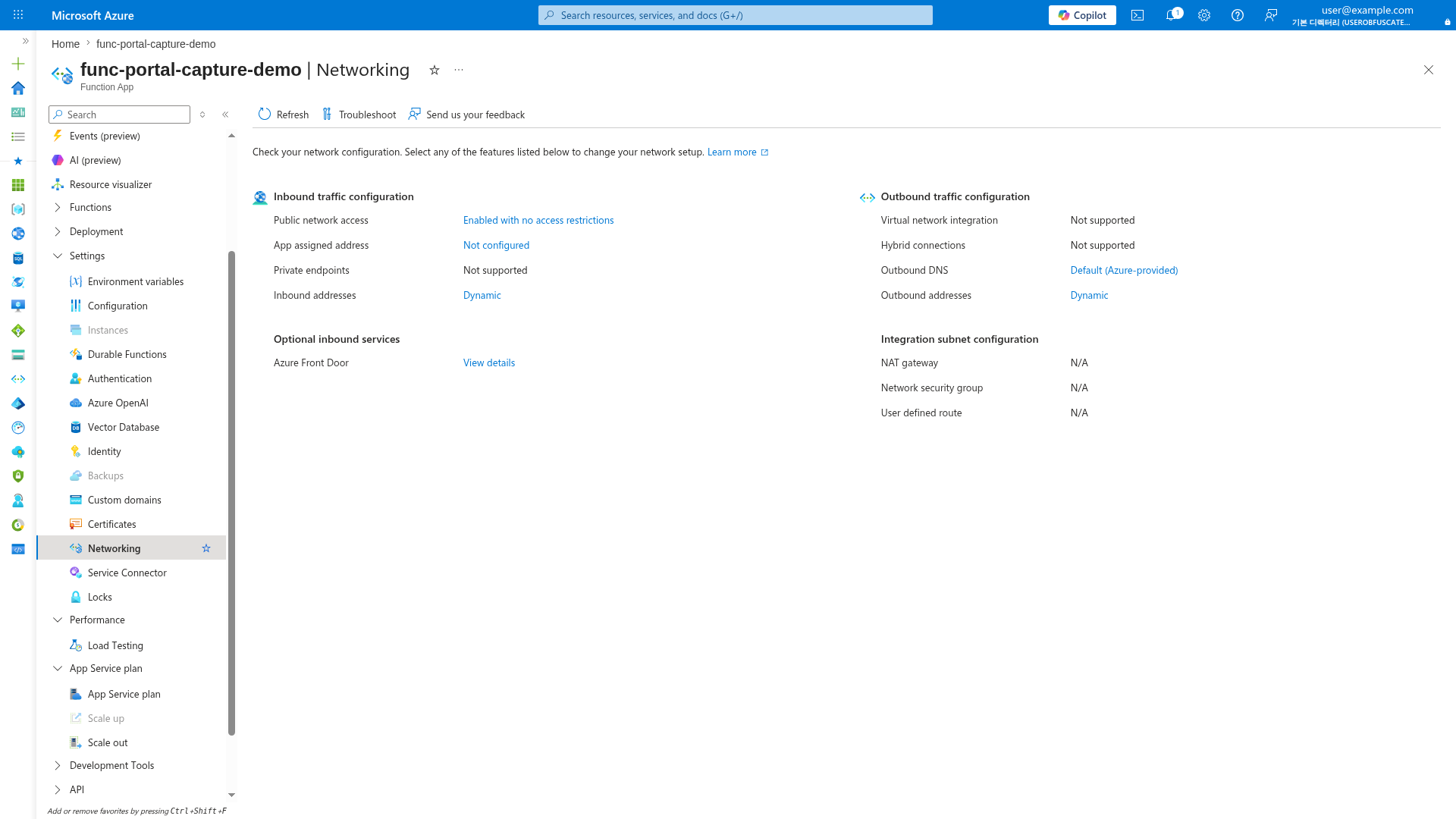
[Observed] Public network access is enabled with no restrictions. VNet integration and private endpoints are not supported on Consumption (Y1). This is the baseline public-only networking posture.
When to Use
- Development and testing environments
- Public-facing APIs without backend dependencies
- Prototypes and demos
- Workloads without compliance requirements for network isolation
Architecture
flowchart TD
    INET[Internet] -->|HTTPS| FA[Function App]
    FA -->|Public endpoint| ST[Storage Account]
    FA -->|Public endpoint| AI[Application Insights]
    FA -->|Public endpoint| OTHER[Other Azure Services]

    style FA fill:#0078d4,color:#fff
    style ST fill:#FFF3E0
Supported Plans
| Plan | Supported | Notes |
|---|---|---|
| Consumption (Y1) | Default and only option | |
| Flex Consumption (FC1) | VNet integration is optional | |
| Premium (EP) | VNet integration is optional | |
| Dedicated (B1) | Public only in this guide; VNet scenarios use S1+ | |
| Dedicated (S1+) | VNet integration is optional |
Prerequisites
This scenario requires no additional networking setup beyond the base deployment. Follow your language tutorial's 02-first-deploy.md:
Plan-Specific Configuration
Consumption (Y1)
No special configuration needed. Public access is the only option.
az functionapp create \
  --name "$APP_NAME" \
  --resource-group "$RG" \
  --storage-account "$STORAGE_NAME" \
  --consumption-plan-location "$LOCATION" \
  --functions-version 4 \
  --runtime python \
  --runtime-version 3.11 \
  --os-type Linux
| Command/Parameter | Purpose |
|---|---|
--consumption-plan-location "$LOCATION" | Creates a serverless Consumption plan in the specified region |
Flex Consumption (FC1) — Public Mode
Skip VNet integration parameters for public deployment.
az functionapp create \
  --name "$APP_NAME" \
  --resource-group "$RG" \
  --storage-account "$STORAGE_NAME" \
  --flexconsumption-location "$LOCATION" \
  --runtime python \
  --runtime-version 3.11 \
  --functions-version 4
| Command/Parameter | Purpose |
|---|---|
--flexconsumption-location "$LOCATION" | Creates a Flex Consumption plan without VNet integration |
Storage Authentication
FC1 public deployments can use either connection string or identity-based storage authentication. Identity-based is recommended for security.
Premium (EP) — Public Mode
Create without VNet integration.
az functionapp plan create \
  --name "$PLAN_NAME" \
  --resource-group "$RG" \
  --location "$LOCATION" \
  --sku EP1 \
  --is-linux

az functionapp create \
  --name "$APP_NAME" \
  --resource-group "$RG" \
  --plan "$PLAN_NAME" \
  --storage-account "$STORAGE_NAME" \
  --runtime python \
  --runtime-version 3.11 \
  --functions-version 4 \
  --os-type Linux
| Command/Parameter | Purpose |
|---|---|
--sku EP1 | Creates an Elastic Premium plan (smallest tier) |
--is-linux | Configures the plan for Linux hosting |
Dedicated (B1) — Public Only
This guide uses B1 for public-only scenarios. For VNet integration, see Private Egress with Standard (S1+) tier.
az appservice plan create \
  --name "$PLAN_NAME" \
  --resource-group "$RG" \
  --location "$LOCATION" \
  --sku B1 \
  --is-linux

az functionapp create \
  --name "$APP_NAME" \
  --resource-group "$RG" \
  --plan "$PLAN_NAME" \
  --storage-account "$STORAGE_NAME" \
  --runtime python \
  --runtime-version 3.11 \
  --functions-version 4 \
  --os-type Linux
| Command/Parameter | Purpose |
|---|---|
--sku B1 | Creates a Basic tier App Service plan (public-only in this guide) |
Verification
Test public endpoint access:
| Command/Parameter | Purpose |
|---|---|
curl --request GET | Tests the public HTTP endpoint |
Expected response:
Security Considerations
Public Exposure
Without VNet integration, your function app and its dependencies are accessible over the public internet. Consider:
- Function-level authorization keys for HTTP triggers
- IP access restrictions to limit source networks
- App Service Authentication for user/workload identity
- Storage firewall rules if not using private endpoints
Add IP Access Restrictions
Limit access to known IP ranges:
az functionapp config access-restriction add \
  --name "$APP_NAME" \
  --resource-group "$RG" \
  --rule-name "AllowCorporate" \
  --priority 100 \
  --action Allow \
  --ip-address "203.0.113.0/24"
| Command/Parameter | Purpose |
|---|---|
--rule-name "AllowCorporate" | Descriptive name for the access rule |
--priority 100 | Lower numbers are evaluated first |
--ip-address "203.0.113.0/24" | CIDR range to allow |
Migrating to Private Networking
To add VNet integration later, see:
- Scenario 2: Private Egress — Add VNet integration for private backend access
- Scenario 3: Private Ingress — Add site private endpoint for private inbound