Scenario 3: Private Ingress (Site Private Endpoint)
Full network isolation with private inbound access via site private endpoint and private outbound through VNet integration.
Portal Walkthrough
The Networking blade shows the baseline state before private endpoint configuration. PII is masked.
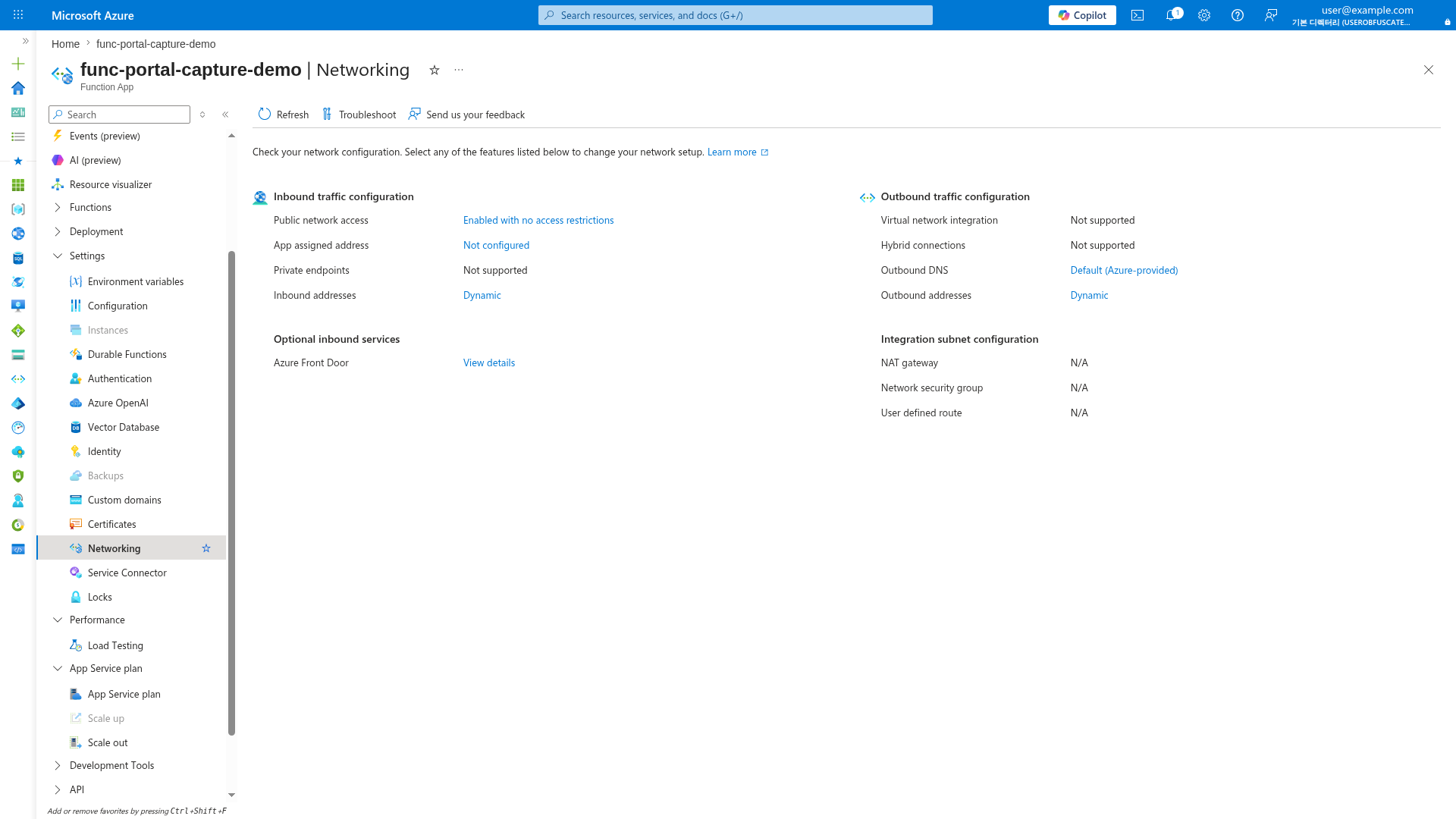
[Observed] On Consumption (Y1), private endpoints are "Not supported". For private ingress, use Flex Consumption (FC1), Premium (EP), or Dedicated plans where the inbound section will show the private endpoint configuration.
When to Use
- Zero-trust architectures requiring no public exposure
- Compliance requirements (PCI-DSS, HIPAA, FedRAMP)
- Internal-only APIs accessible only from corporate network
- Backend services in hub-spoke or landing zone architectures
Architecture
flowchart TD
    subgraph CORP["Corporate Network / VPN"]
        CLIENT[Internal Client]
    end

    CLIENT -->|Private IP| PE_APP[Site Private Endpoint]

    subgraph VNET["VNet"]
        subgraph PE_SUB["Private Endpoint Subnet"]
            PE_APP
            PE_BLOB[PE: blob]
            PE_QUEUE[PE: queue]
            PE_TABLE[PE: table]
            PE_FILE[PE: file]
        end
        subgraph INT_SUB["Integration Subnet"]
            FA[Function App]
        end
    end

    PE_APP --> FA
    FA --> PE_BLOB
    PE_BLOB --> ST[Storage Account]
    PE_QUEUE --> ST
    PE_TABLE --> ST
    PE_FILE --> ST

    INET[Internet] -.->|Blocked| FA

    style FA fill:#0078d4,color:#fff
    style VNET fill:#E8F5E9,stroke:#4CAF50
    style ST fill:#FFF3E0
    style INET fill:#FFCDD2,stroke:#F44336
Supported Plans
| Plan | Supported | Notes |
|---|---|---|
| Consumption (Y1) | No private endpoint support | |
| Flex Consumption (FC1) | Requires VNet integration first | |
| Premium (EP) | Recommended for private workloads | |
| Dedicated (B1) | [^1] | Not tested in this guide |
| Dedicated (S1+) | Full support |
[^1]: Basic (B1) supports VNet integration and private endpoints per Azure documentation, but is not tested or recommended for private networking scenarios in this guide. Use Standard (S1+) for production.
Prerequisites
Complete Scenario 2: Private Egress first. This scenario adds a site private endpoint on top of VNet integration.
Required from Scenario 2: - [ ] Function App with VNet integration enabled - [ ] Storage private endpoints configured - [ ] Private DNS zones linked to VNet
Additional requirements: - [ ] Private DNS zone for privatelink.azurewebsites.net - [ ] Network access from client (VPN, ExpressRoute, or same VNet)
Step-by-Step Configuration
Step 1: Get Function App Resource ID
export APP_ID=$(az functionapp show \
  --name "$APP_NAME" \
  --resource-group "$RG" \
  --query "id" \
  --output tsv)
| Command/Parameter | Purpose |
|---|---|
--query "id" | Retrieves the full resource ID for private endpoint creation |
Step 2: Create Site Private Endpoint
az network private-endpoint create \
  --name "pe-$APP_NAME" \
  --resource-group "$RG" \
  --location "$LOCATION" \
  --vnet-name "$VNET_NAME" \
  --subnet "snet-private-endpoints" \
  --private-connection-resource-id "$APP_ID" \
  --group-ids "sites" \
  --connection-name "conn-$APP_NAME"
| Command/Parameter | Purpose |
|---|---|
--group-ids "sites" | Targets the function app's primary web endpoint |
--private-connection-resource-id "$APP_ID" | Links the endpoint to the function app |
Step 3: Create Private DNS Zone for Web Apps
az network private-dns zone create \
  --resource-group "$RG" \
  --name "privatelink.azurewebsites.net"

az network private-dns link vnet create \
  --resource-group "$RG" \
  --zone-name "privatelink.azurewebsites.net" \
  --name "link-webapp" \
  --virtual-network "$VNET_NAME" \
  --registration-enabled false
| Command/Parameter | Purpose |
|---|---|
privatelink.azurewebsites.net | Standard private DNS zone for App Service/Functions |
--registration-enabled false | Disables auto-registration |
Step 4: Link Private Endpoint to DNS Zone
az network private-endpoint dns-zone-group create \
  --resource-group "$RG" \
  --endpoint-name "pe-$APP_NAME" \
  --name "webapp-dns-zone-group" \
  --private-dns-zone "privatelink.azurewebsites.net" \
  --zone-name "webapp"
| Command/Parameter | Purpose |
|---|---|
az network private-endpoint dns-zone-group create | Automatically registers the private IP in the DNS zone |
Step 5: Disable Public Network Access (Recommended)
az functionapp update \
  --name "$APP_NAME" \
  --resource-group "$RG" \
  --set publicNetworkAccess=Disabled
| Command/Parameter | Purpose |
|---|---|
publicNetworkAccess=Disabled | Completely disables the public endpoint |
SCM Site Access
Disabling public access also blocks the SCM/Kudu site. For deployment:
- Use a self-hosted agent in the VNet for CI/CD
- Deploy from a VM with VNet access
- Use Azure DevOps or GitHub Actions with VNet connectivity
Step 6: SCM Access for Deployment
SCM Access with Private Endpoints
When you create a private endpoint with --group-ids "sites", both the main site and SCM/Kudu endpoint are accessible via the same private endpoint. With a private DNS zone group, Azure creates private DNS A records for both hosts inside privatelink.azurewebsites.net, while public DNS keeps the CNAME chain from *.azurewebsites.net and *.scm.azurewebsites.net to those private records.
your-app.privatelink.azurewebsites.net→ private IPyour-app.scm.privatelink.azurewebsites.net→ same private IP
No separate SCM private endpoint is needed for most scenarios.
For deployment from within the VNet:
| Command/Parameter | Purpose |
|---|---|
func azure functionapp publish | Deploys to the function app via SCM endpoint |
Verification
Check Private Endpoint Status
az network private-endpoint show \
  --name "pe-$APP_NAME" \
  --resource-group "$RG" \
  --query "privateLinkServiceConnections[0].privateLinkServiceConnectionState.status" \
  --output tsv
| Command/Parameter | Purpose |
|---|---|
az network private-endpoint show | Verifies that the site private endpoint connection is approved and usable |
Expected output: Approved
Check Private DNS Records
az network private-dns record-set a list \
  --resource-group "$RG" \
  --zone-name "privatelink.azurewebsites.net" \
  --output table
| Command/Parameter | Purpose |
|---|---|
az network private-dns record-set a list | Confirms that A records exist for both the app hostname and the SCM hostname |
Expected output includes records similar to $APP_NAME and $APP_NAME.scm.
Testing from VNet (VM/Bastion Required)
VNet Access Required
After disabling public access, the function is only reachable from within the VNet. You need one of:
- Jump box VM in the VNet + Azure Bastion
- VPN/ExpressRoute connection
Management Subnet Recommendation
Private endpoint subnets can technically host other resources, but using a separate management subnet for test VMs keeps private endpoints isolated and matches common production landing zone patterns.
Option A: Deploy Jump Box VM with Bastion
# Create Bastion subnet (required: /26 or larger)
az network vnet subnet create \
  --resource-group "$RG" \
  --vnet-name "$VNET_NAME" \
  --name "AzureBastionSubnet" \
  --address-prefixes "10.0.3.0/26"

# Create management subnet for the jump box VM
az network vnet subnet create \
  --resource-group "$RG" \
  --vnet-name "$VNET_NAME" \
  --name "snet-management" \
  --address-prefixes "10.0.4.0/24"

# Create public IP for Bastion
az network public-ip create \
  --resource-group "$RG" \
  --name "pip-bastion-$APP_NAME" \
  --sku "Standard" \
  --location "$LOCATION"

# Create Bastion host (takes 5-10 minutes)
az network bastion create \
  --resource-group "$RG" \
  --name "bastion-$APP_NAME" \
  --vnet-name "$VNET_NAME" \
  --public-ip-address "pip-bastion-$APP_NAME" \
  --location "$LOCATION" \
  --sku "Basic"

# Create jump box VM (no public IP - accessed via Bastion)
az vm create \
  --resource-group "$RG" \
  --name "vm-jumpbox" \
  --image "Ubuntu2404" \
  --size "Standard_B1s" \
  --vnet-name "$VNET_NAME" \
  --subnet "snet-management" \
  --admin-username "azureuser" \
  --generate-ssh-keys \
  --public-ip-address ""
| Command/Parameter | Purpose |
|---|---|
AzureBastionSubnet | Required subnet name for Bastion (must be exactly this name) |
--address-prefixes "10.0.3.0/26" | Minimum /26 CIDR for Bastion subnet |
snet-management | Separate subnet for test or operations VMs |
--sku "Basic" | Basic Bastion SKU (~$0.19/hour) |
--public-ip-address "" | VM has no public IP - only accessible via Bastion |
Connect to VM via Bastion
# Connect via Azure Portal: VM > Connect > Bastion
# Or use Azure CLI:
az network bastion ssh \
  --resource-group "$RG" \
  --name "bastion-$APP_NAME" \
  --target-resource-id $(az vm show --resource-group "$RG" --name "vm-jumpbox" --query "id" --output tsv) \
  --auth-type "ssh-key" \
  --username "azureuser" \
  --ssh-key ~/.ssh/id_rsa
| Command/Parameter | Purpose |
|---|---|
az network bastion ssh | Opens an SSH session to the private VM through Azure Bastion |
--target-resource-id $(az vm show ...) | Resolves the VM resource ID required by the Bastion command |
Test from Jump Box
Once connected to the VM:
| Command/Parameter | Purpose |
|---|---|
nslookup $APP_NAME.azurewebsites.net | Verifies that the public hostname resolves to the private endpoint IP inside the VNet |
Expected output:
Server:         127.0.0.53
Address:        127.0.0.53#53

Non-authoritative answer:
func-demo.azurewebsites.net  canonical name = func-demo.privatelink.azurewebsites.net.
Name:   func-demo.privatelink.azurewebsites.net
Address: 10.0.2.5
| Command/Parameter | Purpose |
|---|---|
curl --request GET | Confirms that HTTPS requests succeed through the site private endpoint |
Expected output:
Option B: Minimal Test VM (No Bastion)
For quick testing, create a VM with public IP and SSH directly:
az vm create \
  --resource-group "$RG" \
  --name "vm-test" \
  --image "Ubuntu2404" \
  --size "Standard_B1s" \
  --vnet-name "$VNET_NAME" \
  --subnet "snet-management" \
  --admin-username "azureuser" \
  --generate-ssh-keys

# SSH to VM (use the public IP from output)
ssh azureuser@<public-ip>

# Test from inside VM
nslookup $APP_NAME.azurewebsites.net
curl --request GET "https://$APP_NAME.azurewebsites.net/api/health"
| Command/Parameter | Purpose |
|---|---|
az vm create | Creates a temporary VM for private endpoint validation without Bastion |
ssh azureuser@<public-ip> | Connects to the test VM so validation runs from inside the VNet |
curl --request GET | Confirms that the function app is reachable privately from the VM |
Cost Optimization
Delete test resources after verification:
az vm delete --resource-group "$RG" --name "vm-test" --yes
az vm delete --resource-group "$RG" --name "vm-jumpbox" --yes
az network bastion delete --resource-group "$RG" --name "bastion-$APP_NAME"
az network public-ip delete --resource-group "$RG" --name "pip-bastion-$APP_NAME"
| Command/Parameter | Purpose |
|---|---|
az vm delete | Removes temporary validation VMs after testing |
az network bastion delete | Removes the Bastion host if it was created only for validation |
az network public-ip delete | Removes the Bastion public IP resource |
- VM (B1s): ~$0.01/hour
- Bastion (Basic): ~$0.19/hour
CI/CD Considerations
With public access disabled, deployment requires VNet connectivity:
Option A: Self-Hosted Agent in VNet
Deploy a VM or container in the VNet running Azure DevOps agent or GitHub Actions runner.
Option B: Azure DevOps with VNet Integration
Use Azure DevOps Managed DevOps Pool with VNet integration (preview).
Option C: GitHub Actions with Private Networking
Use GitHub Actions larger runners with Azure private networking (preview).
Option D: Temporary Public Access
# Enable public access for deployment
az functionapp update \
  --name "$APP_NAME" \
  --resource-group "$RG" \
  --set publicNetworkAccess=Enabled

# Deploy
func azure functionapp publish "$APP_NAME"

# Disable public access
az functionapp update \
  --name "$APP_NAME" \
  --resource-group "$RG" \
  --set publicNetworkAccess=Disabled
| Command/Parameter | Purpose |
|---|---|
--set publicNetworkAccess=Enabled | Temporarily allows public access for deployment |
func azure functionapp publish | Deploys the function app code |
--set publicNetworkAccess=Disabled | Restores private-only access after deployment |
Troubleshooting
| Symptom | Likely Cause | Solution |
|---|---|---|
| Connection refused | DNS resolving to public IP | Verify DNS zone linked to VNet |
| 403 Forbidden | Public access disabled, not on VNet | Connect via VPN or from VM in VNet |
| Deployment fails | SCM site not accessible | Deploy from VNet (see Step 6) or use temporary public access (Option D) |
| DNS not resolving | Zone not linked or cached | Check az network private-dns link vnet list, clear DNS cache |
Next Steps
- Scenario 4: Fixed Outbound IP — Add NAT Gateway for stable egress IP