Scenario 2: Private Egress (VNet + Storage PE)
Public inbound access with private outbound connectivity to backend services through VNet integration and private endpoints.
Portal Walkthrough
The Networking blade shows the baseline state before VNet integration is configured. PII is masked.
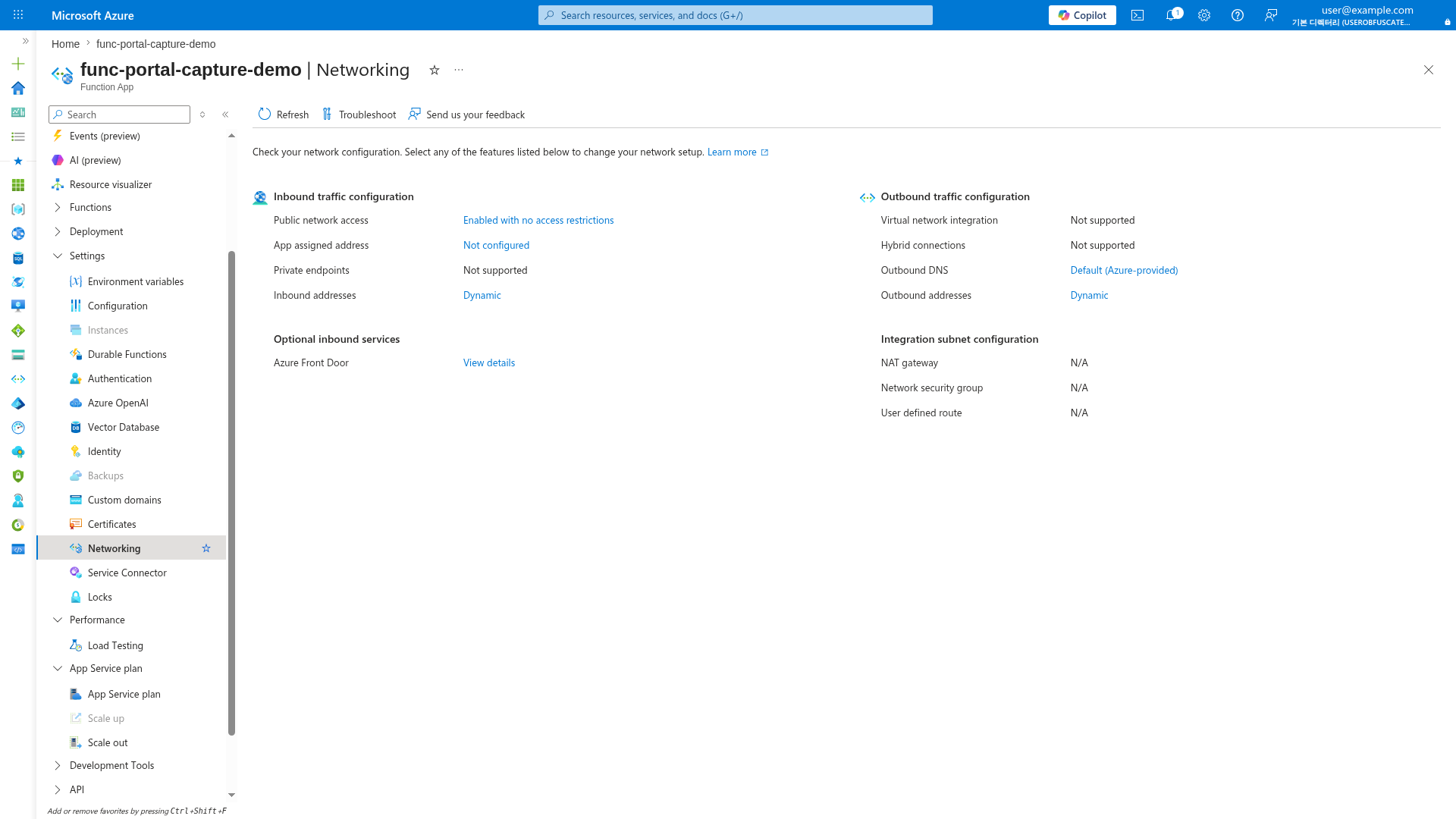
[Observed] On Consumption (Y1), VNet integration is "Not supported". For private egress, use Flex Consumption (FC1) or Premium (EP) plans where the outbound section will show the VNet integration status after configuration.
When to Use
- Access databases, storage, or other services secured behind private endpoints
- Compliance requirements for private data plane traffic
- Hybrid connectivity to on-premises through VPN/ExpressRoute
- Multi-tier architectures with private backend services
Architecture
flowchart TD
    INET[Internet] -->|HTTPS| FA[Function App]

    subgraph VNET["VNet"]
        subgraph INT_SUB["Integration Subnet"]
            FA
        end
        subgraph PE_SUB["Private Endpoint Subnet"]
            PE_BLOB[PE: blob]
            PE_QUEUE[PE: queue]
            PE_TABLE[PE: table]
            PE_FILE[PE: file]
        end
    end

    PE_BLOB --> ST[Storage Account]
    PE_QUEUE --> ST
    PE_TABLE --> ST
    PE_FILE --> ST

    FA -.->|Managed Identity| MI[RBAC]
    MI --> ST

    style FA fill:#0078d4,color:#fff
    style VNET fill:#E8F5E9,stroke:#4CAF50
    style ST fill:#FFF3E0
Supported Plans
| Plan | Supported | Subnet Delegation |
|---|---|---|
| Consumption (Y1) | N/A | |
| Flex Consumption (FC1) | Microsoft.App/environments | |
| Premium (EP) | Microsoft.Web/serverFarms | |
| Dedicated (B1) | [^1] | N/A |
| Dedicated (S1+) | Microsoft.Web/serverFarms |
[^1]: Basic (B1) supports VNet integration per Azure documentation, but is not tested or recommended for private networking scenarios in this guide. Use Standard (S1+) for production.
Prerequisites
Before starting, complete the base deployment from your language tutorial's 02-first-deploy.md, then return here to add VNet integration.
Required resources: - [ ] Function App deployed and running - [ ] VNet with address space (e.g., 10.0.0.0/16) - [ ] Integration subnet (e.g., 10.0.1.0/24) — empty, delegated - [ ] Private endpoint subnet (e.g., 10.0.2.0/24) - [ ] Managed identity enabled on the function app
Step-by-Step Configuration
Step 1: Set Variables
export RG="rg-func-private-demo"
export APP_NAME="func-private-demo"
export STORAGE_NAME="stprivatedemo"
export VNET_NAME="vnet-func-demo"
export LOCATION="koreacentral"
| Command/Parameter | Purpose |
|---|---|
export RG=... | Resource group containing all resources |
export VNET_NAME=... | Virtual network name for integration |
Step 2: Create VNet and Subnets
az network vnet create \
  --name "$VNET_NAME" \
  --resource-group "$RG" \
  --location "$LOCATION" \
  --address-prefixes "10.0.0.0/16" \
  --subnet-name "snet-integration" \
  --subnet-prefixes "10.0.1.0/24"

az network vnet subnet create \
  --name "snet-private-endpoints" \
  --resource-group "$RG" \
  --vnet-name "$VNET_NAME" \
  --address-prefixes "10.0.2.0/24"
| Command/Parameter | Purpose |
|---|---|
--address-prefixes "10.0.0.0/16" | Total VNet address space |
--subnet-prefixes "10.0.1.0/24" | Integration subnet CIDR |
Step 3: Delegate Subnet (Plan-Specific)
az network vnet subnet update \
  --name "snet-integration" \
  --resource-group "$RG" \
  --vnet-name "$VNET_NAME" \
  --delegations "Microsoft.App/environments"
| CLI element | Explanation |
|---|---|
| Command(s) | az network vnet subnet update |
| Key flags | --name, --resource-group, --vnet-name, --delegations |
| Variables | $RG, $VNET_NAME |
| Expected result | Azure CLI applies the configuration change; confirm the returned JSON or follow-up query shows the expected value. |
| Command/Parameter | Purpose |
|---|---|
--delegations "Microsoft.App/environments" | FC1 subnet delegation |
--delegations "Microsoft.Web/serverFarms" | EP/ASP subnet delegation |
Step 4: Enable VNet Integration
az functionapp vnet-integration add \
  --name "$APP_NAME" \
  --resource-group "$RG" \
  --vnet "$VNET_NAME" \
  --subnet "snet-integration"
| Command/Parameter | Purpose |
|---|---|
--vnet "$VNET_NAME" | Target virtual network |
--subnet "snet-integration" | Delegated integration subnet |
Step 5: Create Storage Private Endpoints
export STORAGE_ID=$(az storage account show \
  --name "$STORAGE_NAME" \
  --resource-group "$RG" \
  --query "id" \
  --output tsv)

for SVC in blob queue table file; do
  az network private-endpoint create \
    --name "pe-st-$SVC" \
    --resource-group "$RG" \
    --location "$LOCATION" \
    --vnet-name "$VNET_NAME" \
    --subnet "snet-private-endpoints" \
    --private-connection-resource-id "$STORAGE_ID" \
    --group-ids "$SVC" \
    --connection-name "conn-st-$SVC"
done
| Command/Parameter | Purpose |
|---|---|
--group-ids "$SVC" | Storage sub-resource (blob, queue, table, file) |
--private-connection-resource-id "$STORAGE_ID" | Links endpoint to the storage account |
Step 6: Create Private DNS Zones
for SVC in blob queue table file; do
  az network private-dns zone create \
    --resource-group "$RG" \
    --name "privatelink.$SVC.core.windows.net"

  az network private-dns link vnet create \
    --resource-group "$RG" \
    --zone-name "privatelink.$SVC.core.windows.net" \
    --name "link-$SVC" \
    --virtual-network "$VNET_NAME" \
    --registration-enabled false

  az network private-endpoint dns-zone-group create \
    --resource-group "$RG" \
    --endpoint-name "pe-st-$SVC" \
    --name "$SVC-dns-zone-group" \
    --private-dns-zone "privatelink.$SVC.core.windows.net" \
    --zone-name "$SVC"
done
| Command/Parameter | Purpose |
|---|---|
--registration-enabled false | Disables auto-registration of VMs |
az network private-endpoint dns-zone-group create | Links PE to DNS zone for automatic IP registration |
Step 7: Lock Down Storage (Optional)
After private endpoints are configured, disable public access:
az storage account update \
  --name "$STORAGE_NAME" \
  --resource-group "$RG" \
  --default-action Deny \
  --allow-blob-public-access false
| Command/Parameter | Purpose |
|---|---|
--default-action Deny | Blocks all public network access |
Order Matters
Disable public access after private endpoints and DNS zones are configured. Otherwise, your function app will lose storage connectivity.
Step 8: Configure Storage Authentication and Content Routing
RBAC Required
Identity-based host storage requires RBAC role assignments. Assign Storage Blob Data Owner and Storage Queue Data Contributor to the managed identity before configuring app settings.
Durable Functions
If using Durable Functions, also assign Storage Table Data Contributor for orchestration state storage.
FC1 supports both system-assigned and user-assigned managed identity for storage. System-assigned is simpler; user-assigned is required if you need to pre-configure RBAC before app creation.
Option A: System-Assigned (simpler)
# Enable system-assigned identity (if not already enabled)
az functionapp identity assign \
  --name "$APP_NAME" \
  --resource-group "$RG"

# Get principal ID
export PRINCIPAL_ID=$(az functionapp identity show \
  --name "$APP_NAME" \
  --resource-group "$RG" \
  --query "principalId" \
  --output tsv)

# Assign storage RBAC roles
az role assignment create \
  --assignee "$PRINCIPAL_ID" \
  --role "Storage Blob Data Owner" \
  --scope "$STORAGE_ID"

az role assignment create \
  --assignee "$PRINCIPAL_ID" \
  --role "Storage Queue Data Contributor" \
  --scope "$STORAGE_ID"

# Configure identity-based storage
az functionapp config appsettings set \
  --name "$APP_NAME" \
  --resource-group "$RG" \
  --settings \
    "AzureWebJobsStorage__accountName=$STORAGE_NAME" \
    "AzureWebJobsStorage__credential=managedidentity"
| CLI element | Explanation |
|---|---|
| Command(s) | az functionapp identity assign, az functionapp identity show, az role assignment create, az functionapp config appsettings set |
| Key flags | --name, --resource-group, --query, --output, --assignee, --role, --scope, --settings |
| Variables | $APP_NAME, $RG, $PRINCIPAL_ID, $STORAGE_ID, $STORAGE_NAME |
| Expected result | Azure CLI returns provisioning details; confirm the resource name and successful provisioning state before continuing. |
Option B: User-Assigned (pre-configured RBAC)
# Create user-assigned managed identity
export MI_NAME="mi-$APP_NAME"
az identity create \
  --name "$MI_NAME" \
  --resource-group "$RG" \
  --location "$LOCATION"

# Get identity resource ID and client ID
export MI_ID=$(az identity show \
  --name "$MI_NAME" \
  --resource-group "$RG" \
  --query "id" \
  --output tsv)

export MI_PRINCIPAL_ID=$(az identity show \
  --name "$MI_NAME" \
  --resource-group "$RG" \
  --query "principalId" \
  --output tsv)

export MI_CLIENT_ID=$(az identity show \
  --name "$MI_NAME" \
  --resource-group "$RG" \
  --query "clientId" \
  --output tsv)

# Assign storage RBAC roles to UAMI
az role assignment create \
  --assignee "$MI_PRINCIPAL_ID" \
  --role "Storage Blob Data Owner" \
  --scope "$STORAGE_ID"

az role assignment create \
  --assignee "$MI_PRINCIPAL_ID" \
  --role "Storage Queue Data Contributor" \
  --scope "$STORAGE_ID"

# Attach UAMI to function app
az functionapp identity assign \
  --name "$APP_NAME" \
  --resource-group "$RG" \
  --identities "$MI_ID"

# Configure identity-based storage with UAMI
az functionapp config appsettings set \
  --name "$APP_NAME" \
  --resource-group "$RG" \
  --settings \
    "AzureWebJobsStorage__accountName=$STORAGE_NAME" \
    "AzureWebJobsStorage__credential=managedidentity" \
    "AzureWebJobsStorage__clientId=$MI_CLIENT_ID"
| CLI element | Explanation |
|---|---|
| Command(s) | az identity create, az identity show, az role assignment create, az functionapp identity assign, plus 1 more |
| Key flags | --name, --resource-group, --location, --query, --output, --assignee, --role, --scope, --identities, --settings |
| Variables | $APP_NAME, $MI_NAME, $RG, $LOCATION, $MI_PRINCIPAL_ID, $STORAGE_ID, $MI_ID, $STORAGE_NAME, $MI_CLIENT_ID |
| Expected result | Azure CLI returns provisioning details; confirm the resource name and successful provisioning state before continuing. |
Premium plans can use identity-based host storage, but private storage scenarios still need Azure Files content share settings for deployment and scale operations.
# Enable system-assigned identity (if not already enabled)
az functionapp identity assign \
  --name "$APP_NAME" \
  --resource-group "$RG"

# Get principal ID
export PRINCIPAL_ID=$(az functionapp identity show \
  --name "$APP_NAME" \
  --resource-group "$RG" \
  --query "principalId" \
  --output tsv)

export STORAGE_CONNECTION_STRING=$(az storage account show-connection-string \
  --name "$STORAGE_NAME" \
  --resource-group "$RG" \
  --query "connectionString" \
  --output tsv)

# Assign storage RBAC roles for host storage
az role assignment create \
  --assignee "$PRINCIPAL_ID" \
  --role "Storage Blob Data Owner" \
  --scope "$STORAGE_ID"

az role assignment create \
  --assignee "$PRINCIPAL_ID" \
  --role "Storage Queue Data Contributor" \
  --scope "$STORAGE_ID"

# Configure host storage and content share routing
az functionapp config appsettings set \
  --name "$APP_NAME" \
  --resource-group "$RG" \
  --settings \
    "AzureWebJobsStorage__accountName=$STORAGE_NAME" \
    "AzureWebJobsStorage__credential=managedidentity" \
    "WEBSITE_CONTENTAZUREFILECONNECTIONSTRING=$STORAGE_CONNECTION_STRING" \
    "WEBSITE_CONTENTSHARE=$APP_NAME" \
    "WEBSITE_CONTENTOVERVNET=1"
| CLI element | Explanation |
|---|---|
| Command(s) | az functionapp identity assign, az functionapp identity show, az storage account show-connection-string, az role assignment create, plus 1 more |
| Key flags | --name, --resource-group, --query, --output, --assignee, --role, --scope, --settings |
| Variables | $APP_NAME, $RG, $STORAGE_NAME, $PRINCIPAL_ID, $STORAGE_ID, $STORAGE_CONNECTION_STRING |
| Expected result | Azure CLI returns provisioning details; confirm the resource name and successful provisioning state before continuing. |
Dedicated plans can avoid Azure Files content share dependency by deploying with WEBSITE_RUN_FROM_PACKAGE=1.
# Enable system-assigned identity (if not already enabled)
az functionapp identity assign \
  --name "$APP_NAME" \
  --resource-group "$RG"

# Get principal ID
export PRINCIPAL_ID=$(az functionapp identity show \
  --name "$APP_NAME" \
  --resource-group "$RG" \
  --query "principalId" \
  --output tsv)

# Assign storage RBAC roles
az role assignment create \
  --assignee "$PRINCIPAL_ID" \
  --role "Storage Blob Data Owner" \
  --scope "$STORAGE_ID"

az role assignment create \
  --assignee "$PRINCIPAL_ID" \
  --role "Storage Queue Data Contributor" \
  --scope "$STORAGE_ID"

# Configure identity-based storage
az functionapp config appsettings set \
  --name "$APP_NAME" \
  --resource-group "$RG" \
  --settings \
    "AzureWebJobsStorage__accountName=$STORAGE_NAME" \
    "AzureWebJobsStorage__credential=managedidentity" \
    "WEBSITE_RUN_FROM_PACKAGE=1"
| Command/Parameter | Purpose |
|---|---|
az functionapp identity assign | Enables managed identity on the function app |
az role assignment create | Grants storage access to the managed identity |
az storage account show-connection-string | Retrieves the Azure Files connection string required by Premium content share deployment |
AzureWebJobsStorage__accountName | Storage account name (not connection string) |
AzureWebJobsStorage__credential=managedidentity | Use managed identity for authentication |
AzureWebJobsStorage__clientId | (UAMI only) Specifies which identity to use |
WEBSITE_CONTENTAZUREFILECONNECTIONSTRING | Keeps Premium content share access working when storage is private |
WEBSITE_CONTENTSHARE | Sets the Premium content share name |
WEBSITE_CONTENTOVERVNET=1 | Routes Premium content share traffic through the integrated VNet |
WEBSITE_RUN_FROM_PACKAGE=1 | Uses package-based deployment for Dedicated plans instead of Azure Files content share |
Verification
Check VNet Integration
| Command/Parameter | Purpose |
|---|---|
az functionapp vnet-integration list | Confirms that the function app is attached to the expected VNet and subnet |
Test DNS Resolution (from within VNet)
| Command/Parameter | Purpose |
|---|---|
nslookup $STORAGE_NAME.blob.core.windows.net | Verifies that the storage account resolves to the private endpoint IP from inside the VNet |
Expected: Returns private IP (e.g., 10.0.2.x), not public IP.
Test Function Endpoint
| Command/Parameter | Purpose |
|---|---|
curl --request GET | Confirms that the public endpoint still responds while outbound storage traffic stays private |
Troubleshooting
| Symptom | Likely Cause | Solution |
|---|---|---|
| Storage access denied | DNS not resolving to private IP | Verify DNS zone linked to VNet |
| Function timeout | VNet integration not active | Check az functionapp vnet-integration list |
| 403 on storage | RBAC not assigned | Assign Storage Blob Data Owner to managed identity |
| Deployment fails | Public access disabled too early | Re-enable public access, complete deployment, then disable |
Next Steps
- Scenario 3: Private Ingress — Add site private endpoint for private inbound access
- Scenario 4: Fixed Outbound IP — Add NAT Gateway for stable egress IP