Scenario 4: Fixed Outbound IP (NAT Gateway)
Stable outbound IP addresses for function app egress through NAT Gateway, enabling IP-based allowlisting on downstream services.
Portal Walkthrough
The Networking blade shows the baseline outbound configuration before NAT Gateway is applied. PII is masked.
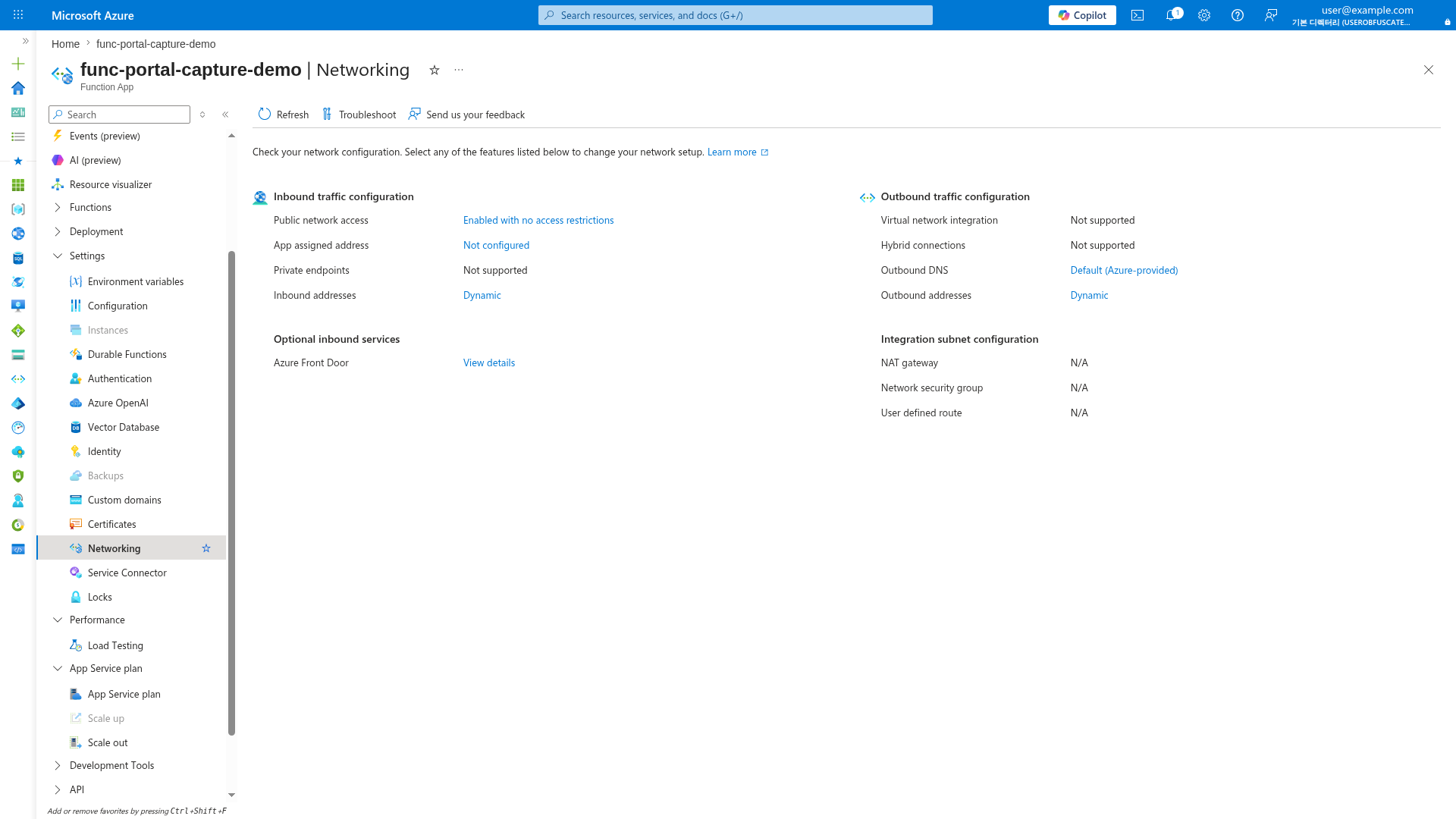
[Observed] Outbound addresses are "Dynamic" on Consumption (Y1). NAT Gateway integration requires Flex Consumption (FC1) or Premium (EP) plans with VNet integration enabled.
When to Use
- Downstream services require IP allowlisting (legacy firewalls, third-party APIs)
- Regulatory requirements for predictable egress identity
- Multi-region deployments needing consistent outbound IPs per region
- SaaS integrations that authenticate by source IP
Architecture
flowchart TD
    INET[Internet] -->|HTTPS| FA[Function App]

    subgraph VNET["VNet"]
        subgraph INT_SUB["Integration Subnet + NAT Gateway"]
            FA --> NAT[NAT Gateway]
        end
        subgraph PE_SUB["Private Endpoint Subnet"]
            PE_BLOB[PE: blob]
        end
    end

    NAT --> PIP[Public IP<br/>203.0.113.10]
    PIP --> EXTERNAL[External Service<br/>IP Allowlist: 203.0.113.10]

    PE_BLOB --> ST[Storage Account]
    FA --> PE_BLOB

    style FA fill:#0078d4,color:#fff
    style VNET fill:#E8F5E9,stroke:#4CAF50
    style NAT fill:#FCE4EC,stroke:#E91E63
    style PIP fill:#FCE4EC,stroke:#E91E63
Supported Plans
| Plan | Supported | Notes |
|---|---|---|
| Consumption (Y1) | No VNet integration | |
| Flex Consumption (FC1) | Attach NAT to integration subnet | |
| Premium (EP) | Full support | |
| Dedicated (B1) | [^1] | Not tested in this guide |
| Dedicated (S1+) | Full support |
[^1]: Basic (B1) supports VNet integration per Azure documentation, but is not tested or recommended for NAT Gateway scenarios in this guide. Use Standard (S1+) for production.
Prerequisites
Complete Scenario 2: Private Egress first. This scenario adds NAT Gateway to the integration subnet.
Required from Scenario 2: - [ ] Function App with VNet integration enabled - [ ] Integration subnet configured
Additional requirements: - [ ] Public IP address or prefix for NAT Gateway - [ ] NAT Gateway resource
Step-by-Step Configuration
Step 1: Create Public IP for NAT Gateway
az network public-ip create \
  --name "pip-nat-func" \
  --resource-group "$RG" \
  --location "$LOCATION" \
  --sku Standard \
  --allocation-method Static \
  --zone 1 2 3
| Command/Parameter | Purpose |
|---|---|
--sku Standard | Required for NAT Gateway (Basic not supported) |
--allocation-method Static | Ensures IP doesn't change |
--zone 1 2 3 | Zone-redundant for high availability |
Step 2: Create NAT Gateway
az network nat gateway create \
  --name "nat-func" \
  --resource-group "$RG" \
  --location "$LOCATION" \
  --public-ip-addresses "pip-nat-func" \
  --idle-timeout 10
| Command/Parameter | Purpose |
|---|---|
--public-ip-addresses "pip-nat-func" | Associates the static public IP |
--idle-timeout 10 | Connection idle timeout in minutes (4-120) |
Step 3: Associate NAT Gateway with Integration Subnet
az network vnet subnet update \
  --name "snet-integration" \
  --resource-group "$RG" \
  --vnet-name "$VNET_NAME" \
  --nat-gateway "nat-func"
| Command/Parameter | Purpose |
|---|---|
--nat-gateway "nat-func" | Routes all subnet egress through NAT Gateway |
Step 4: Get NAT Gateway Public IP
az network public-ip show \
  --name "pip-nat-func" \
  --resource-group "$RG" \
  --query "ipAddress" \
  --output tsv
| CLI element | Explanation |
|---|---|
| Command(s) | az network public-ip show |
| Key flags | --name, --resource-group, --query, --output |
| Variables | $RG |
| Expected result | Azure CLI returns the requested resource data; verify names, IDs, status fields, or metric values match the scenario. |
Save this IP address for downstream allowlisting.
Step 5: Enable Route All (Premium/Dedicated Only)
For Premium and Dedicated plans, ensure all egress routes through VNet:
az functionapp config appsettings set \
  --name "$APP_NAME" \
  --resource-group "$RG" \
  --settings "WEBSITE_VNET_ROUTE_ALL=1"
| Command/Parameter | Purpose |
|---|---|
WEBSITE_VNET_ROUTE_ALL=1 | Forces all outbound traffic through VNet (and thus NAT) |
Flex Consumption
FC1 already routes outbound traffic through VNet by default. WEBSITE_VNET_ROUTE_ALL is not required.
Using Public IP Prefix (Multiple IPs)
For high-throughput workloads, use a public IP prefix instead of a single IP:
# Create IP prefix (e.g., /30 = 4 IPs)
az network public-ip prefix create \
  --name "pip-prefix-nat-func" \
  --resource-group "$RG" \
  --location "$LOCATION" \
  --length 30

# Create NAT Gateway with prefix
az network nat gateway create \
  --name "nat-func" \
  --resource-group "$RG" \
  --location "$LOCATION" \
  --public-ip-prefixes "pip-prefix-nat-func" \
  --idle-timeout 10
| Command/Parameter | Purpose |
|---|---|
--length 30 | CIDR prefix length (/28 = 16 IPs, /30 = 4 IPs, /31 = 2 IPs) |
Verification
Check NAT Gateway Association
az network vnet subnet show \
  --name "snet-integration" \
  --resource-group "$RG" \
  --vnet-name "$VNET_NAME" \
  --query "natGateway.id" \
  --output tsv
| CLI element | Explanation |
|---|---|
| Command(s) | az network vnet subnet show |
| Key flags | --name, --resource-group, --vnet-name, --query, --output |
| Variables | $RG, $VNET_NAME |
| Expected result | Azure CLI returns the requested resource data; verify names, IDs, status fields, or metric values match the scenario. |
Verify Outbound IP
Create a function that calls an external service showing the source IP:
Or call httpbin.org to see your egress IP:
# Example function code
import azure.functions as func
import requests

def main(req: func.HttpRequest) -> func.HttpResponse:
    response = requests.get("https://httpbin.org/ip")
    return func.HttpResponse(response.text)
Expected: The origin field should match your NAT Gateway public IP.
Test from Function App
az functionapp show \
  --name "$APP_NAME" \
  --resource-group "$RG" \
  --query "outboundIpAddresses" \
  --output tsv
| CLI element | Explanation |
|---|---|
| Command(s) | az functionapp show |
| Key flags | --name, --resource-group, --query, --output |
| Variables | $APP_NAME, $RG |
| Expected result | Azure CLI returns the requested resource data; verify names, IDs, status fields, or metric values match the scenario. |
outboundIpAddresses vs NAT Gateway
The outboundIpAddresses property shows default platform IPs. With NAT Gateway configured, actual egress uses the NAT Gateway IP, not these listed IPs.
Capacity Planning
NAT Gateway has specific capacity limits:
| Metric | Limit |
|---|---|
| Concurrent connections per public IP | 64,000 |
| Packets per second | 1 million |
| Connections per second | 50,000 |
For high-scale workloads:
- Add more public IPs or use IP prefix
- Distribute across multiple NAT Gateways with different subnets
Cost Considerations
NAT Gateway pricing:
| Component | Approximate Cost |
|---|---|
| NAT Gateway (per hour) | ~$0.045/hour |
| Data processed (per GB) | ~$0.045/GB |
| Public IP (per hour) | ~$0.005/hour |
Cost Optimization
NAT Gateway charges apply 24/7 regardless of usage. For development environments, consider:
- Sharing one NAT Gateway across multiple function apps
- Using NAT only in production, not dev/test
Troubleshooting
| Symptom | Likely Cause | Solution |
|---|---|---|
| External service sees wrong IP | WEBSITE_VNET_ROUTE_ALL not set (EP/ASP) | Add the setting and restart |
| Connection timeouts | NAT Gateway not associated | Verify subnet has natGateway property |
| SNAT exhaustion | Too many concurrent connections | Add more public IPs or optimize connection pooling |
| High latency | NAT Gateway in different region | Ensure NAT is in same region as function app |
Combining with Private Ingress
NAT Gateway can be combined with site private endpoint for full isolation:
flowchart TD
    CORP[Corporate Client] -->|Private IP| PE_APP[Site Private Endpoint]
    PE_APP --> FA[Function App]

    subgraph VNET["VNet"]
        PE_APP
        FA --> NAT[NAT Gateway]
    end

    NAT --> PIP[Public IP: 203.0.113.10]
    PIP --> EXTERNAL[External API]

    style FA fill:#0078d4,color:#fff
    style NAT fill:#FCE4EC,stroke:#E91E63
See Also
- Networking Scenarios Overview
- Scenario 2: Private Egress
- Scenario 3: Private Ingress
- Platform: Networking