Security Operations
This guide covers day-to-day security operations for Azure Functions: key rotation, RBAC audits, CORS controls, TLS/HTTPS enforcement, IP restrictions, and security monitoring.
Platform Guide
For security architecture and auth design decisions, see Security.
Language Guide
For Python authentication code examples, see HTTP Authentication.
Treat security as continuous operations, not one-time setup. For production function apps, run a recurring process for keys, access, transport, network boundaries, and monitoring.
Prerequisites
- Azure CLI 2.58.0 or later (
az version). - Required permissions for
Microsoft.Web/sites/*,Microsoft.Authorization/roleAssignments/read, and diagnostic settings management. - Log Analytics workspace connected to the function app.
- Shell variables configured for repeatable commands.
RG="rg-functions-prod"
APP_NAME="func-prod-api"
FUNCTION_NAME="HttpIngress"
LAW_NAME="law-functions-prod"
VNET_NAME="vnet-functions-prod"
SUBNET_NAME="snet-functions-integration"
SUBSCRIPTION_ID="<subscription-id>"
APP_RESOURCE_ID="/subscriptions/$SUBSCRIPTION_ID/resourceGroups/$RG/providers/Microsoft.Web/sites/$APP_NAME"
WORKSPACE_ID="/subscriptions/$SUBSCRIPTION_ID/resourceGroups/$RG/providers/Microsoft.OperationalInsights/workspaces/$LAW_NAME"
| Command/Parameter | Purpose |
|---|---|
RG | Resource group name |
APP_NAME | Function app name |
FUNCTION_NAME | Name of the specific function within the app |
LAW_NAME | Log Analytics workspace name |
VNET_NAME | Virtual network name |
SUBNET_NAME | Subnet name for integration |
APP_RESOURCE_ID | Fully qualified Azure resource ID for the function app |
WORKSPACE_ID | Fully qualified Azure resource ID for the workspace |
Portal Walkthrough
General Settings (TLS / HTTPS)
[Observed] The Configuration → General settings blade shows platform security settings. For a new Consumption Function App: HTTPS only is unchecked, Minimum Inbound TLS Version is 1.2, FTPS state is FtpsOnly, and Remote debugging is off:
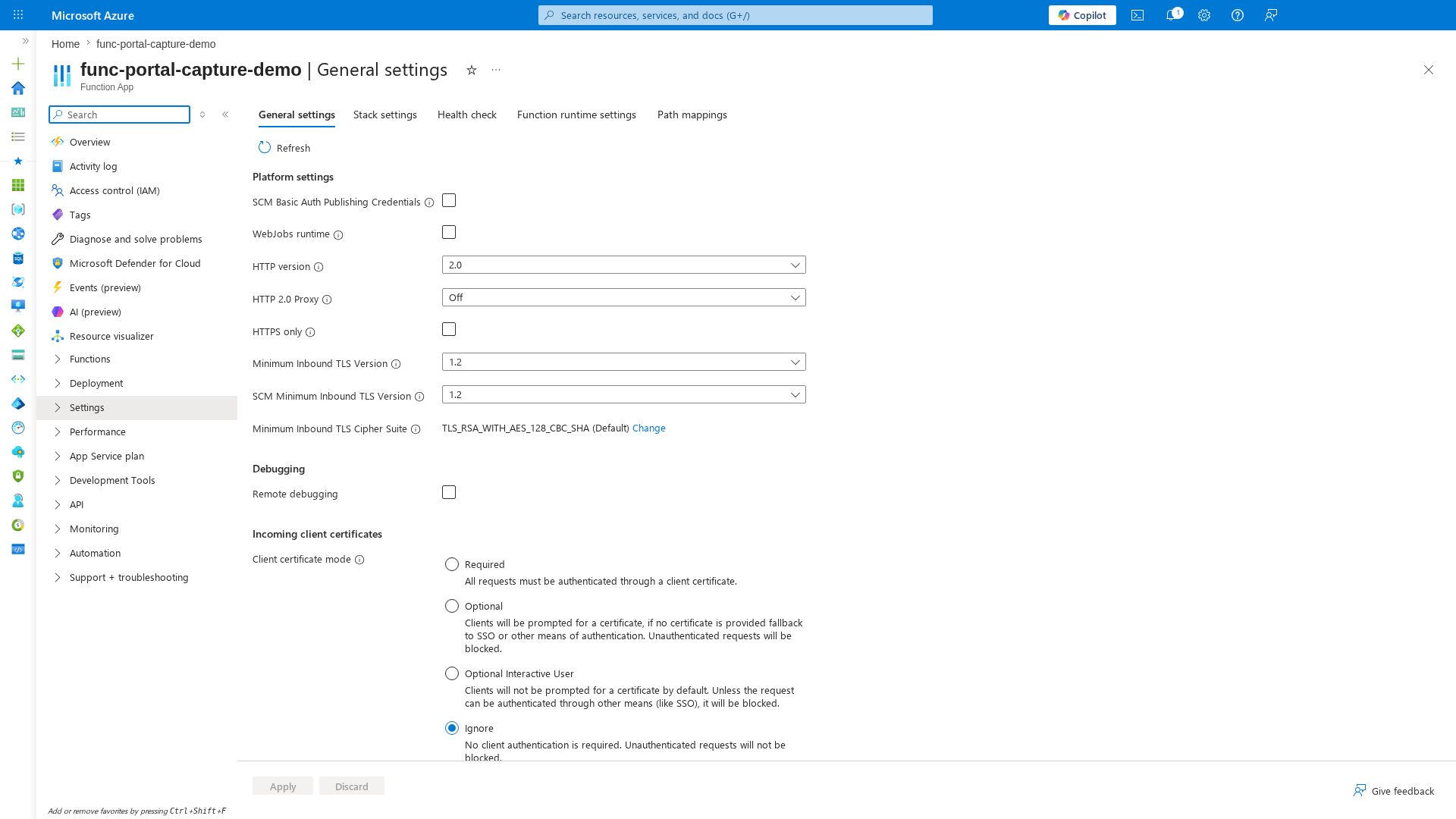
[Inferred] Two items need attention for production hardening: (1) HTTPS only should be enabled to redirect all HTTP traffic to HTTPS, and (2) FTPS state should be set to Disabled if FTPS is not used, reducing the attack surface. These are the first two items in any security baseline checklist.
Environment Variables (Secrets Audit)
[Observed] The Environment variables blade lists all app settings. The four core settings are visible with values hidden by default. The Deployment slot setting column is empty, meaning no settings are slot-sticky:
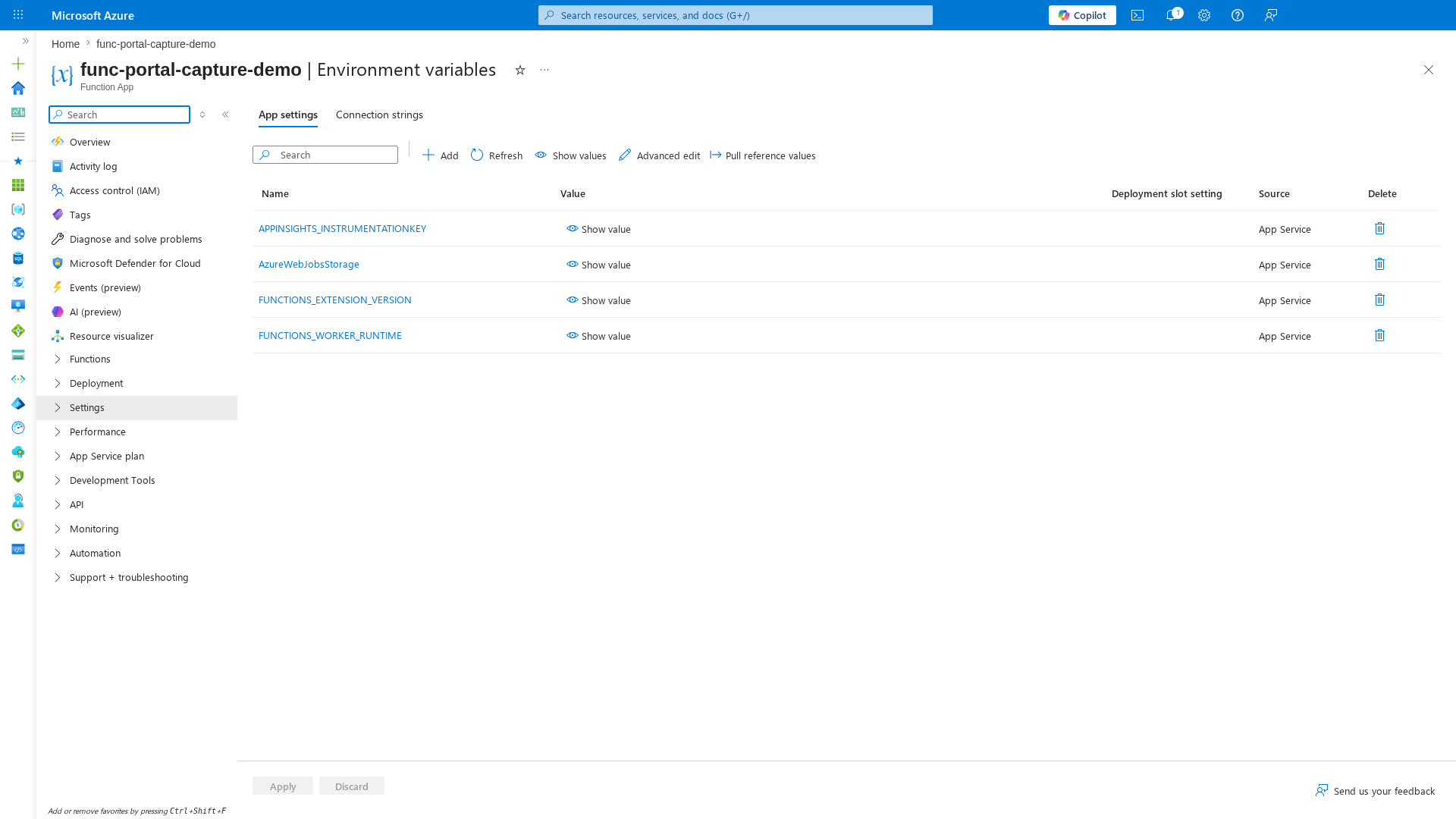
[Inferred] For a security audit, check that sensitive values (connection strings, keys) are backed by Key Vault references (shown as @Microsoft.KeyVault(...) in the value column) rather than stored as plaintext. Use Show values to verify, and confirm that AzureWebJobsStorage uses identity-based connection for Flex Consumption deployments.
When to Use
Use this runbook in these cases:
- New production deployment that needs baseline hardening.
- Recurring maintenance windows (daily, weekly, monthly).
- Confirmed or suspected secret leakage, identity compromise, or abnormal access pattern.
- Ownership change in CI/CD pipelines, app teams, or platform teams.
- Policy rollout affecting TLS, networking, identity, or monitoring controls.
Activity Log Blade
[Observed] The Activity log blade shows recent operations: CreateWebSite, Update website, Update web sites config. Each entry shows Status, Time, Subscription, and Event initiated by (masked to user@example.com):
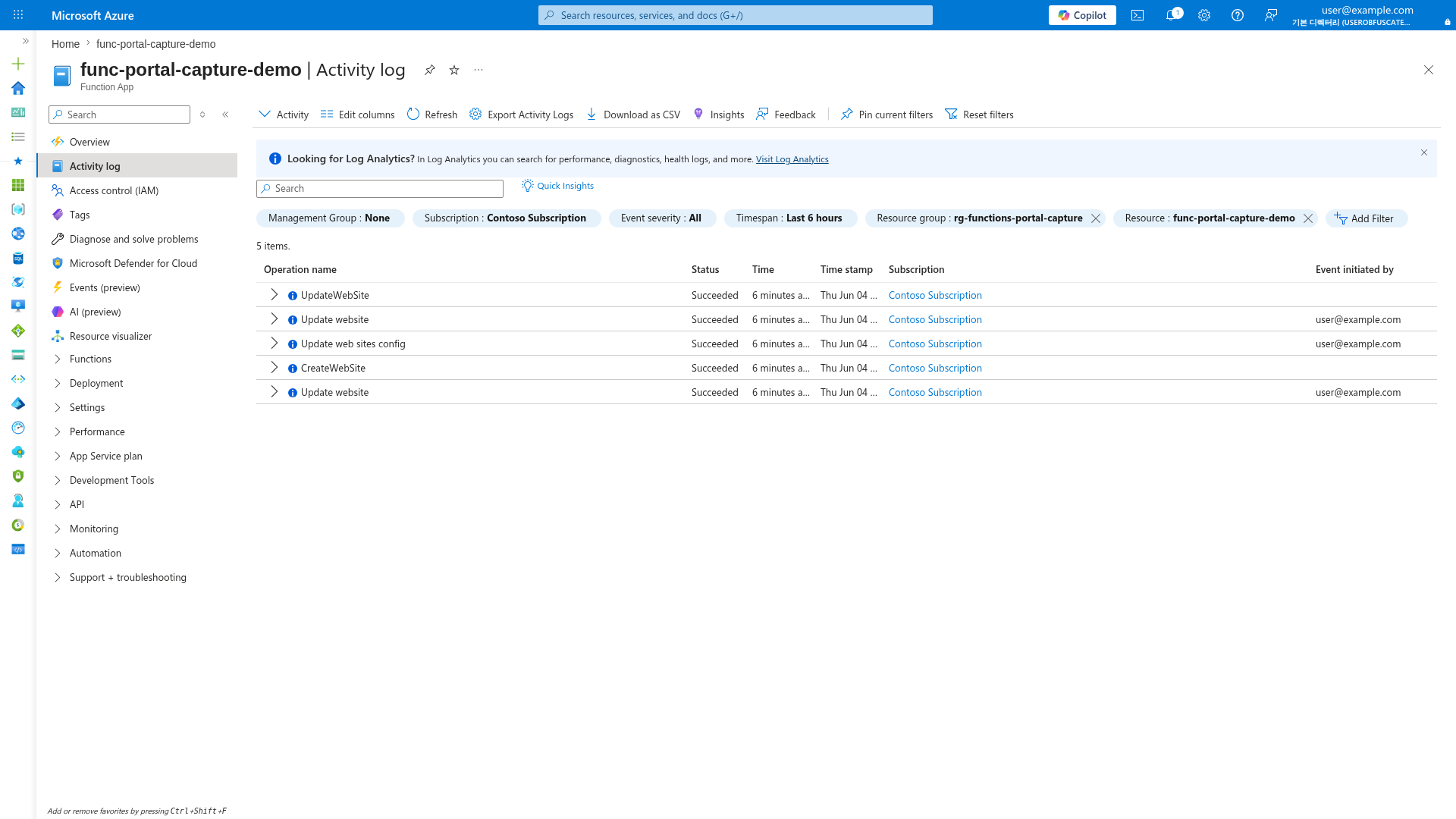
[Inferred] The Activity log is the primary audit trail for control-plane operations. Filter by Timespan, Event severity, and Resource to investigate unauthorized changes. Export Activity Logs to Log Analytics for long-term retention and alerting.
Access Control (IAM) Blade
[Observed] The Access control (IAM) blade provides RBAC management with Check access, Role assignments, Roles, and Deny assignments tabs:
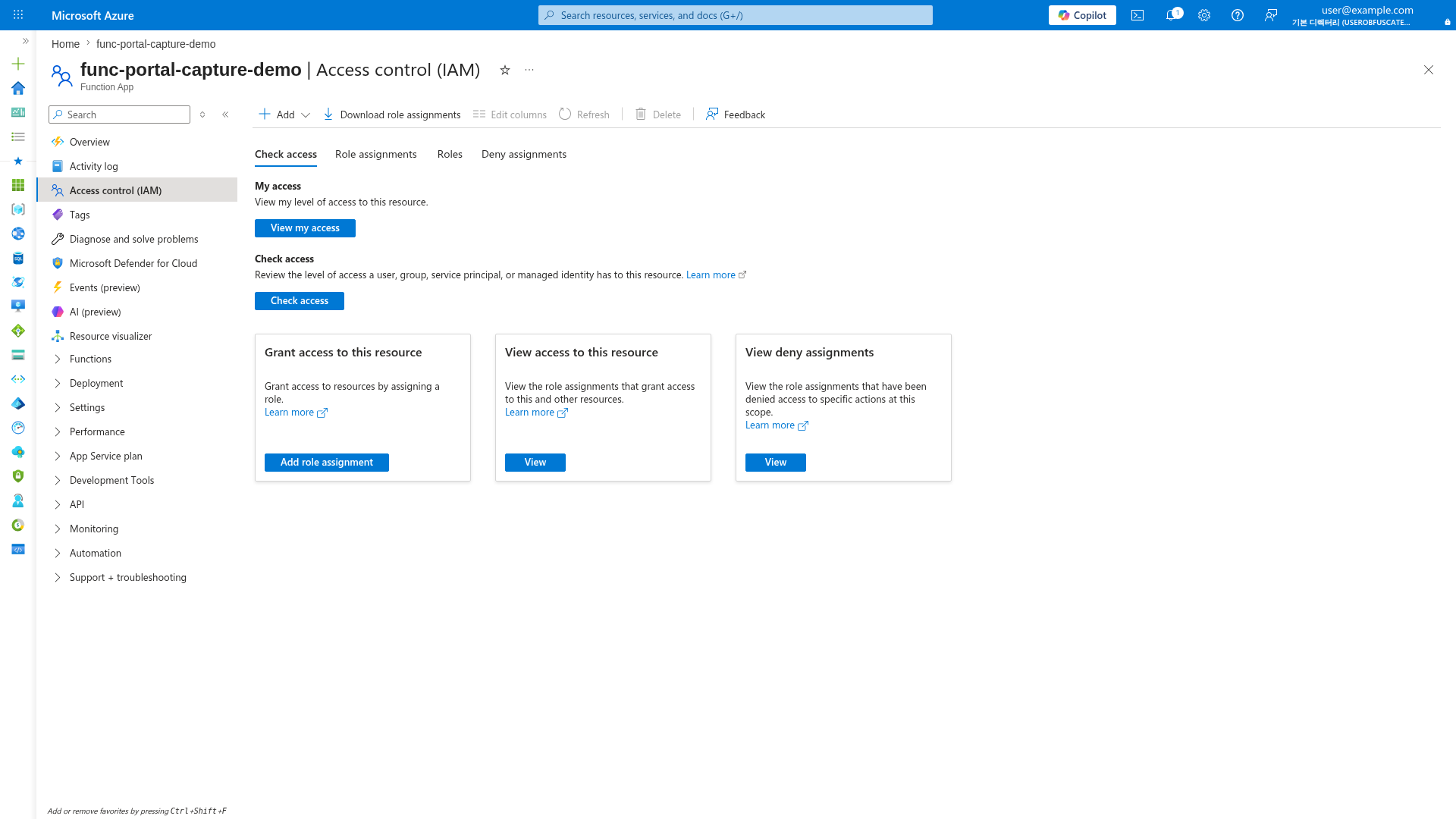
[Inferred] During security incidents, use Check access to verify who has permissions and View deny assignments for explicit blocks. Audit role assignments regularly for privilege drift.
Procedure
Operate controls in a fixed loop so key material, identities, and network boundaries are continuously validated.
flowchart TD
    A[Key Rotation] --> B[Identity Audit]
    B --> C[Network Policy Review]
    C --> D[Incident Response]
    D --> A
Function key rotation
Function keys are shared secrets. Rotate on schedule (for example, every 30-90 days) and immediately after leakage or incident response.
List current function and host keys:
az functionapp function keys list --name "$APP_NAME" --resource-group "$RG" --function-name "$FUNCTION_NAME"
az functionapp keys list --name "$APP_NAME" --resource-group "$RG"
| Command/Parameter | Purpose |
|---|---|
az functionapp function keys list | Lists all keys for a specific function |
az functionapp keys list | Lists all host-level keys for the function app |
--name "$APP_NAME" | Specifies the function app name |
--function-name "$FUNCTION_NAME" | Target function for key listing |
Example output (sanitized): ... Regenerate keys (recommended: let Azure generate secure values automatically):
az functionapp function keys set --name "$APP_NAME" --resource-group "$RG" --function-name "$FUNCTION_NAME" --key-name "default"
az functionapp keys set --name "$APP_NAME" --resource-group "$RG" --key-type "functionKeys" --key-name "default"
| Command/Parameter | Purpose |
|---|---|
az functionapp function keys set | Creates or updates a specific function key |
az functionapp keys set | Creates or updates a host-level key |
--key-name "default" | Target key name to rotate |
--key-type "functionKeys" | Specifies rotation of host-level function keys |
Example output (sanitized):
{"default":"xxxxxxxxxxxxxxxxxxxxxxxxxxxxxxxxxxxxxxxxxxx"}
{"functionKeys":{"default":"xxxxxxxxxxxxxxxxxxxxxxxxxxxxxxxxxxxxxxxxxxx"},"masterKey":"xxxxxxxxxxxxxxxxxxxxxxxxxxxxxxxxxxxxxxxxxxx"}
Only supply explicit --key-value when you have a specific operational need (for example, controlled migration or deterministic rollback).
Automate rotation with Azure Automation, Logic Apps, or a scheduled function. Recommended runbook:
- Generate and set new keys.
- Save values as new Azure Key Vault secret versions.
- Notify consumers to refresh secrets.
- Confirm traffic cutover.
- Revoke old keys.
RBAC and access control audit
RBAC drift is a frequent operational risk. Review role assignments regularly and remove broad standing access.
| Command/Parameter | Purpose |
|---|---|
az role assignment list | Lists all Azure RBAC role assignments |
--scope "$APP_RESOURCE_ID" | Targets the specific function app |
--include-inherited true | Shows roles assigned at higher scopes (subscription, resource group) |
Example output (sanitized): ... Audit Owner/Contributor grants:
az role assignment list --scope "$APP_RESOURCE_ID" --include-inherited true --query "[?roleDefinitionName=='Owner' || roleDefinitionName=='Contributor'].{principalName:principalName,principalType:principalType,role:roleDefinitionName,scope:scope}" --output table
| Command/Parameter | Purpose |
|---|---|
az role assignment list | Lists role assignments |
--query | Filters for Owner and Contributor roles and extracts specific fields |
--output table | Formats results as a table |
Audit one deployment principal (masked ID):
az role assignment list --assignee "xxxxxxxx-xxxx-xxxx-xxxx-xxxxxxxxxxxx" --all true --query "[].{role:roleDefinitionName,scope:scope,principalType:principalType}"
| Command/Parameter | Purpose |
|---|---|
az role assignment list | Lists assignments for a specific identity |
--assignee | The object ID of the user or service principal to audit |
--all true | Shows assignments across all scopes for this identity |
Example output (sanitized):
[
  {
    "principalName": "func-prod-ops-mi",
    "principalType": "ServicePrincipal",
    "roleDefinitionName": "Website Contributor",
    "scope": "/subscriptions/<subscription-id>/resourceGroups/rg-functions-prod/providers/Microsoft.Web/sites/func-prod-api"
  }
]
Least-privilege guidance: prefer GitHub Actions OIDC over client secrets, scope deployment identity to minimum required resources, and re-validate after pipeline ownership changes.
CORS configuration
CORS controls which browser origins can call HTTP endpoints. It is not authentication and must be combined with auth controls.
| Command/Parameter | Purpose |
|---|---|
az functionapp cors show | Displays the current Cross-Origin Resource Sharing (CORS) settings |
--name "$APP_NAME" | Specifies the function app name |
--resource-group "$RG" | Specifies the resource group |
Add approved origins:
az functionapp cors add --name "$APP_NAME" --resource-group "$RG" --allowed-origins "https://portal.contoso.example" "https://admin.contoso.example"
| Command/Parameter | Purpose |
|---|---|
az functionapp cors add | Appends a new origin to the CORS allowlist |
--allowed-origins | Space-separated list of browser origins to allow |
Remove deprecated origins:
az functionapp cors remove --name "$APP_NAME" --resource-group "$RG" --allowed-origins "https://old.contoso.example"
| Command/Parameter | Purpose |
|---|---|
az functionapp cors remove | Deletes a specific origin from the CORS allowlist |
Enable credentialed requests only when required:
| Command/Parameter | Purpose |
|---|---|
az functionapp cors credentials | Configures whether requests can include cookies or authorization headers |
--enable true | Enables support for credentialed CORS requests |
Wildcard risk
Avoid * in production. With credentialed traffic, wildcard origins can expose session context to unintended browser origins.
TLS and HTTPS enforcement
Enforce encrypted transport for all production apps. Set HTTPS-only and minimum TLS version 1.2 or higher.
az functionapp update --name "$APP_NAME" --resource-group "$RG" --https-only true
az functionapp config set --name "$APP_NAME" --resource-group "$RG" --min-tls-version "1.2"
| Command/Parameter | Purpose |
|---|---|
az functionapp update | Updates common properties of the function app |
--https-only true | Redirects all HTTP requests to HTTPS |
az functionapp config set | Updates the app configuration |
--min-tls-version "1.2" | Sets the minimum required TLS version for client connections |
Custom domain and certificate operations:
az functionapp config hostname add --name "$APP_NAME" --resource-group "$RG" --hostname "api.contoso.example"
az functionapp config ssl bind --name "$APP_NAME" --resource-group "$RG" --certificate-thumbprint "<certificate-thumbprint>" --ssl-type "SNI"
| Command/Parameter | Purpose |
|---|---|
az functionapp config hostname add | Assigns a custom domain name to the function app |
--hostname | The custom domain name to bind |
az functionapp config ssl bind | Binds a certificate to a custom hostname |
--certificate-thumbprint | Specifies the thumbprint of the SSL certificate |
--ssl-type "SNI" | Sets the SSL type to Server Name Indication (SNI) |
Operational checks: monitor certificate expiry, verify HTTPS redirection, and re-check TLS baseline after IaC or policy changes.
IP restrictions
Use access restrictions to constrain inbound access to app and deployment surfaces. Always manage main site and SCM site independently.
Allow known ingress and deny default:
az functionapp config access-restriction add --name "$APP_NAME" --resource-group "$RG" --rule-name "AllowCorpEgress" --action "Allow" --ip-address "203.0.113.0/24" --priority 100
az functionapp config access-restriction add --name "$APP_NAME" --resource-group "$RG" --rule-name "DenyAll" --action "Deny" --ip-address "0.0.0.0/0" --priority 2147483647
| Command/Parameter | Purpose |
|---|---|
az functionapp config access-restriction add | Adds an IP or VNet access restriction rule |
--rule-name | Descriptive name for the rule |
--action "Allow" | Permits access from the specified IP range |
--ip-address "203.0.113.0/24" | CIDR range for the permitted network |
--priority 100 | Rule evaluation priority (lower is evaluated first) |
--action "Deny" | Rejects all other inbound traffic |
Restrict SCM endpoint separately:
az functionapp config access-restriction add --name "$APP_NAME" --resource-group "$RG" --rule-name "AllowScmBuildAgents" --action "Allow" --ip-address "198.51.100.0/24" --priority 110 --scm-site true
| Command/Parameter | Purpose |
|---|---|
az functionapp config access-restriction add | Adds a restriction rule |
--scm-site true | Targets the SCM (Kudu) site used for deployments |
Combine with virtual network service endpoint rules when needed:
az functionapp config access-restriction add --name "$APP_NAME" --resource-group "$RG" --rule-name "AllowFromIntegrationSubnet" --action "Allow" --vnet-name "$VNET_NAME" --subnet "$SUBNET_NAME" --priority 120
| Command/Parameter | Purpose |
|---|---|
az functionapp config access-restriction add | Adds a VNet restriction rule |
--vnet-name "$VNET_NAME" | Name of the virtual network |
--subnet "$SUBNET_NAME" | Subnet name within the VNet |
Check current access restrictions:
| Command/Parameter | Purpose |
|---|---|
az functionapp config access-restriction show | Displays the current IP and VNet restriction rules |
--name "$APP_NAME" | Specifies the function app name |
--resource-group "$RG" | Specifies the resource group |
Example output (sanitized):
{"ipSecurityRestrictions":[{"name":"AllowCorpEgress","action":"Allow","ipAddress":"203.0.113.0/24","priority":100},{"name":"DenyAll","action":"Deny","ipAddress":"0.0.0.0/0","priority":2147483647}],"scmIpSecurityRestrictions":[{"name":"AllowScmBuildAgents","action":"Allow","ipAddress":"198.51.100.0/24","priority":110}]}
Diagnostic logging for security events
Enable diagnostics to send platform logs and metrics to Log Analytics for audit and detection.
az monitor diagnostic-settings create --name "func-security-diagnostics" --resource "$APP_RESOURCE_ID" --workspace "$WORKSPACE_ID" --logs '[{"category":"AppServiceHTTPLogs","enabled":true},{"category":"AppServiceAuditLogs","enabled":true},{"category":"AppServicePlatformLogs","enabled":true}]' --metrics '[{"category":"AllMetrics","enabled":true}]'
| Command/Parameter | Purpose |
|---|---|
az monitor diagnostic-settings create | Configures log and metric export for the resource |
--resource "$APP_RESOURCE_ID" | Target Function App resource ID |
--workspace "$WORKSPACE_ID" | Destination Log Analytics workspace ID |
--logs | JSON array of log categories (HTTP, Audit, and Platform logs) |
--metrics | JSON array of metric categories |
KQL: failed authentication/authorization trend: ... Create a scheduled query alert for repeated failures:
az monitor scheduled-query create --name "func-auth-failures" --resource-group "$RG" --scopes "$APP_RESOURCE_ID" --condition "count 'AUTH_FAILURE_QUERY' > 50" --condition-query "AUTH_FAILURE_QUERY=AppServiceHTTPLogs | where ScStatus in (401,403)" --description "High unauthorized/forbidden response volume" --evaluation-frequency "PT5M" --window-size "PT15M" --severity 2
| Command/Parameter | Purpose |
|---|---|
az monitor scheduled-query create | Creates an alert based on a log query |
--scopes "$APP_RESOURCE_ID" | Scopes the alert to the specified function app logs |
--condition "count ... > 50" | Firing threshold for the alert |
--condition-query | KQL query that counts 401 and 403 HTTP status codes |
--evaluation-frequency "PT5M" | Runs the query every 5 minutes |
--window-size "PT15M" | Look-back window for the query evaluation |
Operational security routine
Run this cadence and tighten by risk profile:
- Daily: check 401/403 anomalies, confirm alert delivery, validate no emergency grant remains active.
- Weekly: review RBAC changes, reconcile CORS allowlist, verify SCM restrictions match CI/CD egress ranges.
- Monthly: rotate keys, validate Key Vault propagation and client cutover, re-check HTTPS/TLS baseline.
Verification
Run these checks after each maintenance cycle or incident action.
Validate HTTPS and TLS posture:
az functionapp show --name "$APP_NAME" --resource-group "$RG" --query "{httpsOnly:httpsOnly,clientCertEnabled:clientCertEnabled}" --output table
az functionapp config show --name "$APP_NAME" --resource-group "$RG" --query "{minTlsVersion:minTlsVersion,scmMinTlsVersion:scmMinTlsVersion}" --output table
| Command/Parameter | Purpose |
|---|---|
az functionapp show | Gets common properties of the app |
az functionapp config show | Displays the current configuration settings |
--query | Extracts HTTPS enforcement and TLS version values |
--output table | Formats results as a table |
Expected output (sanitized): ... Validate least-privilege scope:
az role assignment list --scope "$APP_RESOURCE_ID" --include-inherited true --query "[?roleDefinitionName=='Owner' || roleDefinitionName=='Contributor'].{principalName:principalName,role:roleDefinitionName}" --output table
| Command/Parameter | Purpose |
|---|---|
az role assignment list | Verifies current role assignments |
--include-inherited true | Checks for assignments at higher levels (Resource Group/Subscription) |
--output table | Formats results as a table |
Validate access restriction defaults:
az functionapp config access-restriction show --name "$APP_NAME" --resource-group "$RG" --query "{mainDefault:ipSecurityRestrictionsDefaultAction,scmDefault:scmIpSecurityRestrictionsDefaultAction}" --output table
| Command/Parameter | Purpose |
|---|---|
az functionapp config access-restriction show | Verifies the default action for the main and SCM sites |
Validate diagnostics attachment:
az monitor diagnostic-settings list --resource "$APP_RESOURCE_ID" --query "[].{name:name,workspaceId:workspaceId}" --output table
| Command/Parameter | Purpose |
|---|---|
az monitor diagnostic-settings list | Confirms that diagnostic settings are correctly applied |
--resource "$APP_RESOURCE_ID" | Target Function App resource ID |
Rollback / Troubleshooting
Use these actions when a control change breaks production traffic or when indicators suggest compromise.
Incident: key rotation caused client failures
Symptoms: increased 401 responses and client authentication failures immediately after key update. Recovery steps:
- Confirm clients still using old key versions.
- Re-issue previous key value only for emergency bridge window.
- Enforce a timed rollback window and track remaining callers.
- Rotate again after all clients are updated.
az functionapp function keys set --name "$APP_NAME" --resource-group "$RG" --function-name "$FUNCTION_NAME" --key-name "default" --key-value "<previous-key-from-key-vault-version>"
| Command/Parameter | Purpose |
|---|---|
az functionapp function keys set | Restores a specific function key value |
--key-value | Reverts the key to a known previous value from vault history |
Incident: RBAC change locked out operators
...
- Remove emergency assignment after remediation validation.
az role assignment create --assignee "xxxxxxxx-xxxx-xxxx-xxxx-xxxxxxxxxxxx" --role "Website Contributor" --scope "$APP_RESOURCE_ID"
| Command/Parameter | Purpose |
|---|---|
az role assignment create | Adds a temporary role assignment for recovery |
--assignee | User or principal ID to grant access |
--role "Website Contributor" | Standard operator role for Function App management |
--scope "$APP_RESOURCE_ID" | Targets the affected app specifically |
Incident: access restrictions blocked valid ingress
...
- Reconcile intended CIDR ranges and remove temporary rules.
az functionapp config access-restriction add --name "$APP_NAME" --resource-group "$RG" --rule-name "TemporaryIncidentAllow" --action "Allow" --ip-address "203.0.113.25/32" --priority 105
| Command/Parameter | Purpose |
|---|---|
az functionapp config access-restriction add | Adds an emergency IP allow rule |
--rule-name "TemporaryIncidentAllow" | Named to ensure it is audited and removed after the incident |
--priority 105 | High priority to ensure immediate effect |
Incident response evidence checklist
- Preserve Activity Log, platform logs, and app logs for the incident window.
- Capture timeline with UTC timestamps, command transcripts, and change ticket IDs.
- Record impacted principals, keys, origins, and IP ranges with masked identifiers.
- File prevention action items for identity, secret, network, and monitoring controls.
Advanced Topics
Security compliance checklist
Use this minimum operating cadence and tighten based on risk and regulation.
Daily
- Check 401/403 anomalies and unfamiliar source IPs.
- Confirm alert delivery to on-call channels.
- Validate no emergency access grant remains active.
Weekly
- Review RBAC changes and remove temporary privileges.
- Reconcile CORS allowlist with active front-end domains.
- Verify SCM restrictions still match CI/CD origin ranges.
Monthly
- Rotate function and host keys.
- Validate Key Vault propagation and client cutover.
- Confirm HTTPS-only and minimum TLS baseline in all environments.
Quarterly
- Re-certify Owner and Contributor assignments.
- Run tabletop or live drill for leaked key and compromised principal scenarios.
- Review certificate inventory and renew ahead of expiration.
Control ownership
Assign explicit owners: platform team for RBAC/TLS/network controls, application team for key-consumer rollout, and operations team for monitoring triage and evidence retention.
See Also
Sources
- Azure Functions security concepts
- Work with access keys in Azure Functions
- Azure role-based access control overview
- Use managed identities with Azure Functions
- Configure CORS for App Service
- Configure TLS/SSL bindings in App Service
- Set up access restrictions for App Service
- Azure Monitor platform logs overview