Configuration
This guide covers operational runtime configuration for Azure Functions. It focuses on app settings, host.json, secret management, and safe rollout patterns.
Platform Guide
For scaling architecture and plan comparison, see Scaling.
Language Guide
For Python deployment specifics, see the Python Tutorial.
Prerequisites
- Azure CLI 2.56.0 or later with a signed-in context.
- Contributor or higher role on the Function App resource group.
- Access to Application Insights logs for post-change verification.
- Access to Key Vault and managed identity role assignments for secret-backed settings.
- A deployment method that keeps
host.jsonversioned with code.
Portal Walkthrough
This section shows the key Azure Portal blades for Function App configuration. All captures are from a live Consumption (Y1) deployment with PII masked.
Environment Variables (App Settings)
[Observed] The Environment variables blade lists all app settings with their source. The four core settings for a Consumption Function App are visible: APPINSIGHTS_INSTRUMENTATIONKEY, AzureWebJobsStorage, FUNCTIONS_EXTENSION_VERSION, and FUNCTIONS_WORKER_RUNTIME. Values are hidden by default and can be revealed with Show values:
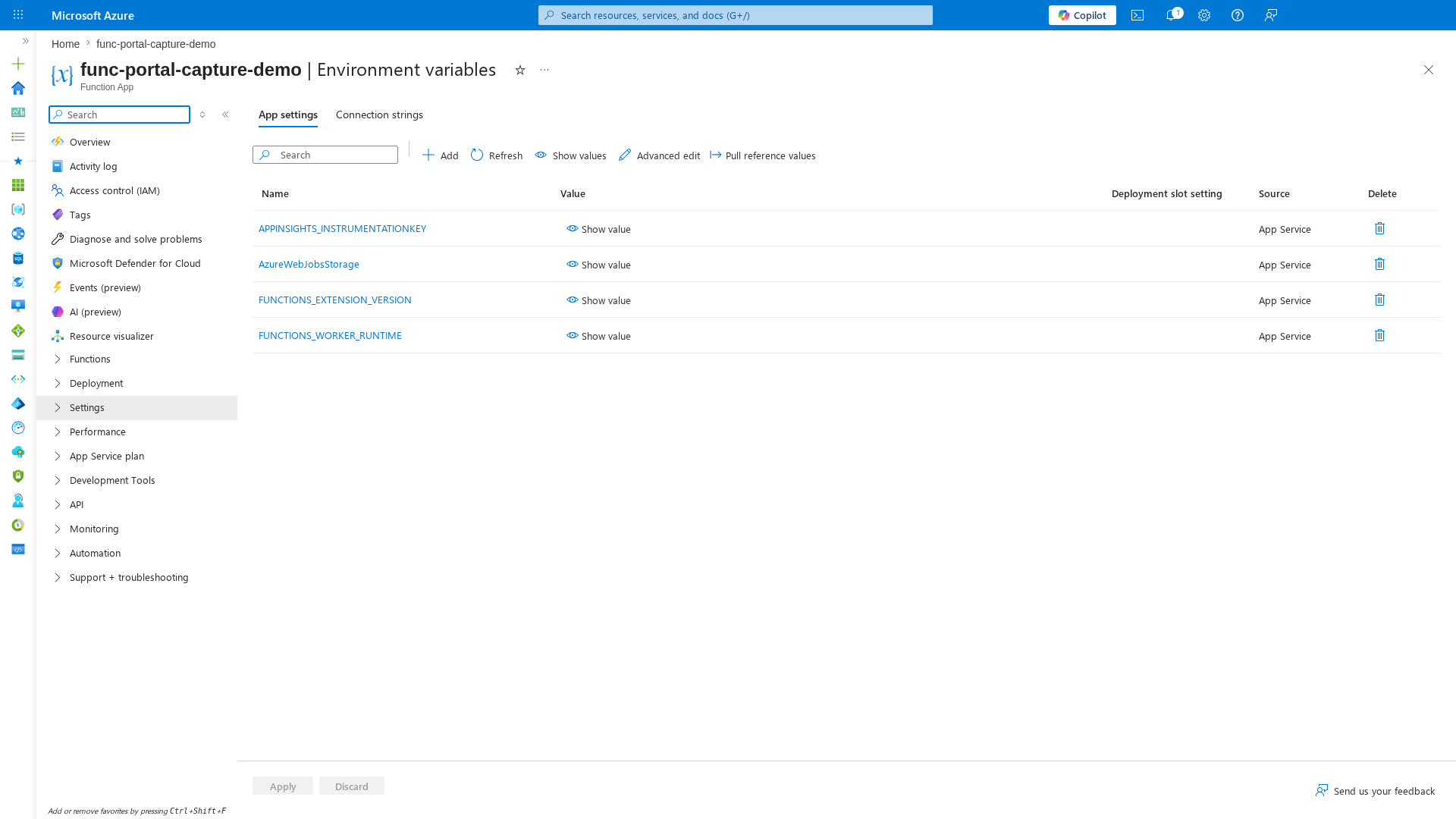
[Inferred] The Deployment slot setting column is empty for all settings, meaning none are slot-sticky. For production deployments with slots, mark environment-specific settings (e.g., connection strings, feature flags) as slot-sticky to prevent them from swapping.
General Settings
[Observed] The Configuration → General settings tab shows platform-level settings: HTTP version (2.0), HTTPS only (unchecked), Minimum Inbound TLS Version (1.2), SCM Minimum Inbound TLS Version (1.2), FTPS (FtpsOnly), Remote debugging (off), and Client certificate mode (Ignore):
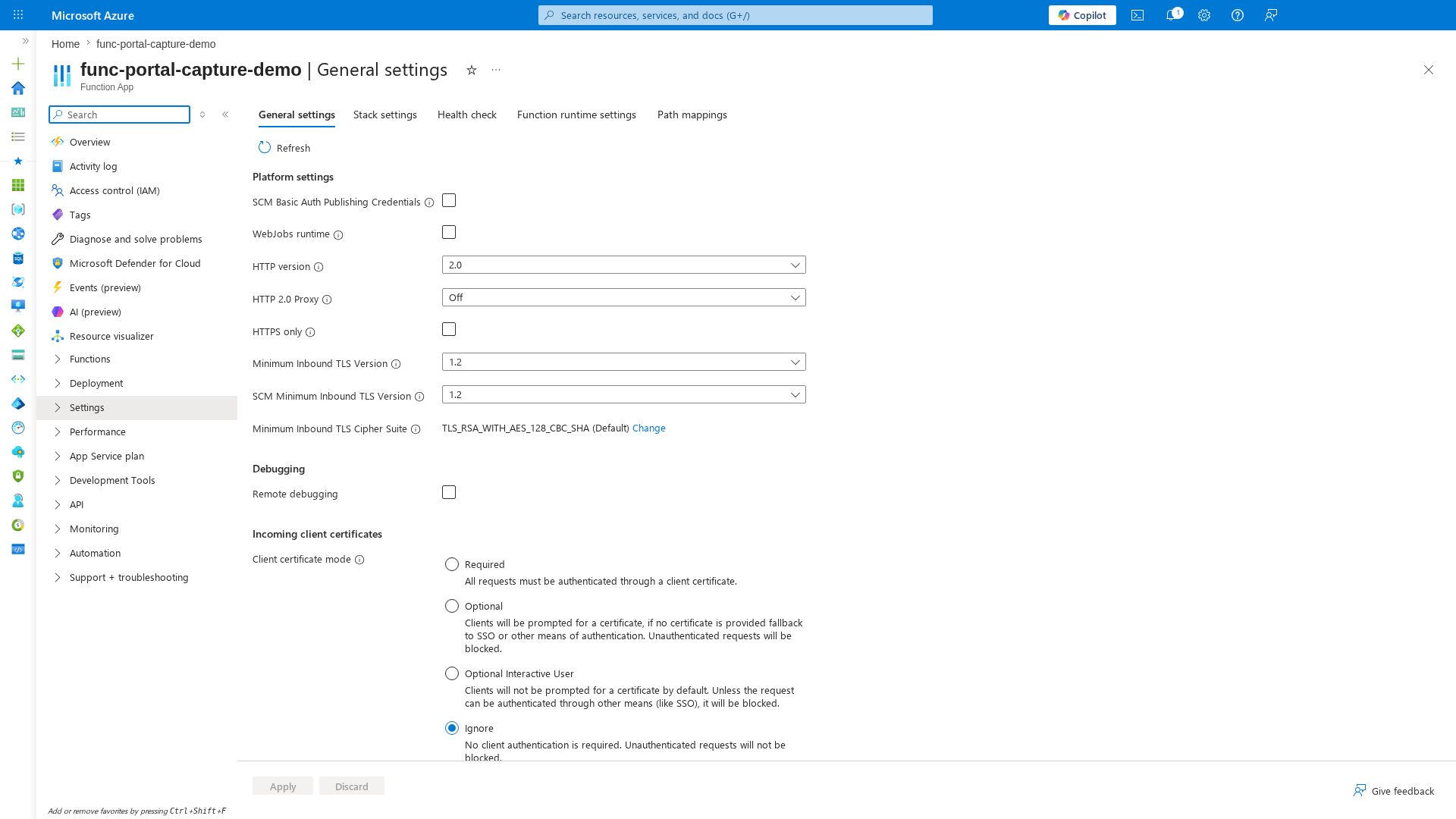
[Inferred] The HTTPS only checkbox is unchecked — this should be enabled for production workloads. The TLS 1.2 minimum is correct. FTPS state FtpsOnly is acceptable but Disabled is preferred if FTPS is not used.
When to Use
Choose configuration layers by scope and change frequency:
- App settings for environment-specific values, secrets, feature flags, and per-slot overrides.
host.jsonfor host-wide runtime behavior such as logging, retries, extension tuning, and sampling.- Extension-specific configuration when tuning one binding type (for example Service Bus or Event Hubs) without changing business logic.
- Function-level attributes or decorators when behavior differs by function (for example retry policy per trigger).
local.settings.jsononly for local developer execution, never as a production source of truth.
flowchart TB
    A["App Settings<br/>Environment and secrets"] --> B["host.json<br/>Host runtime defaults"]
    B --> C["Extension Config<br/>Binding-specific behavior"]
C --> D["Function-level Config<br/>Per-function overrides"]Procedure
Configuration layers
Use a layered model:
- App settings for environment values.
host.jsonfor runtime host behavior.- Local development settings for workstation execution.
App settings
Common settings: | Setting | Purpose | |---|---| | AzureWebJobsStorage or identity-based equivalent | Host storage dependency | | FUNCTIONS_WORKER_RUNTIME | Worker runtime selection | | APPLICATIONINSIGHTS_CONNECTION_STRING | Monitoring destination | | WEBSITE_RUN_FROM_PACKAGE | Immutable package deployment behavior | | Custom settings | Feature flags and endpoints | Set values:
az functionapp config appsettings set \
    --resource-group <resource-group> \
    --name <app-name> \
    --settings FUNCTIONS_WORKER_RUNTIME=<worker-runtime>
| Command/Parameter | Purpose |
|---|---|
az functionapp config appsettings set | Adds or updates application settings for the function app |
--resource-group <resource-group> | Specifies the resource group |
--name <app-name> | Specifies the function app name |
--settings | Space-separated list of key=value pairs to set |
List values (redact secrets before sharing):
az functionapp config appsettings list \
    --resource-group <resource-group> \
    --name <app-name> \
    --query "[].{name:name,value:value}" \
    --output table
| Command/Parameter | Purpose |
|---|---|
az functionapp config appsettings list | Lists all application settings |
--query | JMESPath query to filter and format the settings |
--output table | Formats the output as a table |
Example output:
Name                                         Value
-------------------------------------------  ----------------------------------------------
FUNCTIONS_WORKER_RUNTIME                     python
WEBSITE_RUN_FROM_PACKAGE                     1
APPLICATIONINSIGHTS_CONNECTION_STRING        InstrumentationKey=xxxxxxxx-xxxx-xxxx-xxxx-xxxxxxxxxxxx
MySecretSetting                              @Microsoft.KeyVault(SecretUri=https://kv-prod.vault.azure.net/secrets/db-password/)
host.json essentials
host.json controls host-level behavior such as logging, sampling, and extension configuration.
{
  "version": "2.0",
  "logging": {
    "applicationInsights": {
      "samplingSettings": {
        "isEnabled": true,
        "excludedTypes": "Request;Exception"
      }
    },
    "logLevel": {
      "default": "Information"
    }
  },
  "extensionBundle": {
    "id": "Microsoft.Azure.Functions.ExtensionBundle",
    "version": "[4.*, 5.0.0)"
  }
}
Sampling
Sampling can reduce telemetry costs, but keep critical request and exception visibility.
Show effective host-level overrides from app settings:
az functionapp config appsettings list \
    --resource-group <resource-group> \
    --name <app-name> \
    --query "[?starts_with(name, 'AzureFunctionsJobHost__')].{name:name,value:value}" \
    --output table
| Command/Parameter | Purpose |
|---|---|
az functionapp config appsettings list | Lists application settings |
--query | Filters for settings prefixed with AzureFunctionsJobHost__ |
--output table | Formats the output as a table |
| Example output: | |
### local.settings.json | |
| Use local settings only for local runtime execution. | |
| Operational rules: |
- Do not commit production secrets.
- Keep a sanitized
local.settings.json.examplein source control. - Inject secrets at deployment time via secure pipeline mechanisms.
Key Vault references
Use Key Vault references to resolve secrets in app settings without storing plaintext secret values. Format:
Set a Key Vault-backed app setting:az functionapp config appsettings set \
--resource-group <resource-group> \
--name <app-name> \
--settings "MySecretSetting=@Microsoft.KeyVault(SecretUri=https://<key-vault-name>.vault.azure.net/secrets/<secret-name>/)"
| Command/Parameter | Purpose |
|---|---|
az functionapp config appsettings set | Configures the application setting |
--settings "MySecretSetting=..." | Sets the value as a Key Vault reference |
Check Key Vault reference resolution status:
az rest \
    --method get \
    --url "https://management.azure.com/subscriptions/<subscription-id>/resourceGroups/<resource-group>/providers/Microsoft.Web/sites/<app-name>/config/configreferences/appsettings/list?api-version=2023-12-01" \
    --query "properties[?contains(name, 'MySecretSetting')].{name:name,status:status,details:details}" \
    --output table
| Command/Parameter | Purpose |
|---|---|
az rest --method get | Sends a direct GET request to the Azure Resource Manager API |
--url | Target endpoint for configuration reference status |
--query | Extracts name, resolution status, and details |
--output table | Formats results as a table |
Managed identity for secret access
Enable system-assigned identity:
| Command/Parameter | Purpose |
|---|---|
az functionapp identity assign | Enables a system-assigned managed identity for the app |
--resource-group <resource-group> | Specifies the resource group |
--name <app-name> | Specifies the function app name |
Grant the identity least-privilege access to Key Vault and dependent services. Prefer identity-based connection patterns over connection strings when bindings support it.
Identity-based connection patterns (including Flex Consumption)
Use identity-based connections to remove secret sprawl and align with zero-trust operations. For Flex Consumption, use this pattern for production-grade storage and binding access, especially in locked-down environments. Host storage with identity:
AzureWebJobsStorage__accountName=<storage-account-name>
AzureWebJobsStorage__credential=managedidentity
AzureWebJobsStorage__clientId=<user-assigned-identity-client-id>
MyStorage prefix example): MyStorage__blobServiceUri=https://<storage-account-name>.blob.core.windows.net
MyStorage__queueServiceUri=https://<storage-account-name>.queue.core.windows.net
MyStorage__credential=managedidentity
MyStorage__clientId=<user-assigned-identity-client-id>
az functionapp config appsettings set \
    --resource-group <resource-group> \
    --name <app-name> \
    --settings \
        AzureWebJobsStorage__accountName=<storage-account-name> \
        AzureWebJobsStorage__credential=managedidentity \
        MyStorage__blobServiceUri=https://<storage-account-name>.blob.core.windows.net \
        MyStorage__queueServiceUri=https://<storage-account-name>.queue.core.windows.net \
        MyStorage__credential=managedidentity
| Command/Parameter | Purpose |
|---|---|
az functionapp config appsettings set | Configures multiple application settings at once |
AzureWebJobsStorage__accountName | Sets the storage account name for the host |
AzureWebJobsStorage__credential=managedidentity | Configures host storage to use managed identity |
MyStorage__* | Configures identity-based connection for application storage |
Slot-specific settings
When using slots, mark environment-specific values as slot settings.
az functionapp config appsettings set \
    --resource-group <resource-group> \
    --name <app-name> \
    --slot staging \
    --slot-settings AZURE_FUNCTIONS_ENVIRONMENT=Staging
| Command/Parameter | Purpose |
|---|---|
az functionapp config appsettings set | Configures settings for a specific deployment slot |
--slot staging | Specifies the target slot |
--slot-settings | Defines the settings as sticky to the slot |
Configuration change management workflow
Use a controlled workflow for every production configuration update.
flowchart TD
    A["Propose change<br/>Ticket and risk assessment"] --> B["Review<br/>Peer and platform owner approval"]
    B --> C["Deploy<br/>Staging then production"]
    C --> D["Verify<br/>Health, logs, and dependency checks"]
D --> E["Document<br/>Record baseline and evidence"]- Propose change with expected impact and rollback trigger.
- Review against security, scale, and dependency constraints.
- Deploy to staging slot or non-production app first.
- Verify telemetry, trigger behavior, and secret resolution.
- Promote to production and archive evidence links.
Configuration checklist
- Configuration updates are versioned and reviewed.
- Secrets come from Key Vault references.
host.jsonchanges are validated before production rollout.
Verification
Run these checks after every change:
az functionapp config appsettings list \
    --resource-group <resource-group> \
    --name <app-name> \
    --query "[?name=='FUNCTIONS_WORKER_RUNTIME' || name=='WEBSITE_RUN_FROM_PACKAGE' || starts_with(name, 'AzureFunctionsJobHost__')].{name:name,value:value}" \
    --output table
| Command/Parameter | Purpose |
|---|---|
az functionapp config appsettings list | Retrieves current application settings |
--query | Filters for core worker runtime and host-level override settings |
az functionapp identity show \
    --resource-group <resource-group> \
    --name <app-name> \
    --query "{type:type,principalId:principalId,tenantId:tenantId}" \
    --output table
| Command/Parameter | Purpose |
|---|---|
az functionapp identity show | Displays the managed identity details for the app |
--query | Extracts identity type and identifiers |
az monitor app-insights query \
    --app <application-insights-name> \
    --analytics-query "traces | where timestamp > ago(15m) | where message contains 'Host started' | project timestamp, message | take 5" \
    --output table
| Command/Parameter | Purpose |
|---|---|
az monitor app-insights query | Runs a KQL query against Application Insights |
--analytics-query | Checks the trace log for recent host startup success |
--output table | Formats results as a table |
| Example output: | |
| Success indicators: |
- Changed settings appear with expected values and expected slot scope.
- Managed identity remains enabled and principal ID is unchanged unless intentionally rotated.
- No startup failures related to binding initialization or secret resolution.
- Key Vault reference status is
Resolvedfor all secret-backed settings.
Rollback / Troubleshooting
Use this section when new settings cause startup errors, trigger failures, or inconsistent behavior across environments. Config drift and incorrect settings playbook:
- Re-list current settings and compare with approved baseline from source control or release records.
- Restore known-good app settings and
host.jsonvalues from last successful deployment. - Restart the app and verify host startup and trigger listener status.
-
If only one slot is affected, swap back or redeploy the previous slot package. Targeted checks:
-
AzureWebJobsStoragefailures: confirm identity settings, role assignments, and storage DNS reachability. - Key Vault reference unresolved: confirm vault access policy or RBAC and private endpoint routing.
- Unexpected throttling or backlog: review
host.jsonconcurrency and extension settings. - Local vs cloud mismatch: verify
local.settings.jsonvalues are not assumed in cloud runtime. Rollback command examples:
| Command/Parameter | Purpose |
|---|---|
az functionapp config appsettings delete | Removes one or more application settings |
--setting-names | Specifies the keys of the settings to delete |
az functionapp deployment slot swap \
    --resource-group <resource-group> \
    --name <app-name> \
    --slot staging \
    --target-slot production
| Command/Parameter | Purpose |
|---|---|
az functionapp deployment slot swap | Swaps slots to restore a previously stable configuration |
--slot staging | Specifies the source slot |
--target-slot production | Specifies the target slot |