Windows IIS web.config Startup Failures (Azure App Service Windows)
1. Summary
Symptom
After deployment, the Windows App Service site fails during startup or serves only 500-class failures from IIS. Common signatures include HTTP 500.19, 500.21, 502.5, and HRESULTs like 0x8007000d in startup traces.
Why this scenario is confusing
web.config is evaluated by IIS before your application code is fully available. A single XML, handler, module, rewrite, or locked-setting mismatch can surface as an app outage even though deployment succeeded and binaries are present. Teams often misread this as an application regression instead of an IIS pipeline/configuration failure.
Troubleshooting decision flow (mermaid diagram)
flowchart TD
    A[Startup failure on Windows App Service] --> B{Primary HTTP signature?}
    B -->|500.19 or 0x8007000d| H1[H1: Malformed web.config XML]
    B -->|500.21| H3[H3: Missing runtime or IIS module]
    B -->|502.5| H2[H2: Incorrect processPath or handler mapping]
    B -->|500 with rewrite traces| H4[H4: URL Rewrite rule conflict]
    B -->|Intermittent 500.19 with lock messages| H5[H5: Locked setting conflicts]

    H1 --> C{XML valid and deploy complete?}
    C -->|No| F1[Fix malformed XML and redeploy]
    C -->|Yes| D[Continue hypothesis checks]

    H2 --> E{processPath and arguments valid?}
    E -->|No| F2[Correct AspNetCore/handler config]
    E -->|Yes| D

    H3 --> G{Required module/runtime installed?}
    G -->|No| F3[Install hosting bundle or fix module dependency]
    G -->|Yes| D

    H4 --> I{Rewrite loops or invalid target?}
    I -->|Yes| F4[Disable/fix rewrite rule]
    I -->|No| D

    H5 --> J{Locked section overridden in web.config?}
    J -->|Yes| F5[Remove locked settings and use platform config]
    J -->|No| D

D --> Z[Validate with HTTP sub-status and startup logs]Limitations
- This playbook is only for native Windows App Service running IIS-managed workloads.
- It does not cover Linux, custom containers, or Kubernetes-hosted runtimes.
- Framework-level logic bugs after successful IIS startup are out of scope.
Quick Conclusion
Classify first by IIS sub-status code, then verify whether failure is XML parse, handler/process bootstrap, missing module/runtime, rewrite conflict, or locked-setting precedence. For fast recovery, revert to a known-good web.config, remove risky overrides, and confirm stable startup with AppServiceHTTPLogs sub-status trends.
2. Common Misreadings
- "Deployment passed so startup is healthy" (deployment success does not validate IIS runtime configuration).
- "500 means app code threw" (for startup incidents, IIS often fails before application code executes).
- "502.5 is networking" (
502.5is commonly ASP.NET Core process startup failure behind IIS). - "500.21 means URL Rewrite syntax" (
500.21usually indicates missing/invalid module registration). - "If local IIS works, App Service must behave the same" (platform-level
applicationHost.configlocks and module availability can differ).
3. Competing Hypotheses
- H1: Malformed
web.configXML (parse error) causes IIS to fail config load (500.19,0x8007000d). - H2: Incorrect
processPathor handler mapping prevents ASP.NET Core bootstrap (502.5or startup crash signatures). - H3: Missing runtime/module dependency (for example URL Rewrite module or ASP.NET Core hosting bundle mismatch) triggers module/handler failures (
500.21). - H4: URL Rewrite rule conflict causes startup-time request failures or redirect/rewriting loops yielding
500.xx. - H5:
web.configlocked settings conflict with App ServiceapplicationHost.configprecedence, producing configuration load failures (500.19, section lock messages).
4. What to Check First
Metrics
- Availability drop aligned with deployment or configuration change timestamp.
- Surge of
5xxrequests and failed requests in App Service HTTP metrics. - Restart spikes for the worker process after config updates.
Logs
AppServiceHTTPLogs: confirmScStatus+ScSubStatussignatures (500.19,500.21,502.5).- Application/Event pipeline logs via Log Stream and Kudu diagnostics.
- Windows Event Log snippets for IIS/ASP.NET Core module startup errors.
Platform Signals
- Current
web.configcontent and most recent deployment artifact version. - App stack/runtime configuration in App Service (
.NETversion and bitness where applicable). - Effective site-level behavior when
applicationHost.configrestrictions apply.
Portal view: Logs blade for KQL investigation of IIS sub-status patterns
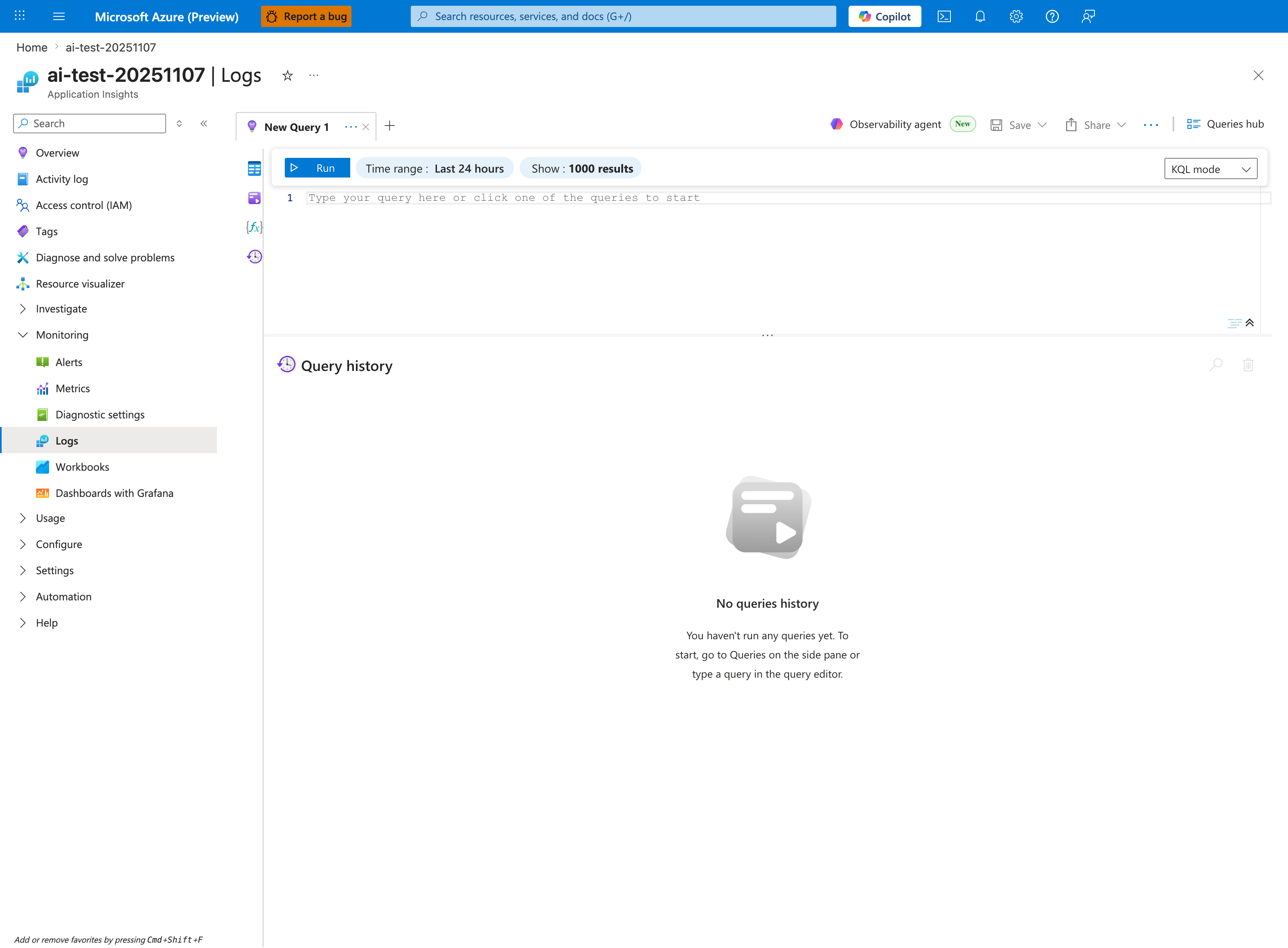
The Logs blade with a New Query 1 tab is the execution surface for KQL queries in the Portal. The visible inline toolbar — Run, Time range: Last 24 hours, Show: 1000 results, KQL mode — names the controls used to bound a query to the incident window. The left-nav Monitoring group lists Alerts, Metrics, Diagnostic settings, Logs (selected), Workbooks, and Dashboards with Grafana — the adjacent surfaces this playbook's evidence section also references. The source resource for this capture is an Application Insights workspace connected to a Linux App Service; the Logs blade itself is OS-agnostic and is the equivalent Portal destination for running this playbook's IIS sub-status queries against a Windows App Service.
5. Evidence to Collect
Required Evidence
- The exact failing
web.configfrom deployedwwwroot. AppServiceHTTPLogsrows including status and sub-status in incident window.- Kudu log stream and Windows Event Log excerpts during failed startup.
- Timestamped deployment history and last known-good deployment ID.
- Current App Service runtime configuration (
az webapp config show).
Useful Context
- Whether failure started immediately after adding rewrite/handler/error sections.
- Whether startup fails on all instances or only after recycle/scale-out.
- Whether the same package starts when reverting only
web.config. - Any manual IIS-oriented changes copied from on-prem docs without App Service validation.
- Whether
httpErrorsinweb.configmasks App Service detailed error pages during incident triage.
CLI Investigation Commands (with expected output)
# App state and host metadata
az webapp show --resource-group <resource-group> --name <app-name> --query "{state:state,enabled:enabled,defaultHostName:defaultHostName}" --output table

# Runtime and site-level configuration snapshot
az webapp config show --resource-group <resource-group> --name <app-name> --query "{windowsFxVersion:windowsFxVersion,netFrameworkVersion:netFrameworkVersion,use32BitWorkerProcess:use32BitWorkerProcess,alwaysOn:alwaysOn}" --output table

# Turn on and inspect web server/application logs if needed
az webapp log config --resource-group <resource-group> --name <app-name> --web-server-logging filesystem --detailed-error-messages true --failed-request-tracing true --application-logging filesystem
az webapp log tail --resource-group <resource-group> --name <app-name>

# Deployment events for startup correlation
az webapp log deployment show --resource-group <resource-group> --name <app-name> --output table
Example Output:
State    Enabled    DefaultHostName
-------  ---------  -------------------------------------------
Running  True       <app-name>.azurewebsites.net

WindowsFxVersion    NetFrameworkVersion    Use32BitWorkerProcess    AlwaysOn
------------------  ---------------------  -----------------------  --------
DOTNET|8.0          v4.0                   False                    True

Time                  Id     Status     Author
-------------------   -----  ---------  ----------------------
2026-04-09T05:42:10Z  1021   Success    ci-pipeline
2026-04-09T06:01:34Z  1022   Success    ci-pipeline
How to Read This
Success in deployment history does not disprove IIS startup failure. Treat deployment and startup as separate checkpoints, then correlate by timestamp.
Sample Log Patterns (with real-looking log output)
Windows Event Log / ANCM (malformed XML and process failures)
[Windows Event Log]
2026-04-09T06:03:11Z  Error  IIS AspNetCore Module V2  EventId=1012
Application '/LM/W3SVC/123456789/ROOT' with physical root 'D:\home\site\wwwroot\' failed to load coreclr.
Exception message:
Could not find a part of the path 'D:\home\site\wwwroot\MyApi.dll'.

2026-04-09T06:03:12Z  Error  IIS-W3SVC-WP  EventId=2307
Configuration file is not well-formed XML.
File: \\?\D:\home\site\wwwroot\web.config
Line: 27
Error: 0x8007000d
IIS HTTP Log pattern (sub-status signatures)
[IIS HTTP Logs]
2026-04-09 06:03:12 GET / 500 19 0 15
2026-04-09 06:03:18 GET / 500 21 0 2
2026-04-09 06:03:24 GET / 502 5 32 101
Kudu diagnostic stream pattern (rewrite and lock hints)
[Kudu / Diagnostic Stream]
2026-04-09T06:05:42.231Z ERROR - Failed to read configuration section 'system.webServer/rewrite/rules'.
2026-04-09T06:05:42.231Z ERROR - This configuration section cannot be used at this path.
2026-04-09T06:05:42.231Z ERROR - Lock violation inherited from higher-level configuration.
2026-04-09T06:05:44.114Z ERROR - Rewrite rule 'ForceHttpsAndCanonicalHost' rewritten URL to itself.
How to Read This
500.19 + 0x8007000d strongly indicates malformed XML or invalid configuration syntax. 500.21 points to module/handler problems. 502.5 usually indicates process bootstrap failure behind ANCM.
KQL Queries with Example Output
Query 1: Detect IIS startup failures by sub-status
// Startup-phase 500/502 failures with sub-status focus
AppServiceHTTPLogs
| where TimeGenerated > ago(6h)
| where ScStatus in (500, 502)
| summarize Requests=count() by ScStatus, ScSubStatus
| order by Requests desc
Example Output:
| ScStatus | ScSubStatus | Requests |
|---|---|---|
| 500 | 19 | 84 |
| 500 | 21 | 31 |
| 502 | 5 | 19 |
How to Read This
Prioritize hypotheses by count. Highest 500.19 volume generally means parse/locked-setting path before module/process debugging.
Query 2: Timeline around deployment and startup failures
// Build timeline for incident window
AppServiceHTTPLogs
| where TimeGenerated between (datetime(2026-04-09 06:00:00) .. datetime(2026-04-09 06:15:00))
| where ScStatus in (500, 502)
| project TimeGenerated, CsMethod, CsUriStem, ScStatus, ScSubStatus, ScWin32Status, TimeTaken
| order by TimeGenerated asc
Example Output:
| TimeGenerated | CsMethod | CsUriStem | ScStatus | ScSubStatus | ScWin32Status | TimeTaken |
|---|---|---|---|---|---|---|
| 2026-04-09 06:03:12 | GET | / | 500 | 19 | 0 | 15 |
| 2026-04-09 06:03:18 | GET | / | 500 | 21 | 0 | 2 |
| 2026-04-09 06:03:24 | GET | / | 502 | 5 | 32 | 101 |
6. Validation and Disproof by Hypothesis
H1: Malformed web.config XML (parse error)
Evidence FOR
- IIS/Event logs show
0x8007000d, line/position parse errors, or malformed XML messages. AppServiceHTTPLogsdominated by500.19immediately after deployment.- Site fails before application-specific startup logs appear.
Evidence AGAINST
- XML validates cleanly and no line-level parse errors are present.
- Failures are primarily
500.21or502.5with module/process signatures.
CLI/KQL to test
# Download and inspect deployed web.config from Kudu (manual check in SCM site)
az webapp deployment list-publishing-profiles --resource-group <resource-group> --name <app-name>

# Reconfirm startup failure signature in live logs
az webapp log tail --resource-group <resource-group> --name <app-name>
AppServiceHTTPLogs
| where TimeGenerated > ago(2h)
| where ScStatus == 500 and ScSubStatus == 19
| project TimeGenerated, CsUriStem, ScStatus, ScSubStatus, ScWin32Status
| order by TimeGenerated desc
Expected results for normal vs abnormal
| State | Expected |
|---|---|
| Normal | No sustained 500.19; startup reaches 200/302 shortly after recycle. |
| Abnormal | Repeated 500.19; parse/format error hints (including 0x8007000d) in logs. |
H2: Incorrect processPath or handler mapping
Evidence FOR
502.5appears with ANCM startup errors indicating target executable or DLL path mismatch.aspNetCoreprocessPathpoints to wrong file (for example stale DLL name).- Handler mapping references unsupported/incorrect module declaration for current app stack.
Evidence AGAINST
- Process path exists and launches correctly under current deployment output.
- No ANCM startup exceptions; failures center on rewrite or locked sections.
CLI/KQL to test
# Verify runtime stack and startup-relevant configuration
az webapp config show --resource-group <resource-group> --name <app-name> --query "{windowsFxVersion:windowsFxVersion,netFrameworkVersion:netFrameworkVersion}" --output table

# Stream logs while recycling to catch process bootstrap errors
az webapp restart --resource-group <resource-group> --name <app-name>
az webapp log tail --resource-group <resource-group> --name <app-name>
AppServiceHTTPLogs
| where TimeGenerated > ago(2h)
| where ScStatus == 502 and ScSubStatus == 5
| summarize Requests=count(), FirstSeen=min(TimeGenerated), LastSeen=max(TimeGenerated)
Expected results for normal vs abnormal
| State | Expected |
|---|---|
| Normal | 502.5 absent; startup logs show process launched and responding. |
| Abnormal | 502.5 spikes after recycle; ANCM errors report invalid executable/DLL path or bootstrap failure. |
H3: Missing runtime/module dependency
Evidence FOR
500.21responses indicating unrecognized module/handler configuration.- Handler config references
HttpPlatformHandleror another module not available for the deployed app/runtime model. - Logs indicate missing URL Rewrite module or ASP.NET Core hosting bundle/runtime mismatch.
- Existing
web.configworks in one environment but fails in App Service due to unavailable module assumptions.
Evidence AGAINST
- Required runtime and modules are present and matched to app target framework.
- No module resolution errors appear in IIS/Kudu diagnostics.
CLI/KQL to test
# Capture effective site configuration and logging for module diagnostics
az webapp config show --resource-group <resource-group> --name <app-name> --output json
az webapp log config --resource-group <resource-group> --name <app-name> --web-server-logging filesystem --failed-request-tracing true --detailed-error-messages true --application-logging filesystem
az webapp log tail --resource-group <resource-group> --name <app-name>
AppServiceHTTPLogs
| where TimeGenerated > ago(2h)
| where ScStatus == 500 and ScSubStatus == 21
| project TimeGenerated, CsMethod, CsUriStem, ScStatus, ScSubStatus, ScWin32Status
| order by TimeGenerated desc
Expected results for normal vs abnormal
| State | Expected |
|---|---|
| Normal | No 500.21 trend; routes return app-generated responses. |
| Abnormal | Persistent 500.21; diagnostics show module not recognized or dependency absent. |
H4: URL Rewrite rule conflict
Evidence FOR
- Startup or first requests produce
500.xxwith rewrite evaluation errors. - Kudu stream shows rewrite loop, invalid back-reference, or destination path conflict.
- Recent rewrite updates (HTTPS/host canonicalization rules) coincide with outage start.
Evidence AGAINST
- Rewrite section disabled/removed and failure signature unchanged.
500.19parse errors exist before rewrite processing.
CLI/KQL to test
# Reproduce quickly after restart and watch diagnostics
az webapp restart --resource-group <resource-group> --name <app-name>
az webapp log tail --resource-group <resource-group> --name <app-name>
AppServiceHTTPLogs
| where TimeGenerated > ago(2h)
| where ScStatus == 500
| summarize Requests=count() by ScSubStatus
| order by Requests desc
Expected results for normal vs abnormal
| State | Expected |
|---|---|
| Normal | Rewrite rules resolve once per request with no loop/error signals. |
| Abnormal | Repeated startup/initial-request 500 with rewrite loop or rule parse diagnostics. |
H5: web.config locked settings conflict with applicationHost.config
Evidence FOR
- Error states configuration section cannot be used at this path or is locked at parent level.
500.19appears whenweb.configattempts to override lockedsystem.webServersections.- Incident starts after adding on-prem IIS settings not permitted in App Service tenant-level config.
Evidence AGAINST
- No lock violation messages in diagnostics.
- Removing suspect locked sections has no impact on failure pattern.
CLI/KQL to test
# Capture current site settings, then tail for lock violations during restart
az webapp config show --resource-group <resource-group> --name <app-name> --output table
az webapp restart --resource-group <resource-group> --name <app-name>
az webapp log tail --resource-group <resource-group> --name <app-name>
AppServiceHTTPLogs
| where TimeGenerated > ago(2h)
| where ScStatus == 500 and ScSubStatus == 19
| summarize Requests=count(), Win32StatusSet=make_set(ScWin32Status, 5)
Expected results for normal vs abnormal
| State | Expected |
|---|---|
| Normal | No lock violations; site-level config accepted and app starts. |
| Abnormal | 500.19 persists with lock/path violation messages tied to system.webServer overrides. |
Normal vs Abnormal Comparison
| Signal | Normal Startup | IIS web.config Startup Failure |
|---|---|---|
| HTTP status mix | Mostly 200/301/302 after warm-up | Sustained 500.19, 500.21, or 502.5 |
| Sub-status trend | No stable 500 sub-status cluster | One or more dominant sub-status signatures |
| Event/Kudu diagnostics | No parse/module/lock errors | XML parse, missing module, rewrite loop, or locked section errors |
| Startup progression | Worker reaches ready state quickly | IIS blocks request pipeline before stable readiness |
| Recovery action | Standard restart succeeds | Requires config correction or rollback |
7. Likely Root Cause Patterns
- Pattern A: Manual
web.configedits introduced malformed XML, invalid escaping, or unclosed elements. - Pattern B: ASP.NET Core deployment changed assembly name/output path but
processPath/argumentsremained stale. - Pattern C:
web.configincludes module declarations unsupported in the active App Service Windows environment. - Pattern D: Rewrite rule migrated from on-prem IIS creates self-rewrite or conflicting redirect logic.
- Pattern E: Locked configuration sections are overridden in
web.configeven though parent-levelapplicationHost.configdisallows them. - Pattern F:
httpErrorscustomization hides useful diagnostics and masks platform-generated error behavior during incident response.
8. Immediate Mitigations
- Roll back to last known-good deployment that includes a previously working
web.config. - Temporarily remove non-essential
rewrite, customhandlers, and aggressivehttpErrorsoverrides to restore startup. - Correct ASP.NET Core
aspNetCoreprocessPathandargumentsto match current deployed artifacts. - Remove or simplify module registrations until
500.21is eliminated. - If lock violations appear, delete conflicting sections and rely on App Service-supported configuration.
Production Safety
Apply one mitigation at a time and validate with sub-status trends. Bundling multiple edits makes root cause confirmation harder and increases rollback risk.
9. Prevention
- Add CI validation for
web.configXML schema and well-formedness before deployment. - Keep
web.configminimal; avoid carrying full on-prem IIS templates into App Service Windows. - Validate rewrite rules with loop-safe conditions and explicit exclusions.
- Version-control and review any change to
handlers,modules, andaspNetCoreprocessPath. - Avoid overriding
httpErrorsunless explicitly required, and document impact on troubleshooting visibility. - Maintain a startup smoke test that checks first-request success and alerts on
500.19,500.21, and502.5spikes.
See Also
Related Queries
../../kql/http/5xx-trend-over-time.md../../kql/console/startup-errors.md../../kql/restarts/repeated-startup-attempts.md
Related Checklists
../../first-10-minutes/startup-availability.md../../decision-tree.md../../quick-diagnosis-cards.md