Windows Container Startup and Health Probes (Azure App Service Windows)
1. Summary
Symptom
Windows custom containers on App Service restart during boot, stay unavailable after deployment, or oscillate between brief 200 responses and repeated 503/timeout events. Platform startup probes fail even when local container tests look healthy.
Why this scenario is confusing
- Windows images are usually much larger than Linux images (often 4-8 GB vs about 200 MB), so pull/extract time can consume startup budget.
- Windows IIS-based containers rely on
ServiceMonitor.exe, unlike Kestrel-only or single-process Linux container patterns. - Teams often apply Linux probe assumptions directly and misclassify startup failures as runtime health check failures.
- Port assumptions differ: IIS commonly binds to port
80, while many Linux app samples assume explicit app port mapping.
Troubleshooting decision flow (mermaid diagram)
graph TD
    A[Symptom: Windows container startup/probe failures] --> B{Which phase fails?}
    B --> C[Before first stable HTTP 200]
    B --> D[After first healthy response]

    C --> E{Early signals}
    E --> F[Pull/extract takes most of startup window]
    E --> G[IIS starts but probes still fail]
    E --> H[Container process model is wrong]

    F --> H1[H1: Image too large]
    G --> I{Binding and service supervision}
    I --> H3[H3: IIS binding mismatch]
    I --> H4[H4: ServiceMonitor.exe missing]
    H --> H2[H2: Wrong base image]

    D --> J{Startup budget and warm-up}
J --> H5[H5: Startup time exceeded for Windows warm-up]Limitations
- Scope is Windows custom containers on Azure App Service.
- Linux behavior appears only in contrast notes to prevent misdiagnosis.
- Log schema names can vary by workspace ingestion settings.
- This playbook does not replace deep framework-specific tuning guidance.
Quick Conclusion
Treat Windows container startup as a full timeline: image pull/extract -> IIS/process initialization -> first stable healthy response. The most common causes are oversized image, incorrect Windows base image family, IIS port binding mismatch, missing ServiceMonitor.exe, and startup budget set too low for normal Windows warm-up.
2. Common Misreadings
- "If it works on Linux container docs, it should behave the same on Windows".
- "Startup timeout means app crash".
- "IIS installed means IIS healthy".
- "
WEBSITES_PORTshould always be tuned exactly like Linux". - "Kudu diagnostics are identical between Windows and Linux custom containers".
- "One successful response means startup problem is solved".
3. Competing Hypotheses
- H1: Container image too large (pull timeout).
- H2: Wrong base image (servercore vs nanoserver incompatibility).
- H3: IIS binding mismatch (port 80 vs
WEBSITES_PORT). - H4:
ServiceMonitor.exenot running (IIS won't start). - H5: Startup time exceeded (Windows containers inherently slower to start).
4. What to Check First
Platform and app settings snapshot
az webapp show --resource-group <resource-group> --name <app-name> --query "{name:name,state:state,kind:kind}" --output table

az webapp config container show --resource-group <resource-group> --name <app-name> --query "{windowsFxVersion:windowsFxVersion,linuxFxVersion:linuxFxVersion}" --output table

az webapp config appsettings list --resource-group <resource-group> --name <app-name> --query "[?name=='WEBSITES_CONTAINER_START_TIME_LIMIT' || name=='WEBSITES_PORT' || name=='WEBSITE_HEALTHCHECK_PATH' || name=='WEBSITE_HEALTHCHECK_MAXPINGFAILURES'].{name:name,value:value}" --output table
Fast triage checklist
- Confirm
windowsFxVersionis populated andlinuxFxVersionis null/empty. - Confirm
WEBSITES_CONTAINER_START_TIME_LIMITis explicitly set for large Windows images. - Confirm serving model: IIS (
ServiceMonitor.exe) or self-hosted app server. - Confirm IIS binding target, usually
*:80:unless intentionally changed. - Confirm whether failures occur before first healthy probe success.
Startup behavior differences to account for
- Windows image pull/extract is materially longer than common Linux images.
- IIS container startup includes service bootstrap, app pool spin-up, and optional app initialization.
- Windows container runtime is platform-isolated on App Service; process-isolation tuning is not user-configurable.
Portal view: Log stream blade for streaming Windows container startup logs
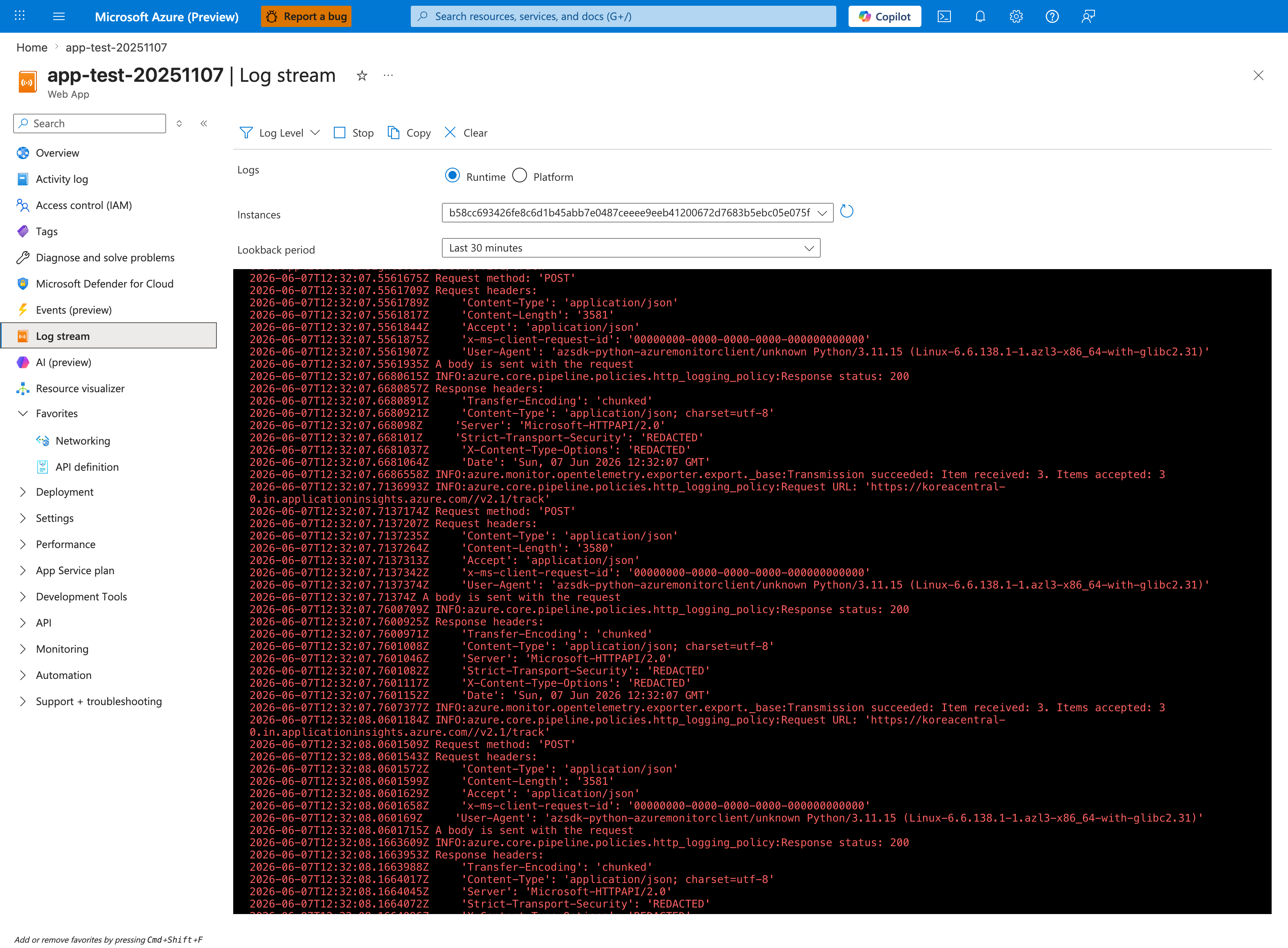
The Log stream blade is the live tail surface for runtime log buffers in the Portal. The visible toolbar (Log Level, Stop, Copy, Clear), the Runtime / Platform radio selector with Runtime selected, and the Instances dropdown are the controls used to focus the buffer during a startup reproduction. The Lookback period: Last 30 minutes chip bounds the window. The source app for this capture is Linux; the Log stream blade itself is OS-agnostic and is the equivalent Portal destination Windows custom container investigators open to view the runtime log buffer this playbook's evidence section names.
5. Evidence to Collect
Required Evidence
- App settings at incident time (
WEBSITES_CONTAINER_START_TIME_LIMIT,WEBSITES_PORT, health settings). - Platform logs covering pull/start/stop lifecycle.
- Console logs showing IIS startup or app process startup.
- HTTP logs for probe path and root path during startup window.
- Dockerfile entrypoint, base image, and image size metadata.
Useful Context
- Recent base image change (
servercore,nanoserver, or generic Windows base). - Startup command overrides in portal or pipeline.
- Slot config drift between staging and production.
- Scale-out events that trigger fresh image pull on new workers.
Sample Log Patterns
AppServicePlatformLogs (pull + timeout)
[AppServicePlatformLogs]
2026-04-09T03:10:02Z  Informational  Pulling image: myregistry.azurecr.io/payments-win:ltsc2022
2026-04-09T03:15:11Z  Informational  Image pull completed. ElapsedMs=309403
2026-04-09T03:15:53Z  Warning        Startup probe has not received healthy response.
2026-04-09T03:16:42Z  Error          Startup limit exceeded for container initialization.
2026-04-09T03:16:42Z  Informational  State: Stopping, Action: StoppingSiteContainers, LastError: ContainerTimeout
AppServiceConsoleLogs (IIS + ServiceMonitor)
[AppServiceConsoleLogs]
2026-04-09T03:15:20Z  Informational  ServiceMonitor.exe starting service 'w3svc'
2026-04-09T03:15:24Z  Informational  IIS configuration loaded from C:\inetpub\wwwroot
2026-04-09T03:16:03Z  Warning        Application initialization still in progress
2026-04-09T03:16:42Z  Error          Container terminated due to startup timeout
AppServiceHTTPLogs (probe path instability)
[AppServiceHTTPLogs]
2026-04-09T03:15:56Z  GET  /          503  420
2026-04-09T03:16:03Z  GET  /          503  401
2026-04-09T03:16:11Z  GET  /          200   52
2026-04-09T03:16:20Z  GET  /healthz   500   90
How to Read This
If pull duration is long and first 200 appears near timeout, prioritize H1/H5. If IIS starts but healthy response stays unstable, validate H3/H4 before changing health check thresholds.
KQL Queries with Example Output
Query 1: Pull duration + timeout correlation
AppServicePlatformLogs
| where TimeGenerated > ago(24h)
| where Message has_any ("Pulling image", "Image pull completed", "Startup limit", "ContainerTimeout", "StoppingSiteContainers")
| project TimeGenerated, Level, Message
| order by TimeGenerated asc
Example Output:
| TimeGenerated | Level | Message |
|---|---|---|
| 2026-04-09 03:10:02 | Informational | Pulling image: myregistry.azurecr.io/payments-win:ltsc2022 |
| 2026-04-09 03:15:11 | Informational | Image pull completed. ElapsedMs=309403 |
| 2026-04-09 03:16:42 | Error | Startup limit exceeded for container initialization. |
| 2026-04-09 03:16:42 | Informational | State: Stopping, Action: StoppingSiteContainers, LastError: ContainerTimeout |
How to Read This
The key signal is elapsed pull + warm-up approaching the configured startup limit.
Query 2: IIS and ServiceMonitor signatures
AppServiceConsoleLogs
| where TimeGenerated > ago(24h)
| where ResultDescription has_any ("ServiceMonitor.exe", "w3svc", "IIS", "application initialization")
| project TimeGenerated, Level, ResultDescription
| order by TimeGenerated asc
Example Output:
| TimeGenerated | Level | ResultDescription |
|---|---|---|
| 2026-04-09 03:15:20 | Informational | ServiceMonitor.exe starting service 'w3svc' |
| 2026-04-09 03:15:24 | Informational | IIS configuration loaded from C:\inetpub\wwwroot |
| 2026-04-09 03:16:03 | Warning | Application initialization still in progress |
How to Read This
IIS container without ServiceMonitor.exe evidence is a strong H4 indicator.
Query 3: Probe stability in first startup window
AppServiceHTTPLogs
| where TimeGenerated > ago(24h)
| where CsUriStem in ("/", "/health", "/healthz")
| summarize requests=count(), failures=countif(ScStatus >= 500), p95=percentile(TimeTaken, 95) by CsUriStem, bin(TimeGenerated, 5m)
| order by TimeGenerated asc
Example Output:
| TimeGenerated | CsUriStem | requests | failures | p95 |
|---|---|---|---|---|
| 2026-04-09 03:15:00 | / | 15 | 12 | 430 |
| 2026-04-09 03:15:00 | /healthz | 6 | 4 | 111 |
How to Read This
Early high failure counts with eventual success generally indicate startup readiness timing, not necessarily persistent runtime outage.
CLI Investigation Commands
# Check startup and probe app settings
az webapp config appsettings list --resource-group <resource-group> --name <app-name> --query "[?name=='WEBSITES_CONTAINER_START_TIME_LIMIT' || name=='WEBSITES_PORT' || name=='WEBSITE_HEALTHCHECK_PATH' || name=='WEBSITE_HEALTHCHECK_MAXPINGFAILURES'].{name:name,value:value}" --output table

# Check health path and runtime model
az webapp config show --resource-group <resource-group> --name <app-name> --query "{healthCheckPath:healthCheckPath,windowsFxVersion:windowsFxVersion,alwaysOn:alwaysOn}" --output table

# Stream logs while reproducing issue
az webapp log tail --resource-group <resource-group> --name <app-name>

# Temporarily increase startup budget for validation
az webapp config appsettings set --resource-group <resource-group> --name <app-name> --settings WEBSITES_CONTAINER_START_TIME_LIMIT=900

# Restart after setting change
az webapp restart --resource-group <resource-group> --name <app-name>
Example Output:
Name                                  Value
------------------------------------  -----------------
WEBSITES_CONTAINER_START_TIME_LIMIT   900
WEBSITES_PORT                         80
WEBSITE_HEALTHCHECK_PATH              /healthz

HealthCheckPath   WindowsFxVersion                                       AlwaysOn
----------------  -----------------------------------------------------  --------
/healthz          DOCKER|myregistry.azurecr.io/payments-win:ltsc2022     True
How to Read This
For IIS-based Windows images, keep port 80 unless you intentionally changed IIS bindings and validated probe routing.
6. Validation and Disproof by Hypothesis
H1: Container image too large (pull timeout)
Support signals - Pull and extract consumes most of startup window. - Image layers are large and numerous. - Timeout happens before sustained successful responses.
Weakening signals - Pull step is short and cached. - Failures persist after image optimization.
Validation steps
- Measure pull duration from platform logs.
- Compare with startup limit.
- Re-test with higher startup limit and optimized image.
H2: Wrong base image (servercore vs nanoserver incompatibility)
Support signals - Runtime dependencies unavailable in selected base image. - IIS or framework startup errors mention missing Windows components. - Image runs inconsistently across environments.
Weakening signals - Base family is aligned to app host model. - Same image starts reliably on repeated deployments.
Validation steps
- Confirm host model requirements (IIS vs self-hosted).
- Match base image accordingly:
servercorefor IIS/full-framework style compatibility,nanoserverfor lighter compatible runtimes. - Rebuild with validated base and retest.
Base Image Rule
If IIS is part of the hosting model, avoid nanoserver and use a compatible IIS-enabled servercore lineage image.
H3: IIS binding mismatch (port 80 vs WEBSITES_PORT)
Support signals - IIS listens on port 80 but probe expectation is configured for another port. - Probes fail while IIS logs indicate service started. - Root path or health path shows inconsistent availability.
Weakening signals - IIS binding and app settings are explicitly aligned. - Probe failures disappear after non-port fixes.
Validation steps
- Inspect IIS site binding (
*:80:by default). - Verify
WEBSITES_PORTonly if using non-default port. - Confirm health path serves from bound endpoint without redirects/auth blocks.
H4: ServiceMonitor.exe not running (IIS won't start)
Support signals - Entrypoint does not run ServiceMonitor.exe w3svc. - IIS service appears briefly then exits/unmanaged. - Startup probes fail despite otherwise valid image artifacts.
Weakening signals - Canonical IIS entrypoint is present and stable. - Logs show sustained w3svc lifecycle.
Validation steps
- Inspect Dockerfile
ENTRYPOINTand startup command. - Remove scripts that bypass service monitor process.
- Rebuild/redeploy and verify stable probe responses.
H5: Startup time exceeded (Windows containers inherently slower)
Support signals - First stable 200 arrives near timeout threshold. - Cold start includes heavy module/JIT/app initialization. - Increasing startup limit significantly improves availability.
Weakening signals - Failures remain identical with generous startup budget. - Logs show deterministic config/runtime errors instead of slow warm-up.
Validation steps
- Build full timeline from pull to first stable healthy response.
- Temporarily increase startup limit.
- Reduce image/startup work and set a justified steady-state limit.
Normal vs Abnormal Comparison
| Signal | Normal Windows startup | Abnormal Windows startup |
|---|---|---|
| Image pull | Predictable and inside budget | Long pull consumes startup budget |
| IIS supervision | ServiceMonitor.exe stable | Service monitor absent/bypassed |
| Port binding | IIS serves on expected binding | Probe target and binding diverge |
| Probe sequence | Brief initial failures then stable 200 | No sustained healthy response |
| Lifecycle | Single boot to steady state | Start/stop loop with timeout |
Contrast Notes (Windows vs Linux)
| Aspect | Windows containers | Linux containers |
|---|---|---|
| Typical image footprint | Often 4-8 GB | Often a few hundred MB |
| Common process model | IIS + ServiceMonitor.exe | Single process (Kestrel/Gunicorn/Node) |
| Startup baseline | Longer warm-up expected | Faster startup commonly observed |
| Common probe pitfall | IIS/service supervision + binding mismatch | App bind/port mismatch |
7. Likely Root Cause Patterns
- Pattern A: Image size and layer structure push cold start over budget.
- Pattern B: Incompatible Windows base image family for chosen runtime/host model.
- Pattern C: IIS binding left at default while probe settings changed.
- Pattern D:
ServiceMonitor.exeremoved or bypassed by custom startup scripts. - Pattern E: Startup timeout tuned for Linux-like behavior, not Windows warm-up.
- Pattern F: Kudu-first triage delays resolution because key startup evidence is in platform/console logs.
8. Immediate Mitigations
- Temporarily raise
WEBSITES_CONTAINER_START_TIME_LIMITto validate timing hypothesis. - Reduce image size and avoid unnecessary Windows layers.
- Use explicit IIS entrypoint with
ServiceMonitor.exe w3svc. - Keep IIS on port
80unless intentionally customizing full binding path. - Make health endpoint lightweight and startup-safe.
- Separate expensive initialization from first-request startup path.
Hyper-V vs Process Isolation
Azure App Service manages Windows container isolation at the platform layer (Hyper-V-isolated multi-tenant model). Process-isolation mode is not an app-level toggle here, so remediation should focus on image compatibility, startup timing, and probe readiness instead of isolation-mode switching.
9. Prevention
- Set Windows-specific startup SLOs that include pull, IIS boot, and app warm-up.
- Enforce base image policy (
servercore/nanoserver) in CI with documented compatibility rules. - Track image size regressions and fail builds beyond threshold.
- Run cold-start validation before production slot swap.
- Keep clear runbook guidance for Windows container probe behavior differences.
- Document Kudu limitations and prioritize logs-first diagnostics.
Windows container Kudu limitations
- Kudu is helpful but less comprehensive for Windows container startup troubleshooting than many Linux workflows.
- Interactive runtime inspection can be limited during unstable startup loops.
- Platform and console logs should be the primary evidence source.
- Treat Kudu checks as supplemental confirmation, not first-line diagnosis.
See Also
- Container Didn't Respond to HTTP Pings
- Deployment Succeeded, Startup Failed
- Warm-up vs Health Check
- Startup Availability (First 10 Minutes)