Slot Swap Restart / Config Drift / Warm-up Race (Azure App Service Linux)
1. Summary
Symptom
A slot swap operation reports success, but production availability degrades immediately after swap: instances restart, startup errors appear, latency spikes, or dependencies fail due to post-swap configuration behavior.
Why this scenario is confusing
From the control-plane perspective, swap is successful. From the application perspective, startup-critical configuration and identity context can change after warm-up, causing a second startup phase (or restart cascade) that was not validated by the original warm-up response.
Slot swap lifecycle (where races and drift appear)
flowchart TD
    A[Deploy to Staging Slot] --> B[Warm-up Validation on Staging]
    B --> C[Config Swap / Slot Setting Resolution]
    C --> D[Traffic Switch to Production]
    D --> E[Post-swap Restart Cascade Possible]
    E --> F[Errors: config drift, stale connections, RBAC failures, latency]
Investigation Notes
- Treat slot swap as a multi-phase state transition, not an atomic runtime event.
- Build one timeline using platform, console, and HTTP logs: swap success, restart, first failing dependency call, recovery.
- Prioritize app setting and connection string drift review before deep code debugging.
- For swap failures due to warm-up timeout, see Slot Swap Failed During Warm-up.
- Linux App Service scope only; avoid Windows/IIS assumptions.
11. Related Queries
12. Related Checklists
13. Related Labs
../lab-guides/slot-swap-config-drift.md
Limitations
- This playbook covers swap-success-then-degradation patterns, not swap operations that fail before completion.
- Linux App Service focus only; no Windows/IIS behavior is included.
- KQL table/field availability depends on diagnostic pipeline configuration.
- Commands and examples use masked placeholders (
<subscription-id>,<object-id>,<resource-group>,<app-name>); adapt to your environment.
Quick Conclusion
When a slot swap succeeds but production degrades, focus on post-swap behavior: restart triggers, slot-setting drift, readiness race conditions, and dependency context differences. Reliable swaps require explicit warm-up contracts, deterministic config parity, and identity/connection validation in the production slot context.
2. Common Misreadings
- "Swap succeeded, so production config must be correct." (success only means swap operation completed, not full post-swap runtime validation)
- "This is the same as warm-up timeout." (different class of issue: swap succeeds first, then runtime fails)
- "If staging passed, production will be identical." (slot settings, identities, and connection context can differ)
- "Restarts after swap mean platform instability." (often deterministic restart triggers from non-sticky settings)
- "Database errors right after swap are transient." (can indicate stale or swapped connection-string mismatch)
3. Competing Hypotheses
- H1: Non-sticky app settings changed during swap trigger production restarts and startup regression.
- H2: Slot-setting drift exists between staging and production, so swapped code runs with unexpected configuration.
- H3: Warm-up race allows traffic before swapped-in code is fully ready (
WEBSITE_SWAP_WARMUP_PING_PATHmissing or too weak). - H4: Post-swap dependency context differs (connection strings, managed identity RBAC), causing immediate access failures.
4. What to Check First
Metrics
- Restart count, instance churn, and startup duration immediately after successful swap timestamp.
- HTTP 5xx/4xx rate and p95 latency before and after traffic switch.
- Error-rate jump window: first 1-10 minutes after swap completion.
Logs
AppServicePlatformLogs: swap lifecycle completion, restart operations, container recycle events.AppServiceConsoleLogs: startup exceptions, configuration load errors, identity/auth failures.AppServiceHTTPLogs: first requests after swap, status mix, warm-up vs user-path timing.
Platform Signals
- Effective app settings and slot-setting flags for both slots.
- Presence/value of
WEBSITE_SWAP_WARMUP_PING_PATHandWEBSITE_SWAP_WARMUP_PING_STATUSES. - Auto-swap configuration and startup budget (
WEBSITES_CONTAINER_START_TIME_LIMIT). - Managed identity assignment and role bindings for production-scoped resources.
Portal view: Activity log timeline for swap audit
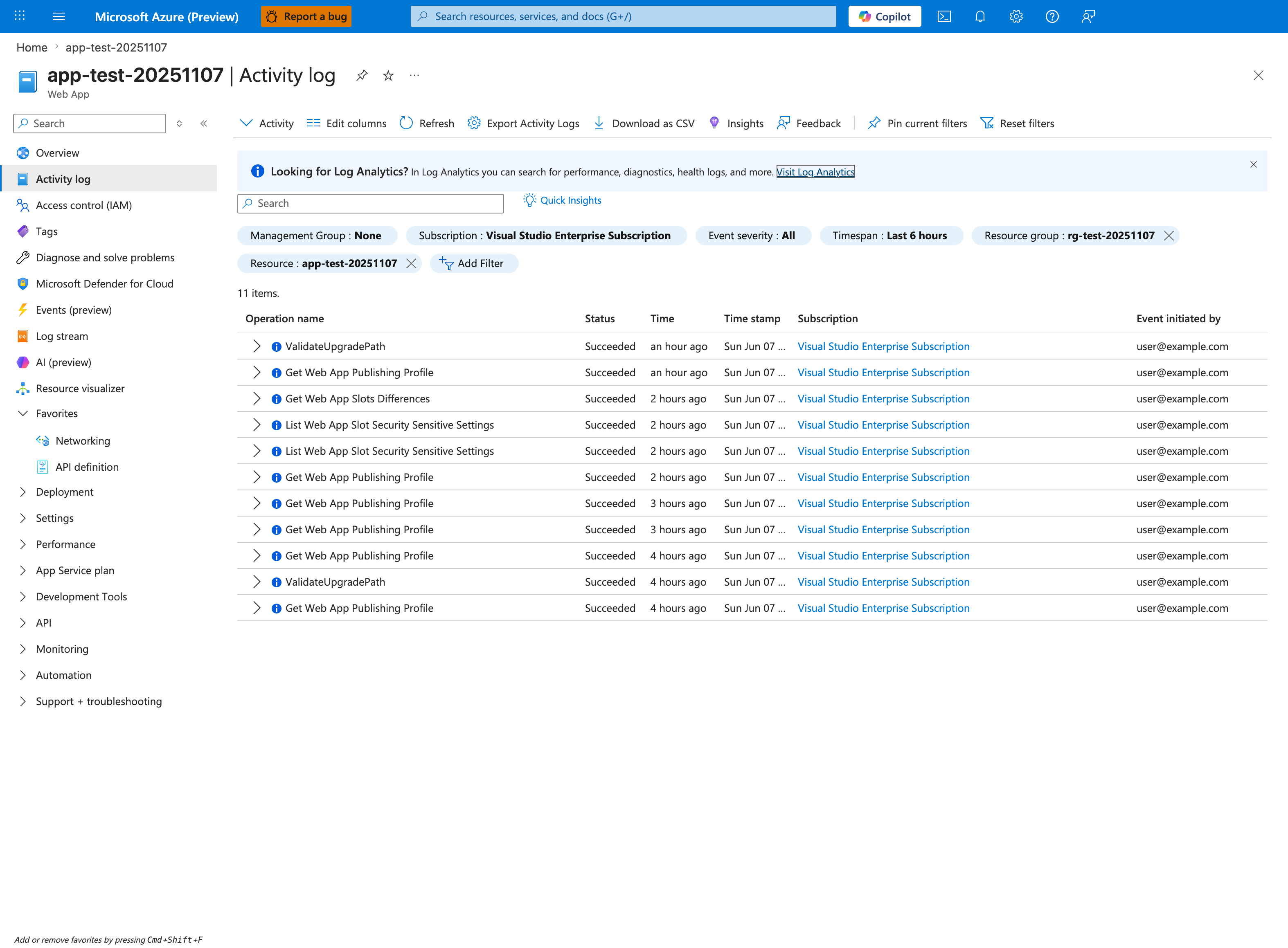
The Activity log blade is the authoritative timeline source for slot-swap operations and the only place that records the exact Succeeded timestamp for Swap Web App Slots against the swap-initiating principal in the Event initiated by column. Pin this filter to the affected app and the incident window, then correlate the Succeeded row's Time stamp value against the first post-swap restart event in AppServicePlatformLogs and the first user-visible 5xx in AppServiceHTTPLogs to build the multi-phase timeline this playbook depends on. Use Download as CSV to export the audit trail before the 90-day retention horizon expires, since the swap audit record is what proves which slot configuration was effective at the moment production began degrading.
5. Evidence to Collect
Required
- Exact timeline: deployment complete, warm-up complete, swap complete, first restart, first user error.
- App settings and connection strings for both slots (including
slotSettingmarkers). - Platform log lines confirming successful swap followed by restart/recycle events.
- Console log excerpts for startup and dependency initialization after swap.
- HTTP log sample for first post-swap 10 minutes (status code and latency).
Useful Context
- Recent changes to startup path, migrations, secret providers, feature flags.
- Whether auto-swap is enabled and average cold-start time for this workload.
- Whether persistent connections/caches are recreated on startup.
- Identity model (system-assigned vs user-assigned) and scope of RBAC assignments.
Sample Log Patterns
AppServiceHTTPLogs (post-swap config endpoint still returns 200)
[AppServiceHTTPLogs]
2026-04-04T11:21:57Z  GET  /config    200  63
2026-04-04T11:23:03Z  GET  /diag/env  200  9
AppServiceConsoleLogs (listener healthy even with drift)
[AppServiceConsoleLogs]
2026-04-04T11:14:20Z  Error  [2026-04-04 11:14:20 +0000] [1894] [INFO] Listening at: http://0.0.0.0:8000
2026-04-04T11:14:21Z  Error  [2026-04-04 11:14:21 +0000] [1894] [INFO] Control socket listening
Swap-related drift signal (application-level config mismatch)
[Application behavior around swap]
Before swap (expected production): DB_CONNECTION_STRING=Server=tcp:prod-db.database.windows.net;Database=appdb;
After swap (unexpected production): DB_CONNECTION_STRING=Server=tcp:staging-db.database.windows.net;Database=appdb-staging;
How to Read This
In config-drift incidents, transport health can look normal (200, low latency, valid listener), while business behavior fails due to wrong effective settings after slot switch.
KQL Queries with Example Output
Query 1: Post-swap request health does not rule out drift
// Observe request success on diagnostic endpoints around swap window
AppServiceHTTPLogs
| where TimeGenerated between (datetime(2026-04-04 11:21:50) .. datetime(2026-04-04 11:23:10))
| project TimeGenerated, CsMethod, CsUriStem, ScStatus, TimeTaken
| order by TimeGenerated asc
Example Output:
| TimeGenerated | CsMethod | CsUriStem | ScStatus | TimeTaken |
|---|---|---|---|---|
| 2026-04-04 11:21:57 | GET | /config | 200 | 63 |
| 2026-04-04 11:23:03 | GET | /diag/env | 200 | 9 |
How to Read This
200 on /config and /diag/env means the app is alive, not that configuration values are correct for production.
Query 2: Confirm listener health to separate runtime boot from config drift
// Confirm process startup/listen behavior from console output
AppServiceConsoleLogs
| where TimeGenerated between (datetime(2026-04-04 11:14:15) .. datetime(2026-04-04 11:14:25))
| where ResultDescription has_any ("Listening at", "Control socket listening", "0.0.0.0")
| project TimeGenerated, Level, ResultDescription
| order by TimeGenerated asc
Example Output:
| TimeGenerated | Level | ResultDescription |
|---|---|---|
| 2026-04-04 11:14:20 | Error | [2026-04-04 11:14:20 +0000] [1894] [INFO] Listening at: http://0.0.0.0:8000 |
| 2026-04-04 11:14:21 | Error | [2026-04-04 11:14:21 +0000] [1894] [INFO] Control socket listening |
How to Read This
Healthy bind/listener lines reduce likelihood of startup transport issues and push investigation toward H1/H2/H4 config-context drift.
Query 3: Compare config endpoint values before and after swap timestamp
// Parse /config payload snapshots to detect effective-setting drift
AppServiceHTTPLogs
| where CsUriStem == "/config"
| where TimeGenerated between (datetime(2026-04-04 11:20:00) .. datetime(2026-04-04 11:30:00))
| project TimeGenerated, ScStatus, TimeTaken
| order by TimeGenerated asc
Example Output:
| TimeGenerated | ScStatus | TimeTaken |
|---|---|---|
| 2026-04-04 11:21:57 | 200 | 63 |
Companion value snapshot (from app response body):
| SnapshotTime | SlotContext | DB_CONNECTION_STRING |
|---|---|---|
| 2026-04-04 11:21:56 | production (before swap) | Server=tcp:prod-db.database.windows.net;Database=appdb; |
| 2026-04-04 11:21:57 | production (after swap) | Server=tcp:staging-db.database.windows.net;Database=appdb-staging; |
How to Read This
The endpoint is healthy (200) but value changes at swap boundary show configuration drift. This is the decisive signal for this playbook.
CLI Investigation Commands
# Capture app setting parity across production and staging slots
az webapp config appsettings list --resource-group <resource-group> --name <app-name> --slot production --output table
az webapp config appsettings list --resource-group <resource-group> --name <app-name> --slot <staging-slot> --output table

# Capture connection string parity across slots
az webapp config connection-string list --resource-group <resource-group> --name <app-name> --slot production --output table
az webapp config connection-string list --resource-group <resource-group> --name <app-name> --slot <staging-slot> --output table

# Validate swap warm-up settings on staging slot
az webapp config appsettings list --resource-group <resource-group> --name <app-name> --slot <staging-slot> --query "[?name=='WEBSITE_SWAP_WARMUP_PING_PATH' || name=='WEBSITE_SWAP_WARMUP_PING_STATUSES' || name=='WEBSITES_CONTAINER_START_TIME_LIMIT'].{name:name,value:value}" --output table

# Show slot summary and host state
az webapp show --resource-group <resource-group> --name <app-name> --query "{state:state,enabled:enabled,hostNames:hostNames}" --output table
Example Output:
Name                    Value                                                SlotSetting
----------------------  ---------------------------------------------------  -----------
DB_CONNECTION_STRING    Server=tcp:prod-db.database.windows.net;...         False
FEATURE_FLAG_X          true                                                 True

Name                    Value                                                SlotSetting
----------------------  ---------------------------------------------------  -----------
DB_CONNECTION_STRING    Server=tcp:staging-db.database.windows.net;...      False
FEATURE_FLAG_X          true                                                 True

Name                               Value
---------------------------------  -------------------------------
WEBSITE_SWAP_WARMUP_PING_PATH      /diag/env
WEBSITE_SWAP_WARMUP_PING_STATUSES  200
WEBSITES_CONTAINER_START_TIME_LIMIT 600

State    Enabled    HostNames
-------  ---------  -------------------------------------------
Running  True       <app-name>.azurewebsites.net
How to Read This
Non-sticky (SlotSetting=False) startup-critical values that differ across slots can flip during swap and cause production drift even when warm-up technically succeeds.
CLI Investigation Commands (Focused Drift Diff)
# Export critical app settings for both slots (table view for rapid review)
az webapp config appsettings list --resource-group <resource-group> --name <app-name> --slot production --query "[?name=='DB_CONNECTION_STRING' || name=='REDIS_CONNECTION_STRING' || name=='KEY_VAULT_URI' || name=='API_BASE_URL' || name=='WEBSITE_SWAP_WARMUP_PING_PATH' || name=='WEBSITE_SWAP_WARMUP_PING_STATUSES'].{name:name,value:value,slotSetting:slotSetting}" --output table

az webapp config appsettings list --resource-group <resource-group> --name <app-name> --slot <staging-slot> --query "[?name=='DB_CONNECTION_STRING' || name=='REDIS_CONNECTION_STRING' || name=='KEY_VAULT_URI' || name=='API_BASE_URL' || name=='WEBSITE_SWAP_WARMUP_PING_PATH' || name=='WEBSITE_SWAP_WARMUP_PING_STATUSES'].{name:name,value:value,slotSetting:slotSetting}" --output table

# Validate identity used by app
az webapp identity show --resource-group <resource-group> --name <app-name> --output table

# Validate role assignments for production-scoped dependencies
az role assignment list --assignee <object-id> --scope /subscriptions/<subscription-id>/resourceGroups/<resource-group> --all --output table
Example Output:
Name                             Value                                           SlotSetting
-------------------------------  ----------------------------------------------  -----------
DB_CONNECTION_STRING             Server=tcp:prod-db.database.windows.net;...    False
KEY_VAULT_URI                    https://kv-prod.vault.azure.net/               True
WEBSITE_SWAP_WARMUP_PING_PATH    /diag/env                                      True
WEBSITE_SWAP_WARMUP_PING_STATUSES 200                                            True

Name                             Value                                           SlotSetting
-------------------------------  ----------------------------------------------  -----------
DB_CONNECTION_STRING             Server=tcp:staging-db.database.windows.net;... False
KEY_VAULT_URI                    https://kv-staging.vault.azure.net/            True
WEBSITE_SWAP_WARMUP_PING_PATH    /diag/env                                      True
WEBSITE_SWAP_WARMUP_PING_STATUSES 200                                            True
How to Read This
In this sample, DB_CONNECTION_STRING differs but is non-sticky (False), which can cause production context to drift on swap. That should be corrected or explicitly justified before release.
6. Validation and Disproof by Hypothesis
H1: Non-sticky settings change triggers restart after successful swap
- Signals that support:
AppServicePlatformLogsshow swap success followed by recycle/restart; restart correlates with setting diffs. - Signals that weaken: no restart/recycle events after swap, stable instance IDs, and no config mutation.
- What to verify:
- Compare app settings across slots and identify startup-critical values not marked as slot settings.
- Confirm whether settings changed at swap boundary and whether this aligns to restart timestamp.
let windowStart = ago(24h);
AppServicePlatformLogs
| where TimeGenerated >= windowStart
| where ResultDescription has_any ("swap", "restart", "recycle", "container")
| project TimeGenerated, OperationName, ResultDescription
| order by TimeGenerated asc
az webapp config appsettings list --resource-group <resource-group> --name <app-name> --slot production
az webapp config appsettings list --resource-group <resource-group> --name <app-name> --slot <staging-slot>
az webapp deployment slot swap --resource-group <resource-group> --name <app-name> --slot <staging-slot> --target-slot production
H2: Slot-setting drift causes swapped code to run with unexpected configuration
- Signals that support: same build works in staging but fails in production post-swap with missing/incorrect endpoint, secret, or feature flags.
- Signals that weaken: explicit diff confirms startup-critical parity and correct slot-setting intent.
- What to verify:
- Diff app settings and connection strings with focus on
slotSetting=trueentries. - Validate intended sticky/non-sticky behavior for each startup-critical value.
- Diff app settings and connection strings with focus on
let windowStart = ago(24h);
AppServiceConsoleLogs
| where TimeGenerated >= windowStart
| where ResultDescription has_any ("KeyError", "missing", "configuration", "secret", "endpoint", "feature flag")
| project TimeGenerated, ResultDescription
| order by TimeGenerated desc
az webapp config appsettings list --resource-group <resource-group> --name <app-name> --slot production
az webapp config appsettings list --resource-group <resource-group> --name <app-name> --slot <staging-slot>
az webapp config connection-string list --resource-group <resource-group> --name <app-name> --slot production
az webapp config connection-string list --resource-group <resource-group> --name <app-name> --slot <staging-slot>
H3: Warm-up race allows traffic before effective readiness after swap
- Signals that support: swap succeeds quickly, user traffic starts, then high error/latency while app still initializing.
- Signals that weaken: dedicated warm-up path exists, returns expected status, and post-swap error spike absent.
- What to verify:
- Ensure
WEBSITE_SWAP_WARMUP_PING_PATHis set to a lightweight readiness endpoint. - Validate accepted statuses are explicit and minimal.
- Check auto-swap timing vs cold-start duration (
WEBSITES_CONTAINER_START_TIME_LIMIT).
- Ensure
let windowStart = ago(24h);
AppServiceHTTPLogs
| where TimeGenerated >= windowStart
| summarize requests=count(), errors=countif(ScStatus >= 500), p95=percentile(TimeTaken,95) by bin(TimeGenerated, 1m)
| order by TimeGenerated asc
az webapp config appsettings list --resource-group <resource-group> --name <app-name> --slot <staging-slot>
az webapp config appsettings set --resource-group <resource-group> --name <app-name> --slot <staging-slot> --settings WEBSITE_SWAP_WARMUP_PING_PATH=/ready WEBSITE_SWAP_WARMUP_PING_STATUSES=200 WEBSITES_CONTAINER_START_TIME_LIMIT=600
az webapp deployment slot auto-swap --resource-group <resource-group> --name <app-name> --slot <staging-slot> --auto-swap-slot production
H4: Post-swap dependency context breaks (stale connection strings or identity RBAC mismatch)
- Signals that support: immediate DB/auth/storage failures after swap only on production slot context.
- Signals that weaken: dependency access validates successfully under production slot identity and connection settings.
- What to verify:
- Connection string values/Key Vault references resolve correctly in production slot.
- Managed identity principal used by production has required roles at correct scope.
- Any startup-cached tokens or pooled connections are refreshed after swap.
let windowStart = ago(24h);
AppServiceConsoleLogs
| where TimeGenerated >= windowStart
| where ResultDescription has_any ("login failed", "authorization", "forbidden", "ManagedIdentityCredential", "connection", "timeout")
| project TimeGenerated, ResultDescription
| order by TimeGenerated desc
az webapp identity show --resource-group <resource-group> --name <app-name>
az role assignment list --assignee <object-id> --scope /subscriptions/<subscription-id>/resourceGroups/<resource-group> --all
az webapp config connection-string list --resource-group <resource-group> --name <app-name> --slot production
Normal vs Abnormal Comparison
| Signal | Normal Slot Swap | Slot Swap Config Drift |
|---|---|---|
/config HTTP status | 200 | 200 (can still be drifted) |
/config effective values | Production values remain expected | Values switch to staging or unintended target |
| Console listener logs | 0.0.0.0:<port> and stable | Same (often healthy), so transport looks normal |
| Post-swap functional behavior | Dependency calls succeed | DB/auth/external dependency failures start immediately |
| App settings parity | Startup-critical keys intentionally sticky/non-sticky | Critical key slot-setting intent incorrect or drifted |
| Operational conclusion | Swap is both control-plane and runtime healthy | Swap control-plane succeeded, runtime config context is wrong |
Slot Drift Diff Checklist
| Category | Production Slot (Expected) | Staging Slot (Expected) | Drift Risk if Different and Non-sticky |
|---|---|---|---|
DB_CONNECTION_STRING | Production database endpoint | Staging database endpoint | High (traffic can hit wrong data source after swap) |
REDIS_CONNECTION_STRING | Production cache | Staging cache | Medium-High (cache poisoning/stale reads) |
FEATURE_FLAG_* | Controlled by release policy | Pre-validation values | Medium (feature set mismatch) |
KEY_VAULT_URI | Production vault URI | Staging vault URI | High (secret lookup failures) |
API_BASE_URL | Production downstream URL | Staging downstream URL | High (cross-environment API calls) |
Drift decision rules
| Rule | Action |
|---|---|
Startup-critical key differs and SlotSetting=False | Treat as release blocker before swap |
Startup-critical key differs and SlotSetting=True with explicit intent | Document and allow |
| Swap warm-up path validates only shallow route | Add dependency-aware warm-up endpoint |
| Identity context differs across slots without documented reason | Validate RBAC and block swap until resolved |
How to Read This
The goal is not full key parity. The goal is intentional parity: every difference must be either sticky-by-design or safe to swap.
Normal vs Abnormal Swap Timeline
| Phase | Normal Swap | Swap with Config Drift |
|---|---|---|
| Warm-up | Staging endpoint returns expected readiness | Staging warm-up passes but does not validate effective prod config |
| Swap complete event | No immediate error spike | Error spike within 1-10 minutes |
/config endpoint | 200 and expected production values | 200 but unexpected values |
| Dependency behavior | Stable DB/auth calls | Authentication or connection failures begin |
| Recovery action | Continue rollout | Correct slot settings and recycle/reswap |
7. Likely Root Cause Patterns
- Pattern A: Startup-critical setting was not marked as slot setting (or was incorrectly marked), changing effective runtime config after swap.
- Pattern B: Warm-up endpoint validated a shallow response, but real readiness required longer dependency initialization.
- Pattern C: Auto-swap executed with insufficient warm-up budget for cold initialization profile.
- Pattern D: Production identity/RBAC or secret resolution differs from staging and fails immediately under real traffic.
- Pattern E: Database/client connection pools cached stale endpoints or credentials across slot transition.
8. Immediate Mitigations
- Freeze additional swaps and validate setting parity before next release. Risk: release cadence slows temporarily.
- Set explicit
WEBSITE_SWAP_WARMUP_PING_PATHand strict status list (200or200,202only if justified). Risk: poorly chosen endpoint can still under-validate readiness. - Increase startup budget (
WEBSITES_CONTAINER_START_TIME_LIMIT) for current build while startup path is optimized. Risk: slower failure detection for broken builds. - Recycle production slot after correcting config/identity to clear stale connection pools and token caches. Risk: brief additional restart event.
- If impact is ongoing, swap back or redeploy known-good revision with validated slot settings. Risk: rollback can reintroduce prior defects if not verified.
9. Prevention
- Maintain a versioned slot-configuration contract: each startup-critical key has documented sticky/non-sticky intent.
- Add CI/CD guardrails to diff slot settings and block swaps on unauthorized drift.
- Separate
/warmupfrom/healthand ensure/warmupvalidates app-readiness invariants needed immediately after traffic switch. - Define post-swap observability gate (restart count, error budget burn, p95) before marking deployment successful.
- Standardize identity model and RBAC automation so staging and production permissions are intentionally equivalent or explicitly different.
- Rotate/refresh dependency clients on startup and on configuration change to avoid stale connection behavior.