Authentication Redirect Loop (Azure App Service Linux)
1. Summary
Symptom
Users are redirected repeatedly between App Service and the identity provider (Microsoft Entra ID or another OpenID Connect provider). The browser eventually shows a "too many redirects" error, and the application never loads.
Why this scenario is confusing
Redirect loops can be caused by identity configuration drift, reverse-proxy header handling, token persistence failures, protocol mismatch, or deployment-slot behavior. The browser symptom is the same while the remediation is different for each root cause.
Troubleshooting decision flow
graph TD
    A[Symptom: Infinite auth redirects] --> B{Do redirect_uri and host match actual public URL?}
    B -->|No| H1[H1: Redirect URI mismatch]
    B -->|Yes| C{Are X-Forwarded-* and Host preserved through proxy?}
    C -->|No| H2[H2: Reverse proxy/header rewrite]
    C -->|Yes| D{Do auth logs show session/token persistence errors?}
    D -->|Yes| H3[H3: Token store corruption/full]
    D -->|No| E{Do redirects flip between http and https?}
    E -->|Yes| H4[H4: Mixed HTTP/HTTPS]
    E -->|No| F{Did issue begin right after slot swap?}
    F -->|Yes| H5[H5: Slot swap auth config drift]
    F -->|No| G[Inspect custom auth middleware and cookie domain settings]
Symptom details
- Browser network trace shows repeated
302responses between App Service and the identity provider. - Browser error:
ERR_TOO_MANY_REDIRECTS(or equivalent). - App sign-in appears successful at the identity provider but returns to sign-in immediately.
- No steady authenticated session is established.
Normal flow vs redirect loop flow
sequenceDiagram
    participant U as User Browser
    participant P as Front Door/App Gateway
    participant A as App Service
    participant I as Identity Provider

    rect rgb(230,255,230)
        Note over U,I: Normal auth flow
        U->>P: GET /app
        P->>A: Forward request (Host + X-Forwarded-Proto)
        A-->>U: 302 to IdP authorize endpoint
        U->>I: Authorize request (redirect_uri=https://app.contoso.com/.auth/login/...)
        I-->>U: 302 back with auth code
        U->>P: GET /.auth/login/callback?code=...
        P->>A: Forward callback (original host/proto preserved)
        A-->>U: Session cookie + 302 /app
        U->>A: GET /app with session cookie
        A-->>U: 200 OK
    end

    rect rgb(255,235,235)
        Note over U,I: Redirect loop flow
        U->>A: GET /app
        A-->>U: 302 to IdP
        U->>I: Authorize
        I-->>U: 302 callback
        U->>A: GET callback
        A-->>U: 302 to IdP again (session not recognized or redirect_uri/proto mismatch)
        loop Repeats until browser limit
            U->>I: Authorize
            I-->>U: Redirect back
            U->>A: Callback
            A-->>U: 302 to IdP
        end
    end
2. Common Misreadings
- "Identity provider is down." (loop usually results from config mismatch, not provider outage)
- "User password or MFA failure." (credentials can be correct while callback/session handling is broken)
- "Clearing browser cookies is the fix." (may temporarily mask symptoms but not configuration root cause)
- "This is always an app code bug." (most loops are auth/proxy/host/protocol configuration issues)
- "If production works, staging config differences do not matter." (slot swap can promote bad auth settings)
3. Competing Hypotheses
- H1: Redirect URI mismatch — App registration redirect URI does not match the app's actual public URL (for example custom domain vs
azurewebsites.net). - H2: Reverse proxy stripping headers — Front Door or Application Gateway modifies
HostorX-Forwarded-Proto, so auth redirect generation is incorrect. - H3: Token store corruption or full — Auth module cannot persist or retrieve session tokens, so each request re-triggers authentication.
- H4: Mixed HTTP/HTTPS — App is effectively perceived as HTTP internally while external URL is HTTPS, causing protocol mismatch loops.
- H5: Slot swap broke auth config — Slot-sticky auth settings (client ID, issuer, redirect URI assumptions) diverged during swap.
4. What to Check First
Metrics
302rate bursts over short windows and concentration on/+ callback path.- Number of redirect hops per client/session over time.
- Timing correlation between redirect spikes and recent config/swap events.
Logs
AppServiceHTTPLogsfor repeated302chains and callback behavior.AppServiceAuthenticationLogsforredirect_uri, nonce/state, cookie/correlation failures.- Browser network/HAR chain proving loop sequence and host/scheme used.
Platform Signals
- Effective App Service auth settings and HTTPS-only posture.
- Proxy/edge host +
X-Forwarded-Protoforwarding behavior. - Slot configuration parity and recent swap timeline.
Portal view: Runtime log stream for live redirect-loop traffic
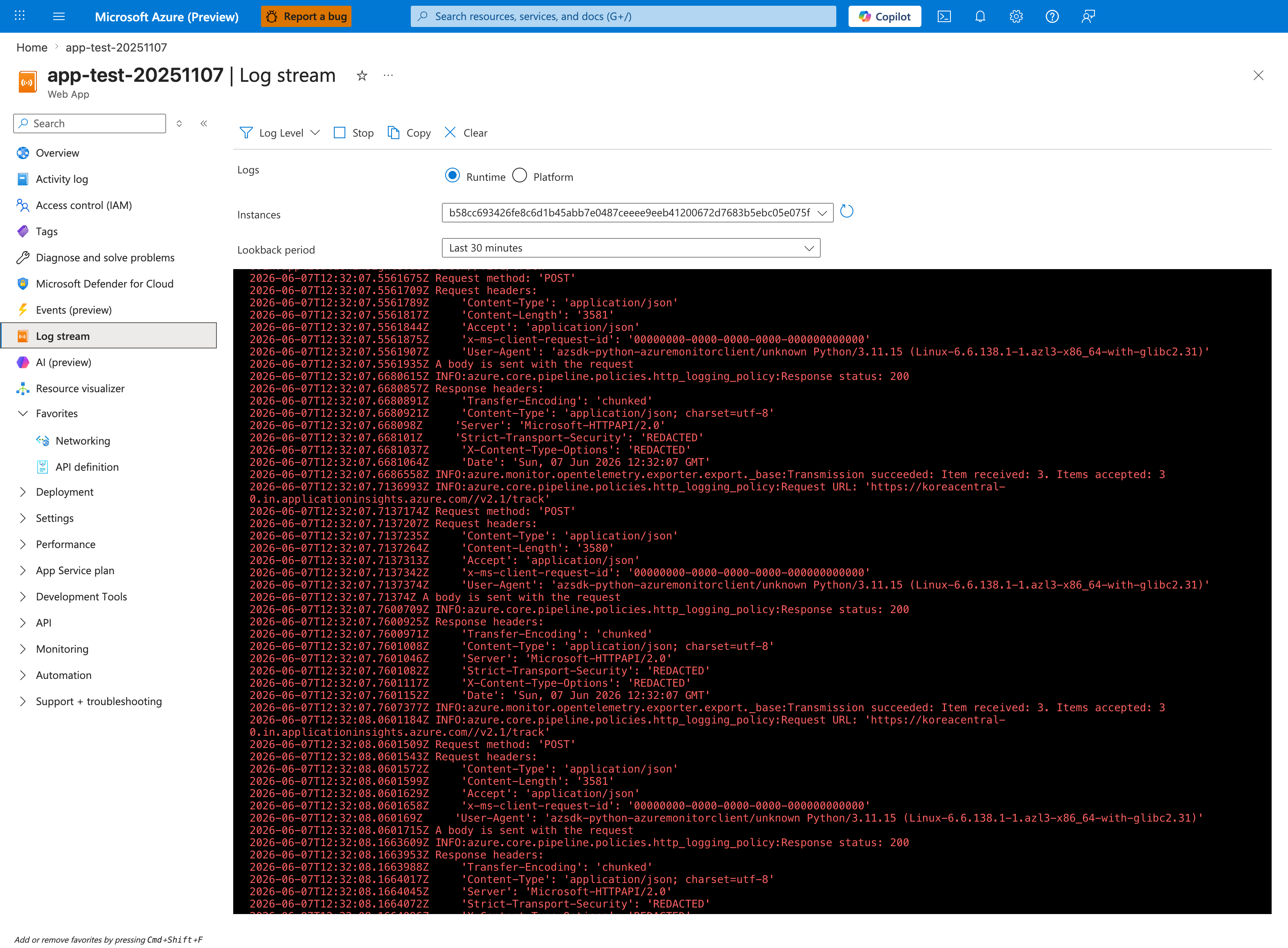
The Log stream blade with the Runtime radio selected is the live tail surface for app-emitted logs that this playbook uses while a suspected redirect-loop reproduction runs in a browser. The visible entries (2026-06-07 timestamps, HTTP POST calls with Content-Type: application/json, Response status 200 from OpenTelemetry exporter transmissions to koreacentral-0.in.applicationinsights.azure.com/v2.1/track) show the line-by-line format this blade prints — application log lines from the running worker appear in the same pane while it is open. The Instances dropdown is the per-instance tail selector visible above the streaming pane; the Lookback period: Last 30 minutes chip bounds the buffer to the reproduction window. The toolbar's Log Level filter is the noise control you adjust when the OpenTelemetry exporter chatter visible in this baseline (Items received 3, Items accepted 3) drowns out the lines you actually need to read.
5. Evidence to Collect
Required Evidence
- Redirect chain capture from browser DevTools (network HAR preferred).
- Authentication settings and app settings from Azure CLI.
AppServiceHTTPLogsevidence showing 302 chain patterns.AppServiceAuthenticationLogsevidence showing callback/auth failures.- Proxy configuration evidence (Front Door/App Gateway header forwarding behavior).
Core commands
az webapp show --resource-group <resource-group> --name <app-name>
az webapp auth show --resource-group <resource-group> --name <app-name>
az webapp config appsettings list --resource-group <resource-group> --name <app-name>
az webapp deployment slot list --resource-group <resource-group> --name <app-name>
KQL: HTTP redirect-chain evidence
AppServiceHTTPLogs
| where TimeGenerated > ago(6h)
| where ScStatus == 302
| summarize redirects=count(), paths=dcount(CsUriStem), clients=dcount(CIp) by bin(TimeGenerated, 5m)
| order by TimeGenerated asc
AppServiceHTTPLogs
| where TimeGenerated > ago(6h)
| where ScStatus == 302
| summarize hops=count() by CIp, CsUserAgent, bin(TimeGenerated, 2m)
| where hops > 10
| order by hops desc
KQL: authentication failure evidence
AppServiceAuthenticationLogs
| where TimeGenerated > ago(6h)
| summarize failures=count() by ResultDescription, bin(TimeGenerated, 5m)
| order by TimeGenerated asc
AppServiceAuthenticationLogs
| where TimeGenerated > ago(6h)
| where ResultDescription has_any ("redirect_uri", "invalid", "nonce", "state", "token", "cookie", "correlation")
| project TimeGenerated, OperationName, ResultDescription
| order by TimeGenerated desc
Sample Log Patterns
These examples are illustrative synthetic patterns (no dedicated live lab dataset currently exists for this scenario).
CLI Investigation Commands
# Inspect effective auth settings
az webapp auth show --resource-group <resource-group> --name <app-name> --output json

# Check HTTPS enforcement and host-related configuration
az webapp show --resource-group <resource-group> --name <app-name> --query "{defaultHostName:defaultHostName,httpsOnly:httpsOnly,hostNames:hostNames}" --output json

# Compare production and staging auth-relevant app settings
az webapp config appsettings list --resource-group <resource-group> --name <app-name> --slot production --query "[?name=='WEBSITE_AUTH_ENABLED' || name=='WEBSITE_AUTH_DEFAULT_PROVIDER' || name=='WEBSITE_AUTH_CLIENT_ID' || name=='WEBSITE_AUTH_OPENID_ISSUER'].{name:name,value:value}" --output table
az webapp config appsettings list --resource-group <resource-group> --name <app-name> --slot <staging-slot> --query "[?name=='WEBSITE_AUTH_ENABLED' || name=='WEBSITE_AUTH_DEFAULT_PROVIDER' || name=='WEBSITE_AUTH_CLIENT_ID' || name=='WEBSITE_AUTH_OPENID_ISSUER'].{name:name,value:value}" --output table
Example Output (illustrative):
{
  "enabled": true,
  "defaultProvider": "azureactivedirectory",
  "unauthenticatedClientAction": "RedirectToLoginPage"
}

{
  "defaultHostName": "<app-name>.azurewebsites.net",
  "httpsOnly": true,
  "hostNames": [
    "<app-name>.azurewebsites.net",
    "app.contoso.com"
  ]
}

Name                           Value
-----------------------------  -----------------------------------------------
WEBSITE_AUTH_ENABLED           True
WEBSITE_AUTH_DEFAULT_PROVIDER  AzureActiveDirectory
WEBSITE_AUTH_CLIENT_ID         <masked>
WEBSITE_AUTH_OPENID_ISSUER     https://login.microsoftonline.com/<tenant-id>/v2.0
How to Read This
CLI output should prove host/scheme/auth settings are internally consistent across slots. If they are not, fix config parity first; app-code changes rarely resolve redirect loops caused by auth configuration drift.
AppServiceHTTPLogs (illustrative redirect-loop signature)
[AppServiceHTTPLogs]
2026-04-04T12:01:14Z  GET  /                       302  21
2026-04-04T12:01:14Z  GET  /.auth/login/aad/callback 302  33
2026-04-04T12:01:15Z  GET  /                       302  19
2026-04-04T12:01:15Z  GET  /.auth/login/aad/callback 302  30
2026-04-04T12:01:16Z  GET  /                       302  20
2026-04-04T12:01:16Z  GET  /.auth/login/aad/callback 302  29
AppServiceAuthenticationLogs (illustrative auth-module signal)
[AppServiceAuthenticationLogs]
2026-04-04T12:01:14Z  Warning  Correlation cookie validation failed for callback request.
2026-04-04T12:01:14Z  Warning  redirect_uri mismatch. Expected https://app.contoso.com/.auth/login/aad/callback
2026-04-04T12:01:15Z  Warning  Nonce validation failed. Authentication handshake restarting.
2026-04-04T12:01:16Z  Warning  Token persisted = false. Re-challenging user.
Reverse proxy header mismatch pattern (illustrative)
[Proxy Access Logs]
2026-04-04T12:01:14Z  host=app.contoso.com  x-forwarded-proto=http   upstream_status=302
2026-04-04T12:01:15Z  host=app.contoso.com  x-forwarded-proto=http   upstream_status=302
How to Read This
Repeating 302 on both / and callback path with nonce/state/correlation warnings indicates handshake never reaches stable session establishment. Prioritize H1/H2/H4 before changing application business logic.
Query 1: Detect redirect-loop bursts
AppServiceHTTPLogs
| where TimeGenerated > ago(6h)
| where ScStatus == 302
| summarize redirects=count(), distinctPaths=dcount(CsUriStem), distinctClients=dcount(CIp) by bin(TimeGenerated, 1m)
| where redirects >= 20
| order by TimeGenerated asc
Example Output (illustrative):
| TimeGenerated | redirects | distinctPaths | distinctClients |
|---|---|---|---|
| 2026-04-04 12:01:00 | 48 | 2 | 3 |
| 2026-04-04 12:02:00 | 57 | 2 | 4 |
| 2026-04-04 12:03:00 | 51 | 2 | 3 |
How to Read This
Very high per-minute 302 counts with only 1-2 active paths are classic loop telemetry. Normal sign-in flow produces short redirect bursts, not sustained high-rate repetition.
Query 2: Isolate callback/auth-validation failure messages
AppServiceAuthenticationLogs
| where TimeGenerated > ago(6h)
| where ResultDescription has_any ("redirect_uri", "nonce", "state", "correlation", "token", "cookie")
| summarize failures=count() by ResultDescription, bin(TimeGenerated, 5m)
| order by TimeGenerated asc
Example Output (illustrative):
| TimeGenerated | ResultDescription | failures |
|---|---|---|
| 2026-04-04 12:00:00 | redirect_uri mismatch. Expected https://app.contoso.com/.auth/login/aad/callback | 26 |
| 2026-04-04 12:00:00 | Correlation cookie validation failed for callback request. | 18 |
| 2026-04-04 12:05:00 | Nonce validation failed. Authentication handshake restarting. | 22 |
How to Read This
If failure text is dominated by redirect URI or correlation/nonce errors, root cause is usually configuration/proxy/session handling, not user credential issues.
Query 3: Confirm callback endpoint keeps returning 302 instead of stabilizing
AppServiceHTTPLogs
| where TimeGenerated > ago(6h)
| where CsUriStem in ("/", "/.auth/login/aad/callback")
| summarize requests=count(), redirects=countif(ScStatus == 302), success=countif(ScStatus == 200) by CsUriStem, bin(TimeGenerated, 2m)
| order by TimeGenerated asc
Example Output (illustrative):
| TimeGenerated | CsUriStem | requests | redirects | success |
|---|---|---|---|---|
| 2026-04-04 12:02:00 | / | 30 | 30 | 0 |
| 2026-04-04 12:02:00 | /.auth/login/aad/callback | 29 | 29 | 0 |
How to Read This
Callback requests should eventually transition to a post-auth 200 flow. Persistent callback 302 with zero success is loop confirmation.
6. Validation and Disproof by Hypothesis
H1: Redirect URI mismatch
- Signals that support
- Auth logs show
redirect_urior callback mismatch errors. - Identity provider app registration includes only
https://<app-name>.azurewebsites.net/...while users accesshttps://app.contoso.com. - Redirect location headers oscillate between multiple hostnames.
- Auth logs show
- Signals that weaken
- Redirect URIs in app registration exactly match active public URL and callback path.
- Auth logs show successful callback processing with no URI mismatch.
- What to verify
- Compare browser-visible host, App Service default host, and configured redirect URIs.
- Confirm callback path and scheme (
https) are identical in IdP and App Service auth config.
H2: Reverse proxy stripping headers
- Signals that support
- Redirects generated with wrong host or protocol after passing through Front Door/App Gateway.
- Logs show request host different from expected public host.
- Issue reproduces only through proxy, not on direct
azurewebsites.netendpoint.
- Signals that weaken
HostandX-Forwarded-Protoare consistently preserved.- Same redirect loop occurs when bypassing proxy.
- What to verify
- Review proxy rule set for host-header override and forwarded-header behavior.
- Confirm end-to-end
httpswith preserved host from client edge to App Service.
H3: Token store corruption or full
- Signals that support
- Auth logs indicate token/session persistence failures.
- Every authenticated callback is followed by fresh challenge with no durable session cookie behavior.
- Problem started after storage pressure, key rotation, or auth token store changes.
- Signals that weaken
- Authentication logs show stable session creation and retrieval.
- Session cookies persist and are accepted across requests.
- What to verify
- Inspect
AppServiceAuthenticationLogsfor storage, cookie, nonce, state, and token handling errors. - Validate configured auth token store settings and backing dependency health (if externalized).
- Inspect
H4: Mixed HTTP/HTTPS
- Signals that support
- Redirect sequence alternates between
http://andhttps://. - App enforces HTTPS while upstream auth components infer HTTP from forwarded headers.
- Loop disappears when forcing consistent HTTPS at edge and app settings.
- Redirect sequence alternates between
- Signals that weaken
- All redirects are consistently HTTPS.
- No scheme mismatch in logs, headers, or callback URLs.
- What to verify
- Confirm HTTPS-only setting and TLS termination pattern.
- Verify proxy sends
X-Forwarded-Proto: httpsand app trusts forwarded headers.
H5: Slot swap broke auth config
- Signals that support
- Incident starts immediately after slot swap.
- Slot-specific app settings differ (
clientId, issuer URL, allowed audiences, auth flags). - Staging works, production loops only after swap.
- Signals that weaken
- No recent swap activity and slot configs are identical for auth-relevant settings.
- Problem persists even after reapplying known-good production auth settings.
- What to verify
- Diff production/staging slot settings and auth config snapshots.
- Confirm slot-sticky settings include all auth-sensitive values.
Normal vs Abnormal Comparison
| Signal | Normal Authentication Flow | Redirect Loop Scenario |
|---|---|---|
| HTTP redirect count per sign-in | Few redirects then stable 200 | Sustained high-rate 302 bursts |
| Callback endpoint outcome | Callback consumed, session established | Callback repeatedly re-challenges |
| Auth log content | Occasional informational entries | Repeated nonce/state/correlation/redirect_uri warnings |
| Scheme/host consistency | https and canonical host preserved | Mixed host/proto or mismatched redirect URI |
| User experience | Sign-in completes and app loads | Browser ends with too-many-redirects error |
7. Likely Root Cause Patterns
- Redirect URI and host mismatch: IdP callback registration does not match the actual public hostname/scheme used by users.
- Proxy header/protocol rewrite: lost or rewritten
Host/X-Forwarded-Protocauses generated redirects to drift from canonical URL. - Session persistence failure after callback: nonce/state/correlation or token-store issues prevent stable auth session establishment.
- Slot-driven auth drift: swap promotes non-parity auth settings, producing loop immediately after release operations.
8. Immediate Mitigations
- For H1: Add exact redirect URIs for every active host (
custom-domainand App Service domain only if intentionally used), including callback path. - For H2: Configure Front Door/App Gateway to preserve host and forward protocol headers correctly.
- For H3: Clear or repair token/session store path, fix storage limits, and validate cookie/session settings.
- For H4: Enforce HTTPS everywhere and correct forwarded-proto trust configuration.
- For H5: Reapply production auth settings, correct slot-sticky configuration, then perform validated swap runbook.
9. Prevention
- Standardize on a single canonical public host per environment and register all required redirect URIs explicitly.
- Add pre-deployment validation that checks auth settings, callback URI, and slot-sticky settings before swap.
- Keep reverse-proxy templates version-controlled, including host/proto forwarding rules.
- Add alerting on
AppServiceAuthenticationLogsspikes for redirect/correlation/token failures. - Include a synthetic sign-in test in release validation to catch redirect loops before user impact.
See Also
Related Labs
No dedicated lab for this scenario.
Sources
- Authentication and authorization in Azure App Service
- Configure your App Service or Azure Functions app to use Microsoft Entra sign-in
- Configure Azure App Service authentication settings by using the Azure CLI
- Azure Front Door origin and routing architecture
- Application Gateway request routing rules overview