CORS Failures and Token Errors (Azure App Service Linux)
1. Summary
Symptom
A frontend SPA fails to call an API hosted on App Service. Browser console shows CORS failures (for example missing Access-Control-Allow-Origin) or requests return unexpected 401/403 despite recent sign-in.
Why this scenario is confusing
CORS and authentication failures overlap in browser behavior. A preflight rejection can look like an auth problem, and token validation failures can look like CORS policy problems. The same endpoint can fail differently depending on method, headers, credential mode, and token lifetime.
Troubleshooting decision flow
graph TD
    A[Symptom: SPA sees CORS and/or 401/403] --> B{Are allowed origins correct for frontend host?}
    B -->|No| H1[H1: CORS misconfiguration]
    B -->|Yes| C{Are OPTIONS preflight requests returning 401/403?}
    C -->|Yes| H2[H2: Preflight blocked by auth]
    C -->|No| D{Do failures align with token expiry window?}
    D -->|Yes| H3[H3: Token expired and refresh fails]
    D -->|No| E{Are duplicate CORS headers present?}
    E -->|Yes| H4[H4: Double CORS headers]
    E -->|No| F{Do origin/audience values mix custom and default domains?}
    F -->|Yes| H5[H5: Domain mismatch for CORS/audience]
    F -->|No| G[Investigate app-level auth middleware policy]
Symptom details
- Browser console reports
Access-Control-Allow-Originor preflight errors. OPTIONScalls fail or do not return expected CORS headers.- API returns
401or403unexpectedly from SPA, especially after idle periods. - Same API call may succeed in server-to-server tools but fail in-browser.
CORS preflight flow with App Service Auth in path
sequenceDiagram
    participant B as Browser SPA
    participant E as Edge/Proxy
    participant S as App Service
    participant A as App/Auth Middleware

    B->>E: OPTIONS /api/resource\nOrigin + Access-Control-Request-Method + Headers
    E->>S: Forward preflight request
    alt Correct handling
        S->>A: Evaluate CORS policy
        A-->>B: 204/200 + Access-Control-Allow-* headers
        B->>S: Actual request with Authorization header
        S-->>B: 200/401/403 with consistent CORS headers
    else Misconfigured auth interception
        S-->>B: 401/403 on OPTIONS (no valid CORS headers)
        B-->>B: Browser blocks actual request as CORS failure
    end
Token expiration and refresh failure flow
sequenceDiagram
    participant B as Browser SPA
    participant IdP as Identity Provider
    participant API as App Service API

    B->>API: GET /api/data (expired access token)
    API-->>B: 401 Unauthorized
    B->>IdP: Silent refresh (iframe or refresh token path)
    alt Refresh succeeds
        IdP-->>B: New access token
        B->>API: Retry with fresh token
        API-->>B: 200 OK
    else Refresh fails (cookie/CORS/policy)
        IdP-->>B: Refresh blocked or denied
        B->>API: Retry with stale token or no token
        API-->>B: 401/403 repeated
    end
2. Common Misreadings
- "Browser says CORS, so token is fine." (CORS may hide underlying 401/403 auth details.)
- "401 always means expired token." (Could be audience/issuer mismatch or missing credentials mode.)
- "403 means CORS denied." (403 is usually authorization/policy denial after auth pipeline.)
- "Adding
*to CORS is the safest quick fix." (*is incompatible with credentialed requests and can create new failures.) - "If Postman works, browser should also work." (Browser enforces preflight/CORS; Postman does not.)
Common Misdiagnoses
- "Browser says CORS, so token is fine." (CORS may hide underlying 401/403 auth details.)
- "401 always means expired token." (Could be audience/issuer mismatch or missing credentials mode.)
- "403 means CORS denied." (403 is usually authorization/policy denial after auth pipeline.)
- "Adding
*to CORS is the safest quick fix." (*is incompatible with credentialed requests and can create new failures.) - "If Postman works, browser should also work." (Browser enforces preflight/CORS; Postman does not.)
3. Competing Hypotheses
- H1: CORS not configured or misconfigured — Allowed origins do not include frontend domain, or wildcard (
*) is combined with credentials. - H2: Preflight OPTIONS request blocked by auth — App Service Auth or app auth layer challenges OPTIONS before CORS handling.
- H3: Token expired and silent refresh fails — Access token expires, and refresh path fails due to cookie restrictions or cross-origin policy.
- H4: Double CORS headers — Both App Service platform CORS and application middleware emit CORS headers, causing browser rejection.
- H5: Custom domain vs default domain mismatch — SPA origin and token audience/issuer expectations use different domains (
contoso.comvsazurewebsites.net).
4. What to Check First
Metrics
- Trend of
OPTIONSrequests by status (2xx,401,403) for affected routes. - Correlation of
401/403bursts with token lifetime boundaries. - Relative error distribution by method (
OPTIONSvsGET/POST) and endpoint.
Logs
AppServiceHTTPLogsfor preflight status behavior and route concentration.AppServiceAuthenticationLogsfor token expiry/audience/issuer and challenge failures.- Browser network capture for preflight + actual request pair and response headers.
Platform Signals
- Effective App Service CORS configuration and Easy Auth/auth settings.
- Active hostname strategy (
azurewebsites.netvs custom domain) across SPA/API. - Any recent auth/CORS setting changes close to incident start.
Portal view: Runtime log stream for CORS preflight and token-validation signals
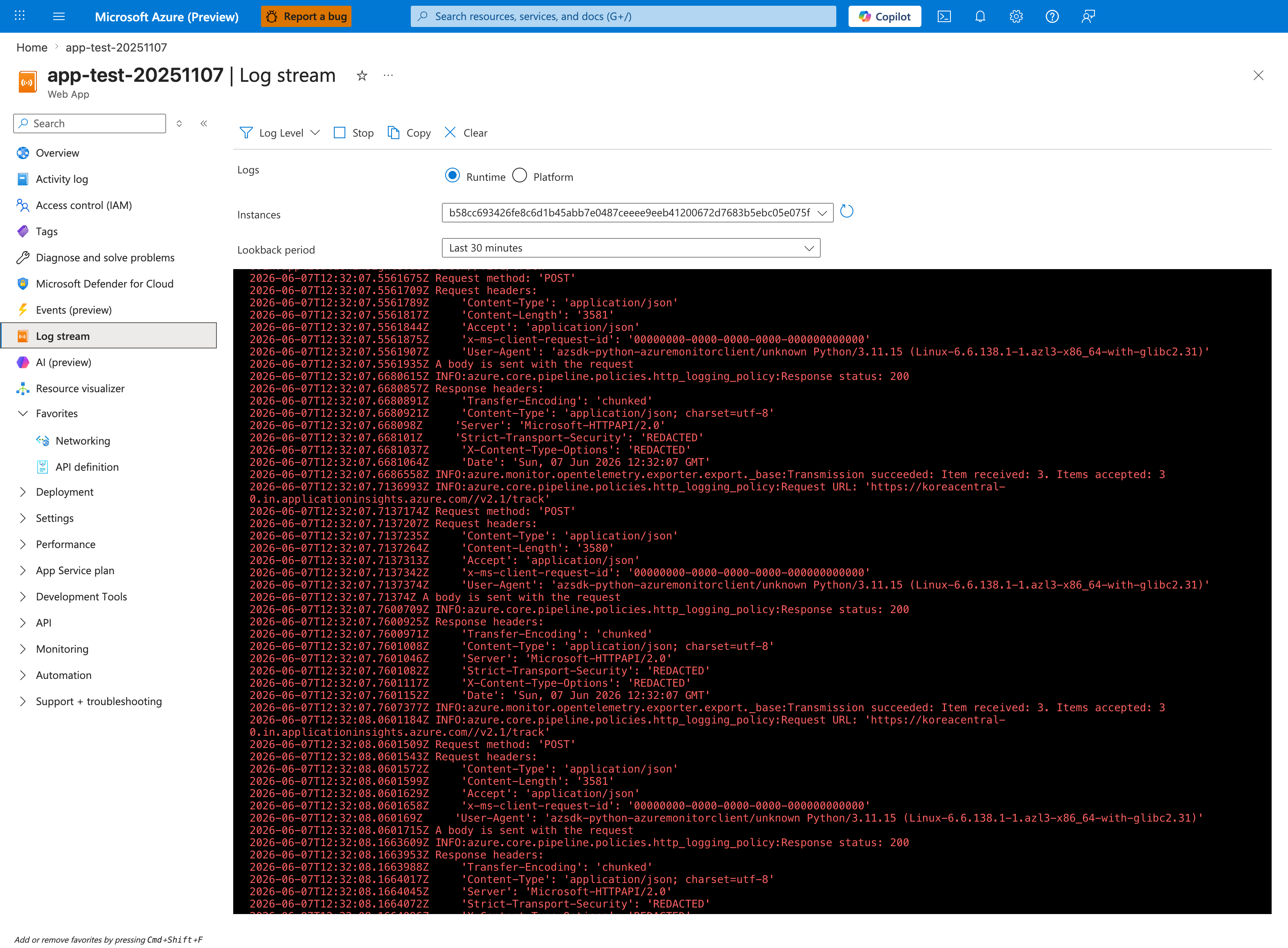
The Log stream blade with the Runtime radio selected is the live tail surface for app-emitted logs. The visible entries (2026-06-07 timestamps, HTTP POST calls with Content-Type: application/json, Response status 200 from OpenTelemetry exporter transmissions to koreacentral-0.in.applicationinsights.azure.com/v2.1/track) show the line-by-line format this blade prints — application log lines from the running worker appear in the same pane while it is open. The Instances dropdown isolates a single worker, the Lookback period: Last 30 minutes chip bounds the buffer, and the toolbar's Log Level filter is the noise control you adjust to suppress the OpenTelemetry exporter chatter visible in this baseline. Use this surface as the live counterpart to the aggregated AppServiceHTTPLogs and AppServiceAuthenticationLogs evidence Section 5's KQL queries operate over.
5. Evidence to Collect
Required Evidence
- Browser network capture including preflight
OPTIONSand failing API call pair. - App Service CORS/auth configuration snapshots.
AppServiceHTTPLogsforOPTIONS+401/403behavior.AppServiceAuthenticationLogsfor token validation/issuer/audience failures.
Core commands
az webapp cors show --resource-group <resource-group> --name <app-name>
az webapp auth show --resource-group <resource-group> --name <app-name>
az webapp config appsettings list --resource-group <resource-group> --name <app-name>
az webapp show --resource-group <resource-group> --name <app-name>
KQL: 401/403 with OPTIONS method
AppServiceHTTPLogs
| where TimeGenerated > ago(6h)
| where CsMethod == "OPTIONS"
| summarize total=count(), s401=countif(ScStatus == 401), s403=countif(ScStatus == 403), s2xx=countif(ScStatus between (200 .. 299)) by bin(TimeGenerated, 5m), CsUriStem
| order by TimeGenerated asc
AppServiceHTTPLogs
| where TimeGenerated > ago(6h)
| where ScStatus in (401, 403)
| summarize hits=count() by CsMethod, CsUriStem, ScStatus
| order by hits desc
KQL: auth/token validation failure patterns
AppServiceAuthenticationLogs
| where TimeGenerated > ago(6h)
| where ResultDescription has_any ("token", "expired", "issuer", "audience", "signature", "nonce", "forbidden", "unauthorized")
| summarize failures=count() by ResultDescription, bin(TimeGenerated, 5m)
| order by TimeGenerated asc
AppServiceAuthenticationLogs
| where TimeGenerated > ago(6h)
| project TimeGenerated, OperationName, ResultDescription
| order by TimeGenerated desc
Sample Log Patterns
The following patterns are illustrative (synthetic) examples that mirror real-world App Service CORS/token incidents.
AppServiceHTTPLogs (preflight rejected with 401/403)
[AppServiceHTTPLogs]
2026-04-04T10:31:02Z  OPTIONS  /api/orders   401    38
2026-04-04T10:31:02Z  GET      /api/orders   401    112
2026-04-04T10:31:18Z  OPTIONS  /api/orders   403    44
2026-04-04T10:31:18Z  GET      /api/orders   403    129
2026-04-04T10:32:01Z  OPTIONS  /api/profile  204    16
2026-04-04T10:32:01Z  GET      /api/profile  200    84
AppServiceAuthenticationLogs (token validation failures)
[AppServiceAuthenticationLogs]
2026-04-04T10:31:02Z  ValidateToken  IDX10223: Lifetime validation failed. The token is expired.
2026-04-04T10:31:18Z  ValidateToken  IDX10214: Audience validation failed. Audiences: api://<wrong-api-app-id>
2026-04-04T10:31:19Z  Challenge      Unauthorized due to invalid token.
2026-04-04T10:33:11Z  ValidateToken  Token validation succeeded for audience api://<expected-api-app-id>
Header conflict pattern (browser/network capture)
HTTP/1.1 200 OK
Access-Control-Allow-Origin: https://spa.contoso.com
Access-Control-Allow-Origin: https://staging-spa.contoso.com
Access-Control-Allow-Credentials: true
Vary: Origin
How to Read This
OPTIONS with 401/403 is a strong indicator that preflight is being challenged before CORS handling. Authentication failures (token expired, audience validation failed) point to auth/token root causes. Duplicate Access-Control-Allow-Origin headers indicate double CORS ownership.
KQL Queries with Example Output
Query 1: Detect OPTIONS 401/403 spikes by endpoint
AppServiceHTTPLogs
| where TimeGenerated > ago(6h)
| where CsMethod == "OPTIONS"
| summarize total=count(), s401=countif(ScStatus == 401), s403=countif(ScStatus == 403), s2xx=countif(ScStatus between (200 .. 299)) by bin(TimeGenerated, 5m), CsUriStem
| order by TimeGenerated asc
Example Output:
| TimeGenerated | CsUriStem | total | s401 | s403 | s2xx |
|---|---|---|---|---|---|
| 2026-04-04 10:30:00 | /api/orders | 12 | 8 | 3 | 1 |
| 2026-04-04 10:35:00 | /api/orders | 10 | 0 | 0 | 10 |
| 2026-04-04 10:35:00 | /api/profile | 6 | 0 | 0 | 6 |
How to Read This
High s401/s403 on OPTIONS indicates preflight/auth pipeline ordering issues (H2). A later return to all s2xx usually means policy/middleware alignment was fixed.
Query 2: Classify 401/403 by method and route
AppServiceHTTPLogs
| where TimeGenerated > ago(6h)
| where ScStatus in (401, 403)
| summarize hits=count() by CsMethod, CsUriStem, ScStatus
| order by hits desc
Example Output:
| CsMethod | CsUriStem | ScStatus | hits |
|---|---|---|---|
| OPTIONS | /api/orders | 401 | 44 |
| GET | /api/orders | 401 | 31 |
| OPTIONS | /api/orders | 403 | 19 |
| GET | /api/admin | 403 | 14 |
How to Read This
If OPTIONS dominates, treat CORS/preflight handling as first suspect. If only GET/POST fail with 403 while OPTIONS is healthy, shift focus to role/claim authorization policy.
Query 3: Token error signatures in auth logs
AppServiceAuthenticationLogs
| where TimeGenerated > ago(6h)
| where ResultDescription has_any ("expired", "audience", "issuer", "signature", "unauthorized", "forbidden")
| summarize failures=count() by bin(TimeGenerated, 5m), ResultDescription
| order by TimeGenerated asc
Example Output:
| TimeGenerated | ResultDescription | failures |
|---|---|---|
| 2026-04-04 10:30:00 | IDX10223: Lifetime validation failed. The token is expired. | 27 |
| 2026-04-04 10:30:00 | IDX10214: Audience validation failed. | 11 |
| 2026-04-04 10:35:00 | Unauthorized due to invalid token. | 6 |
How to Read This
Expired-token clusters aligned with token TTL support H3. Audience/issuer errors support H5 (domain/audience mismatch) more than pure CORS misconfiguration.
CLI Investigation Commands
# Check platform CORS configuration
az webapp cors show --resource-group <resource-group> --name <app-name> --output json

# Check App Service authentication/authorization config
az webapp auth show --resource-group <resource-group> --name <app-name> --output json

# Inspect app settings that commonly impact auth flows
az webapp config appsettings list --resource-group <resource-group> --name <app-name> --query "[?name=='WEBSITE_AUTH_ENABLED' || name=='WEBSITE_AUTH_DEFAULT_PROVIDER' || contains(name, 'AUTH_')].{name:name,value:value}" --output table
Example Output:
allowedOrigins
-------------------------------------------------
https://spa.contoso.com
https://admin.contoso.com

globalValidation
-----------------------------------------------
{"requireAuthentication": true, "unauthenticatedClientAction": "Return401"}

Name                              Value
--------------------------------  -----------------------------
WEBSITE_AUTH_ENABLED              True
WEBSITE_AUTH_DEFAULT_PROVIDER     AzureActiveDirectory
WEBSITE_AUTH_ALLOWED_AUDIENCES    api://<expected-api-app-id>
How to Read This
Validate exact origin strings (scheme + host + port). Then validate auth audience/issuer expectations. CORS and token settings must match the same domain and API identity strategy.
Normal vs Abnormal Comparison
| Signal | Normal | Abnormal (CORS/token incident) |
|---|---|---|
| OPTIONS preflight status | Mostly 200/204 | Frequent 401/403 |
| Access-Control-Allow-Origin | Single origin value matching request origin | Missing, wrong, or duplicated/conflicting values |
| GET/POST with valid token | 200/2xx expected | 401 (expired/invalid token) or 403 (policy/role denial) |
| Auth log signatures | Occasional normal validation entries | Repeated expired, audience, issuer, or invalid token failures |
| Browser behavior | API response visible in network panel | Browser blocks response as CORS error despite backend 401/403 details |
| Interpretation | CORS and auth contract aligned | Preflight/auth sequencing issue, token issue, or both |
6. Validation and Disproof by Hypothesis
H1: CORS not configured or misconfigured
- Signals that support
- Frontend origin missing from allowed origins.
*configured while requests use credentials (cookies or auth headers) and browser rejects response.- Preflight response lacks expected
Access-Control-Allow-*fields.
- Signals that weaken
- Allowed origins exactly match active SPA origin(s), including scheme and port.
- Preflight succeeds with correct headers and status.
- What to verify
- Compare browser
Originto exact configured origins. - Validate credential mode and CORS policy compatibility.
- Compare browser
H2: Preflight OPTIONS blocked by auth
- Signals that support
OPTIONSrequests return401/403whileGET/POSTbehavior differs.- Auth logs show challenge or unauthorized outcomes for preflight endpoints.
- Temporarily bypassing auth for OPTIONS resolves CORS failure.
- Signals that weaken
- OPTIONS consistently returns 2xx with proper CORS headers.
- No auth events associated with preflight timing.
- What to verify
- Query
AppServiceHTTPLogsfor OPTIONS status distribution. - Confirm request pipeline allows preflight before auth challenge logic.
- Query
H3: Token expired and silent refresh fails
- Signals that support
- Failures spike at token lifetime boundaries.
- Auth logs show expired token or refresh-related failures.
- Browser indicates blocked third-party cookie/silent refresh path.
- Signals that weaken
- Fresh token acquisition works and API still returns 401/403.
- Failures occur immediately after interactive login without expiry relation.
- What to verify
- Correlate 401 bursts to access token expiry interval.
- Validate refresh flow requirements (cookie policy, redirect URI, CORS allowances).
H4: Double CORS headers
- Signals that support
- Response contains duplicate or conflicting
Access-Control-Allow-Originheaders. - Platform CORS and app middleware both enabled.
- Browser rejects despite apparent allowed origin.
- Response contains duplicate or conflicting
- Signals that weaken
- Only one CORS authority emits headers consistently.
- No duplicate header evidence in network trace.
- What to verify
- Inspect raw response headers in browser and server logs.
- Disable one CORS layer and retest.
H5: Custom domain vs default domain mismatch
- Signals that support
- SPA runs on custom domain, but API audience/issuer or CORS origins point to
azurewebsites.netonly. - Tokens minted for one audience are sent to another-domain API endpoint.
- Failures disappear when hostnames are aligned end-to-end.
- SPA runs on custom domain, but API audience/issuer or CORS origins point to
- Signals that weaken
- Origin, audience, and endpoint host all use consistent domain strategy.
- Token validation passes for same domain endpoints.
- What to verify
- Compare SPA origin, API URL, token audience, and issuer values.
- Ensure CORS origins and auth audiences cover active production hostnames only.
7. Likely Root Cause Patterns
- Preflight is challenged before CORS handling:
OPTIONSreceives401/403, browser reports CORS failure, and actual API call is blocked in-browser. - Auth token lifecycle mismatch: access tokens expire and silent refresh fails due to cookie/CORS/session constraints, producing repeated
401/403. - Domain/audience contract drift: SPA origin, API host, token audience/issuer, and CORS origin list are not aligned end-to-end.
- Dual CORS ownership: platform CORS and app middleware both emit CORS headers, causing duplicate/conflicting header behavior.
8. Immediate Mitigations
- For H1: Add exact frontend origin(s), remove invalid wildcard-with-credentials pattern, and redeploy policy.
- For H2: Exempt OPTIONS preflight from auth challenge or reorder middleware so CORS preflight is processed first.
- For H3: Reduce token lifetime mismatch effects, harden refresh flow, and fix cookie/CORS conditions required for silent refresh.
- For H4: Use a single CORS authority (platform or app), not both.
- For H5: Align custom domain strategy across SPA origin, API endpoint, token audience, and CORS configuration.
9. Prevention
- Treat CORS and auth as one contract in deployment validation (origin, audience, issuer, credential mode).
- Add automated preflight tests for critical endpoints and headers (
Authorization, custom headers, credentials). - Monitor
OPTIONS401/403 trends and token validation failures with alerts. - Keep domain migration runbooks explicit: default domain and custom domain must not be mixed unintentionally.
- Version-control CORS and auth config with environment-specific review gates.
See Also
Related Labs
-
No dedicated lab for this scenario.
- Slow Response but Low CPU
- Troubleshooting KQL Queries