Private Endpoint / Custom DNS / Route Confusion (Azure App Service Linux)
1. Summary
Symptom
Outbound calls from an Azure App Service Linux app to a dependency expected over Private Endpoint fail with timeout/refused errors, or the hostname resolves to a public IP instead of the expected private IP.
Why this scenario is confusing
Private Endpoint health, DNS resolution, and route policy are separate layers. Portal status may look healthy while runtime traffic still takes a public or blocked path.
Troubleshooting decision flow
graph TD
    A[Symptom: Private endpoint dependency calls fail] --> B{Resolve dependency FQDN in-app}
    B --> C[Public IP/NXDOMAIN/wrong private IP]
    B --> D[Expected private IP resolves]
    C --> H1[H1: Private DNS zone/link/record issue]
    D --> E{Check DNS forwarder behavior}
    E --> F[Custom DNS cannot resolve privatelink chain]
    E --> G[DNS good; TCP path fails or route unexpected]
    E --> I[Endpoint state/policy/caches stale]
    F --> H2[H2: Custom DNS forwarding issue]
    G --> H3[H3: Route confusion]
    I --> H4[H4: Private path blocked or stale]
Scope and limitations
- Linux/OSS scope only; Windows-specific worker behavior is out of scope.
- Authentication-only incidents are covered only when routing or DNS confusion is involved.
- Vendor-specific firewall tuning is intentionally excluded.
Quick conclusion
For this incident class, prove DNS answer, route path, and policy allowance independently from inside the Linux app. Most durable fixes come from correcting private DNS links/forwarding, aligning route-all with UDR intent, and removing policy/cache mismatches that keep traffic from the intended private endpoint.
2. Common Misreadings
- "Private Endpoint is approved, so DNS is correct."
- "It resolves on my laptop, so App Service resolution is identical."
- "VNet Integration means all outbound is private by default."
- "Intermittent failures prove platform instability" (often TTL/cache transition).
3. Competing Hypotheses
- H1: Private DNS zone is missing, unlinked, or has wrong A record.
- H2: Custom DNS does not forward
privatelink.*zones correctly (e.g., missing conditional forwarding to Azure DNS168.63.129.16, or enterprise resolver misconfiguration). - H3: Route confusion (route-all off, conflicting UDR, split-horizon design mismatch).
- H4: Private path is blocked or stale (NSG/firewall deny, endpoint not approved, old DNS cache).
4. What to Check First
Metrics
- App Service HTTP 5xx and latency trend during dependency calls.
- Dependency-side connectivity failure metrics in the same time window.
- Firewall or NVA deny counters for destination private IP/port.
Logs
- Resolver errors:
ENOTFOUND,EAI_AGAIN,Name or service not known. - Connect errors:
ETIMEDOUT,ECONNREFUSED,No route to host. - DNS forwarder logs for
privatelink.*queries.
Platform Signals
- VNet Integration state and subnet assignment.
- Private Endpoint connection state (
Approved,Pending,Rejected,Disconnected). - Private DNS zone links and A record values.
- Effective routes and NSG rules on integration/private endpoint subnets.
Portal view: Networking blade as the layer-separation control panel
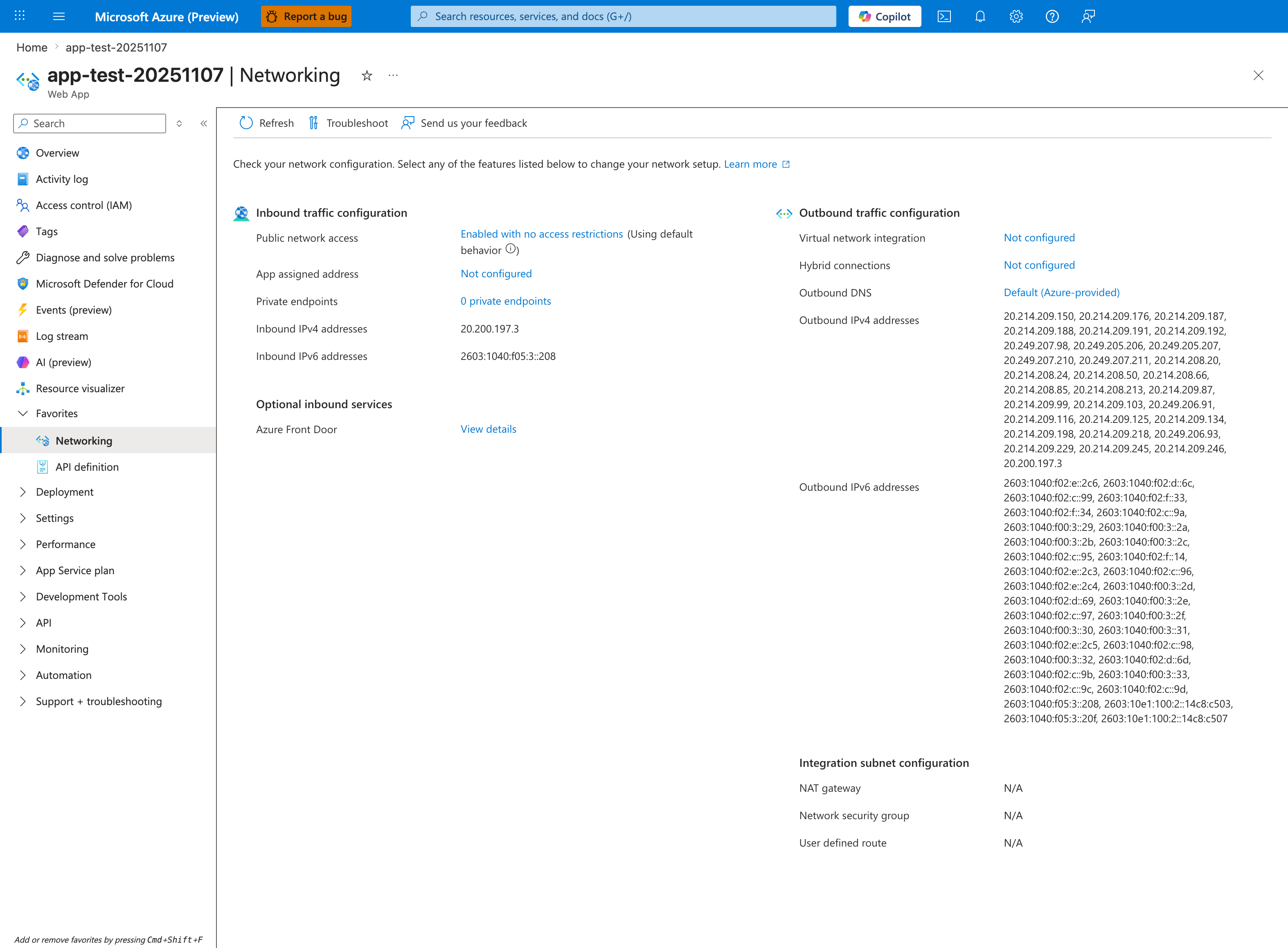
The Networking blade enforces the playbook's central diagnostic principle — Private Endpoint health, DNS resolution, and route policy are separate layers and must be verified independently — by surfacing each layer in its own card. Verify in this exact order: first the Outbound traffic configuration > Virtual network integration field to confirm the integration subnet exists (the prerequisite for private DNS zone lookups to even reach the integration VNet); second the Outbound DNS field to confirm the resolver path (Default (Azure-provided) returns private zone records only if zones are linked to the integration VNet, while Custom bypasses Azure DNS entirely — H2 territory); third the Integration subnet configuration card's NSG and UDR fields to confirm no route table is steering traffic to a firewall that blocks the dependency's private IP (H3/H4). The Inbound traffic configuration > Private endpoints link shows endpoints into the App Service itself, which is unrelated to outbound private-endpoint dependency resolution — a common point of confusion this playbook explicitly disambiguates. Use the Troubleshoot toolbar button to launch the integrated network diagnostics that test each layer's reachability with one click.
Investigation Notes
- Always validate from inside Linux App Service runtime; external resolver behavior is not authoritative.
- Private connectivity requires both correct DNS answer and permitted network path.
- Different services use different private FQDN patterns; verify the exact expected name.
- Intermittent behavior after endpoint changes often maps to TTL and cache layering.
- Keep all timeline correlation in UTC.
5. Evidence to Collect
Required Evidence
- In-app resolution output for exact dependency FQDN (
nslookup,getent hosts). - Private Endpoint NIC IP and subresource mapping.
- Private DNS zone link list and record-set values.
- Integration subnet route table and effective allow/deny controls.
- UTC timestamped app failures.
Useful Context
- Custom DNS architecture and forwarder chain.
- Current route-all setting for the app.
- Recent changes to endpoint, DNS, route table, NSG, firewall policy.
- DNS TTL and known cache layers (runtime, resolver, forwarder).
Sample Log Patterns
AppServiceHTTPLogs (dns-vnet lab)
[AppServiceHTTPLogs]
2026-04-04T11:23:04Z  GET  /diag/env    200    15
2026-04-04T11:23:03Z  GET  /diag/stats  200    24
2026-04-04T11:22:19Z  GET  /connect     200    975
2026-04-04T11:22:18Z  GET  /resolve     200    512
2026-04-04T11:18:02Z  GET  /            200    148
2026-04-04T11:17:12Z  GET  /diag/stats  499    24400
AppServiceConsoleLogs (dns-vnet lab)
AppServicePlatformLogs (dns-vnet lab)
[AppServicePlatformLogs]
2026-04-04T11:17:11Z  Informational  Site is running with patch version PYTHON 3.11.14
2026-04-04T11:17:11Z  Informational  State: Started, Action: None, LastError: , LastErrorTimestamp: 01/01/0001 00:00:00
2026-04-04T11:17:11Z  Informational  Site started.
2026-04-04T11:17:11Z  Informational  Site is running with deployment version: xxxxxxxx-xxxx-xxxx-xxxx-xxxxxxxxxxxx
2026-04-04T11:17:10Z  Informational  State: Starting, Action: WarmUpProbeSucceeded
2026-04-04T11:17:10Z  Informational  Site startup probe succeeded after 36.3947007 seconds.
How to Read This
Healthy startup + successful app health endpoints does not prove private endpoint path correctness. In this incident class, the deciding evidence is /resolve answer quality and /connect destination behavior.
KQL Queries with Example Output
Query 1: Focus on /resolve and /connect timeline
AppServiceHTTPLogs
| where TimeGenerated between (datetime(2026-04-04 11:17:00) .. datetime(2026-04-04 11:24:00))
| where CsUriStem in ("/resolve", "/connect", "/diag/stats")
| project TimeGenerated, CsMethod, CsUriStem, ScStatus, TimeTaken
| order by TimeGenerated desc
Example Output:
| TimeGenerated | CsMethod | CsUriStem | ScStatus | TimeTaken |
|---|---|---|---|---|
| 2026-04-04 11:22:19 | GET | /connect | 200 | 975 |
| 2026-04-04 11:22:18 | GET | /resolve | 200 | 512 |
| 2026-04-04 11:17:12 | GET | /diag/stats | 499 | 24400 |
How to Read This
/resolve and /connect returning 200 only means handlers completed, not that they used private path. Validate their payload details (resolved IP and SSL/connect details) before concluding network is healthy.
Query 2: Verify startup baseline is healthy
AppServicePlatformLogs
| where TimeGenerated between (datetime(2026-04-04 11:17:00) .. datetime(2026-04-04 11:18:00))
| project TimeGenerated, Level, Message
| order by TimeGenerated asc
Example Output:
| TimeGenerated | Level | Message |
|---|---|---|
| 2026-04-04 11:17:10 | Informational | Site startup probe succeeded after 36.3947007 seconds. |
| 2026-04-04 11:17:11 | Informational | Site started. |
| 2026-04-04 11:17:11 | Informational | Site is running with deployment version: xxxxxxxx-xxxx-xxxx-xxxx-xxxxxxxxxxxx |
How to Read This
This removes startup instability from the root-cause set and strengthens H1/H2/H3 (DNS/forwarding/route confusion) over generic app crash hypotheses.
Query 3: Verify console diagnostic gap
AppServiceConsoleLogs
| where TimeGenerated between (datetime(2026-04-04 11:17:00) .. datetime(2026-04-04 11:24:00))
| project TimeGenerated, Level, ResultDescription
| order by TimeGenerated asc
Example Output:
| TimeGenerated | Level | ResultDescription |
|---|---|---|
| No rows |
How to Read This
A console-log gap is common here. Use endpoint diagnostics and Azure network/DNS control-plane evidence as primary proof.
CLI Investigation Commands
# Confirm private endpoint state and private IP
az network private-endpoint show --resource-group <resource-group> --name <private-endpoint-name> --query "{name:name,ip:networkInterfaces[0].id,provisioningState:provisioningState}" --output table

# Validate private DNS zone links
az network private-dns link vnet list --resource-group <dns-resource-group> --zone-name privatelink.blob.core.windows.net --output table

# Validate private DNS A records
az network private-dns record-set a list --resource-group <dns-resource-group> --zone-name privatelink.blob.core.windows.net --output table

# Confirm app VNet integration and route-all
az webapp show --resource-group <resource-group> --name <app-name> --query "{virtualNetworkSubnetId:virtualNetworkSubnetId,vnetRouteAllEnabled:siteConfig.vnetRouteAllEnabled}" --output table
Example Output:
Name                     ProvisioningState
-----------------------  -----------------
pe-stlabdnsvnet-blob     Succeeded

Name                       VirtualNetwork
-------------------------  --------------------------------------------------------------------------------
link-spoke-vnet            /subscriptions/<subscription-id>/resourceGroups/<resource-group>/providers/Microsoft.Network/virtualNetworks/<spoke-vnet>

Name                 IPv4Address
-------------------  ----------------
stlabdnsvnet         10.20.2.4

VirtualNetworkSubnetId                                                                                                        VnetRouteAllEnabled
----------------------------------------------------------------------------------------------------------------------------  -------------------
/subscriptions/<subscription-id>/resourceGroups/<resource-group>/providers/Microsoft.Network/virtualNetworks/<vnet>/subnets/<subnet>  true
How to Read This
In the dns-vnet incident, /resolve proved stlabdnsvnet....blob.core.windows.net and stlabdnsvnet....privatelink.blob.core.windows.net resolved to public 20.60.200.161, and /connect showed SSL failure to the privatelink URL. That evidence is definitive for DNS/link/forwarding misconfiguration, not endpoint approval failure.
6. Validation and Disproof by Hypothesis
H1: Private DNS zone/link/record is wrong
Signals that support - App resolves dependency to public IP or NXDOMAIN. - Zone exists but VNet link to integration VNet is missing. - A record points to an old private endpoint IP.
Signals that weaken - App resolves consistently to current endpoint private IP. - Zone link and record remain correct across incident windows.
Validation (CLI + KQL)
nslookup <dependency-fqdn>
getent hosts <dependency-fqdn>
az network private-dns zone show --resource-group <resource-group> --name <private-dns-zone>
az network private-dns link vnet list --resource-group <resource-group> --zone-name <private-dns-zone> --output table
az network private-dns record-set a show --resource-group <resource-group> --zone-name <private-dns-zone> --name <record-name>
AppServiceConsoleLogs
| where TimeGenerated > ago(6h)
| where ResultDescription has_any ("ENOTFOUND", "EAI_AGAIN", "NXDOMAIN", "Name or service not known")
| project TimeGenerated, _ResourceId, ResultDescription
| order by TimeGenerated desc
H2: Custom DNS is not forwarding to Azure DNS
Signals that support - Query against custom DNS fails, but query against 168.63.129.16 returns expected private IP. - Failures affect multiple private endpoint dependencies.
Signals that weaken - Custom DNS resolves private and public names consistently. - Failures persist when DNS resolution is proven correct.
Validation (CLI + KQL)
az network vnet show --resource-group <resource-group> --name <vnet-name> --query "dhcpOptions.dnsServers"
nslookup <dependency-fqdn> <custom-dns-ip>
nslookup <dependency-fqdn> 168.63.129.16
az webapp show --resource-group <resource-group> --name <app-name> --query "siteConfig.vnetRouteAllEnabled"
AppServiceConsoleLogs
| where TimeGenerated > ago(12h)
| where ResultDescription has_any ("Temporary failure in name resolution", "DNS", "lookup")
| summarize Failures=count() by bin(TimeGenerated, 15m)
| order by TimeGenerated desc
H3: Route confusion (route-all/UDR/split-horizon)
Signals that support - DNS resolves to private IP, but TCP to destination port times out. - Effective routes show unexpected next hop. - Route-all is disabled while design expects centralized inspection path.
Signals that weaken - Effective route is valid and direct/private path tests succeed. - Failures are resolver-only, not connect-path failures.
Validation (CLI + KQL)
az webapp show --resource-group <resource-group> --name <app-name> --query "{vnetRouteAllEnabled:siteConfig.vnetRouteAllEnabled, virtualNetworkSubnetId:virtualNetworkSubnetId}"
az webapp vnet-integration list --resource-group <resource-group> --name <app-name>
az network vnet subnet show --resource-group <resource-group> --vnet-name <vnet-name> --name <integration-subnet-name>
az network route-table route list --resource-group <resource-group> --route-table-name <route-table-name> --output table
nc -vz <private-endpoint-ip> <port>
curl --verbose --connect-timeout 5 https://<dependency-fqdn>
AppServiceConsoleLogs
| where TimeGenerated > ago(6h)
| where ResultDescription has_any ("ETIMEDOUT", "ECONNREFUSED", "No route to host", "connect timeout")
| project TimeGenerated, _ResourceId, ResultDescription
| order by TimeGenerated desc
H4: Private path blocked or stale state
Signals that support - Endpoint state is Pending/Rejected/Disconnected. - NSG/firewall denies destination private IP/port. - Endpoint was recreated and DNS cache still points to old IP until TTL expiry.
Signals that weaken - Endpoint is approved, NSG/firewall allows path, DNS record equals current NIC IP. - Failures continue long after TTL with no route/policy changes.
Validation (CLI + KQL)
az network private-endpoint show --resource-group <resource-group> --name <private-endpoint-name>
az network private-endpoint-connection list --resource-group <resource-group> --name <resource-name> --type <resource-provider-type>
az network vnet subnet show --resource-group <resource-group> --vnet-name <vnet-name> --name <integration-subnet-name> --query "networkSecurityGroup.id"
az network nsg rule list --resource-group <resource-group> --nsg-name <nsg-name> --output table
AppServiceConsoleLogs
| where TimeGenerated > ago(6h)
| where ResultDescription has_any ("ETIMEDOUT", "timeout", "connection refused")
| summarize Errors=count() by bin(TimeGenerated, 10m)
| order by TimeGenerated desc
Normal vs Abnormal Comparison
| Signal | Normal private endpoint path | Abnormal route/DNS confusion pattern |
|---|---|---|
| Public storage FQDN resolution | May resolve publicly from non-private path contexts | In-app private scenario should use private chain, not public answer |
*.privatelink.blob.core.windows.net resolution | Resolves to private IP (10.x) tied to private endpoint NIC | Resolves to public IP 20.60.200.161 |
/connect to privatelink URL | TLS/connect success using private route | SSL/connect failure due to public endpoint routing |
| Private endpoint state | Approved/Succeeded and matched DNS mapping | Endpoint may appear healthy while DNS points elsewhere |
| App/platform startup logs | Healthy | Healthy (not a startup issue) |
| Interpretation | DNS + route policy aligned | DNS zone link/forwarding missing or incorrect despite healthy endpoint object |
7. Likely Root Cause Patterns
- Pattern A: Private DNS zone link missing for the integration VNet.
- Pattern B: Custom DNS forwarder does not correctly resolve
privatelink.*zones (missing conditional forwarding to Azure DNS168.63.129.16or Azure DNS Private Resolver misconfiguration). - Pattern C: Route-all expectation mismatch with UDR/firewall design.
- Pattern D: NSG/firewall deny introduced during policy hardening.
- Pattern E: Endpoint recreation changed private IP, but caches retained old mapping.
8. Immediate Mitigations
- Fix zone link and A record for the affected private zone. Risk: Low.
- Add conditional forwarding for private zones to
168.63.129.16. Risk: Medium (shared impact if misconfigured). - Align route-all and UDR behavior with intended architecture. Risk: Medium (egress behavior can shift broadly).
- Add explicit allow rules for integration subnet to endpoint IP/port. Risk: Medium (scope carefully).
- Temporarily shorten DNS TTL during cutover and monitor cache convergence. Risk: Low.
9. Prevention
- Automate Private Endpoint onboarding checks (approval, DNS link, record correctness, route policy).
- Standardize DNS forwarding architecture for Azure private zones.
- Add CI policy tests to block route/NSG changes that break private endpoint reachability.
- Run synthetic DNS + TCP probes from App Service runtime for critical dependencies.
- Track DNS change windows with explicit rollback paths.
See Also
../../kql/http/5xx-trend-over-time.md../../kql/http/latency-trend-by-status-code.md../../kql/correlation/latency-vs-errors.md../../first-10-minutes/outbound-network.md- Lab: DNS Resolution (VNet)
- Outbound Network (First 10 Minutes)
- DNS Resolution (VNet-integrated App Service)