DNS Resolution with VNet-Integrated App Service (Azure App Service Linux)
1. Summary
Symptom
Outbound calls from an Azure App Service Linux app fail because hostnames for internal or private dependencies do not resolve correctly after enabling VNet integration. Errors commonly include ENOTFOUND, Temporary failure in name resolution, Name or service not known, or intermittent SERVFAIL.
Why this scenario is confusing
The same FQDN may resolve successfully from a VM in the VNet, from your local machine through VPN, or from another app, while the failing App Service instance still returns DNS errors. Teams often assume "VNet integration means DNS is automatically identical everywhere," but runtime DNS path, custom resolver behavior, private zone linking, and app-level DNS settings can diverge.
Troubleshooting decision flow
graph TD
    A[Symptom: DNS failures in VNet-integrated App Service] --> B{Check resolver path first}
    B --> C[Custom DNS unreachable or not forwarding private zones]
    B --> D[Resolver reachable]
    C --> H1[H1: Custom DNS path broken]
    D --> E{Check zone linkage and answers}
    E --> F[Wrong/NXDOMAIN/public answer for private dependency]
    E --> G[Answers differ by app DNS override]
    E --> I[Intermittent answers near TTL/scale events]
    F --> H2[H2: Private DNS zone link/record issue]
    G --> H3[H3: App-level DNS override issue]
    I --> H4[H4: Split-brain DNS and cache effects]
Scope and limitations
- This playbook focuses on Azure App Service Linux and OSS workloads only.
- It does not provide exhaustive Windows-specific DNS client behavior.
- It assumes Log Analytics ingestion is available for App Service HTTP/console telemetry.
- Hybrid/on-prem conditional forwarding nuances vary by enterprise DNS implementation and are validated case by case.
Quick conclusion
When DNS failures occur in a VNet-integrated App Service Linux app, treat resolver path, private DNS linkage, and app-level DNS overrides as equally likely suspects until disproven. The fastest durable resolution is to prove each hypothesis with concrete in-app lookup evidence, App Service logs, and Azure DNS configuration checks, then standardize DNS architecture to eliminate drift and split-brain surprises.
2. Common Misreadings
- "VNet integration is enabled, so DNS must already be correct."
- "The private endpoint exists, therefore name resolution cannot be the issue."
- "If one lookup worked once, DNS is ruled out."
- "Setting
WEBSITE_DNS_SERVERalways fixes everything." - "Only network routes matter; DNS zones and forwarders are secondary."
3. Competing Hypotheses
- H1: Custom DNS servers are configured but unreachable, unhealthy, or not forwarding Azure private zones correctly from the integration subnet.
- H2: Private DNS zones are missing required VNet links or contain incorrect/stale records, so names resolve to public IPs, wrong private IPs, or NXDOMAIN.
- H3: App-level DNS override (
WEBSITE_DNS_SERVERorWEBSITE_DNS_ALT_SERVER) points to an unintended resolver path that differs from expected VNet DNS. - H4: Split-brain DNS and caching effects (resolver cache, library cache, TTL mismatch) cause intermittent success/failure across instances and retries.
4. What to Check First
Metrics
- App response failure trend (5xx and dependency timeout spikes) aligned to DNS error windows.
- Instance count/scale events around incident start time (to detect cache and per-instance variance).
- TCP connection behavior to confirm this is not primarily SNAT/connectivity exhaustion.
Logs
AppServiceConsoleLogsfor resolver signatures (ENOTFOUND,EAI_AGAIN,Name or service not known,SERVFAIL,NXDOMAIN).AppServiceHTTPLogsfor endpoint/path correlation during periods where downstream hostname lookups fail.- Application framework logs (Python
socket.gaierror,requests/httpxexception traces).
Platform Signals
- App Service VNet integration status and subnet assignment.
- Effective DNS settings for the app (
WEBSITE_DNS_SERVER,WEBSITE_DNS_ALT_SERVER, app settings drift). - Private Endpoint + Private DNS zone linkage health.
- Azure DNS Private Resolver inbound/outbound endpoint path (if used).
Portal view: Networking blade for VNet integration and DNS resolver verification
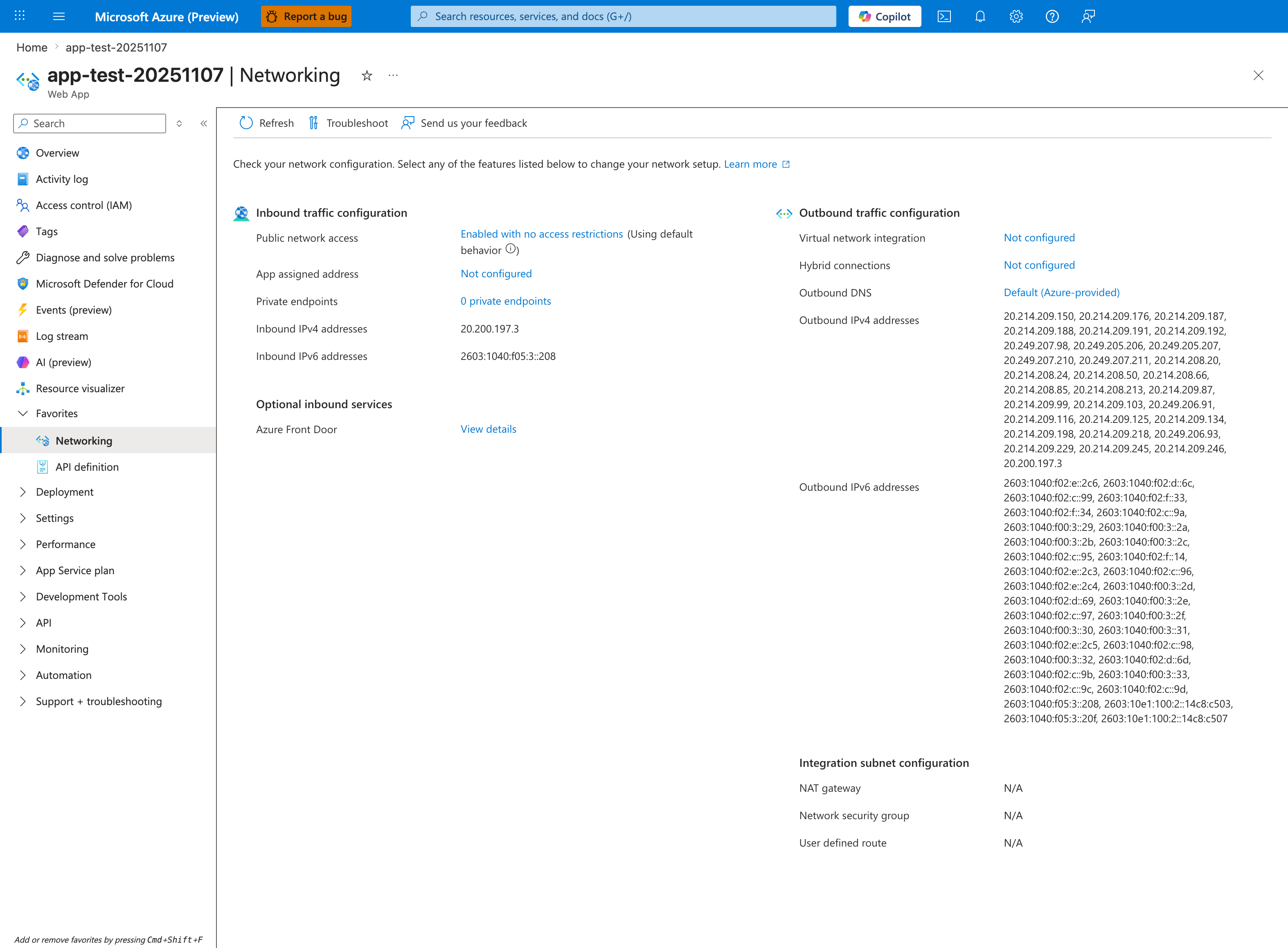
The Networking blade exposes the two settings that determine DNS outcome for VNet-integrated apps: Virtual network integration (which subnet the resolver requests originate from) and Outbound DNS (which resolver is used). The screenshot above shows the unintegrated baseline where Virtual network integration: Not configured and Outbound DNS: Default (Azure-provided) mean all lookups go to Azure-provided DNS (168.63.129.16) — Private DNS zone records will not be returned unless the integration subnet's VNet has the relevant privatelink.* zone link, which is exactly the H2 misconfiguration. After enabling VNet integration, the Outbound DNS field reads Custom if WEBSITE_DNS_SERVER is set in app settings (H3) or Inherited from VNet if the integration VNet has dhcpOptions.dnsServers populated; both are explicit override paths to investigate. Click Virtual network integration → Configuration to view the integration subnet and confirm it matches the subnet linked to the private DNS zones your app needs to resolve.
Investigation Notes
- Regional VNet integration provides a network path, but does not automatically enable route-all or make all outbound traffic private. DNS outcome depends on resolver configuration and zone linkage, while routing outcome depends on
vnetRouteAllEnabledand subnet route tables — these are separate checks. - A successful
nslookuponce does not prove resolver stability; perform repeated checks across time and instances. - Private Endpoint connectivity requires both route reachability and correct DNS resolution to the private IP.
- Linux workloads may surface DNS exceptions differently by runtime (Python, Node.js, Java), but lookup-layer signatures are comparable.
- Avoid embedding resolver IP assumptions in application code; keep resolver control in platform/network configuration.
5. Evidence to Collect
Required Evidence
- Exact failing FQDN(s), error text, and UTC timestamps for at least 3-5 incidents.
- Current VNet integration configuration for the app and integration subnet.
- DNS-related app settings currently applied to the app.
- Proof of resolution result from inside the running Linux container (multiple attempts).
- Private DNS zone records and VNet link status for each affected namespace.
Useful Context
- Whether the dependency is Private Endpoint-backed Azure PaaS, internal IaaS, or on-prem through DNS forwarders.
- Whether custom DNS is implemented via domain controllers, BIND/Infoblox, or Azure DNS Private Resolver.
- Recent changes: zone record edits, resolver patching, subnet NSG/UDR updates, scale events, slot swaps.
- Expected split-horizon behavior (public answer externally, private answer internally) documented by design.
Sample Log Patterns
AppServiceHTTPLogs (dns-vnet lab)
[AppServiceHTTPLogs]
2026-04-04T11:23:04Z  GET  /diag/env    200    15
2026-04-04T11:23:03Z  GET  /diag/stats  200    24
2026-04-04T11:22:19Z  GET  /connect     200    975
2026-04-04T11:22:18Z  GET  /resolve     200    512
2026-04-04T11:18:02Z  GET  /            200    148
2026-04-04T11:17:12Z  GET  /diag/stats  499    24400
AppServiceConsoleLogs (dns-vnet lab)
AppServicePlatformLogs (dns-vnet lab)
[AppServicePlatformLogs]
2026-04-04T11:17:11Z  Informational  Site is running with patch version PYTHON 3.11.14
2026-04-04T11:17:11Z  Informational  State: Started, Action: None, LastError: , LastErrorTimestamp: 01/01/0001 00:00:00
2026-04-04T11:17:11Z  Informational  Site started.
2026-04-04T11:17:11Z  Informational  Site is running with deployment version: xxxxxxxx-xxxx-xxxx-xxxx-xxxxxxxxxxxx
2026-04-04T11:17:10Z  Informational  State: Starting, Action: WarmUpProbeSucceeded
2026-04-04T11:17:10Z  Informational  Site startup probe succeeded after 36.3947007 seconds.
How to Read This
This pattern shows the app process is healthy (Site started) while DNS-dependent endpoints show abnormal latency and occasional client-disconnect (499). That combination strongly suggests dependency resolution/path issues, not app startup failure.
KQL Queries with Example Output
Query 1: Endpoint behavior around DNS tests
AppServiceHTTPLogs
| where TimeGenerated between (datetime(2026-04-04 11:17:00) .. datetime(2026-04-04 11:24:00))
| where CsUriStem in ("/resolve", "/connect", "/diag/stats", "/diag/env")
| project TimeGenerated, CsMethod, CsUriStem, ScStatus, TimeTaken
| order by TimeGenerated desc
Example Output:
| TimeGenerated | CsMethod | CsUriStem | ScStatus | TimeTaken |
|---|---|---|---|---|
| 2026-04-04 11:23:04 | GET | /diag/env | 200 | 15 |
| 2026-04-04 11:23:03 | GET | /diag/stats | 200 | 24 |
| 2026-04-04 11:22:19 | GET | /connect | 200 | 975 |
| 2026-04-04 11:22:18 | GET | /resolve | 200 | 512 |
| 2026-04-04 11:17:12 | GET | /diag/stats | 499 | 24400 |
How to Read This
200 alone does not mean DNS is correct. Focus on /resolve and /connect latency patterns and payload evidence. Here, /resolve and /connect are significantly slower than baseline health endpoints, indicating external dependency lookup/connect path stress.
Query 2: Platform startup health vs DNS incident window
AppServicePlatformLogs
| where TimeGenerated between (datetime(2026-04-04 11:17:00) .. datetime(2026-04-04 11:18:00))
| project TimeGenerated, Level, Message
| order by TimeGenerated asc
Example Output:
| TimeGenerated | Level | Message |
|---|---|---|
| 2026-04-04 11:17:10 | Informational | Site startup probe succeeded after 36.3947007 seconds. |
| 2026-04-04 11:17:10 | Informational | State: Starting, Action: WarmUpProbeSucceeded |
| 2026-04-04 11:17:11 | Informational | Site is running with deployment version: xxxxxxxx-xxxx-xxxx-xxxx-xxxxxxxxxxxx |
| 2026-04-04 11:17:11 | Informational | Site started. |
How to Read This
Clean startup telemetry eliminates startup regression hypotheses. Keep focus on DNS resolver path, private zone linking, and split-horizon resolution outcomes.
Query 3: Console log presence check
AppServiceConsoleLogs
| where TimeGenerated between (datetime(2026-04-04 11:17:00) .. datetime(2026-04-04 11:24:00))
| project TimeGenerated, Level, ResultDescription
| order by TimeGenerated asc
Example Output:
| TimeGenerated | Level | ResultDescription |
|---|---|---|
| No rows |
How to Read This
No console rows plus healthy platform startup usually means app process started, but diagnostic detail must come from HTTP endpoint behavior and Azure DNS configuration data.
CLI Investigation Commands
# Check app VNet integration and route-all state
az webapp show --resource-group <resource-group> --name <app-name> --query "{virtualNetworkSubnetId:virtualNetworkSubnetId,vnetRouteAllEnabled:siteConfig.vnetRouteAllEnabled}" --output table

# Check DNS override settings on app
az webapp config appsettings list --resource-group <resource-group> --name <app-name> --query "[?name=='WEBSITE_DNS_SERVER' || name=='WEBSITE_DNS_ALT_SERVER'].{name:name,value:value}" --output table

# Check private DNS VNet links for blob private zone
az network private-dns link vnet list --resource-group <dns-resource-group> --zone-name privatelink.blob.core.windows.net --output table

# Check A records for storage account in private zone
az network private-dns record-set a list --resource-group <dns-resource-group> --zone-name privatelink.blob.core.windows.net --output table
Example Output:
VirtualNetworkSubnetId                                                                                                        VnetRouteAllEnabled
----------------------------------------------------------------------------------------------------------------------------  -------------------
/subscriptions/<subscription-id>/resourceGroups/<resource-group>/providers/Microsoft.Network/virtualNetworks/<vnet>/subnets/<subnet>  true

Name                 Value
-------------------  -----
WEBSITE_DNS_SERVER
WEBSITE_DNS_ALT_SERVER

Name                      VirtualNetwork
------------------------  ------------------------------------------------------------------------------
link-hub-vnet             /subscriptions/<subscription-id>/resourceGroups/<resource-group>/providers/Microsoft.Network/virtualNetworks/<hub-vnet>

Name                 IPv4Address
-------------------  ----------------
stlabdnsvnet         10.20.2.4
How to Read This
If private zone links or A records are missing/incorrect, the app can resolve to public IPs even with VNet integration enabled. VNet integration confirms network path, not DNS correctness.
6. Validation and Disproof by Hypothesis
H1: Custom DNS server path is broken
Signals that support - DNS errors begin after moving from Azure-provided DNS to custom resolver IPs. - Intermittent SERVFAIL/timeout appears across multiple hostnames, not only one dependency. - Resolver health checks show packet loss/high latency from the integration subnet path.
Signals that weaken - Repeated lookups from app instances consistently succeed through the same resolver. - Only one zone/fqdn fails while others resolve normally via the same resolver. - DNS failures persist even when custom DNS settings are removed in a controlled test.
What to verify
- Confirm current DNS-related app settings:
az webapp config appsettings list --resource-group "$RG" --name "$APP_NAME" --query "[?name=='WEBSITE_DNS_SERVER' || name=='WEBSITE_DNS_ALT_SERVER']"
- Validate VNet integration details:
- Check resolver error signatures in platform logs:
AppServiceConsoleLogs
| where TimeGenerated > ago(6h)
| where ResultDescription has_any ("ENOTFOUND", "EAI_AGAIN", "Temporary failure in name resolution", "SERVFAIL", "Name or service not known")
| project TimeGenerated, _ResourceId, ResultDescription
| order by TimeGenerated desc
H2: Private DNS zone linkage or record set is incorrect
Signals that support - FQDN resolves to public IP when private endpoint resolution is expected. - Affected zone lacks VNet link to the integration VNet or link is not in expected state. - Record drift exists between intended private endpoint IP and zone A-record target.
Signals that weaken - Zone links and A-records are correct, and lookup from app consistently returns expected private IP. - Same hostname resolves correctly and connection succeeds from app during incident window. - Failures are resolver timeout-only with no incorrect answer patterns.
What to verify
- Inspect private DNS zone VNet links:
- Inspect relevant record sets:
- Correlate DNS incident windows with HTTP failures:
AppServiceHTTPLogs
| where TimeGenerated > ago(6h)
| summarize Requests=count(), Failures=countif(ScStatus >= 500), P95DurationMs=percentile(TimeTaken, 95)
          by bin(TimeGenerated, 5m), CsHost, CsUriStem
| order by TimeGenerated desc
H3: App-level DNS override causes unintended resolver behavior
Signals that support - WEBSITE_DNS_SERVER was recently changed and aligns with incident onset. - Only this app fails while another app in same VNet resolves correctly without override. - Rollback of DNS app setting in test slot restores consistent resolution.
Signals that weaken - App has no DNS override settings and uses expected default resolution path. - Both apps with and without overrides fail identically at same timestamps. - Failures map to missing private zone records rather than resolver selection.
What to verify
- Compare DNS settings between working and failing apps:
az webapp config appsettings list --resource-group "$RG" --name "$APP_NAME" --query "[?contains(name, 'DNS')]"
- Capture runtime lookup output from the app container (SSH/Kudu) repeatedly for affected names.
- Validate whether fallback resolver behavior is expected in your architecture (for example when primary custom DNS is unavailable).
AppServiceConsoleLogs
| where TimeGenerated > ago(6h)
| where ResultDescription has_any ("dns", "resolver", "gaierror", "EAI_AGAIN", "ENOTFOUND")
| project TimeGenerated, _ResourceId, ResultDescription
| order by TimeGenerated desc
H4: Split-brain DNS plus cache/TTL effects create intermittent failures
Signals that support - Different app instances return different answers for the same FQDN during short windows. - Failures cluster near TTL expiry boundaries or after scale-out/slot swap events. - Public vs private answer differs by resolver path, and app alternates between paths.
Signals that weaken - All instances return the same wrong answer continuously. - TTL/cache flushing has no effect and root issue is persistent record misconfiguration. - Resolver and zone data are stable, but dependency service itself is down.
What to verify
- During incident, run repeated lookups over time from the same app instance and compare across instances.
- Review deployment/scale timeline versus first-failure timestamps.
- Validate TTL values in private zones and resolver cache policy against expected failover behavior.
az monitor metrics list --resource "/subscriptions/<subscription-id>/resourceGroups/$RG/providers/Microsoft.Web/sites/$APP_NAME" --metric "Http5xx" --interval PT5M --aggregation Total
Normal vs Abnormal Comparison
| Signal | Normal DNS-private path | Abnormal (dns-vnet incident pattern) |
|---|---|---|
/resolve result | *.privatelink.blob.core.windows.net resolves to private IP (for example 10.x) | *.privatelink.blob.core.windows.net resolves to public IP 20.60.200.161 |
/connect result | TLS/connect succeeds to private endpoint path | SSL/connect error against privatelink URL due to public endpoint routing |
/diag/env and /diag/stats | Low latency, consistent 200 | Mostly 200 but occasional 499/high latency spikes |
| Platform startup logs | Site started, no startup errors | Same (healthy startup), proving issue is post-start dependency path |
| Interpretation | Private DNS + route chain is aligned | Private DNS zone link/record path is misconfigured (H2/H3 focus) |
7. Likely Root Cause Patterns
- Pattern A: Custom DNS forwarders do not forward Azure private zones (for example
privatelink.*) to the proper upstream path. - Pattern B: Private DNS zone exists but VNet link is missing for the app integration VNet, so app resolves wrong or no records.
- Pattern C: App-specific
WEBSITE_DNS_SERVERoverride diverges from enterprise DNS architecture and bypasses intended resolver chain. - Pattern D: Split-horizon DNS with aggressive cache/TTL mismatch yields intermittent wrong-answer windows after scale events.
8. Immediate Mitigations
- Revert recent DNS app setting changes (
WEBSITE_DNS_SERVER,WEBSITE_DNS_ALT_SERVER) in a controlled slot first. Risk: medium (can impact other name resolution dependencies). - Add/fix missing private DNS VNet links and correct wrong A-record targets. Risk: medium-high (zone-wide blast radius if edited incorrectly).
- Temporarily pin dependency hostname to validated resolver path via enterprise DNS forwarder policy. Risk: medium (operational debt, can mask architecture issues).
- Reduce DNS volatility by aligning TTLs with expected failover behavior and avoiding ultra-low TTL unless required. Risk: low-medium.
- If using Azure DNS Private Resolver, validate and repair inbound/outbound endpoint forwarding rules. Risk: medium.
9. Prevention
- Standardize DNS architecture for App Service VNet integration (authoritative zones, forwarding hierarchy, ownership model).
- Use infrastructure-as-code for private DNS zones, links, and record lifecycle to prevent configuration drift.
- Establish resolver health monitoring and synthetic DNS probes from representative app subnets.
- Document split-brain design explicitly (which resolver should return public vs private answers and why).
- Add deployment guardrails: change-review checks for DNS app settings and private DNS link integrity.
See Also
../../kql/http/5xx-trend-over-time.md../../kql/http/latency-trend-by-status-code.md../../kql/correlation/latency-vs-errors.md../../first-10-minutes/outbound-network.md- Lab: DNS Resolution (VNet)