mTLS Failures
Symptom
X-ARR-ClientCertis missing in app code- App Service returns
403when inbound client certificates are required - Application code fails certificate parsing or trust validation
- Outbound mTLS calls fail because the client certificate cannot be found or loaded
- ASE deployments show behavior differences between expected private ingress and actual certificate flow
flowchart TD
    Start[mTLS failure] --> A{Inbound or outbound?}
    A -->|Inbound header missing| B[Check client certificate site settings]
    A -->|Front-end 403| C[Check caller certificate presentation]
    A -->|App validation failure| D[Check parsing and trust policy]
    A -->|Outbound certificate missing| E[Check certificate loading configuration]
    A -->|ASE topology confusion| F[Check ingress path and ASE design]
Possible Causes
clientCertEnabledis false- request path is covered by
clientCertExclusionPaths - caller used HTTP instead of HTTPS
- caller never presented a certificate to the front end
- application assumed the platform validated the chain
- outbound certificate thumbprint or path is wrong
- App Service certificate-loading configuration is incomplete
- ASE ingress topology is different from what the application team assumed
- an upstream gateway or proxy changes how client-certificate authentication is performed before the request reaches App Service
Diagnosis Steps
1. X-ARR-ClientCert header missing at the app
Check the site settings:
az webapp show \
  --resource-group $RG \
  --name $APP_NAME \
  --query "{clientCertEnabled:clientCertEnabled,clientCertMode:clientCertMode,clientCertExclusionPaths:clientCertExclusionPaths,httpsOnly:httpsOnly}" \
  --output json
Interpretation:
clientCertEnabled=false: missing header is expected- request path matches
clientCertExclusionPaths: missing header can be expected on that route httpsOnly=false: callers may be bypassing the intended TLS path
2. 403 from the front end with clientCertMode=Required
Compare a request without and with a certificate:
curl --include "https://$APP_NAME.azurewebsites.net/cert-info"

curl --include \
  --cert ./client.pem \
  --key ./client.key \
  "https://$APP_NAME.azurewebsites.net/cert-info"
If only the second request reaches the app, the platform enforcement path is working and the failing caller is not presenting a certificate.
3. Chain validation failure in app code
Check for these patterns:
- treating
X-ARR-ClientCertas full PEM instead of base64 content - failing to add PEM markers before parsing
- validating only CN when the security model depends on issuer or SAN
- expired intermediate or untrusted issuing CA in your application trust policy
4. WEBSITE_LOAD_CERTIFICATES is set but the cert is still missing
Verify:
- thumbprint matches exactly
- expected certificate format was uploaded
- the application is looking in the correct OS-specific location or store
- the app restarted after configuration change
Certificate-loading details are OS-specific
On App Service, outbound certificate access differs between Windows and Linux. Validate your exact hosting OS before debugging application code.
5. ASE-specific ingress confusion
For ASE or ILB ASE deployments, confirm:
- where ingress actually enters the App Service front-end layer
- whether an upstream proxy or gateway changes the expected request path
- whether the ingress chain preserves the standard
X-ARR-ClientCertapplication contract
Portal view: Networking blade as entry point for mTLS configuration
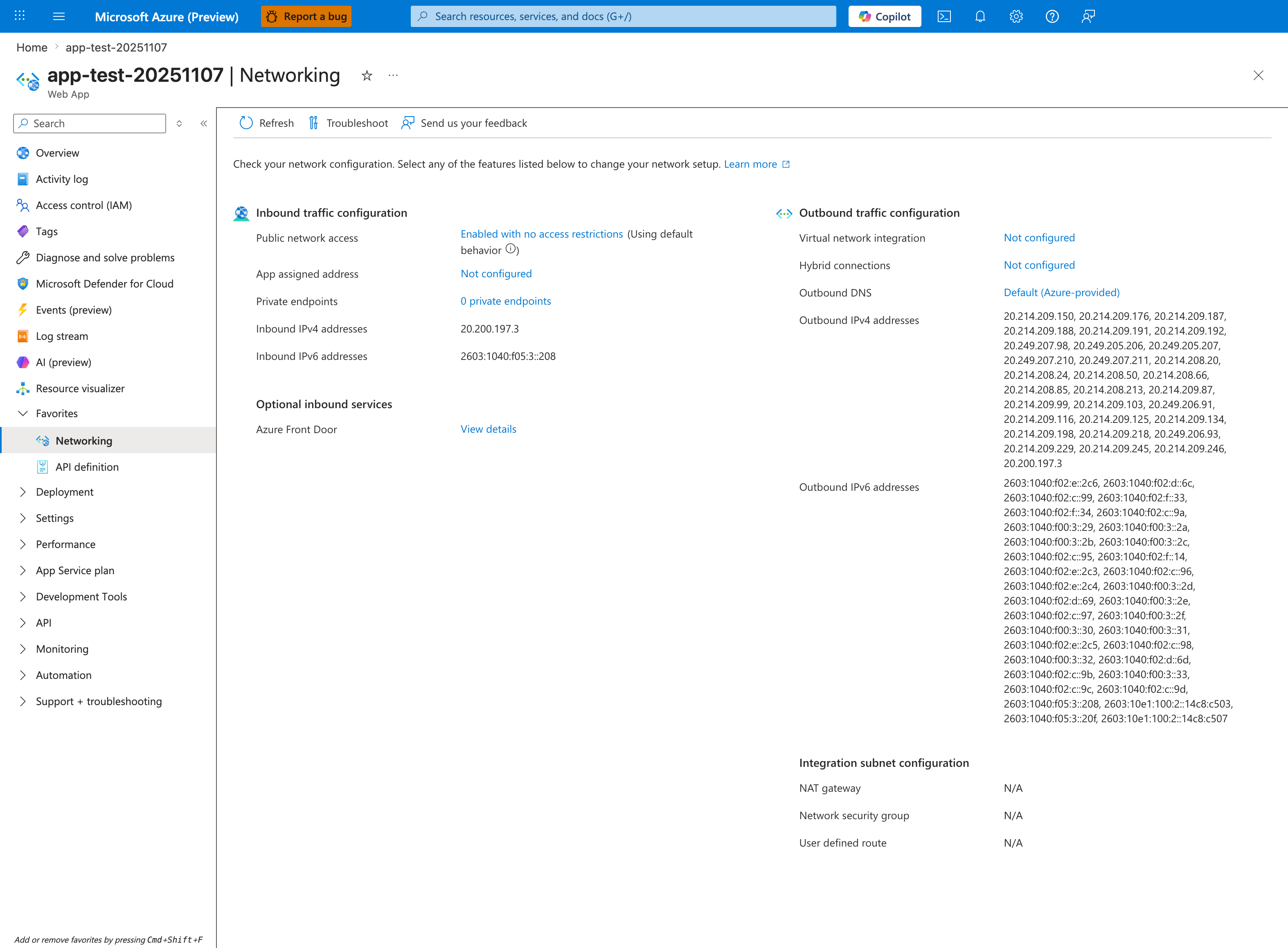
The Networking blade is the orientation surface for inbound-path verification. The Inbound traffic configuration column lists Public network access (Enabled with no access restrictions), Private endpoints (0 private endpoints), Inbound IPv4 (20.200.197.3), and Inbound IPv6 (2603:1040:f05:3::208) — together these describe every surface on which an inbound client connection (including an mTLS handshake) can land for this app. The Optional inbound services row shows Azure Front Door as an upstream integration registered against this app's inbound configuration. The Outbound traffic configuration column (Virtual network integration: Not configured, Hybrid connections: Not configured) confirms no VNet egress detour exists in this baseline. The toolbar Troubleshoot button is the platform-supplied network-diagnostics launcher.
Resolution
- Enable
clientCertEnabledand set the intendedclientCertMode - remove only the exclusion paths you no longer need
- enforce HTTPS-only and retest with an actual client certificate
- reconstruct PEM correctly before parsing
X-ARR-ClientCert - validate the certificate chain and authorization policy in application code
- correct outbound certificate thumbprint, path, or store lookup logic
- review ASE ingress design and document the actual front-end trust boundary instead of assuming ASE behaves exactly like the public multitenant ingress path
Prevention
- Keep inbound and outbound mTLS runbooks separate
- add a lower-environment
/cert-infodiagnostics endpoint for rollout testing - document every
clientCertExclusionPathsentry with business justification - validate certificate loading and rotation during planned maintenance windows
- treat ASE as a topology change, not as a new certificate format
See Also
- Mutual TLS Architecture
- Incoming Client Certificates
- Outbound Client Certificates
- SSL Certificate Issues