App Startup Failures
1. Summary
This playbook applies when an Azure App Service app deploys or restarts but never becomes reachable, repeatedly restarts, or fails to answer platform startup probes. Use it for built-in Linux stacks and custom containers when the main symptom is "the app will not start" rather than a later functional error.
Symptoms
- The site returns
503 Service Unavailableright after deployment or restart. - The platform reports
Container didn't respond to HTTP pings on port. - Console logs show immediate crashes, missing modules, port-binding failures, or entrypoint errors.
- A custom container starts locally but never becomes ready on App Service.
Common error messages
Container didn't respond to HTTP pings on port: 8000.ModuleNotFoundError,Cannot find module,ClassNotFoundException, orNo such file or directory.Failed to start site. Revert by stopping site.Site startup probe failed after ... seconds.failed to bind,address already in use, orpermission denied.
flowchart TD
    A[App fails to start] --> B{Did process launch at all?}
    B -->|No| H1[H1: Entrypoint or artifact mismatch]
    B -->|Yes| C{Did app bind expected port and address?}
    C -->|No| H2[H2: Port or bind mismatch]
    C -->|Yes| D{Did process crash after launch?}
    D -->|Yes| H3[H3: Dependency or runtime compatibility issue]
    D -->|No| E{Custom container only?}
    E -->|Yes| H4[H4: Container startup contract issue]
    E -->|No| F[Review health endpoint and startup budget]
2. Common Misreadings
| Observation | Often Misread As | Actually Means |
|---|---|---|
App Service says Running | Application is healthy | Control plane state only shows the site object is enabled, not that the worker is ready. |
| No console rows exist | Logging is broken | The process may have failed before meaningful stdout/stderr was emitted. |
| App works locally | Platform issue in Azure | Port, working directory, environment variables, and runtime image can differ in App Service. |
| HTTP 503 appears | Application generated the response | On startup incidents, 503 often comes from the platform while waiting for readiness. |
| Custom container image pulls successfully | Container contract is satisfied | The container can still fail due to wrong port, health behavior, or startup time. |
3. Competing Hypotheses
| Hypothesis | Likelihood | Key Discriminator |
|---|---|---|
| H1: Entrypoint, startup command, or artifact path is wrong | High | Console logs show command-not-found, module-not-found, or bad class/module reference. |
| H2: App binds the wrong port or address | High | Process starts, but no listener appears on the port App Service expects. |
| H3: Runtime or dependency mismatch causes a crash loop | High | Startup begins, then exits with missing package or incompatible runtime errors. |
| H4: Custom container startup contract is not met | Medium | Container image starts elsewhere but App Service cannot validate readiness in time. |
| H5: Slow initialization exceeds startup budget | Medium | Normal bootstrap eventually appears, but only after platform timeout. |
4. What to Check First
-
Inspect current runtime stack and startup command
-
Inspect startup-related app settings
-
Confirm site state and host inventory
-
If using containers, inspect container settings
Portal view: Web App Down detector for startup-failure triage
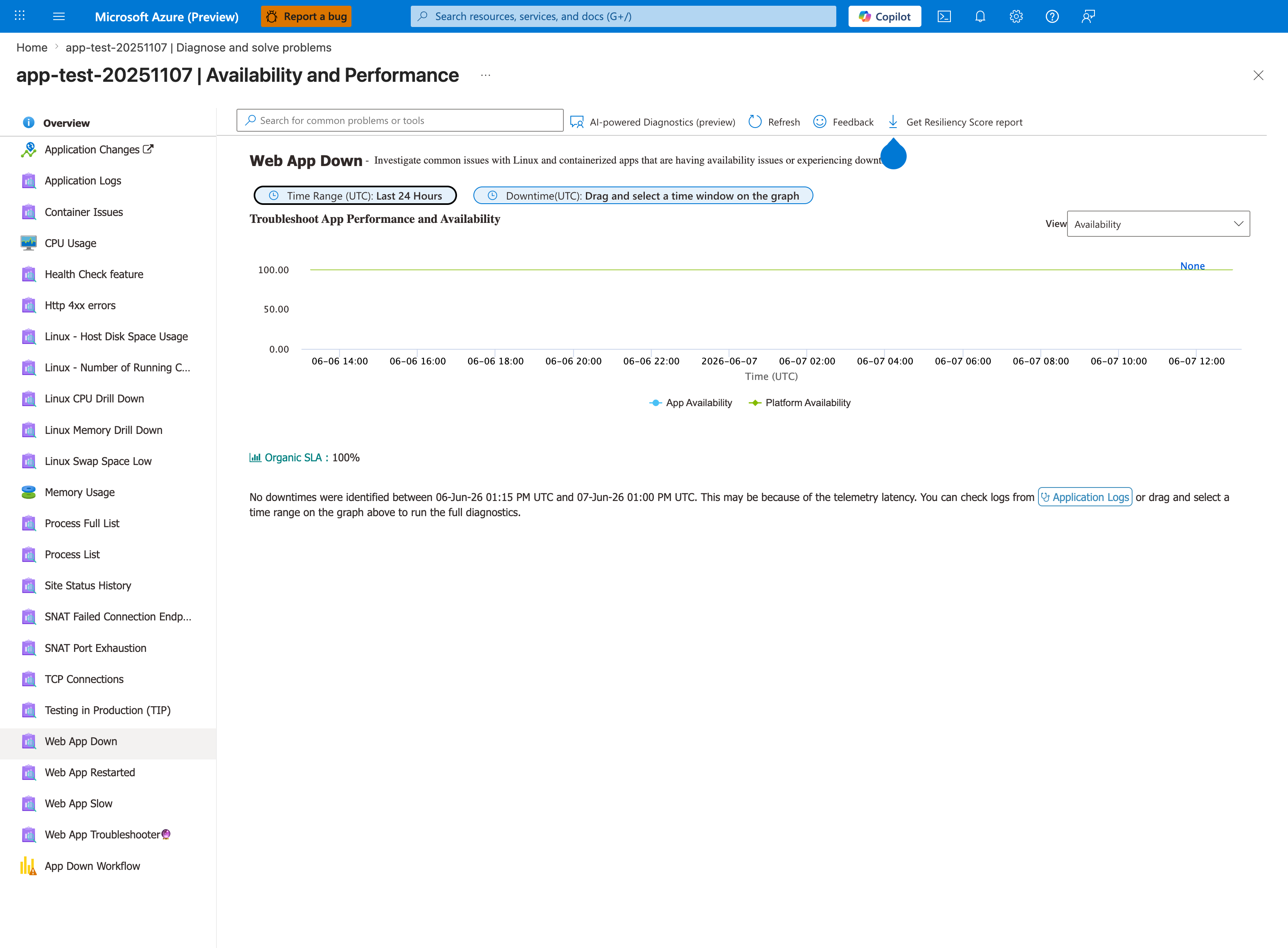
The Web App Down detector under Availability and Performance is the orientation surface for this playbook's first triage step. In this baseline capture both KPI tiles read 100% (App Availability blue, Platform Availability green) and the green banner reports "No downtimes were identified for this Web App in the last 24 hours". The detector's separation of App Availability from Platform Availability into two distinct KPI tiles is the property the playbook leverages when scoping a startup failure to worker-side versus infrastructure-side causes. The left-rail detector navigation lists adjacent detectors (Container Issues, Web App Restarted) that the playbook's Section 5 evidence list routes to next. The Linux drill-down labels reflect this capture's source app; the detector itself is OS-agnostic and the same hub is the correct first stop on Windows apps as well.
5. Evidence to Collect
Capture the first startup attempt after a restart or deployment. Later retries often hide the original failure mode.
5.1 KQL Queries
Query 1: Startup timeout and restart sequence
AppServicePlatformLogs
| where TimeGenerated > ago(24h)
| where Message has_any ("startup probe failed", "ContainerTimeout", "Failed to start site", "terminated during site startup", "Restarting")
| project TimeGenerated, Level, Message
| order by TimeGenerated asc
| Column | Example data | Interpretation |
|---|---|---|
Message | Site startup probe failed after 44.1 seconds. | The app did not become ready in time. |
Message | terminated during site startup | Worker lifecycle ended before readiness. |
Level | Error | Strong evidence of startup-phase failure rather than request-path regression. |
How to Read This
Read these rows as a lifecycle story: platform starts the site, waits, gives up, then stops it. That sequence narrows the issue to startup, not normal request handling.
Query 2: Console startup lines and fatal errors
AppServiceConsoleLogs
| where TimeGenerated > ago(24h)
| where ResultDescription has_any ("Listening at", "Starting", "ModuleNotFoundError", "Cannot find module", "ClassNotFoundException", "address already in use", "permission denied")
| project TimeGenerated, Level, ResultDescription
| order by TimeGenerated asc
| Column | Example data | Interpretation |
|---|---|---|
ResultDescription | Listening at: http://0.0.0.0:8000 | Confirms the process started and bound correctly. |
ResultDescription | ModuleNotFoundError: No module named 'app' | Entrypoint or artifact path mismatch. |
ResultDescription | Error: listen EACCES | Port or permission contract is broken. |
How to Read This
One positive listener line can disprove H1. One fatal import or bind line can almost close the incident immediately.
Query 3: HTTP symptoms during startup failure
AppServiceHTTPLogs
| where TimeGenerated > ago(24h)
| summarize Requests=count(), P95=percentile(TimeTaken,95) by bin(TimeGenerated, 5m), ScStatus
| where ScStatus >= 500
| order by TimeGenerated asc
| Column | Example data | Interpretation |
|---|---|---|
ScStatus | 503 | Often platform-generated unavailability during startup. |
P95 | 49982 | Long waits strongly suggest readiness timeout behavior. |
Requests | 210 | External health checks or user traffic observed the failure. |
How to Read This
Uniform 503 plus near-identical long latency values usually means the app never became probe-ready rather than producing its own error pages.
5.2 CLI Investigation
# Show runtime stack and startup command
az webapp config show \
    --resource-group $RG \
    --name $APP_NAME \
    --query "{linuxFxVersion:linuxFxVersion,appCommandLine:appCommandLine}" \
    --output json
Sample output:
Interpretation:
- Compare the command to the actual project layout.
- Confirm the runtime stack matches the application expectations.
# Show startup-related app settings
az webapp config appsettings list \
    --resource-group $RG \
    --name $APP_NAME \
    --query "[?name=='WEBSITES_PORT' || name=='PORT' || name=='WEBSITES_CONTAINER_START_TIME_LIMIT'].{name:name,value:value}" \
    --output table
Sample output:
Name                                   Value
-------------------------------------  -----
WEBSITES_PORT                          8000
WEBSITES_CONTAINER_START_TIME_LIMIT    230
Interpretation:
- For Linux custom containers, compare both
WEBSITES_PORTand the runtime-injectedPORTwith the actual listener. Linux startup behavior is more nuanced than a directWEBSITES_PORTmismatch model. - See Container HTTP Pings Lab for experimental evidence on Linux port behavior.
- A longer startup budget can help only after fixing real startup inefficiency or dependency delays.
6. Validation and Disproof by Hypothesis
H1: Entrypoint, startup command, or artifact path mismatch
Proves if the first fatal message is command-not-found, import-not-found, bad module path, or missing startup file.
Disproves if the app starts and listens successfully.
Validation steps:
- Compare startup command to deployed artifact layout.
- Confirm the working module/class/file exists where the runtime expects it.
- If using build-on-deploy, confirm the generated output preserves the needed entrypoint.
H2: Port or bind mismatch
Proves if logs show the process listening on a different port, localhost only, or failing to bind.
Disproves if the app listens on 0.0.0.0 and the expected port.
Validation steps:
- Compare
WEBSITES_PORT,PORT, and the actual listener log line together instead of assuming a single-setting mismatch explains the failure. - Ensure custom containers expose the same port they advertise to App Service.
- Avoid hardcoding localhost bindings.
H3: Runtime or dependency mismatch
Proves if the process starts, then crashes with missing package, incompatible runtime, or native dependency errors.
Disproves if the same runtime and dependency set stays stable long enough to serve healthy requests.
Validation steps:
- Confirm the language/runtime version in App Service matches the app assumptions.
- Reconcile dependency installation method with deployment method.
- Check for native library requirements and architecture mismatches.
H4: Custom container startup contract issue
Proves if the image is pulled but App Service never gets a valid readiness response.
Disproves if built-in stacks show the same failure or the container logs show a correct listener quickly.
Validation steps:
- Verify exposed port, listener address, and startup command inside the image.
- Reduce startup work that blocks readiness.
- Keep the first health endpoint lightweight and unauthenticated.
7. Likely Root Cause Patterns
| Pattern | Evidence | Resolution |
|---|---|---|
| Wrong module/class path | Import or startup command error in console logs | Fix startup command to match artifact layout. |
| Wrong port binding | Listener uses another port or localhost | Bind 0.0.0.0 to the expected port. |
| Missing dependencies | Immediate crash after startup begins | Rebuild artifact or enable correct build automation. |
| Slow cold initialization | Logs eventually show readiness after timeout | Optimize startup path and use lighter warm-up behavior. |
| Container contract mismatch | Custom image starts elsewhere but not on App Service | Align image entrypoint, exposed port, and readiness behavior. |
8. Immediate Mitigations
- Restart once only after capturing logs from the first failing attempt.
- Revert to the last known good package or image if production is affected.
- Correct obvious startup command and port mismatches before changing timeout values.
- For slot-based releases, validate staging startup on its own hostname before swap.
- If initialization is heavy, temporarily remove nonessential bootstrap work from the critical path.
- Re-test with one clear startup timeline and confirm healthy HTTP responses appear.
9. Prevention
Prevention checklist
- [ ] Keep startup commands version-controlled and reviewed with each repo layout change.
- [ ] Standardize one port-binding convention across environments.
- [ ] Capture startup logs centrally in Log Analytics or Application Insights.
- [ ] Test startup on a staging slot before production promotion.
- [ ] Keep readiness endpoints lightweight and free from expensive dependency checks.
See Also
- Playbooks
- Container Didn't Respond to HTTP Pings
- Deployment Succeeded but Startup Failed
- Health and Recovery Operations