Troubleshooting Decision Tree
Use this page when you need to triage quickly from symptom to likely failure category and then open the right playbook.
The tree is intentionally symptom-first and optimized for the first 10–15 minutes of incident response.
Portal view: Diagnose and solve problems as the triage entry point
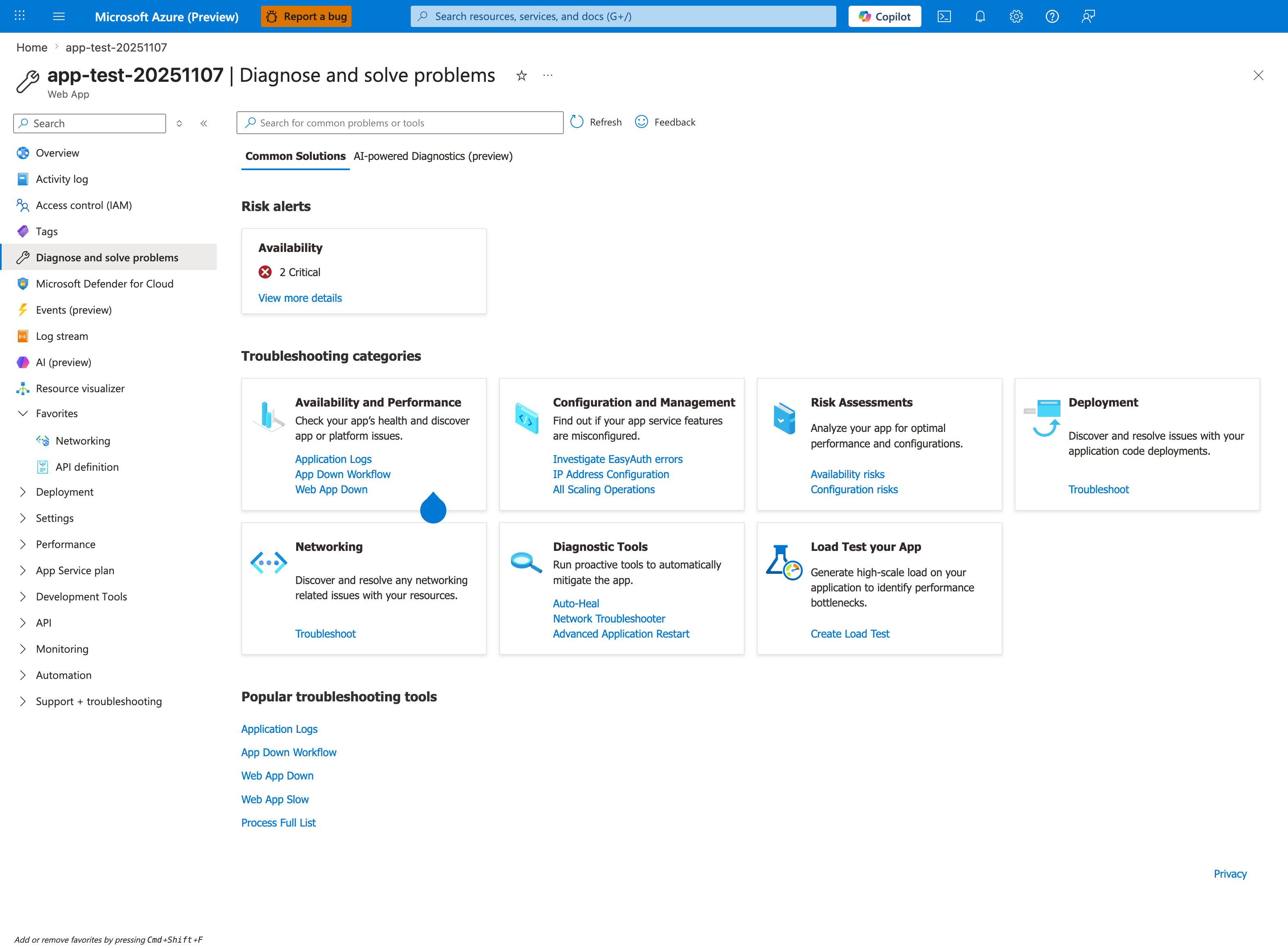
Before walking the manual decision tree below, open Diagnose and solve problems in the Portal — its Risk alerts panel and Common Solutions may already point directly to the failure category. The seven Troubleshooting categories correspond to the branches in the decision tree: Availability and Performance covers the 5xx and startup branches, Networking covers the outbound dependency branch, Configuration and Management covers the slot swap and config drift branches, and Deployment covers the post-deploy regression branch. Click App Down Workflow for an automated walkthrough that runs many of the queries from the decision tree below in a guided sequence.
Main triage decision tree
flowchart TD
    S[Incident starts: user-visible impact] --> Q1{Is it a 5xx issue?}

    Q1 -->|Yes| Q1A{Intermittent or constant?}
    Q1 -->|No| Q2{Is startup failing?}

    Q1A -->|Intermittent under load| P1[Playbook: Intermittent 5xx Under Load]
    Q1A -->|Constant after deploy or swap| Q3{Was there a recent restart or deployment?}
    Q1A -->|Constant, no deploy| P2[Playbook: Slow Response but Low CPU]

    Q3 -->|Yes, startup symptoms| P3[Playbook: Deployment Succeeded but Startup Failed]
    Q3 -->|Yes, proxy forward errors| P4[Playbook: Failed to Forward Request]
    Q3 -->|Yes, slot behavior changed| P5[Playbook: Slot Swap Config Drift]
    Q3 -->|No clear deploy signal| P6[Playbook: Container Didn't Respond to HTTP Pings]

    Q2 -->|Yes| Q2A{Container up but unhealthy?}
    Q2 -->|No| Q4{Is outbound dependency failing?}

    Q2A -->|Startup timeout or ping failure| P6
    Q2A -->|Warm-up confusion| P7[Playbook: Warm-up vs Health Check]
    Q2A -->|Swap warm-up failure| P8[Playbook: Slot Swap Failed During Warm-up]

    Q4 -->|Yes| Q4A{DNS, SNAT, or private endpoint route?}
    Q4 -->|No| Q5{Is it a performance issue?}

    Q4A -->|DNS| P9[Playbook: DNS Resolution VNet-Integrated App Service]
    Q4A -->|SNAT or outbound churn| P10[Playbook: SNAT or Application Issue]
    Q4A -->|Private endpoint/custom DNS| P11[Playbook: Private Endpoint Custom DNS Route Confusion]

    Q5 -->|Yes| Q5A{CPU, memory, or disk?}
    Q5 -->|No| P12[Use Methodology: build hypotheses from evidence]

    Q5A -->|CPU not saturated but slow| P2
    Q5A -->|Memory pressure or kill/recycle| P13[Playbook: Memory Pressure and Worker Degradation]
    Q5A -->|Disk full| P14[Playbook: No Space Left on Device]
    Q5A -->|First request very slow| P15[Playbook: Slow Start Cold Start]
5xx branch deep-dive tree
flowchart TD
    A[Observed 5xx] --> B{Status pattern}
    B -->|Mostly 500| C[Check application exceptions and endpoint concentration]
    B -->|Mostly 502| D[Check forwarding path and dependency timeouts]
    B -->|Mostly 503| E[Check warm-up, restart, and health transitions]

    C --> F{Startup related?}
    F -->|Yes| G[Container Didn't Respond to HTTP Pings]
    F -->|No| H[Slow Response but Low CPU]

    D --> I{Outbound signatures present?}
    I -->|Yes| J[SNAT or Application Issue]
    I -->|No| K[Failed to Forward Request]

    E --> L{Recent deploy or swap?}
    L -->|Yes| M[Deployment Succeeded but Startup Failed]
    L -->|Swap-specific| N[Slot Swap Failed During Warm-up]
    L -->|No| O[Intermittent 5xx Under Load]
Playbook leaves (direct links)
- Intermittent 5xx Under Load
- Slow Response but Low CPU
- Memory Pressure and Worker Degradation
- No Space Left on Device
- Slow Start / Cold Start
- Container Didn't Respond to HTTP Pings
- Warm-up vs Health Check
- Slot Swap Failed During Warm-up
- Deployment Succeeded but Startup Failed
- Failed to Forward Request
- Slot Swap Config Drift
- SNAT or Application Issue?
- DNS Resolution (VNet-Integrated)
- Private Endpoint / Custom DNS Route Confusion
Quick reference matrix
| Symptom Pattern | Most Likely Cause Category | Playbook Link |
|---|---|---|
| 5xx spikes only during traffic bursts | worker saturation, timeout queueing, or outbound pressure | Intermittent 5xx Under Load |
| 503 after deployment or restart | startup/warm-up sequence instability | Deployment Succeeded but Startup Failed |
| 502 with proxy-forward messages | front-end to worker forwarding path issue | Failed to Forward Request |
| Container appears running but no responses | binding mismatch or app not listening correctly | Container Didn't Respond to HTTP Pings |
| Swap operation fails during warm-up | warm-up endpoint mismatch or timeout | Slot Swap Failed During Warm-up |
| App became unstable after swap | slot config drift or restart race | Slot Swap Config Drift |
| High latency with low CPU | dependency wait, lock contention, sync blocking | Slow Response but Low CPU |
| Gradual slowdown then recycle | memory growth and worker degradation | Memory Pressure and Worker Degradation |
| Intermittent outbound timeout/reset | SNAT pressure or outbound connection churn | SNAT or Application Issue? |
| Name resolution failures in VNet integration | DNS resolver path or custom DNS mismatch | DNS Resolution (VNet-Integrated) |
| Private endpoint dependency unreachable | private DNS zone/routing configuration mismatch | Private Endpoint / Custom DNS Route Confusion |
Errors include No space left on device | local filesystem exhaustion | No Space Left on Device |
| First request after idle/deploy is very slow | cold start behavior or startup regression | Slow Start / Cold Start |
| Health check reports unhealthy while app path works | warm-up vs health-check semantics confusion | Warm-up vs Health Check |
Triage prompts to ask in order
- Is it a 5xx issue? If yes, is it intermittent or constant?
- Was there a recent restart or deployment in the incident window?
- Is startup failing (container not ready, ping failure, warm-up timeout)?
- Is outbound dependency failing (DNS, SNAT, private endpoint route)?
- Is it a performance issue (CPU, memory, disk, or cold start)?
Minimal evidence before choosing a branch
- 15-minute HTTP status trend (
AppServiceHTTPLogs) - platform event timeline for restarts/deployments (
AppServicePlatformLogs+ Activity Log) - console signatures for startup and outbound failures (
AppServiceConsoleLogs)
AppServiceHTTPLogs
| where TimeGenerated > ago(2h)
| summarize total=count(), err5xx=countif(ScStatus >= 500 and ScStatus < 600), p95=percentile(TimeTaken,95) by bin(TimeGenerated, 5m)
| order by TimeGenerated asc
AppServicePlatformLogs
| where TimeGenerated > ago(24h)
| where ResultDescription has_any ("restart", "recycle", "health", "swap", "deploy", "container")
| project TimeGenerated, OperationName, ResultDescription
| order by TimeGenerated desc
AppServiceConsoleLogs
| where TimeGenerated > ago(6h)
| where ResultDescription has_any ("timeout", "failed", "could not bind", "No space left", "DNS", "ConnectTimeout")
| project TimeGenerated, ResultDescription
| order by TimeGenerated desc
CLI triage bundle
az monitor activity-log list --resource-group <resource-group> --offset 24h
az monitor metrics list --resource <app-resource-id> --metric "Http5xx,Requests,AverageResponseTime,CpuPercentage,MemoryWorkingSet" --interval PT1M
az webapp log show --resource-group <resource-group> --name <app-name>
az webapp config show --resource-group <resource-group> --name <app-name>
Avoid branch bias
Do not choose a branch only because it matches a familiar past issue. If the first branch is disproven by timestamps, return to the top and re-classify. Decision trees accelerate triage, but evidence still decides root cause.
Decision Tree Limits
- This tree is optimized for App Service Linux OSS workloads.
- Multi-cause incidents can map to more than one branch.
- If no branch matches cleanly, use Troubleshooting Method and build explicit competing hypotheses.
Branch-specific first checks
If you choose the startup branch
- Confirm expected port and startup command alignment.
- Check whether health check path depends on unavailable dependencies.
- Validate slot-specific settings when swap is part of the timeline.
If you choose the outbound branch
- Verify whether only one dependency host fails.
- Compare failure windows against outbound-heavy endpoints.
- Test DNS resolution and route behavior from the running app context.
If you choose the runtime degradation branch
- Compare memory trend with restart cadence.
- Check for
No space left on deviceand temporary filesystem growth. - Identify whether high latency leads 5xx or follows it.
Practical triage examples
- Intermittent 502 + connect timeout logs + burst traffic
- Decision tree branch: 5xx → intermittent → outbound candidate. - Start with SNAT or Application Issue?.
- Deployment succeeded + immediate 503 + ping failures
- Decision tree branch: restart/deployment → startup failing. - Start with Deployment Succeeded but Startup Failed.
- Latency grows over hours + recycle + memory climb
- Decision tree branch: performance → memory. - Start with Memory Pressure and Worker Degradation.
See Also
- Troubleshooting Method
- Detector Map
- Architecture Overview
- Evidence Map
- Troubleshooting Mental Model
- First 10 Minutes: Performance
- First 10 Minutes: Outbound Network
- First 10 Minutes: Startup Availability