Platform Limits & Quotas
Quick reference for common Azure App Service platform limits and quota-related behaviors.
Overview
graph TD
    A[Subscription Quota] --> B[App Service Plan]
    B --> C[Web Apps]
    C --> D[Instance Scale]
    C --> E[Storage Quota]
    C --> F[Networking Limits]
    C --> G[Request Limits]
Request Limits
| Limit | Typical Value | Notes | Source |
|---|---|---|---|
| Frontend HTTP timeout | 230 seconds | Enforced by the App Service frontend for synchronous HTTP requests on Windows apps; Linux apps are documented as approximately 240 seconds. | Web request times out in App Service |
| Max request body | 128 MB | [Requires verification] This guide does not currently have an App Service-specific Microsoft Learn source for a platform-wide 128 MB limit. Request body limits vary by runtime and web server. | Request Limits <requestLimits> (IIS) [Stack-specific] |
| URL length | 8192 characters | [Requires verification] No App Service-specific Microsoft Learn source was found for a universal 8192-character limit. URL limits vary by stack and front-end/server behavior. | Request Limits <requestLimits> (IIS) [Stack-specific] |
Scale and Plan Limits
| Tier | Max Instances (Typical) | Deployment Slots (Typical) | Always On | Source |
|---|---|---|---|---|
| Free (F1) | 1 | 0 | No | Azure App Service limits |
| Basic (B1) | 3 | 0 | No | Azure App Service limits |
| Standard (S1) | 10 | 5 | Yes | Azure App Service limits |
| Premium (P1V3 and above) | 30+ | 20 | Yes | Azure App Service limits |
Regional and SKU variation
Effective limits can vary by region, subscription, and SKU generation. Validate current values in Microsoft Learn and in your subscription quotas.
Storage and File System
| Area | Behavior | Notes |
|---|---|---|
/home | Persistent | Survives restarts and redeployments |
/tmp | Ephemeral | Reclaimed across restarts/reimages |
Logs (/home/LogFiles) | Persistent and quota-counted | Large log volume can consume storage quota |
Deployment and Configuration Limits
| Limit | Value | Notes | Source |
|---|---|---|---|
| Max app settings | 10,000 | [Requires verification] This guide does not currently have a Microsoft Learn source that documents a hard App Service limit of 10,000 settings. Environment block and runtime constraints can be stack-specific. | Configure an App Service app [Requires verification] |
| ZIP deploy upload size | 2048 MB | CLI/Kudu ZIP deploy package limit. | Deploy files to Azure App Service |
| Slot settings scope | Per-slot | Mark sensitive values as slot settings. | Configure an App Service app |
Networking and Connections
| Limit/Behavior | Value / Pattern | Notes | Source |
|---|---|---|---|
| SNAT ports per instance (common) | 128 | Outbound-heavy apps can exhaust ports. | Troubleshoot intermittent outbound connection errors |
| Outbound IPs | Multiple, can change | Use possibleOutboundIpAddresses for allowlists. | Azure App Service limits |
| WebSocket and long-lived connections | Tier-dependent | Higher tiers support greater concurrency. | Azure App Service limits |
Diagnostics and Retention
| Area | Typical Range | Notes | Source |
|---|---|---|---|
| Filesystem log retention | 30–90 days | [Requires verification] Retention depends on storage usage and log configuration; no single App Service platform default was verified for this range. | Enable diagnostic logging for apps in Azure App Service [Requires verification] |
| Live log streaming session | Time-limited | Streams may disconnect on inactivity. | Enable diagnostic logging for apps in Azure App Service |
| Application Insights retention | Configurable | Affects cost and forensic depth. | Manage usage and costs for Application Insights |
Limit-Driven Symptoms
- Intermittent outbound failures under load (possible SNAT pressure)
- Sudden 5xx spikes with no code change (plan/resource saturation)
- Failed uploads or deployments due to artifact size
- Missing files due to writing into ephemeral paths
- Slow or dropped long-running HTTP requests over frontend timeout
Run It in the Portal
Portal view: Scale up (App Service plan) blade
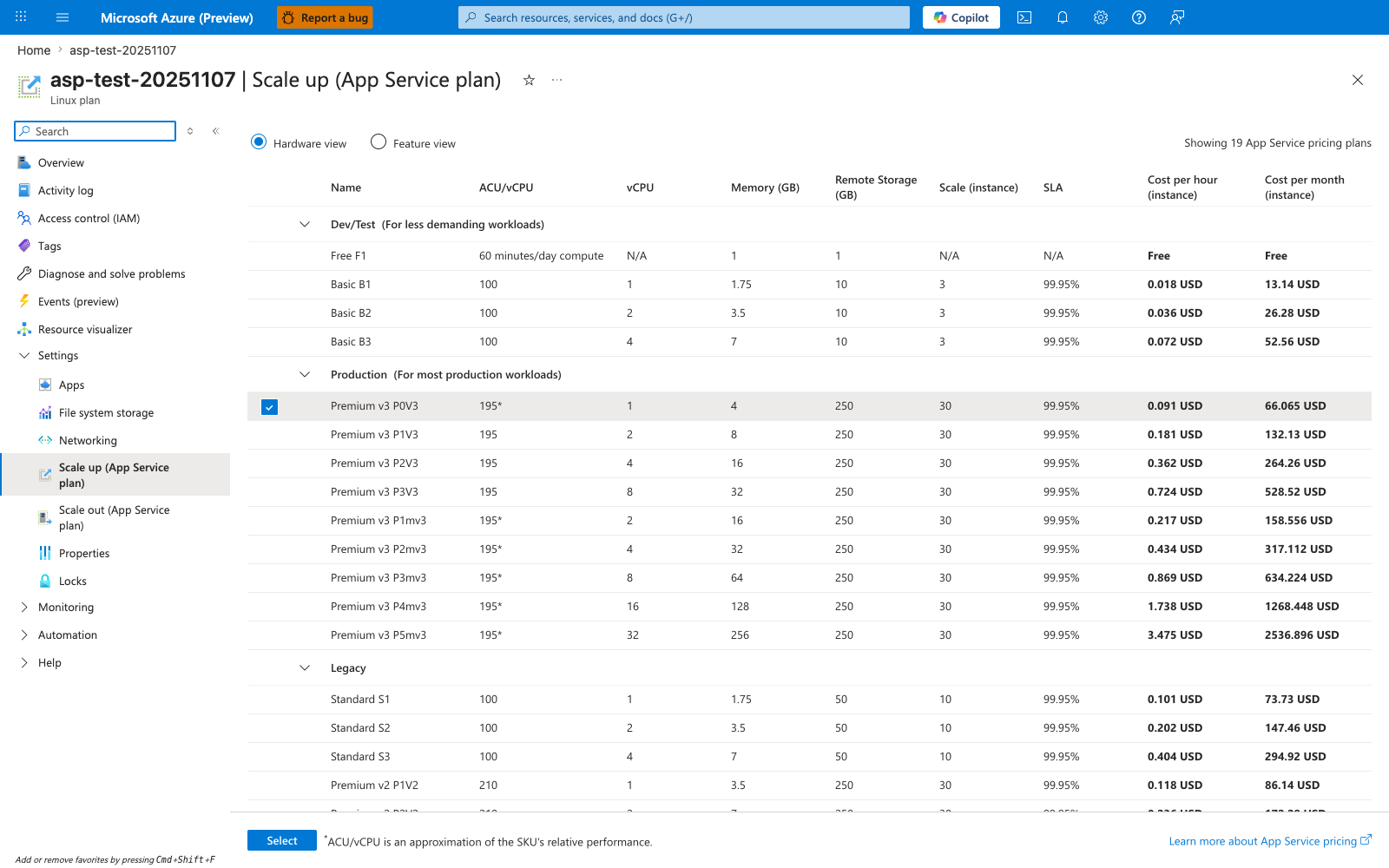
The Scale up (App Service plan) blade is where you compare the plan SKUs that drive most of the limits in the Scale and Plan Limits table above. This capture shows the Hardware view table grouped into Dev/Test, Production, and Legacy, with the selected Premium v3 P0V3 row exposing the per-plan fields that matter operationally: vCPU, Memory (GB), Remote Storage (GB), Scale (instance), and SLA. Because the blade is scoped to the App Service plan rather than the individual web app, it is the right place to confirm whether plan tier and per-instance capacity are part of a saturation or quota problem. Use this view to verify the current plan family and worker size before concluding that a symptom is application-only.
See Also
Sources
- Azure App Service Limits (Microsoft Learn)
- App Service Plan Overview (Microsoft Learn)
- Best Practices for App Service (Microsoft Learn)
Language-Specific Details
Language/runtime behavior (for example, worker model, memory profile, and startup semantics) can change how these limits are experienced in practice. See: