Azure CLI App Service Cheatsheet
Language-agnostic quick reference for Azure App Service operations with long flags only.
Overview
flowchart TD
    A[Azure CLI Cheatsheet] --> B[Lifecycle]
    A --> C[Configuration]
    A --> D[Deployment]
    A --> E[Monitoring]
    A --> F[Networking]
A --> G[Identity & Slots]Prerequisites
az login
az account set --subscription <subscription-id>

RG="rg-myapp"
APP_NAME="app-myapp-prod"
PLAN_NAME="plan-myapp"
LOCATION="koreacentral"
App Service Lifecycle
az group create --name $RG --location $LOCATION --output json
az appservice plan create --resource-group $RG --name $PLAN_NAME --location $LOCATION --sku P1V3 --is-linux --output json
az webapp create --resource-group $RG --plan $PLAN_NAME --name $APP_NAME --output json
az webapp show --resource-group $RG --name $APP_NAME --output json
az webapp stop --resource-group $RG --name $APP_NAME --output json
az webapp start --resource-group $RG --name $APP_NAME --output json
az webapp restart --resource-group $RG --name $APP_NAME --output json
az webapp delete --resource-group $RG --name $APP_NAME --output json
Masked output example:
{
  "id": "/subscriptions/<subscription-id>/resourceGroups/rg-myapp/providers/Microsoft.Web/sites/app-myapp-prod",
  "name": "app-myapp-prod",
  "defaultHostName": "app-myapp-prod.azurewebsites.net",
  "identity": {
    "tenantId": "<tenant-id>",
    "principalId": "xxxxxxxx-xxxx-xxxx-xxxx-xxxxxxxxxxxx"
  }
}
Configuration
az webapp config appsettings list --resource-group $RG --name $APP_NAME --output table
az webapp config appsettings set --resource-group $RG --name $APP_NAME --settings KEY1=VALUE1 KEY2=VALUE2 --output json
az webapp config appsettings delete --resource-group $RG --name $APP_NAME --setting-names KEY1 KEY2 --output json

az webapp config connection-string list --resource-group $RG --name $APP_NAME --output table
az webapp config connection-string set --resource-group $RG --name $APP_NAME --settings MainDb="Server=tcp:<server>.database.windows.net;Database=<db>;" --connection-string-type SQLAzure --output json
az webapp config connection-string delete --resource-group $RG --name $APP_NAME --setting-names MainDb --output json

az webapp config set --resource-group $RG --name $APP_NAME --always-on true --http20-enabled true --output json
Deployment
az webapp deploy --resource-group $RG --name $APP_NAME --src-path ./deploy.zip --type zip --output json
az webapp deployment source config-local-git --resource-group $RG --name $APP_NAME --output json
az webapp deployment source show --resource-group $RG --name $APP_NAME --output json
az webapp log deployment list --resource-group $RG --name $APP_NAME --output table
az webapp deployment list-publishing-profiles --resource-group $RG --name $APP_NAME --xml --output json
Monitoring
az webapp log config --resource-group $RG --name $APP_NAME --application-logging filesystem --detailed-error-messages true --failed-request-tracing true --web-server-logging filesystem --output json
az webapp log tail --resource-group $RG --name $APP_NAME
az webapp log download --resource-group $RG --name $APP_NAME --output json

WEBAPP_RESOURCE_ID=$(az webapp show --resource-group $RG --name $APP_NAME --query id --output tsv)
az monitor metrics list --resource $WEBAPP_RESOURCE_ID --metric "Requests" "Http5xx" "AverageResponseTime" --interval PT5M --aggregation Total Average --output table
Linux caveat for log download
az webapp log download may not work with web apps running on Linux. For Linux apps, use log streaming (az webapp log tail), the Diagnose and Solve Problems portal blade, or access logs via /home/LogFiles.
Networking
az webapp vnet-integration add --resource-group $RG --name $APP_NAME --vnet <vnet-name> --subnet <subnet-name> --output json
az webapp vnet-integration list --resource-group $RG --name $APP_NAME --output table
az webapp vnet-integration remove --resource-group $RG --name $APP_NAME --vnet <vnet-name> --subnet <subnet-name> --output json

az webapp config access-restriction add --resource-group $RG --name $APP_NAME --rule-name AllowCorp --action Allow --ip-address <corp-cidr> --priority 100 --output json
az webapp config access-restriction show --resource-group $RG --name $APP_NAME --output json
az webapp config access-restriction remove --resource-group $RG --name $APP_NAME --rule-name AllowCorp --output json
Managed Identity
az webapp identity assign --resource-group $RG --name $APP_NAME --output json
az webapp identity show --resource-group $RG --name $APP_NAME --output json
Masked output example:
{
  "type": "SystemAssigned",
  "principalId": "xxxxxxxx-xxxx-xxxx-xxxx-xxxxxxxxxxxx",
  "tenantId": "<tenant-id>",
  "userAssignedIdentities": null
}
Deployment Slots
az webapp deployment slot create --resource-group $RG --name $APP_NAME --slot staging --configuration-source $APP_NAME --output json
az webapp deployment slot list --resource-group $RG --name $APP_NAME --output table
az webapp deployment slot swap --resource-group $RG --name $APP_NAME --slot staging --target-slot production --action swap --output json
az webapp traffic-routing set --resource-group $RG --name $APP_NAME --distribution staging=20 --output json
az webapp traffic-routing clear --resource-group $RG --name $APP_NAME --output json
az webapp deployment slot delete --resource-group $RG --name $APP_NAME --slot staging --output json
Traffic not explicitly assigned to a non-production slot continues to go to production automatically.
Cleanup
Run It in the Portal
Portal view: Web App Overview blade (CLI command Portal counterparts)
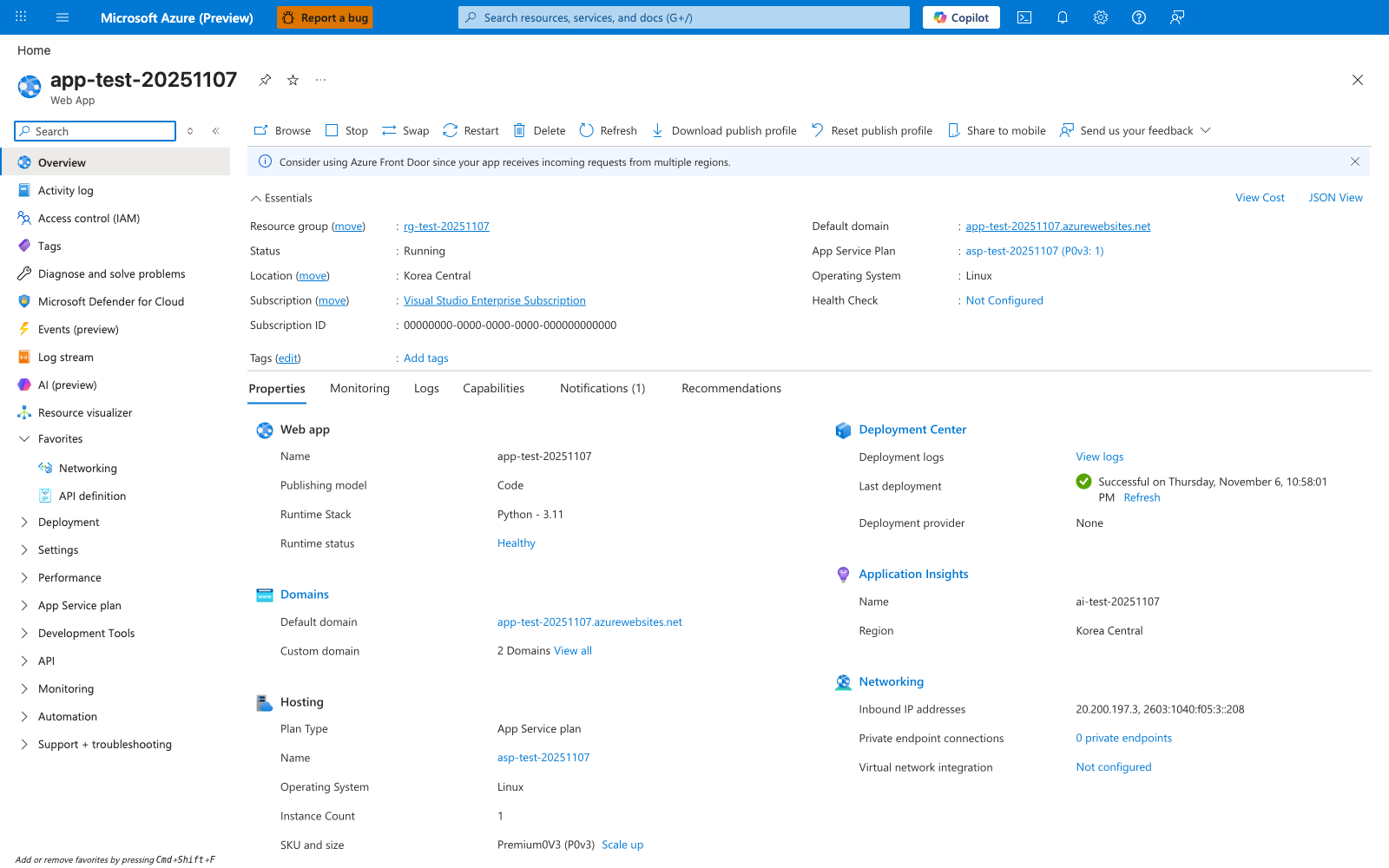
Most CLI verbs in this cheatsheet have a direct visual counterpart on this blade. The command bar Stop, Restart, and Delete map to az webapp stop, az webapp restart, and az webapp delete, while Browse aligns with the Default domain shown in Essentials and Download publish profile aligns with az webapp deployment list-publishing-profiles. The visible Essentials and Properties fields (Status: Running, Operating System: Linux, App Service Plan, Runtime status: Healthy, Last deployment) make this a practical post-command verification view after create, deploy, restart, or plan-change operations. Use this blade to confirm that the app is running on the expected plan and that the most recent deployment succeeded.