Security Architecture
Azure App Service security is built as a layered control system rather than a single perimeter. Production-grade deployments combine identity-bound access, network segmentation, encryption, policy enforcement, and continuous monitoring to implement defense-in-depth and Zero Trust principles across the entire request and data path.
Prerequisites
- Familiarity with Azure App Service components (app, plan, deployment slots)
- Working knowledge of Microsoft Entra ID, RBAC, and managed identities
- Understanding of virtual networks, private endpoints, and TLS certificates
- Access to review App Service configuration and governance policies
Main Content
Security model overview
App Service security can be modeled as five concentric layers. Each layer reduces blast radius if an outer control is bypassed.
graph TD
    L1[Layer 1: Network Boundary<br/>WAF, Access Restrictions, Private Endpoints]
    L2[Layer 2: Transport<br/>TLS 1.2+, HTTPS-only, certificate lifecycle]
    L3[Layer 3: Identity<br/>Managed Identity, App Service Auth, Entra ID]
    L4[Layer 4: Application<br/>Security headers, CORS policy, input validation]
    L5[Layer 5: Data<br/>Key Vault, encryption at rest, connection security]

    L1 --> L2 --> L3 --> L4 --> L5
Layer intent:
- Network boundary (outermost) limits who can initiate connections.
- Transport protects confidentiality and integrity in transit.
- Identity ensures callers and workloads are strongly authenticated.
- Application applies protocol- and payload-level protections.
- Data (innermost) protects secrets and persisted business data.
Note
A secure App Service deployment is not “public endpoint plus HTTPS.” It is a composition of independent controls that fail safely and are continuously validated.
Zero Trust on App Service
App Service aligns well with Zero Trust when controls are intentionally combined:
- Verify explicitly: Authenticate and authorize every request and every service-to-service call.
- Use least privilege: Prefer managed identity over static credentials and grant minimum RBAC scope.
- Assume breach: Segment network paths, encrypt all channels, and instrument for rapid detection.
Zero Trust decision flow for an inbound request:
flowchart TD
    A[Incoming Request] --> B{Source allowed<br/>by WAF/Access Restrictions/Private Endpoint?}
    B -->|No| X[Block and log event]
    B -->|Yes| C{HTTPS and TLS policy compliant?}
    C -->|No| Y[Reject or redirect to HTTPS]
    C -->|Yes| D{Identity token valid and authorized?}
    D -->|No| Z[Return 401 or 403 and alert]
    D -->|Yes| E{Application policy checks pass?<br/>CORS, headers, input constraints}
    E -->|No| Q[Return controlled failure and log]
    E -->|Yes| F[Execute business logic]
    F --> G[Access downstream data using managed identity]
    G --> H[Emit telemetry to monitoring and SIEM]
Network Security
Inbound controls
Inbound security determines who can reach your app process.
-
Access Restrictions
- Evaluate allow/deny rules by IP, CIDR, service tag, or virtual network source.
- Enforced before request execution in app code.
-
Private Endpoints
- Expose app ingress via private IP in your virtual network.
- Eliminate direct public network path for private-only architectures.
- Depend on correct private DNS resolution for reliable connectivity.
-
Azure Front Door or Application Gateway with WAF
- Centralize TLS policy, bot filtering, and Layer 7 protections.
- Add edge inspection before traffic reaches App Service.
-
Service Endpoints (legacy pattern)
- Historically used for service-level trust to subnet identity.
Outbound controls
Outbound security determines how your app reaches dependencies.
-
Regional VNet Integration
- Routes application egress into selected virtual network paths.
- Required for private dependency access patterns.
-
NAT Gateway
- Provides deterministic, scalable outbound IP addresses.
- Improves control for partner allowlists and SNAT management.
-
User-Defined Routes (UDR)
- Force traffic through firewall or inspection appliances.
-
Network Security Groups (NSG) on integration subnet
- Restrict reachable destinations and protocols.
Inbound and outbound flow with security controls:
graph TD
    Client[Client] --> Edge[Front Door or App Gateway with WAF]
    Edge --> Inbound[Access Restrictions and/or Private Endpoint]
    Inbound --> App[App Service]

    App --> VNetInt[VNet Integration Subnet]
    VNetInt --> NSG[NSG + UDR Policy]
    NSG --> NAT[NAT Gateway]
    NSG --> PrivateDeps[Private Dependencies]
    NAT --> InternetDeps[Approved Internet Dependencies]
Private App Service architecture
High-security production design often uses private ingress and private dependency access end to end.
graph TD
    User[Enterprise Client] --> FD[Azure Front Door Premium + WAF]
    FD --> PEApp[Private Endpoint: App Service]
    PEApp --> App[App Service]

    App --> VNI[VNet Integration]
    VNI --> PESQL[Private Endpoint: Azure SQL]
    VNI --> PEKV[Private Endpoint: Key Vault]
    VNI --> PEST[Private Endpoint: Storage]

    PESQL --> SQL[(Azure SQL)]
    PEKV --> KV[(Azure Key Vault)]
    PEST --> ST[(Storage Account)]
Design notes: treat DNS as part of the security boundary, restrict SCM/Kudu separately, and validate failover behavior for private endpoints and upstream gateways.
Identity and Access
Managed identity
Managed identity replaces embedded credentials with workload-bound tokens issued by Microsoft Entra ID.
Portal view: Identity blade
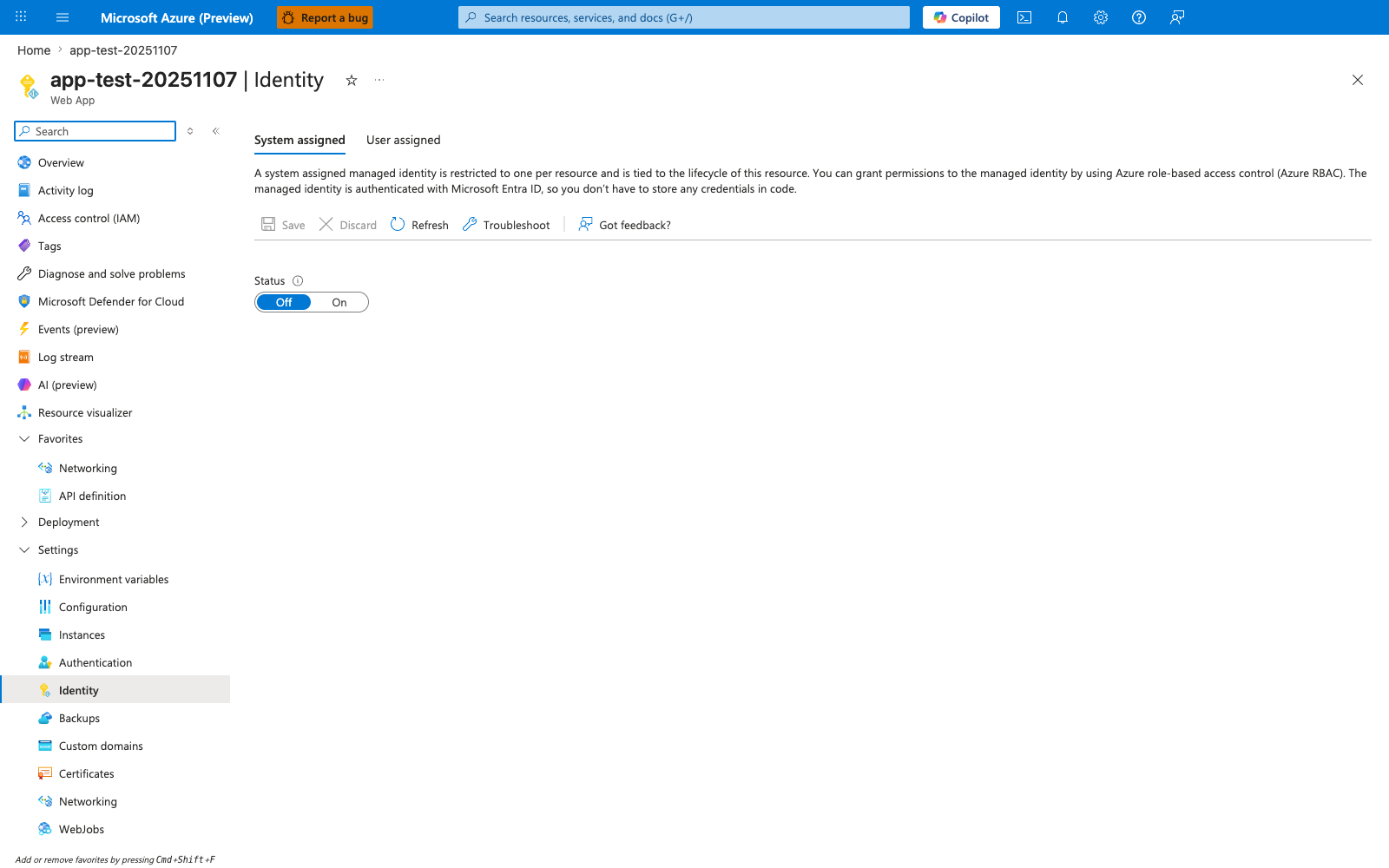
The Identity blade exposes the two managed identity lifecycles that matter for App Service security design. The System assigned tab, Status toggle, and empty Object (principal) ID field show that enabling this option creates a workload-bound service principal for just this app, while the User assigned tab points to reusable identities that can be attached separately. The Permissions section ties the concept to runtime access: token issuance is only half of the model, because you still grant RBAC roles to whichever identity type the app will use.
System-assigned managed identity - Lifecycle tied to one App Service app. - Best for simple one-app-to-resource trust. - Deleted automatically when the app is deleted.
User-assigned managed identity - Independent lifecycle and reusable across multiple apps. - Best for shared trust domains, slot swap continuity, or centralized identity governance. - Requires explicit assignment to each app.
Token acquisition model:
- App requests token from local managed identity endpoint.
- Platform brokers identity assertion to Entra ID.
- Entra ID issues scoped token for target audience/resource.
- App presents token to target service.
Anti-pattern to avoid:
- Storing long-lived connection strings or keys in app settings when target service supports Entra ID and managed identity.
Service-to-service authentication
sequenceDiagram
    participant App as App Service Workload
    participant MI as Managed Identity Endpoint
    participant AAD as Microsoft Entra ID
    participant Target as Target Resource (Key Vault / SQL / Storage)

    App->>MI: Request token for target audience
    MI->>AAD: Exchange workload identity assertion
    AAD-->>MI: Access token (short-lived)
    MI-->>App: Access token
    App->>Target: API call with Bearer token
    Target-->>App: Authorized response
RBAC best practices
| Scenario | Target Resource | Recommended Role |
|---|---|---|
| Read secrets | Key Vault | Key Vault Secrets User |
| Read/write blobs | Storage Account | Storage Blob Data Contributor |
| Query database | Azure SQL | db_datareader (SQL-level) |
| Send messages | Service Bus | Azure Service Bus Data Sender |
Transport Security
TLS configuration
Transport protection should be explicit and enforced by policy:
- Set minimum TLS version to 1.2 at a minimum.
- Prefer TLS 1.3 where supported by your fronting architecture.
- Define clear TLS termination points.
- Use strong certificate lifecycle practices (issuance, rotation, revocation).
TLS termination patterns:
-
Terminate at Front Door/Application Gateway
- Edge handles client TLS and WAF policy.
- Backend to App Service should still use HTTPS.
-
Terminate at App Service
- Simpler topology, fewer components.
- Reduced edge-layer inspection capability compared with dedicated WAF gateway.
-
End-to-end TLS
- TLS from client to edge and edge to origin.
Certificate sources:
- App Service Managed Certificate (simple custom-domain HTTPS)
- Certificates from Azure Key Vault
- Uploaded PFX certificates (operationally heavier)
HTTPS enforcement
Use the httpsOnly setting to force encrypted transport.
- HTTP requests are redirected to HTTPS endpoint.
- Non-TLS traffic is never processed as business traffic.
- Combine with strict headers to prevent downgrade behavior.
Application Security
Security headers
Baseline response headers reduce common browser-side attack classes.
| Header | Value | Purpose |
|---|---|---|
| Strict-Transport-Security | max-age=31536000; includeSubDomains | HSTS |
| X-Content-Type-Options | nosniff | MIME sniffing prevention |
| X-Frame-Options | DENY or SAMEORIGIN | Clickjacking prevention |
| Content-Security-Policy | default-src 'self' | XSS/injection prevention |
| X-XSS-Protection | 0 | Disable legacy XSS filter (CSP preferred) |
| Referrer-Policy | strict-origin-when-cross-origin | Referrer leakage prevention |
CORS configuration
App Service supports CORS at platform layer, while frameworks can enforce CORS in code.
Platform-level CORS (az webapp cors) - Fast to configure and centralize for simple API patterns. - Useful when teams need non-code operational controls.
Application-level CORS (middleware) - Supports granular logic per route, method, environment, and tenant. - Preferred for complex APIs and fine-grained authorization models.
Common CORS mistakes:
*allow-all with credentialed requests.- Broad origin wildcards in production without business need.
- Missing preflight handling for non-simple methods/headers.
FTPS and SCM security
Operational endpoints can become hidden attack surfaces.
- Disable FTP/FTPS when not required.
- Apply dedicated access restrictions for SCM site.
- Disable basic authentication for SCM/FTP where supported by process and tooling.
- Use CI/CD with modern auth flows instead of shared deployment credentials.
Data Protection
Secrets management
Use Key Vault references in app settings to externalize secret storage.
Pattern: assign managed identity, grant get secret access, reference secrets from Key Vault, and rotate secrets in vault without redeploying app code.
Secret rotation guidance: prefer versionless references for mature pipelines, pin versions when strict change control is required, and alert on secret retrieval failures and near-expiry certificates.
Anti-pattern:
- Persisting secrets directly in environment variables not backed by Key Vault governance.
Encryption
Data protection spans multiple states:
- Encryption at rest: Platform-managed encryption for App Service data stores and dependent managed services.
- Encryption in transit: TLS for client-to-app and app-to-dependency paths.
- Customer-managed keys (CMK): Available in specific App Service Environment scenarios requiring tenant-controlled key material.
Filesystem security
Storage behavior has direct security implications:
- Temporary storage (such as
/tmp) is ephemeral and should not hold sensitive durable state. - Persistent app content paths require strict deployment and access controls.
- Multi-instance apps may share persistent paths, so writes must be concurrency-safe and integrity-checked.
Compliance and Governance
Azure Policy
Use policy to enforce non-negotiable baseline controls:
- HTTPS-only required
- Minimum TLS 1.2 enforced
- Managed identity required
- Diagnostic settings required
- Remote debugging disabled
- FTPS only or disabled
Example policy-oriented audit command:
az policy assignment list \
    --scope "/subscriptions/<subscription-id>/resourceGroups/$RG" \
    --output table
Microsoft Defender for App Service
Defender for App Service extends detection and posture capabilities:
- Identifies vulnerable framework and package patterns
- Detects suspicious access behavior and known malicious sources
- Surfaces recommendations and alerts in Defender for Cloud
- Supports integration into SOC workflows and ticketing pipelines
Audit and monitoring
Security operations require combined control-plane and data-plane visibility.
- Activity Log: Control-plane operations (configuration changes, role assignments, restarts)
- Diagnostic Logs: HTTP logs, application logs, platform logs
- Log Analytics: Central query and retention for investigation
- Microsoft Sentinel: Correlation, analytics rules, incident response workflows
Recommended alert domains include auth failures, access restriction deny spikes, TLS/HTTPS posture drift, and SCM endpoint exposure.
Security Anti-Patterns
| Anti-Pattern | Risk | Correct Approach |
|---|---|---|
| Connection strings in App Settings | Credential exposure | Key Vault references + managed identity |
| Public SCM site with basic auth | Unauthorized deployment | Disable basic auth, restrict SCM access |
| No access restrictions | Open to internet | IP restrictions or Private Endpoints |
| TLS 1.0/1.1 enabled | Weak encryption | Enforce TLS 1.2 minimum |
| CORS allow-all (*) | Cross-origin attacks | Explicit allowed origins |
| FTP enabled | Unencrypted credential transfer | Disable FTP, use FTPS or deploy via CI/CD |
Advanced Topics
End-to-end security baseline workflow
flowchart TD
    Plan[Define baseline controls] --> Deploy[Deploy via IaC]
    Deploy --> Validate[Validate policy and runtime settings]
    Validate --> Monitor[Collect logs and security signals]
    Monitor --> Detect[Detect anomalies and threats]
    Detect --> Respond[Contain and remediate]
    Respond --> Improve[Feed lessons into baseline]
    Improve --> Plan
A durable security program treats configuration as code and operations as continuous verification.