Resource Relationships
Azure App Service is usually one component in a broader Azure architecture that includes identity, networking, secrets, data, storage, and monitoring resources. This document maps the most common platform relationships and explains why each relationship exists.
Prerequisites
- Familiarity with Azure resource hierarchy (subscription, resource group, resource)
- Basic understanding of Microsoft Entra ID and managed identities
- Working knowledge of RBAC scopes and least-privilege design
Main Content
Core relationship map
flowchart TD
    Client[Client]
    Entra[Microsoft Entra ID]
    Cosmos[Azure Cosmos DB]
    Sql[Azure SQL Database]
    Redis[Azure Cache for Redis]
    Kv[Azure Key Vault]
    Storage[Azure Storage]
    Acr[Azure Container Registry]
    Monitor[Azure Monitor]

    subgraph Plan[App Service Plan]
        App[App Service app]
        App2[App Service app 2]
    end

    MI[Managed Identity]

    Client --> App
    App --> Cosmos
    App --> Sql
    App --> Redis
    App --> Kv
    App --> Storage
    App --> Acr
    App --> Monitor

    App -.-> MI
    MI -.-> Entra
Solid arrows represent runtime traffic or data flow. Dashed arrows represent identity and token relationships.
Portal view: Resource group overview
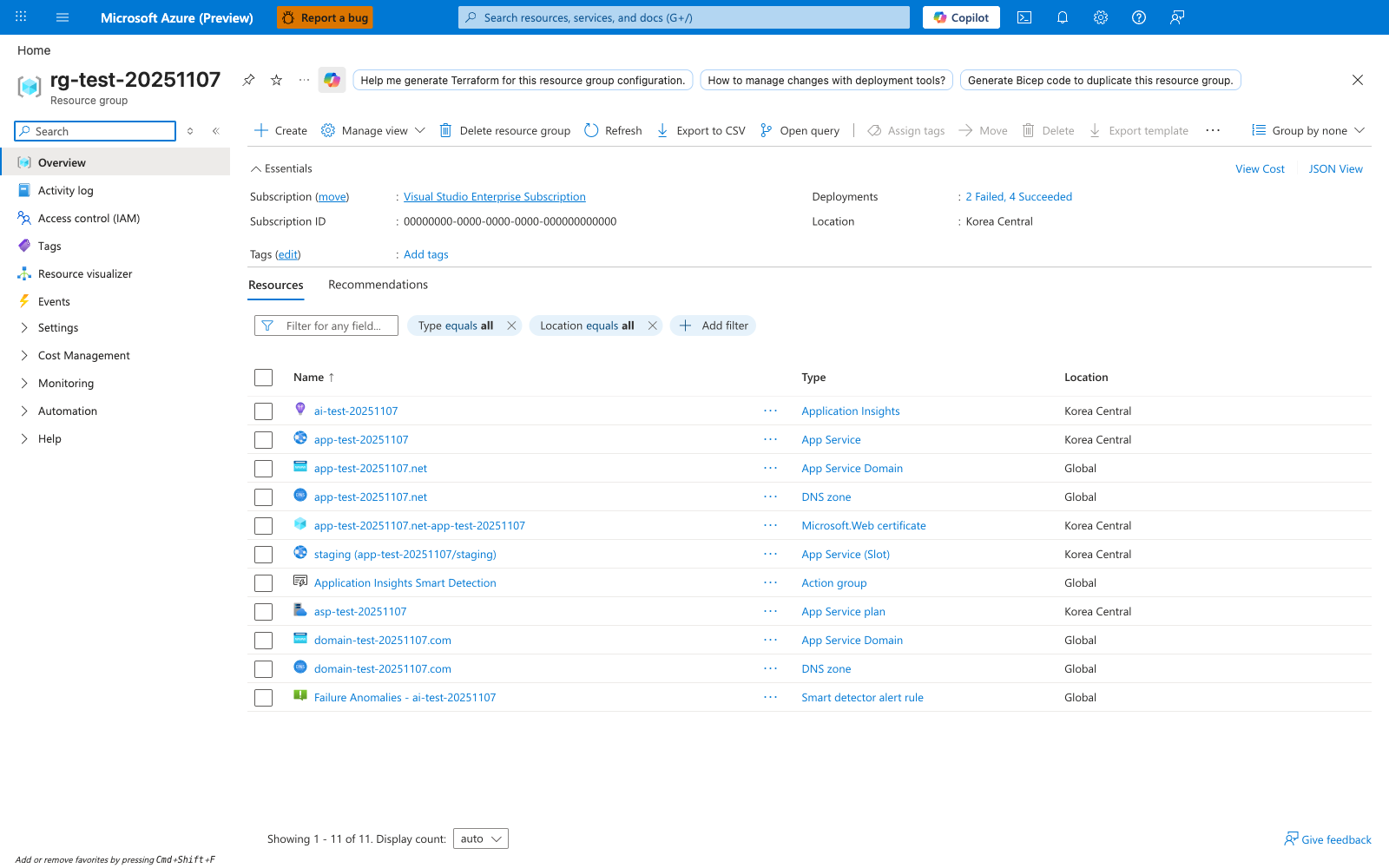
The resource group overview is the easiest place to see that an App Service app is never an isolated object. The Resources list shows the app, its staging slot, the shared App Service Plan, DNS zones, certificates, and Application Insights components as separate Azure resources that participate in one workload. That relationship map is the point of this page: deployment, scaling, monitoring, and custom-domain behavior are spread across multiple resource types even when operators think of them as one website.
Plan-to-app relationship
An App Service Plan is the compute boundary that hosts one or more apps.
Implications:
- Co-hosted apps share compute resources
- Scaling at plan scope affects all apps in that plan
- Cost is primarily tied to plan SKU and instance count
App-to-identity relationship
Managed identity allows the app to request tokens without storing credentials in code or config files.
Flow summary:
- App requests token from managed identity endpoint
- Platform obtains token from Microsoft Entra ID
- App presents token to downstream Azure service
Benefits:
- Eliminates secret distribution for many service-to-service calls
- Simplifies credential rotation risk
- Supports least-privilege authorization through RBAC
sequenceDiagram
    participant App as App Service App
    participant MI as Managed Identity Endpoint
    participant Entra as Microsoft Entra ID
    participant Resource as Azure Resource

    App->>MI: Request access token for resource
    MI->>Entra: Token acquisition
    Entra-->>MI: Access token
    MI-->>App: Access token
    App->>Resource: Call API with bearer token
App-to-data relationships
Common data patterns:
- Relational data service for transactional workloads
- NoSQL data service for flexible schema and globally distributed needs
- Cache service for low-latency reads and session acceleration
Design considerations:
- Connection pooling and retry policy
- Regional placement for latency minimization
- Throughput tier alignment with app scale profile
App-to-secrets relationship
Secret retrieval typically uses one of these paths:
- Application code requests secrets at runtime using identity
- Platform-level secret references resolve into app settings
Security guidance:
- Store no production secrets in source control
- Apply least-privilege secret access policies
- Audit and alert on secret access anomalies
App-to-storage relationship
Storage relationships include:
- Blob/object access for unstructured assets
- File-share integration for shared file semantics
- Queue/table patterns for asynchronous and metadata workloads
Persistence rule:
- Treat app local disk as ephemeral
- Use external storage services for durable business data
App-to-container-registry relationship
For container-hosted apps:
- App Service pulls container images from registry
- Registry authentication can use managed identity
- Deployment reliability depends on image availability and pull performance
App-to-monitoring relationship
Monitoring resources capture:
- Request telemetry
- Dependency traces
- Platform and app logs
- Alert signals for SLO/SLA operations
Observability should be treated as a first-class dependency, not an afterthought.
Network-scoped relationships
Resource relationships are often constrained by network boundaries:
- Private endpoint for inbound private app access
- VNet integration for outbound private dependency access
- Private DNS to ensure correct private name resolution
graph TD
    Client[VNet Client] --> PE[Private Endpoint]
    PE --> App[App Service]
    App --> Int[VNet Integration Subnet]
    Int --> Data[(Private Data Service)]
    Int --> Secret[(Private Secret Store)]
RBAC and scope relationships
Authorization is evaluated at scope levels:
- Management group
- Subscription
- Resource group
- Resource
Recommended pattern:
- Assign app identity only the minimum roles needed
- Prefer resource-scope role assignments over broad scopes
- Review assignments regularly
Lifecycle and dependency ordering
Infrastructure lifecycle should respect dependency order:
- Network and identity foundations
- Plan and app resources
- Data/secrets dependencies and permissions
- Deployment and post-deploy validation
The same ordering helps in teardown and incident recovery planning.
CLI examples for relationship validation
Show managed identity state:
Example output (PII masked):
{
  "principalId": "xxxxxxxx-xxxx-xxxx-xxxx-xxxxxxxxxxxx",
  "tenantId": "<tenant-id>",
  "type": "SystemAssigned",
  "userAssignedIdentities": null
}
List role assignments for app principal:
Inspect app-to-plan linkage:
az webapp show \
    --resource-group "$RG" \
    --name "$APP_NAME" \
    --query "{serverFarmId:serverFarmId, id:id, state:state}" \
    --output json
Bicep snippet for identity + app relationship
param location string = resourceGroup().location
param planName string
param appName string

resource plan 'Microsoft.Web/serverfarms@2023-12-01' = {
  name: planName
  location: location
  sku: {
    name: 'S1'
    tier: 'Standard'
    capacity: 1
  }
  properties: {
    reserved: true
  }
}

resource app 'Microsoft.Web/sites@2023-12-01' = {
  name: appName
  location: location
  identity: {
    type: 'SystemAssigned'
  }
  properties: {
    serverFarmId: plan.id
    httpsOnly: true
  }
}
Advanced Topics
Dependency blast-radius mapping
Map each app dependency to failure impact classes:
- Tier 0: request-path critical
- Tier 1: degraded-mode possible
- Tier 2: non-critical operational
This helps prioritize resilience investment and incident response.
Multi-app plan governance
When several apps share one plan:
- Define ownership boundaries
- Set shared SLO expectations
- Enforce release windows for high-risk changes
Secret and identity rotation strategy
Even with managed identities, supporting services and admin credentials require rotation governance. Include periodic validation in runbooks.
Compliance evidence collection
Collect evidence from:
- RBAC assignment exports
- Diagnostic settings
- Network topology and private endpoint records
- Policy compliance reports
Language-Specific Details
For language-specific implementation details, see: - Node.js Guide - Python Guide - Java Guide - .NET Guide
See Also
- How App Service Works
- Hosting Models
- Networking
- Managed identity for App Service (Microsoft Learn)
- Azure RBAC overview (Microsoft Learn)