Networking
Azure App Service networking controls define who can reach your application and how your application reaches downstream services. Correct networking design is fundamental for security, compliance, and predictable performance.
Prerequisites
- Familiarity with virtual networks, subnets, DNS, and private IP ranges
- Understanding of ingress vs egress traffic
- Access to configure App Service networking features
Main Content
Networking model overview
graph TD
    Internet[Internet Clients] --> Ingress{Inbound Path}
    Ingress --> Public[Public Endpoint + Access Rules]
    Ingress --> Private[Private Endpoint]

    App[App Service App] --> Egress{Outbound Path}
    Egress --> Default[Platform Outbound]
    Egress --> VNet[VNet Integration]
    VNet --> PrivateResources[Private Resources in VNet]
Portal view: Networking blade
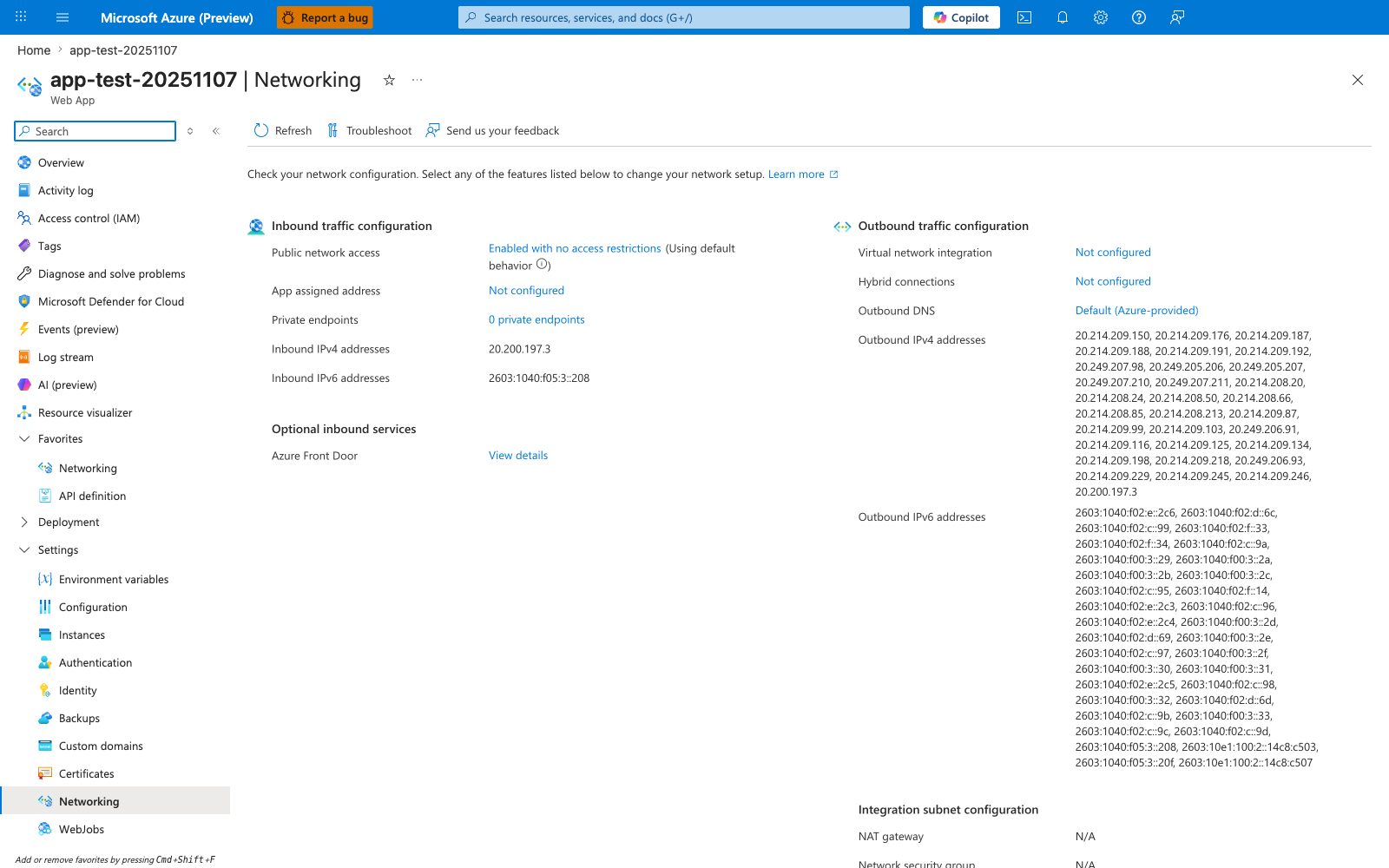
The Networking blade separates App Service networking into the two planes operators actually manage: ingress and egress. On the inbound side, Public network access, Access restriction status, and Private endpoints tell you whether requests arrive over an open public edge, rule-filtered access path, or Private Link. On the outbound side, Virtual network integration and the listed Outbound addresses show how the app reaches downstream resources, which is the core distinction behind VNet integration versus private inbound publishing.
Inbound traffic controls
By default, an app has a public endpoint. You can tighten inbound access using:
- Access restrictions (IP, service tags, priority rules)
- Private endpoint (private ingress over Private Link)
- Authentication/authorization policy at the edge
Access restrictions
Access restrictions provide allow/deny controls evaluated before traffic reaches your app process.
graph TD
    Client[Client] --> FE[App Service Frontend]
    FE --> Rules[Access Restriction Rules]
    Rules -->|Allow| App[Application]
    Rules -->|Deny| Reject[403 Response]
Best practices:
- Use explicit allowlist rules
- Keep rule priorities documented
- Apply equivalent restrictions to SCM site where needed
Note
Misconfigured access rules are a common cause of "app is up but unreachable" incidents.
Private endpoint for inbound isolation
A private endpoint assigns a private IP for app access within your network boundary.
graph TD
    Internet[Public Internet] -- blocked or restricted --> App[App Service]
    subgraph VNet[Virtual Network]
        Client[VNet Client] --> PE[Private Endpoint]
    end
    PE --> App
Benefits:
- Reduces internet exposure
- Enables private-only ingress architectures
- Supports strict network segmentation requirements
Outbound traffic controls
Outbound traffic covers calls from your app to databases, APIs, and service dependencies.
VNet integration for outbound connectivity
VNet integration lets app outbound traffic reach private resources.
graph TD
    App[App Service App] --> Integration[VNet Integration Subnet]
    Integration --> Database[(Private Database)]
    Integration --> Api[Private API]
    Integration --> Vault[Private Secret Store]
Key requirements:
- Dedicated integration subnet
- Proper subnet delegation (
Microsoft.Web/serverFarms) - Sufficient subnet address space (minimum sizing guidance applies)
Ingress vs egress
VNet integration controls outbound connectivity. It does not make your app privately reachable from clients. Use private endpoint for private inbound access.
Combining inbound and outbound private patterns
High-security architecture commonly combines:
- Private endpoint for inbound
- VNet integration for outbound
- Private DNS zones for name resolution
- Strict NSG and route governance
graph TD
    subgraph VNet[Virtual Network]
        Client[VNet Client] --> PE[Private Endpoint]
        Subnet[Integration Subnet] --> DB[(Private Data Service)]
    end
    PE --> App[App Service]
    App --> Subnet
DNS behavior with private endpoint
Private endpoint access typically relies on a CNAME chain and private DNS zone mapping.
sequenceDiagram
    participant Client as VNet Client
    participant DNS as DNS Resolver
    participant Zone as Private DNS Zone
    participant PE as Private Endpoint
    participant App as App Service

    Client->>DNS: Resolve app.azurewebsites.net
    DNS-->>Client: CNAME app.privatelink.azurewebsites.net
    Client->>Zone: Resolve app.privatelink.azurewebsites.net
    Zone-->>Client: A record 10.x.x.x
    Client->>PE: Connect to private IP
    PE->>App: Forward over Azure backbone
Outbound SNAT and connection planning
Outbound connections consume SNAT ports. High churn or poor connection reuse can cause intermittent failures.
Common symptoms:
- Sporadic outbound timeout spikes
- Dependency connection resets under burst load
- Recovery after traffic drop
Mitigations:
- Reuse outbound connections
- Use connection pooling in dependency clients
- Consider NAT Gateway with VNet integration for larger outbound capacity
Hybrid connectivity
To reach on-premises or cross-network systems:
- VNet integration + VPN/ExpressRoute for full network extension
- Hybrid connections for simpler TCP scenarios
Choose based on latency, throughput, protocol support, and operational ownership.
CLI examples for networking configuration
Show current network-related app configuration:
az webapp show \
    --resource-group "$RG" \
    --name "$APP_NAME" \
    --query "{defaultHostName:defaultHostName, httpsOnly:httpsOnly, hostNames:hostNames}" \
    --output json
Add access restriction rule:
az webapp config access-restriction add \
    --resource-group "$RG" \
    --name "$APP_NAME" \
    --rule-name "allow-corp" \
    --action Allow \
    --ip-address "203.0.113.0/24" \
    --priority 100
List access restriction rules:
az webapp config access-restriction show \
    --resource-group "$RG" \
    --name "$APP_NAME" \
    --output table
Create private endpoint (conceptual example):
az network private-endpoint create \
    --resource-group "$RG" \
    --name "$PE_NAME" \
    --vnet-name "$VNET_NAME" \
    --subnet "$SUBNET_NAME" \
    --private-connection-resource-id "$APP_RESOURCE_ID" \
    --group-id "sites" \
    --connection-name "$PE_CONNECTION_NAME"
Example output snippet (PII masked):
{
  "customDnsConfigs": [
    {
      "fqdn": "app-<masked>.azurewebsites.net",
      "ipAddresses": [
        "192.0.2.4"
      ]
    },
    {
      "fqdn": "app-<masked>.scm.azurewebsites.net",
      "ipAddresses": [
        "192.0.2.4"
      ]
    }
  ],
  "id": "/subscriptions/<subscription-id>/resourceGroups/rg-<masked>/providers/Microsoft.Network/privateEndpoints/pe-<masked>",
  "name": "pe-<masked>",
  "provisioningState": "Succeeded"
}
IP address behavior and lifecycle
Understanding when and why IP addresses change is critical for firewall allowlists, DNS records, and downstream dependency configurations.
Outbound IP addresses
App Service assigns a set of outbound IPs shared within the scale unit. Two fields are relevant:
| Field | Description | When to use |
|---|---|---|
outboundIpAddresses | Currently active outbound IPs | Current state only — not safe for allowlists |
possibleOutboundIpAddresses | All IPs the app could ever use on this plan | Always use this for firewall allowlists |
Query both fields:
az webapp show \
    --resource-group "$RG" \
    --name "$APP_NAME" \
    --query "{active:outboundIpAddresses, possible:possibleOutboundIpAddresses}" \
    --output json
Example output (PII masked):
{
  "active": "4.217.128.55,4.217.128.64,4.217.128.65,4.217.128.66,4.217.128.67,4.217.128.80,20.41.120.146,20.196.112.47,20.41.120.193,20.196.112.79,20.41.120.195,20.196.112.159,20.41.66.225",
  "possible": "20.194.32.78,20.194.38.125,20.194.38.174,20.194.38.52,20.194.7.226,20.194.7.69,20.196.112.159,20.196.112.173,20.196.112.182,20.196.112.202,20.196.112.213,20.196.112.228,20.196.112.47,20.196.112.79,20.41.120.146,20.41.120.148,20.41.120.149,20.41.120.151,20.41.120.154,20.41.120.193,20.41.120.195,20.41.120.200,20.41.120.201,20.41.120.202,20.41.66.225,4.217.128.55,4.217.128.64,4.217.128.65,4.217.128.66,4.217.128.67,4.217.128.80"
}
Outbound IPs change under these conditions
- Scale up or scale down (App Service Plan SKU change)
- App Service Plan migration to a different scale unit or region
- Enabling or disabling VNet Integration
- Platform-side infrastructure updates
Always allowlist all addresses from possibleOutboundIpAddresses, not just the currently active set.
Outbound IP behavior with VNet Integration
When VNet Integration is enabled with WEBSITE_VNET_ROUTE_ALL=1, outbound traffic exits through the delegated integration subnet — not through the platform's shared outbound IPs. The effective egress IP becomes the NAT IP of the subnet (or a NAT Gateway if attached).
# Check current VNet integration state
az webapp vnet-integration list \
    --resource-group "$RG" \
    --name "$APP_NAME" \
    --output json
Example output:
[
  {
    "name": "snet-integration",
    "vnetResourceId": "/subscriptions/<subscription-id>/resourceGroups/rg-<masked>/providers/Microsoft.Network/virtualNetworks/vnet-net-test/subnets/snet-integration",
    "isSwift": null
  }
]
After enabling VNet Integration and WEBSITE_VNET_ROUTE_ALL=1, downstream services that allowlisted the previous platform outbound IPs will lose connectivity. Update allowlists to reflect the subnet's egress IP.
Inbound IP addresses and Private Endpoint
By default, the app's inbound IP is shared and public. When a Private Endpoint is created, the app is assigned a private IP from the endpoint subnet. The public endpoint continues to exist but can be blocked via access restrictions.
Query the inbound IP:
az webapp show \
    --resource-group "$RG" \
    --name "$APP_NAME" \
    --query "inboundIpAddress" \
    --output tsv
Query Private Endpoint assigned IP:
az network private-endpoint show \
    --resource-group "$RG" \
    --name "pe-$APP_NAME" \
    --query "customDnsConfigs[0].ipAddresses" \
    --output json
Example output:
Private Endpoint does not remove the public IP
Creating a Private Endpoint assigns a private IP but does not automatically disable the public endpoint. To fully restrict inbound access to private clients only:
- Create the Private Endpoint.
- Add an access restriction to deny all public traffic (set a
Deny Allrule with lowest priority). - Validate resolution from inside the VNet returns the private IP.
Skipping step 2 leaves the app reachable from the public internet even with a Private Endpoint active.
Troubleshooting matrix
| Symptom | Likely Cause | Validation Path |
|---|---|---|
| Public clients blocked unexpectedly | Restriction rule precedence | Review priorities/actions |
| Private endpoint unreachable | DNS zone/link issue | Verify CNAME/A resolution in VNet |
| App cannot reach private DB | Missing VNet integration route | Validate subnet/delegation/NSG |
| Intermittent outbound timeouts | SNAT exhaustion | Inspect connection reuse + outbound metrics |
Advanced Topics
Zero-trust ingress pattern
Use private endpoint + strict access restrictions + identity-aware upstream gateway for layered controls.
Route-all outbound strategy
In some designs, all outbound flows through controlled network paths for inspection and policy enforcement. Validate latency impact before broad rollout.
Multi-environment DNS governance
Separate private DNS zones by environment when strict isolation is required, and document naming conventions to prevent resolution drift.
Networking readiness checklist
- Inbound path explicitly documented (public/private)
- Access restrictions tested from allowed/denied sources
- Private DNS resolution validated in each subnet
- Outbound dependency inventory mapped to route path
- Alerting enabled for connectivity failures
Language-Specific Details
For language-specific implementation details, see: - Node.js Guide - Python Guide - Java Guide - .NET Guide
See Also
- How App Service Works
- Request Lifecycle
- Scaling
- Resource Relationships
- App Service networking features (Microsoft Learn)
- VNet integration overview (Microsoft Learn)