Mutual TLS Architecture
Azure App Service supports mutual TLS in multiple places, but the trust boundary is different in each one. For production design, separate inbound client certificate authentication, outbound client certificate presentation, and App Service Environment (ASE) ingress topology instead of treating all three as the same feature.
Main Content
The three mTLS planes in App Service
flowchart TD
    Client[External client with certificate] --> FE[App Service front end]
    FE --> Header[X-ARR-ClientCert header]
    Header --> App[Web app code]
    App --> Store[Loaded private certificate]
    Store --> Remote[Remote API requiring mTLS]
    Corp[Corporate or private network] --> ASE[ASE or ILB ASE ingress]
    ASE --> FE
App Service mTLS has three distinct planes:
| Plane | Direction | Where TLS terminates | What your code sees | Primary platform controls |
|---|---|---|---|---|
| Incoming client certificate authentication | Inbound | App Service front end | X-ARR-ClientCert header | clientCertEnabled, clientCertMode, clientCertExclusionPaths |
| Outbound client certificate authentication | Outbound | Remote service | Certificate loaded by the app process | uploaded private certificate, WEBSITE_LOAD_CERTIFICATES |
| End-to-end private ingress with ASE | Inbound topology | App Service front end inside ASE path | Depends on the exact ingress chain and proxy design | ASE / ILB ASE network design, ingress and certificate policy |
The important architecture rule is that inbound mTLS and outbound mTLS are independent. Enabling client certificates for inbound requests does not automatically give your app a client certificate for outbound calls, and uploading a private certificate for outbound calls does not authenticate inbound callers.
Incoming client certificate authentication
For inbound mutual TLS, App Service terminates TLS at the front end and forwards the presented client certificate to your application in the X-ARR-ClientCert request header.
Portal view: Custom domains and TLS bindings
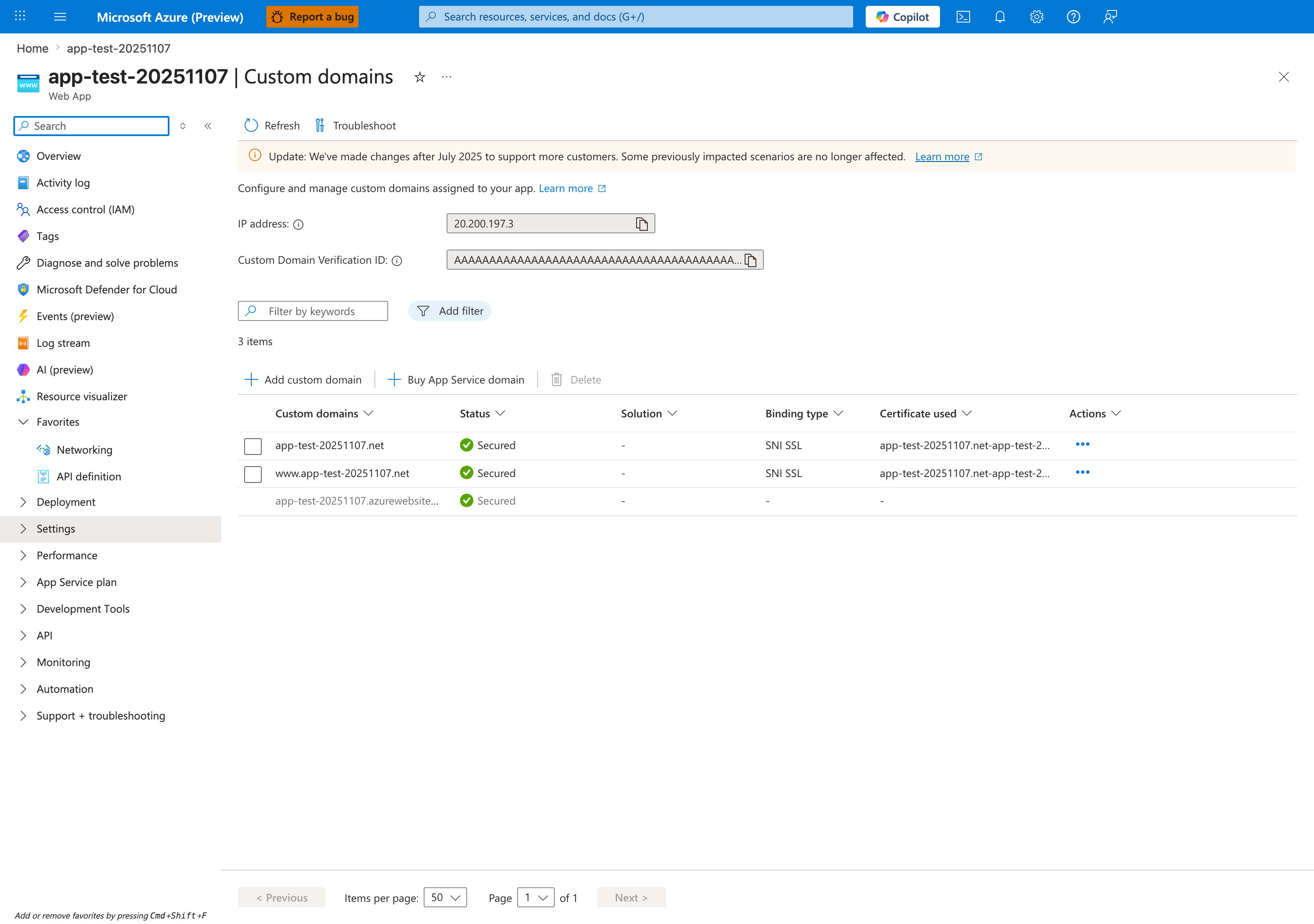
The Custom domains blade is where the inbound TLS surface becomes concrete for client-certificate designs. The hostname rows and their SNI SSL binding type define which front-end endpoints can participate in the TLS handshake, while the Certificate used column ties each hostname to the server certificate that the front end will present. The contrast between the two App Service domain rows (both bound to an SNI SSL certificate) and the default *.azurewebsites.net row (whose Solution, Binding type, and Certificate used columns are all -) shows that mTLS configuration applies on top of explicitly bound custom hostnames — clientCertEnabled and clientCertMode decide whether App Service then asks the client to present a certificate and forward X-ARR-ClientCert to your app.
Key platform behavior:
clientCertEnabledturns the feature on.clientCertModecontrols whether certificates are required or optional.clientCertExclusionPathsbypasses certificate enforcement for selected paths.- The forwarded header value is base64-encoded certificate content without PEM markers.
- Your application must validate issuer, subject, thumbprint, validity window, and chain policy as needed.
App Service forwards, but does not validate
Microsoft Learn explicitly states that App Service does not validate the inbound client certificate. Treat clientCertMode=Required as "certificate must be presented at the edge," not "certificate chain is trusted for authorization."
Site properties for inbound mTLS
| Property | Type | Example | Purpose |
|---|---|---|---|
clientCertEnabled | Boolean | true | Enables client certificate forwarding and enforcement behavior |
clientCertMode | String | Required | Controls whether certificates are required, optional, or renegotiated for interactive browsers |
clientCertExclusionPaths | String | /health;/webhooks/partner-a | Skips client certificate enforcement for matching request paths |
Supported clientCertMode values documented by Microsoft Learn:
RequiredOptionalOptionalInteractiveUser
Design guidance:
- Use
Requiredfor API endpoints where every caller must present a client certificate. - Use
Optionalonly when the application enforces certificate presence for selected routes or callers. - Use
clientCertExclusionPathssparingly for liveness probes, platform callbacks, or third-party webhook endpoints that cannot present a certificate.
Exclusion paths rely on TLS renegotiation
Microsoft Learn documents that clientCertExclusionPaths and OptionalInteractiveUser rely on TLS renegotiation. TLS 1.3 and HTTP/2 do not support renegotiation, and large request bodies can fail when renegotiation is required. Validate these constraints before standardizing on exclusions.
Outbound mTLS from the app to remote services
Outbound mTLS means your App Service app acts as the TLS client and presents its own certificate to a downstream dependency such as a partner API, API gateway, or internal service.
The platform pattern is different from inbound mTLS:
- Upload a private certificate to the App Service app.
- Make it available to application code with
WEBSITE_LOAD_CERTIFICATES. - Load the certificate from the platform-exposed store or filesystem location.
- Attach it to your HTTP client or TLS context.
Note
App Service documents outbound certificate loading separately from inbound client certificate authentication. Keep the configuration, rotation, and operational runbooks separate.
ASE and end-to-end private ingress considerations
App Service Environment changes where the App Service front ends and workers live on your network, but your application should still treat inbound client certificates as platform-forwarded artifacts unless your ingress chain adds another gateway or proxy behavior.
Conservative ASE design assumptions:
- Use ASE to control where ingress is exposed and how private routing works.
- Assume the standard
X-ARR-ClientCertapplication contract only when no upstream gateway or proxy changes that behavior. - Document ILB ASE as an ingress-topology choice, not as proof of a different in-app certificate format.
ASE details need topology-specific validation
ASE changes network boundaries, load-balancer placement, and private ingress patterns. Validate your exact ASE v3 ingress chain, especially for ILB deployments and upstream proxies such as Application Gateway or Front Door, before assuming standard App Service certificate-forwarding behavior.
Comparison summary
| Question | Incoming client certificates | Outbound client certificates | ASE private ingress |
|---|---|---|---|
| Who presents the certificate? | External caller | Your app | External caller through ASE path |
| Where is TLS terminated? | App Service front end | Remote service | App Service front end in ASE topology |
| What does app code receive? | X-ARR-ClientCert header | Certificate from local store/path | Depends on whether the ingress chain preserves the standard App Service contract |
| What validates trust? | Your app code | Remote service and your outbound TLS configuration | Your app code plus ASE network design |
| Common mistake | Assuming Required validates the chain | Forgetting WEBSITE_LOAD_CERTIFICATES | Assuming ASE changes the app-level certificate contract |
See Also
- Security Architecture
- Networking
- Incoming Client Certificates
- Outbound Client Certificates
- mTLS Best Practices