Azure App Service Deployment Scenarios
Understanding the relationship between App Service SKUs and deployment architecture is essential for security, performance, and cost-effectiveness. This guide breaks down common scenarios based on networking requirements and tier capabilities.
Scenario Overview
The choice of deployment scenario typically follows a progression of networking complexity and isolation requirements.
graph TD
    Start[Choose Deployment Scenario] --> FreeBasic[Scenario A: Public Basic]
    FreeBasic --> |Add VNet Integration| StdPrem[Scenario B: VNet Integrated]
    StdPrem --> |Full Isolation| Isolated[Scenario C: Isolated ASE]

    subgraph "Scenario A"
    FreeBasic[Free/Basic Tiers]
    end

    subgraph "Scenario B"
    StdPrem[Standard/Premium Tiers]
    end

    subgraph "Scenario C"
    Isolated[Isolated v2/v3 Tiers]
    end
Matrix A: Networking and Security by SKU
| Feature | Free/Shared | Basic | Standard | Premium (v2/v3/v4) | Isolated (ASE) |
|---|---|---|---|---|---|
| Public Inbound | Yes | Yes | Yes | Yes | Optional |
| Regional VNet Integration | No | Yes | Yes | Yes | Native |
| Private Endpoints | No | Yes | Yes | Yes | Native |
| IP Restrictions | Yes | Yes | Yes | Yes | Yes |
| Hybrid Connections | No | Yes | Yes | Yes | No (Direct VNet) |
| Outbound IP Control | Shared | Shared | Shared | Shared/NAT Gateway | Fully Controlled |
Matrix B: Deployment Methods by SKU
| Method | Free/Shared | Basic | Standard | Premium | Isolated |
|---|---|---|---|---|---|
| ZIP Deploy | Yes | Yes | Yes | Yes | Yes |
| Run from Package | Yes | Yes | Yes | Yes | Yes |
| Container (Web App for Containers) | No | Yes | Yes | Yes | Yes |
| GitHub Actions / ADO | Yes | Yes | Yes | Yes | Yes (vNet required) |
| Kudu (SCM) Site | Public access only | Depends on SCM private endpoint and public network access settings | Depends on SCM private endpoint and public network access settings | Depends on SCM private endpoint and public network access settings | Depends on ASE/network topology |
| Deployment Slots | No | No | 5 | 20 | 20 |
SCM reachability depends on topology, not just SKU
SCM/Kudu reachability depends on whether you configure an SCM private endpoint and whether public network access remains enabled. Private endpoints for multi-tenant App Service are available from the Basic tier onward, so Basic, Standard, and Premium apps can be public-only, dual-access, or effectively private depending on network configuration.
Portal view: Deployment slots
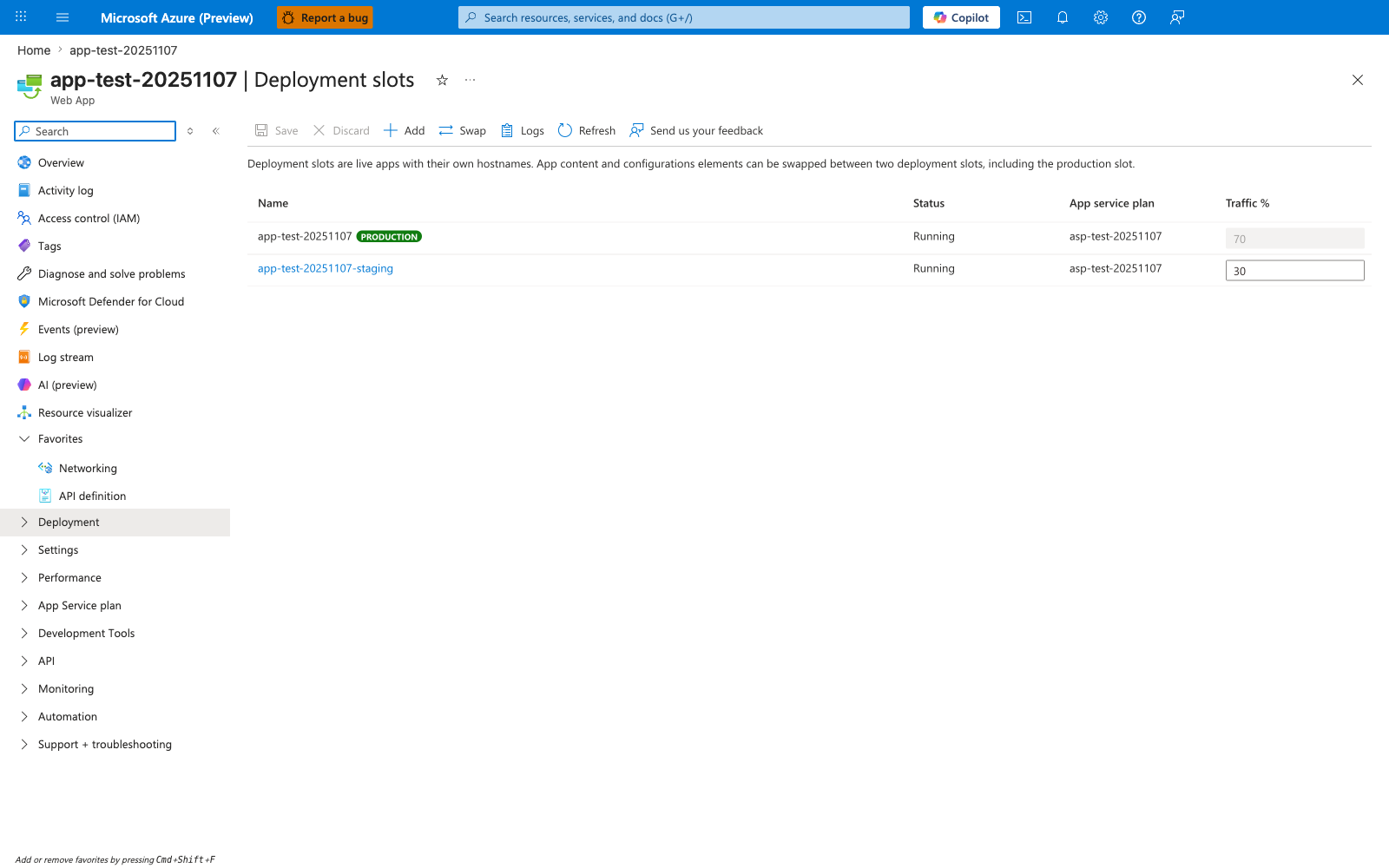
The Deployment slots blade turns release strategy into concrete routing controls. Separate Production and staging rows, each with its own App URL, Status, and Traffic %, show that slots are distinct runtime targets even though they live under one app and plan boundary. The 70% / 30% split and the Swap button map directly to canary and cutover scenarios: you can shift live traffic gradually, then promote the staged build into production once behavior is verified.
Scenario A: Public-Only (Free/Shared tiers)
Best for early development, personal projects, or static-like sites where VNet integration and private ingress are not required.
graph TD
    User((User)) -->|HTTPS| PublicEndpoint[App Service Public IP]
    Developer((Developer)) -->|Push| GitHub[GitHub Actions]
    GitHub -->|ZIP Deploy| Kudu[Kudu SCM Site]
    Kudu -->|Deploy| AppInstance[App Service Instance]
    AppInstance -->|Outbound| Internet((Public Internet))
Key Characteristics
- Networking: All traffic enters via a shared public IP address.
- Security: Access control is limited to IP restrictions (allow/deny lists).
- SCM Access: The Kudu management site is publicly accessible. Warning: This management interface is exposed to the internet and should be secured with strong credentials or disabled if not in use.
Deployment Example (ZIP Deploy)
az webapp deployment source config-zip \
    --resource-group "myResourceGroup" \
    --name "myWebApp" \
    --src "project.zip"
| Command/Parameter | Purpose |
|---|---|
| --resource-group | Specifies the Azure resource group containing the app service. |
| --name | The name of the target App Service. |
| --src | Path to the ZIP file containing the application code. |
Scenario B: VNet Integrated & Private Inbound (Basic/Standard/Premium)
The standard for production enterprise applications. This scenario allows the App Service to reach resources inside a Virtual Network and supports private ingress via Private Endpoints.
graph TD
    User((User)) -->|Private Link| PrivEnd[Private Endpoint]
    subgraph "Azure Virtual Network"
        PrivEnd --> AppService[App Service]
        AppService -->|Regional VNet Integration| Subnet[Integration Subnet]
        Subnet --> SQL[Azure SQL / Private Resource]
    end
    Developer((Developer)) -->|VPN/ExpressRoute| SCM[SCM Private Endpoint]
    SCM --> AppService
Key Characteristics
- Regional VNet Integration: Allows the app to access resources in a VNet (like SQL databases or Key Vaults with private endpoints).
- Private Endpoints: Provides a private IP for ingress. Note: Adding a private endpoint does not automatically disable the public endpoint; you must explicitly disable public network access in the Networking settings to achieve full isolation.
- Outbound Traffic: Can be routed through a NAT Gateway or Firewall for fixed outbound IPs (requires NAT Gateway on the integration subnet).
Enabling VNet Integration
az webapp vnet-integration add \
    --resource-group "myResourceGroup" \
    --name "myWebApp" \
    --vnet "myVNet" \
    --subnet "integrationSubnet"
| Command/Parameter | Purpose |
|---|---|
| --resource-group | Specifies the Azure resource group containing the app service. |
| --name | The name of the target App Service. |
| --vnet | The name of the Virtual Network to integrate with. |
| --subnet | The dedicated subnet for App Service outbound traffic. |
Scenario C: Isolated (ASE)
The highest level of isolation. The entire App Service Environment (ASE) runs within your Virtual Network on dedicated hardware.
graph TD
    subgraph "Azure Virtual Network (ASE)"
        ILB[Internal Load Balancer] --> WebApps[App Service Instances]
        WebApps --> DataSubnet[Data/Backend Subnet]
    end
    Gateway[Application Gateway / Front Door] -->|Private| ILB
Key Characteristics
- Single Tenant: No shared infrastructure with other customers.
- Internal Load Balancer (ILB): Can be configured to have no public internet footprint at all.
- Scalability: Supports much larger scale-out compared to multi-tenant tiers.
Pre-Deployment Checklist
- Verify SKU Compatibility: Ensure the chosen tier supports VNet integration (Basic+) or Private Endpoints (Basic+).
- Subnet Delegation: The integration subnet must be delegated to
Microsoft.Web/serverFarmsand must be empty before configuration. - App Settings (Code Deploy): For ZIP or package-based deployments, configure
WEBSITE_RUN_FROM_PACKAGE=1for faster startup and atomic swaps only when the runtime supports it. On Linux code apps, it is supported for Node.js and .NET, but not for Python or Java. (Not applicable for custom containers). - DNS Resolution: Ensure private DNS zones (
privatelink.azurewebsites.net) are linked to your VNet when using Private Endpoints.
See Also
Sources
- Microsoft Learn: App Service Environment Overview
- Microsoft Learn: VNet Integration
- Microsoft Learn: Deploy from Package
- Microsoft Learn: Continuous Deployment