How App Service Works
Azure App Service is a managed hosting platform for web apps and APIs. You focus on application behavior, while Microsoft operates fleet management, patching, frontend routing, and worker lifecycle. This page builds the mental model you need for design reviews, deployment decisions, and production troubleshooting.
Scope of this page
This page explains the common mental model for Azure App Service — architecture, deployment, storage, startup, and diagnostics. Some operational details lean toward Linux and container hosting. Where behavior differs by hosting mode (Windows code, Linux built-in, Linux custom container), the text calls it out explicitly. For isolated environments (ASE), see Microsoft Learn: App Service Environment overview.
Community guide disclaimer
This field guide is a community-maintained learning resource. For authoritative platform behavior, always confirm with Microsoft Learn and Azure product documentation before production changes.
Prerequisites
Reading prerequisites
- Basic Azure concepts: subscription, resource group, region, identity
- Basic understanding of HTTP request/response lifecycle
- Familiarity with the difference between control configuration and runtime execution
Hands-on prerequisites
- Azure CLI installed and authenticated (
az --version,az login) - Permission to read and update App Service resources in your subscription
- One test app and one test plan for experiments (non-production)
Main Content
[Beginner] Architecture at a glance
Before diving into each subsystem, anchor on the full regional picture: configuration enters through the control plane, user traffic enters through the runtime plane, and deployment traffic typically enters through the SCM plane.
flowchart TD
    Client["Client or browser"]
    Deploy["Developer or CI/CD pipeline"]

    subgraph Control["Control plane"]
        ARM["Azure Resource Manager<br/>App Service resource provider"]
    end

    subgraph Stamp["Regional App Service stamp"]
        subgraph Runtime["Runtime plane"]
            FE["Front-end gateways<br/>Routing and TLS termination"]
            Workers["Worker instances<br/>Application code execution"]
            Storage["Shared content storage<br/>Azure Files"]
        end

        subgraph SCMPlane["Deployment plane"]
            SCM["SCM and Kudu endpoint<br/>Deployment and diagnostics"]
        end

        Platform["Health checks, scaling,<br/>and platform management"]
    end

    Client --> FE
    FE --> Workers
    Workers --> Storage
    Deploy --> SCM
    SCM --> Storage
    ARM --> Platform
    Platform --> FE
    Platform --> Workers
Key takeaways:
- User requests hit front-end gateways first, then flow to healthy worker instances that run your application code.
- Configuration changes go through Azure Resource Manager and the App Service resource provider, not directly to the request path.
- SCM/Kudu is a companion deployment and diagnostics surface, which is why deployment behavior and runtime behavior can differ.
- Shared content and logs typically rely on network-backed storage, while platform services coordinate health, placement, and scale inside the regional stamp.
Portal view: App Service Web App overview
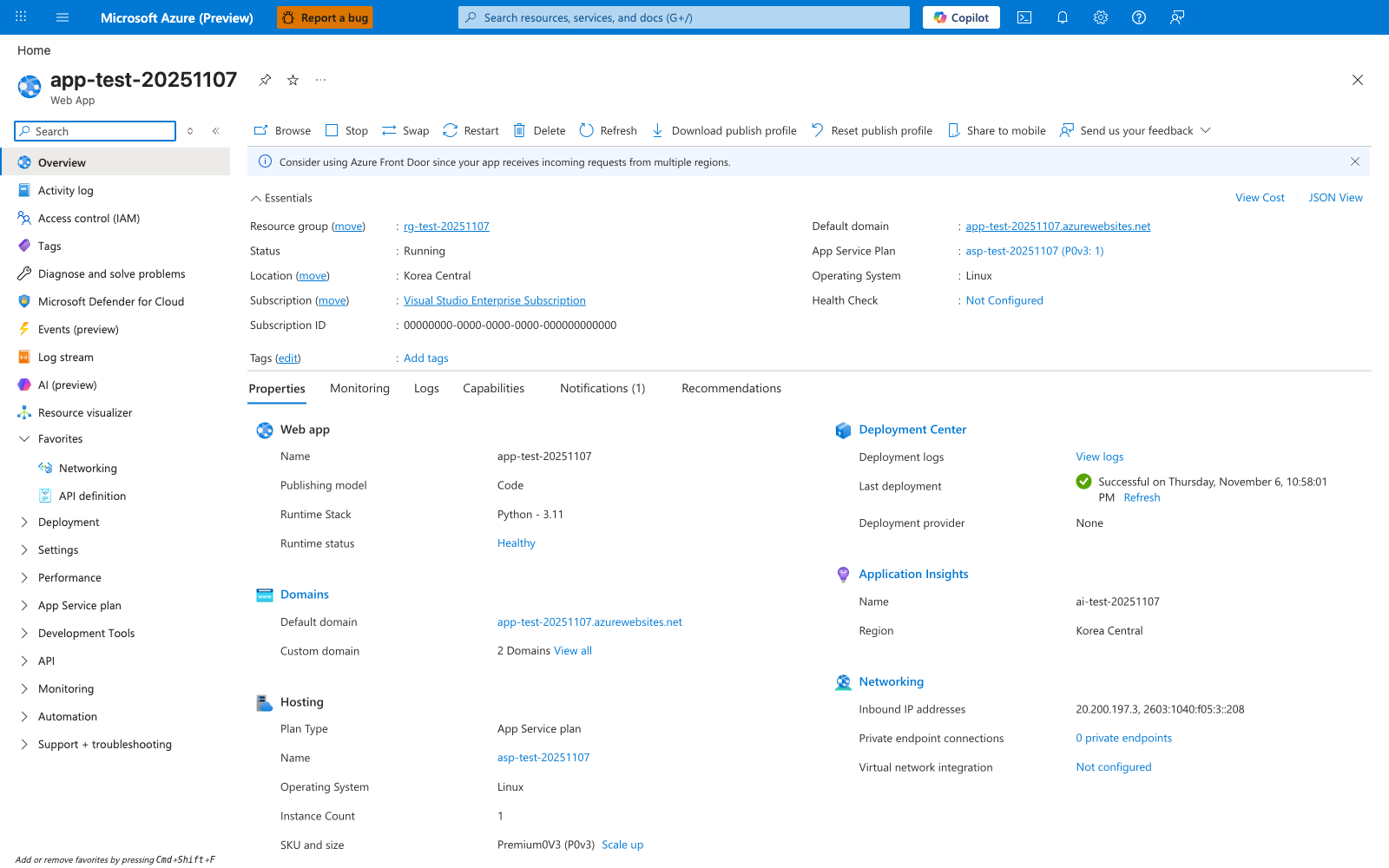
The Overview blade is the operator's mental map of an App Service Web App. The Essentials panel ties the app to its plan SKU (asp-test-20251107 (P0v3: 1)), Operating System: Linux, and the Default domain that frontend gateways resolve for clients. The Properties tab body groups the same fields by concern - Web app (Publishing model: Code, Runtime Stack: Python - 3.11, Runtime status: Healthy), Hosting (Plan Type: App Service plan, Instance Count: 1, SKU and size: Premium0V3 (P0v3)), Deployment Center (Last deployment), Application Insights, and Networking (Inbound IP addresses, Private endpoint connections) - which line up with the runtime plane in the diagram above. The command bar (Browse, Stop, Swap, Restart, Delete, Refresh, Download publish profile, Reset publish profile) gives you the management-plane levers; everything you change here flows through ARM and may recycle workers.
[Beginner] Control plane vs data plane
For change management and incident response, it helps to collapse the platform into what you configure versus what executes at runtime.
flowchart TD
    subgraph CP["Control plane<br/>What you configure"]
        C1["App Service Plan SKU and instance count"]
        C2["App settings and connection strings"]
        C3["Custom domains and TLS certificates"]
        C4["Deployment slots and swap"]
        C5["Identity and RBAC assignment"]
        C6["Access restrictions"]
    end

    subgraph DP["Data plane<br/>What runs at runtime"]
        D1["Front-end gateway routing"]
        D2["Worker instance execution"]
        D3["Health probes and instance recycling"]
        D4["Log streaming and diagnostics"]
        D5["SCM and deployment engine"]
        D6["Shared file system I/O"]
    end

CP --> DP| Operation | Plane | Example |
|---|---|---|
| Create App Service Plan | Control | az appservice plan create |
| Change app setting | Control (triggers runtime restart) | az webapp config appsettings set |
| Handle HTTP request | Data | Client → Frontend → Worker → App |
| Scale out instances | Control (new workers join data plane) | az appservice plan update --number-of-workers |
| ZIP deploy | Data (SCM plane) | az webapp deploy --src-path |
| Assign managed identity | Control | az webapp identity assign |
Learn references:
[Beginner] Platform architecture at a glance
The most useful mental model for App Service is three planes, not two:
- Management plane
- Runtime plane
- SCM plane
Each plane has different APIs, responsibilities, and failure modes.
Three-plane model
| Plane | What it is | Typical operations | Typical tools |
|---|---|---|---|
| Management plane | Azure Resource Manager + App Service resource provider | App settings, scaling, certificates, networking config, slot config, identity | Azure Portal, ARM/Bicep, Azure CLI, REST |
| Runtime plane | Frontend gateways + worker instances that run your app | Request routing, app startup, health checks, process execution, log streaming path | Browser/API clients, platform probes, runtime logs |
| SCM plane | Companion management surface (Kudu + deployment engine) | ZIP deploy API, deployment logs, selected diagnostics, environment metadata | https://<app-name>.scm.azurewebsites.net, Kudu APIs |
Note
A single management-plane change (for example, changing an app setting) can trigger runtime recycle. Treat any config mutation as potentially restart-impacting.
Core request path (single-region, single-app)
For a normal single-app flow, keep the model simple:
Client → App Service Frontend → Worker Instance
Do not assume a global load balancer in this baseline diagram. Multi-region routing with Front Door or Traffic Manager is a separate architecture topic.
flowchart TD
    C["Client"] --> FE["App Service Frontend"]
    FE --> W["Worker Instance"]
    W --> APP["App Process"]
Management, runtime, and SCM interactions
flowchart TD
    OP["Operator / CI"] --> MGMT["Management Plane<br/>ARM + RP"]
    USER["End User"] --> FE["Runtime Frontend"]
    FE --> WK["Worker Instance"]
    WK --> APP["Main App Sandbox"]

    OP --> SCM["SCM Plane<br/>Kudu Site"]
    SCM --> DEPLOY["Deployment Engine"]
    SCM --> META["Diagnostics/Metadata"]

    MGMT --> FE
    MGMT --> WK
    DEPLOY --> CONTENT["App Content"]
    CONTENT --> APP
Main app vs SCM app are separate contexts
The main app and the SCM/Kudu site run in different sandbox contexts. They are related operationally, but not identical runtime contexts. Diagnostic visibility differs by hosting mode.
Microsoft Learn references:
[Beginner] Hosting modes and what changes
App Service behavior is not identical across hosting modes. Most confusion comes from applying Linux custom container assumptions to built-in stacks, or vice versa.
Hosting mode comparison
| Aspect | Windows Code | Linux Built-in | Linux Custom Container |
|---|---|---|---|
| Startup model | Platform launches stack runtime on worker | Platform launches built-in language image and startup command | Platform pulls your image and starts container |
| Port contract | Platform-managed internal port/named pipe behavior | App typically reads PORT (or WEBSITES_PORT when applicable) | App typically binds to runtime-injected PORT; WEBSITES_PORT is a related configuration hint, not a complete Linux startup model |
| Persistent storage path | Durable app content/log paths (Windows filesystem model) | /home persistent shared storage by default | /home persistence depends on WEBSITES_ENABLE_APP_SERVICE_STORAGE setting |
| Diagnostic entry point | Kudu/SCM provides rich diagnostics | Kudu/SCM provides rich diagnostics | SSH into app container is primary; Kudu diagnostics are limited |
| Common pitfall | Assuming local temp files are durable | Binding wrong port or slow startup | Expecting SCM container to see app container filesystem/processes |
Port and storage are mode-specific
Do not apply one universal rule for every mode. Your app must satisfy the correct contract for its hosting mode.
Port contract by hosting mode
- Windows code
- App Service integrates with IIS/httpPlatform/ASP.NET hosting model.
- Binding is platform-managed (named pipe or platform-assigned port behavior depending on stack).
- Linux built-in image
- App typically binds to
PORT(and in some casesWEBSITES_PORT). - Validate startup command and framework binding behavior.
- App typically binds to
- Linux custom container
- App Service startup behavior is more complex than a simple
WEBSITES_PORTmismatch model. - Apps should usually bind to the runtime-injected
PORT, whileWEBSITES_PORTremains a related configuration input for custom containers. - See Container HTTP Pings — Lab Guide for experimental evidence on Linux port behavior.
- App Service startup behavior is more complex than a simple
Storage behavior by hosting mode
- Built-in images:
/homeis typically persistent and shared. - Custom containers: persistence behavior depends on
WEBSITES_ENABLE_APP_SERVICE_STORAGE.
Note
Microsoft documentation and historical behavior around custom-container storage defaults can vary by scenario. Verify your actual settings and observed behavior rather than assuming /home persistence.
Learn references:
[Beginner] Management plane: what you configure
The management plane is where desired state is declared.
Typical objects and settings:
- App Service Plan SKU and instance count
- App settings and connection strings
- Deployment slots and slot settings
- Custom domains and TLS certificates
- Access restrictions
- Identity settings (system/user-assigned managed identity)
- Backup and restore configuration
Why management-plane changes can restart runtime
Many settings are consumed at process/container start. When changed, App Service recycles processes to enforce consistency.
Common recycle triggers:
- App settings change
- Startup command change
- Stack/runtime configuration change
- Slot swap
- Scale up/down or scale in/out
Example: inspect current app state with CLI
az webapp show \
    --resource-group "$RG" \
    --name "$APP_NAME" \
    --query "{state:state, hostNames:hostNames, httpsOnly:httpsOnly, appServicePlanId:appServicePlanId}" \
    --output json
Example output (PII masked):
{
  "appServicePlanId": "/subscriptions/<subscription-id>/resourceGroups/<rg>/providers/Microsoft.Web/serverfarms/<plan>",
  "hostNames": [
    "app-<masked>.azurewebsites.net"
  ],
  "httpsOnly": true,
  "state": "Running"
}
Example: inspect key app settings safely
az webapp config appsettings list \
    --resource-group "$RG" \
    --name "$APP_NAME" \
    --query "[?name=='WEBSITES_PORT' || name=='PORT' || name=='WEBSITES_ENABLE_APP_SERVICE_STORAGE' || name=='SCM_DO_BUILD_DURING_DEPLOYMENT']"
Learn references:
[Beginner] Runtime plane: how requests are served
At runtime, App Service frontends terminate inbound connections and route traffic to healthy worker instances.
Runtime path and warm instance selection
sequenceDiagram
    participant U as User
    participant FE as App Service Frontend
    participant W as Worker Instance
    participant A as App Process
    U->>FE: HTTPS request
    FE->>W: Route to healthy instance
    W->>A: Invoke app listener
    A-->>W: Response
    W-->>FE: Response
    FE-->>U: HTTPS response
Instance lifecycle realities
- Instances can recycle during platform maintenance.
- Scale-out adds new instances that must warm up.
- Scale-in removes instances and in-flight behavior must tolerate it.
Design implications:
- Prefer stateless app nodes.
- Keep startup idempotent.
- Externalize durable state.
- Ensure graceful shutdown behavior.
Runtime observability basics
- Request failures (HTTP 5xx, latency spikes) are runtime symptoms.
- Management-plane metrics alone are insufficient.
- Log correlation should include timestamp, instance, and request identifiers.
Learn references:
[Operator] SCM plane (Kudu): deployment and diagnostics companion
The SCM site (<app-name>.scm.azurewebsites.net) is a companion management surface.
Reframe it correctly:
- Kudu is not always equivalent to your runtime environment.
- Diagnostic depth varies by hosting model.
- Deployment APIs are still valuable even when UI features differ.
What Kudu typically provides
| Capability | Endpoint or surface |
|---|---|
| ZIP deployment API | /api/zipdeploy |
| Deployment history | /api/deployments |
| Environment metadata | /api/environment |
| Log stream | /api/logstream |
| File APIs | /api/vfs/ |
Critical caveats by hosting model
-
Linux custom container
- SCM site runs in a separate container from your app container.
- SCM cannot directly inspect app container filesystem/processes.
- Use app-container SSH/logs as primary diagnostic path.
-
SCM access restrictions can differ from main app
- Main site may be reachable while SCM is blocked.
- Troubleshoot SCM access rules separately.
-
Linux Kudu ZIP deploy UI limitations
- UI behavior is not universal across Linux scenarios.
- Prefer API/CLI deployment commands for reliability.
Common confusion
"My app works, but Kudu will not open" is often an SCM access-restriction configuration issue, not an app runtime issue.
Access restrictions for main site vs SCM site
flowchart TD
    OP["Operator IP"] --> MAIN["Main Site Access Rules"]
    OP --> SCMR["SCM Site Access Rules"]
    MAIN --> APP["app.azurewebsites.net"]
    SCMR --> KUDU["app.scm.azurewebsites.net"]
CLI check: SCM and app access restrictions
az webapp config access-restriction show \
    --resource-group "$RG" \
    --name "$APP_NAME" \
    --output json
Learn references:
[Operator] Build and deployment flow (accurate model)
App Service supports multiple deployment sources and mechanisms. Oryx is one build automation path, not a universal default for every deployment style.
Correct framing
- You can build in CI and deploy artifacts.
- You can trigger server-side build for selected flows.
- You can deploy prebuilt containers.
- ZIP deploy does not auto-build unless you explicitly enable it.
Deployment method vs build behavior
| Deployment method | Typical build location | Build behavior notes |
|---|---|---|
| GitHub Actions (recommended for compiled stacks) | CI pipeline | Build/test/package in CI, then deploy artifact or container |
| ZIP deploy | Usually prebuilt artifact | No server-side build unless SCM_DO_BUILD_DURING_DEPLOYMENT=true |
| Local Git / external Git integration | Can use server-side build path | May use build automation depending on stack and configuration |
| Container image deploy | Container build pipeline | App Service pulls image; no App Service source build step |
Deployment flow map
flowchart TD
    SRC["Source Code"] --> CI["CI Build/Test"]
    CI --> ART["Artifact or Image"]
    ART --> DEPLOY["Deployment Mechanism"]
    DEPLOY --> APP["Runtime Startup"]

    SRC --> KUDUDEPLOY["Kudu/Oryx Path"]
    KUDUDEPLOY --> APP
ZIP deploy with explicit server-side build setting
az webapp config appsettings set \
    --resource-group "$RG" \
    --name "$APP_NAME" \
    --settings SCM_DO_BUILD_DURING_DEPLOYMENT=true

az webapp deploy \
    --resource-group "$RG" \
    --name "$APP_NAME" \
    --src-path "./build-output.zip" \
    --type zip
GitHub Actions pattern (high-level)
- Build and test in CI.
- Produce immutable artifact (or container image digest).
- Deploy artifact/image to App Service.
- Validate health endpoint before full traffic confidence.
Tip
For Java, .NET, and Node builds with compile steps, CI-built artifacts improve reproducibility and rollback simplicity.
Learn references:
[Beginner] Filesystem model: ephemeral vs persistent
Storage behavior drives many production incidents. Separate storage into two classes:
- Ephemeral instance-local storage
- Persistent shared storage
Ephemeral storage
Characteristics:
- Fast local I/O
- Instance-scoped
- Lost on recycle/replacement
- Not shared across scaled-out instances
Good uses:
- Temporary upload staging
- Transient cache files
- Intermediate processing artifacts
Bad uses:
- User data requiring durability
- Cross-instance coordination files
- Any state you need after restart
Persistent storage (/home on Linux)
Characteristics:
- Network-backed
- Persists across restarts
- Shared between instances of same app
- Higher latency than local temporary storage
Key Linux paths:
| Path | Typical purpose |
|---|---|
/home/site/wwwroot | Deployed app content |
/home/LogFiles | Application/platform logs |
/home/data | App-specific persistent files |
Verify hosting mode defaults
For built-in Linux images, /home is generally persistent and shared. For custom containers, persistence depends on WEBSITES_ENABLE_APP_SERVICE_STORAGE. Verify your actual app settings and runtime behavior.
Mistake example: file-based database on /home
Do not assume /home is suitable for SQLite or other file-based databases in production multi-instance scenarios.
Why this is risky:
- Shared network filesystem characteristics can introduce lock contention.
- Latency variance affects transaction behavior.
- Multi-instance concurrency increases corruption/timeout risk.
Preferred approach:
- Use managed database services (Azure SQL, Azure Database for PostgreSQL, Cosmos DB, etc.).
Learn references:
[Operator] Startup contracts and health
Startup success is a contract between your app and the platform:
- App listens on expected port model
- App initializes within limits
- Health endpoint reflects readiness truthfully
- App handles termination gracefully
Health Check behavior details
Health Check is more than a monitoring toggle; it is part of runtime traffic safety.
Important behaviors:
- Health endpoint should return 200 only when fully warmed.
- If endpoint responds with 302 redirect, Health Check does not follow redirect as success.
- A 1-minute timeout generally counts as unhealthy.
- Most effective with 2+ instances (single instance has limited failover value).
- Used as a readiness gate during scale-out and recovery flows.
flowchart TD
    P["Platform Probe"] --> H{"Health endpoint result"}
    H -->|200 and ready| IN["Instance kept in rotation"]
    H -->|Timeout or non-healthy| OUT["Instance marked unhealthy"]
    OUT --> REC["Recovery/replace actions"]
Example health endpoint design rules
- Avoid expensive deep checks on every probe call.
- Confirm critical dependencies needed for serving traffic.
- Return explicit non-200 when app is not ready.
- Keep response fast and deterministic.
Learn references:
[Operator] Warm-up and deployment safety
Deployment safety is about controlling user impact while new code starts.
Slot swap mechanics
When using deployment slots:
- Deploy to source slot.
- Source slot warms up.
- Target (production) stays online during warm-up.
- Swap happens after readiness checks.
sequenceDiagram
    participant Dev as CI/CD
    participant Slot as Staging Slot
    participant Prod as Production Slot
    Dev->>Slot: Deploy new version
    Slot->>Slot: Warm-up and validate
    Note over Prod: Remains online
    Dev->>Prod: Execute swap
    Prod-->>Dev: New version active
Custom swap warm-up settings
WEBSITE_SWAP_WARMUP_PING_PATHWEBSITE_SWAP_WARMUP_PING_STATUSES
Use these to align swap readiness with your app’s real warm-up endpoint and expected status codes.
Important slot constraints
- Deployment slots require Standard tier or higher.
- Auto swap is not supported on Linux web apps / Web App for Containers.
If slots are not available
Use one or more alternatives:
- Artifact rollback (redeploy previous known-good package)
- Run-from-package with previous package version
- Blue-green traffic strategy in CI/CD workflow (external routing/control)
Baseline should be tier-aware
Do not assume slot-based rollback is universally available. Your operational baseline must include a rollback method that matches your SKU and hosting mode.
Learn references:
[Operator] Shared plan contention and capacity behavior
An App Service Plan is the compute boundary. Apps in the same plan compete for shared CPU, memory, and I/O capacity.
What shares plan resources
Within one plan, shared compute can be consumed by:
- Multiple web apps
- Deployment slots
- Diagnostic workloads and log generation
- Backup operations
- WebJobs
This is why app-only metrics can hide root cause. Plan-level visibility is mandatory.
Monitoring strategy: app and plan together
Track at least:
- Plan CPU percentage
- Plan memory working set pressure
- HTTP queue/latency signals at app level
- Restart count and instance health
Example: inspect plan for an app
az webapp show \
    --resource-group "$RG" \
    --name "$APP_NAME" \
    --query "{planId:serverFarmId, state:state}" \
    --output json
Use the planId to correlate app incidents with plan-level metrics in Azure Monitor.
Learn references:
[Beginner] Operational baseline checklist
Use this as a minimum baseline before production go-live.
Reliability baseline
- Health endpoint implemented and tested
- Health check configured in App Service
- At least two instances for meaningful health-based routing (where workload requires availability)
- Startup path measured and within acceptable threshold
Deployment safety baseline
- CI build/test pipeline produces immutable artifacts
- Rollback method documented and tested
- If Standard+ with slots: slot swap/rollback runbook
- If no slots: previous artifact redeploy or run-from-package fallback
- Deployment identity/credentials minimized
Observability baseline
- Application logging enabled with structured format
- Log retention and export path documented
- Alerting defined for error rate, restart spikes, and latency regressions
Configuration baseline
- Port contract validated for hosting mode
- Storage behavior validated (
/homepersistence expectation verified) - Secrets stored in secure settings/Key Vault references where applicable
Capacity baseline
- Plan-level metrics dashboard in place
- App-level and plan-level alerts linked in incident workflow
- Scale policy reviewed against real traffic profile
Advanced Topics
Zone redundancy and regional resiliency
Zone resilience in App Service depends on SKU, instance count, and regional capability.
Conditions and boundaries
- Zone redundancy is available on supported Premium tiers (for example Premium v2/v3/v4 where supported).
- You generally need 2+ instances for meaningful zonal distribution.
- Region must support the relevant zonal capability.
- Fault domains are platform-managed; they are not directly user-controlled in App Service.
What this means operationally
- Validate zone support before committing architecture decisions.
- Pair zonal design with data-tier resiliency.
- Add regional failover strategy for true regional outage tolerance.
flowchart TD
    U["User Traffic"] --> FE["Regional Frontends"]
    FE --> Z1["Workers in Zone 1"]
    FE --> Z2["Workers in Zone 2"]
    FE --> Z3["Workers in Zone 3"]
Learn references:
Language-Specific Details
For language-specific implementation details, see:
See Also
- Hosting Models
- Request Lifecycle
- Scaling
- Networking
- Resource Relationships
- Authentication Architecture
- Security Architecture
Sources
- Azure App Service overview
- App Service plan overview
- App Service Environment overview
- Kudu service overview
- Configure a custom container for App Service
- Operating system functionality in App Service
- Deploy ZIP package to App Service
- Deploy to App Service by using GitHub Actions
- Set up staging environments in App Service
- Run your app from a ZIP package
- Monitor App Service instances by using Health Check
- Set up App Service access restrictions
- Reliability in App Service
- About availability zones
- Troubleshoot diagnostic logs in App Service
- Best practices for Azure App Service
- Configure app settings
- Scale an app in Azure App Service