Outbound Client Certificates
Use this runbook when your App Service app must present its own client certificate to a downstream service for mutual TLS. The platform handles certificate upload and exposure to app code, but your application still must load the certificate and attach it to the outbound TLS client.
Prerequisites
- Private certificate exported as password-protected
.pfx/ PKCS#12 - Permission to upload certificates and update app settings
- Target service that requires client-certificate authentication
- Variables set:
$RG$APP_NAME
When to Use
Use outbound client certificates when:
- A partner API requires certificate-based client authentication
- Internal APIs behind a gateway require mTLS from the caller
- The application must present a private certificate instead of bearer-token-based identity
Procedure
flowchart TD
    A[Private certificate PFX] --> B[az webapp config ssl upload]
    B --> C[Certificate thumbprint]
    C --> D[WEBSITE_LOAD_CERTIFICATES]
    D --> E[Windows store or Linux file path]
    E --> F[Application outbound TLS client]
1) Upload the private certificate
az webapp config ssl upload \
  --resource-group $RG \
  --name $APP_NAME \
  --certificate-file ./client-cert.pfx \
  --certificate-password "<certificate-password>" \
  --output json
Capture the thumbprint from the command output or inspect uploaded certificates:
Portal view: Certificates blade (.pfx tab)
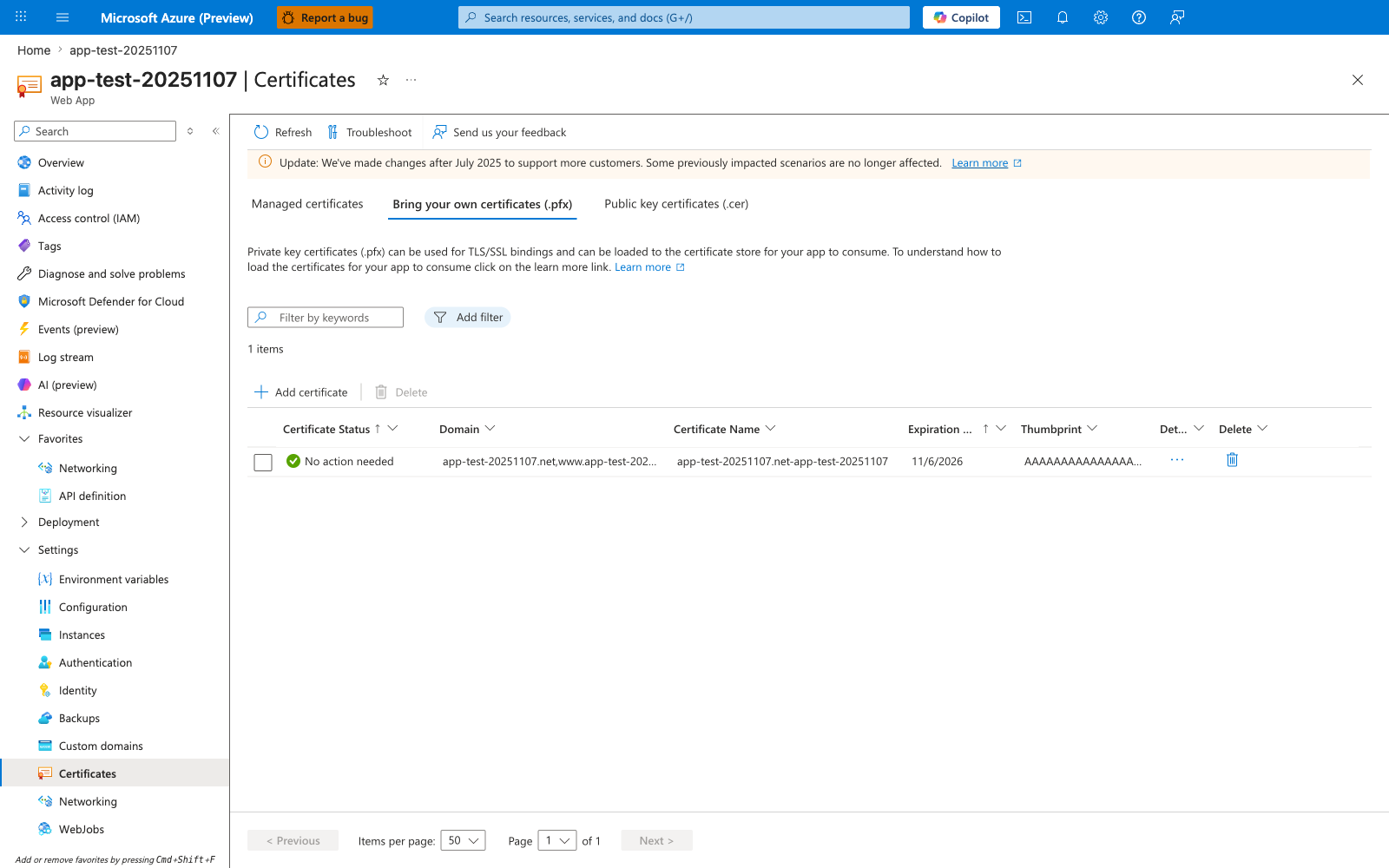
The Certificates blade with the Bring your own certificates (.pfx) tab active is where every certificate uploaded by az webapp config ssl upload appears. The row shown is a typical post-upload state: the Certificate Status of No action needed means the platform has validated the PFX, the Thumbprint column is the exact value to plug into WEBSITE_LOAD_CERTIFICATES, and Expiration: 11/6/2026 is the date that should drive a calendar reminder for the rotation procedure in step 5 below. The three tabs are not interchangeable for outbound mTLS — only .pfx certificates carry the private key the application needs to present the certificate to a downstream service, so always confirm you are on this tab before reading thumbprints. The Add certificate action is the Portal equivalent of az webapp config ssl upload and additionally surfaces alternative sources such as importing from Key Vault when the certificate is already stored centrally.
2) Make the certificate available to code
Expose one certificate by thumbprint:
az webapp config appsettings set \
  --resource-group $RG \
  --name $APP_NAME \
  --settings WEBSITE_LOAD_CERTIFICATES="<thumbprint>" \
  --output json
Expose all uploaded certificates:
az webapp config appsettings set \
  --resource-group $RG \
  --name $APP_NAME \
  --settings WEBSITE_LOAD_CERTIFICATES="*" \
  --output json
Prefer explicit thumbprints over wildcard loading
WEBSITE_LOAD_CERTIFICATES="*" is convenient for testing, but explicit thumbprints reduce ambiguity and make certificate rotation easier to audit.
3) Know where the certificate appears at runtime
Runtime access differs by hosting OS:
| Hosting model | Where the certificate appears |
|---|---|
| Windows-hosted App Service | CurrentUser\My certificate store |
| Windows containers | C:\appservice\certificates\... paths or container certificate stores, depending on container model |
| Linux containers / built-in Linux | /var/ssl/private for private certificates and /var/ssl/certs for public certificates |
Useful environment variables in containers:
WEBSITE_PRIVATE_CERTS_PATHWEBSITE_PUBLIC_CERTS_PATHWEBSITE_INTERMEDIATE_CERTS_PATHWEBSITE_ROOT_CERTS_PATH
4) Restart after changing certificate visibility
When you change thumbprints or add certificates after initial configuration, restart the app so the new certificate exposure is consistent for application code.
5) Plan rotation deliberately
Recommended rotation shape:
- Upload the renewed certificate.
- Add the new thumbprint to
WEBSITE_LOAD_CERTIFICATESor switch to the new thumbprint. - Restart the app.
- Validate outbound mTLS calls.
- Remove the retired certificate after successful cutover.
For configuration indirection, use Key Vault references where appropriate and remember that unpinned references can refresh to the latest version within 24 hours.
Note
Key Vault references help with configuration rotation, but the exact certificate-loading pattern still depends on how your app reads certificate material at runtime.
Verification
Check the app setting:
az webapp config appsettings list \
--resource-group $RG \
--name $APP_NAME \
--query "[?name=='WEBSITE_LOAD_CERTIFICATES']" \
--output json
Check uploaded certificates:
az webapp config ssl list \
--resource-group $RG \
--query "[?hostNames==null].{thumbprint:thumbprint,subjectName:subjectName,expirationDate:expirationDate}" \
--output json
Application-level verification:
- Windows code-based app can find the certificate in
CurrentUser\My - Windows container app can resolve the certificate from its documented container path or store model
- Linux app can open the expected file under
/var/ssl/private - The remote service accepts the outbound request and logs the expected client certificate identity
Rollback / Troubleshooting
Common issues:
- Certificate not found in app code:
- thumbprint mismatch in
WEBSITE_LOAD_CERTIFICATES - app restart was skipped
- wrong OS-specific lookup logic
- thumbprint mismatch in
- Upload succeeded but outbound calls still fail:
- wrong certificate password at runtime for
.p12 - remote service does not trust the client certificate chain
- app never attached the certificate to its HTTP or TLS client
- wrong certificate password at runtime for
- Rotation did not take effect:
- app still references old thumbprint
- certificate reference refresh window not yet elapsed
Rollback by restoring the previous thumbprint and restarting the app:
az webapp config appsettings set \
--resource-group $RG \
--name $APP_NAME \
--settings WEBSITE_LOAD_CERTIFICATES="<previous-thumbprint>" \
--output json
az webapp restart \
  --resource-group $RG \
  --name $APP_NAME
See Also
- Mutual TLS Architecture
- Incoming Client Certificates
- Python mTLS Client Certificates Recipe
- .NET mTLS Client Certificates Recipe