Incoming Client Certificates
Use this runbook to enable inbound mutual TLS on Azure App Service, forward the client certificate to your application, and verify the platform-to-app handoff before you add application-level authorization logic.
Prerequisites
- App Service plan in Basic, Standard, Premium, or Isolated tier
- HTTPS-only enabled on the web app
- A client certificate and private key available for testing
- Permission to update the App Service site configuration
- Variables set:
$RG$APP_NAME
When to Use
Use inbound client certificates when:
- API callers must present a client certificate before the request reaches your app logic
- Partner integrations require certificate-based caller identity
- You want App Service to terminate TLS and forward the client certificate in a normalized header
- You need route-specific exceptions such as
/healthor webhook endpoints
Procedure
flowchart TD
    A[Client with certificate] --> B[App Service front end]
    B --> C{clientCertMode policy}
    C -->|Allowed| D[X-ARR-ClientCert]
    D --> E[Application validation]
    C -->|Rejected| F[403 / handshake failure]
1) Enable HTTPS-only first
Verify:
az webapp show \
  --resource-group $RG \
  --name $APP_NAME \
  --query "{httpsOnly:httpsOnly,hostNames:hostNames}" \
  --output json
Portal view: Custom domains blade (HTTPS bindings)
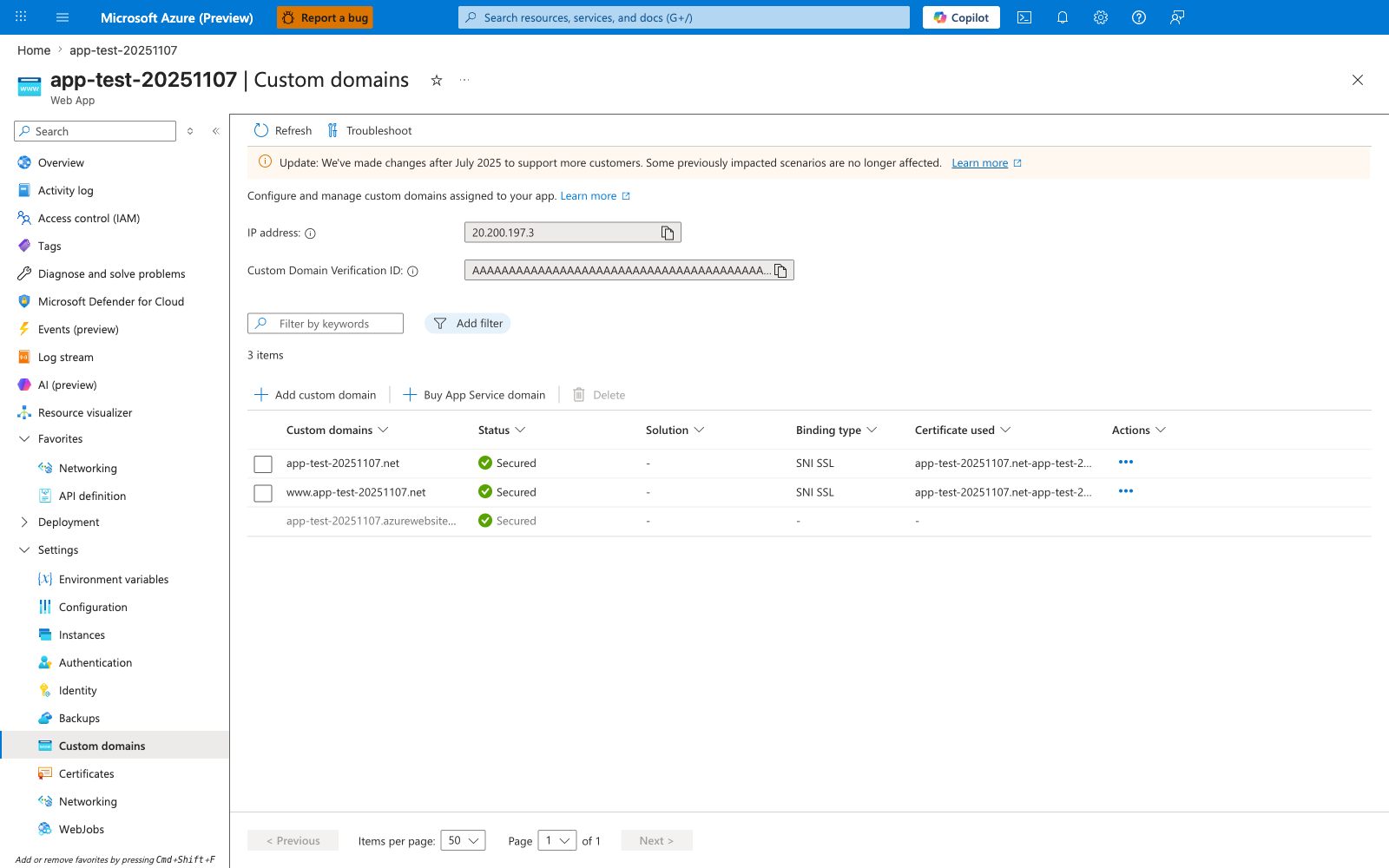
The Custom domains blade is the prerequisite check for inbound mTLS that the --https-only true command above enforces at the protocol level. For each row, Status: Secured together with Binding type: SNI SSL means the platform terminates TLS at the front end for that hostname — the same termination layer that produces the X-ARR-ClientCert header described in step 5 below. The default *.azurewebsites.net hostname is always Secured using the platform-managed wildcard certificate, but custom domains (app-test-20251107.net and www.app-test-20251107.net here) require an explicit binding before mTLS can work on those hostnames — an unbound custom domain cannot complete HTTPS on that hostname, so the TLS/mTLS handshake for that domain never succeeds and clients see a certificate or connection error instead of a redirect. After running the az webapp update --set clientCertEnabled=true command in step 2, return to this blade to confirm every domain you intend to enforce mTLS on shows Secured with a valid Certificate used value.
2) Enable client certificate mode
Use Azure CLI:
az webapp update \
  --resource-group $RG \
  --name $APP_NAME \
  --set clientCertEnabled=true clientCertMode=Required \
  --output json
Common values:
RequiredOptionalOptionalInteractiveUser
Portal path:
- Open App Service in Azure Portal.
- Go to Settings → Configuration → General settings.
- Set Client certificate mode.
- Save and restart if required by your rollout policy.
3) Add exclusion paths when needed
Use exclusion paths only for endpoints that cannot present a client certificate.
az webapp update \
  --resource-group $RG \
  --name $APP_NAME \
  --set clientCertExclusionPaths="/health;/webhooks/github" \
  --output json
Exclusions weaken your trust boundary
Keep excluded paths narrow and explicit. Do not exclude broad prefixes such as /api unless you are intentionally disabling certificate enforcement for that whole surface.
Exclusions and interactive mode use TLS renegotiation
Microsoft Learn notes that clientCertExclusionPaths and OptionalInteractiveUser rely on TLS renegotiation. TLS 1.3 and HTTP/2 do not support renegotiation, and uploads larger than 100 KB can fail when renegotiation is required. Test these cases before using exclusions in production.
4) Use Bicep for declarative configuration
resource webApp 'Microsoft.Web/sites@2023-12-01' = {
  name: appName
  location: location
  kind: 'app,linux'
  properties: {
    serverFarmId: plan.id
    httpsOnly: true
    clientCertEnabled: true
    clientCertMode: 'Required'
    clientCertExclusionPaths: '/health;/webhooks/github'
    siteConfig: {
      linuxFxVersion: 'PYTHON|3.11'
    }
  }
}
5) Understand what reaches the app
When App Service forwards the request to your application, it adds:
- Header name:
X-ARR-ClientCert - Header content: base64-encoded certificate content
- Parsing implication: add PEM markers in code before using libraries that expect PEM format
Example reconstruction pattern:
Do not assume platform trust validation
Microsoft Learn states that App Service does not validate the forwarded client certificate. Your application must validate thumbprint, issuer, chain, expiry, and route authorization policy.
Verification
Check effective site settings
az webapp show \
  --resource-group $RG \
  --name $APP_NAME \
  --query "{clientCertEnabled:clientCertEnabled,clientCertMode:clientCertMode,clientCertExclusionPaths:clientCertExclusionPaths}" \
  --output json
Test with curl
curl --include \
  --cert ./client.pem \
  --key ./client.key \
  "https://$APP_NAME.azurewebsites.net/cert-info"
Expected results:
Requiredmode + valid test certificate: request reaches the appRequiredmode + no client certificate: request fails before normal app handling- Excluded path such as
/health: request succeeds without a client certificate if explicitly excluded
Inspect app-level header handling
Add a temporary diagnostics endpoint or application log entry that confirms:
X-ARR-ClientCertexists- The header can be converted into PEM format
- Certificate parsing succeeds in your framework
Rollback / Troubleshooting
Disable inbound client certificate enforcement:
az webapp update \
  --resource-group $RG \
  --name $APP_NAME \
  --set clientCertEnabled=false clientCertExclusionPaths= \
  --output json
Common issues:
X-ARR-ClientCertmissing:clientCertEnabledis false- the request matched an excluded path
- the client did not use HTTPS
- Front-end rejection with
Requiredmode:- caller did not present a certificate
- TLS negotiation failed before the app received the request
- App code cannot parse the certificate:
- code treated the header as full PEM instead of base64 content
- certificate markers were not added before parsing