Slots and Swap
Deployment slots reduce release risk by letting you deploy to a live nonproduction endpoint, validate it, and promote it into production with a swap. This page focuses on slot creation and promotion mechanics and links to the broader operational slot guide where appropriate.
Main Content
Slot Promotion Flow
flowchart TD
    A[Deploy new version to staging slot] --> B[Apply slot-specific settings]
    B --> C[Warm up staging slot]
    C --> D[Run smoke tests]
    D --> E{Ready to promote?}
    E -- Yes --> F[Swap staging with production]
    E -- No --> G[Keep production unchanged]
    F --> H[Previous production now lives in staging]
    H --> I[Swap back if rollback is required]
Create a Deployment Slot
az webapp deployment slot create \
  --resource-group $RG \
  --name $APP_NAME \
  --slot staging \
  --configuration-source $APP_NAME \
  --output json

az webapp deployment slot list \
  --resource-group $RG \
  --name $APP_NAME \
  --query "[].{name:name,state:state,host:defaultHostName}" \
  --output table
| Command/Parameter | Purpose |
|---|---|
az webapp deployment slot create | Creates a new deployment slot for the existing app. |
--resource-group $RG | Targets the resource group that contains the app. |
--name $APP_NAME | Selects the parent web app. |
--slot staging | Creates a slot named staging. |
--configuration-source $APP_NAME | Copies the production slot configuration into the new slot. |
--output json | Returns structured output for verification or scripting. |
az webapp deployment slot list | Lists existing slots on the app. |
--query "[].{name:name,state:state,host:defaultHostName}" | Limits the output to slot name, state, and hostname. |
--output table | Formats the slot list in a readable table. |
Tier requirement
Deployment slots require an App Service Plan tier that supports slots, such as Standard, Premium, or Isolated.
Configure Slot-Specific Settings
Some values must stay with the slot instead of moving during a swap. Typical examples include environment names, test endpoints, and nonproduction secrets.
az webapp config appsettings set \
  --resource-group $RG \
  --name $APP_NAME \
  --slot staging \
  --settings APP_ENVIRONMENT=staging API_BASE_URL=https://api-staging.contoso.example \
  --slot-settings APP_ENVIRONMENT API_BASE_URL \
  --output json
| Command/Parameter | Purpose |
|---|---|
az webapp config appsettings set | Writes application settings to the selected slot. |
--resource-group $RG | Targets the resource group that contains the app. |
--name $APP_NAME | Selects the web app to configure. |
--slot staging | Applies the settings to the staging slot. |
--settings | Supplies app setting key-value pairs to update. |
APP_ENVIRONMENT=staging | Marks the slot as a staging environment. |
API_BASE_URL=https://api-staging.contoso.example | Points the slot at the staging API endpoint. |
--slot-settings APP_ENVIRONMENT API_BASE_URL | Makes those settings sticky so they do not swap into production. |
--output json | Returns structured output after the update. |
Do not forget sticky settings
If environment-dependent values are not marked as slot settings, they can move during the swap and cause production to point to the wrong backend or use the wrong secrets.
Manual Swap
az webapp deployment slot swap \
  --resource-group $RG \
  --name $APP_NAME \
  --slot staging \
  --target-slot production \
  --output json
| Command/Parameter | Purpose |
|---|---|
az webapp deployment slot swap | Swaps the source slot and target slot. |
--resource-group $RG | Targets the resource group that contains the app. |
--name $APP_NAME | Selects the web app whose slots will be swapped. |
--slot staging | Chooses staging as the source slot. |
--target-slot production | Chooses production as the destination slot. |
--output json | Returns structured swap results. |
Portal view: Swap blade with config preview
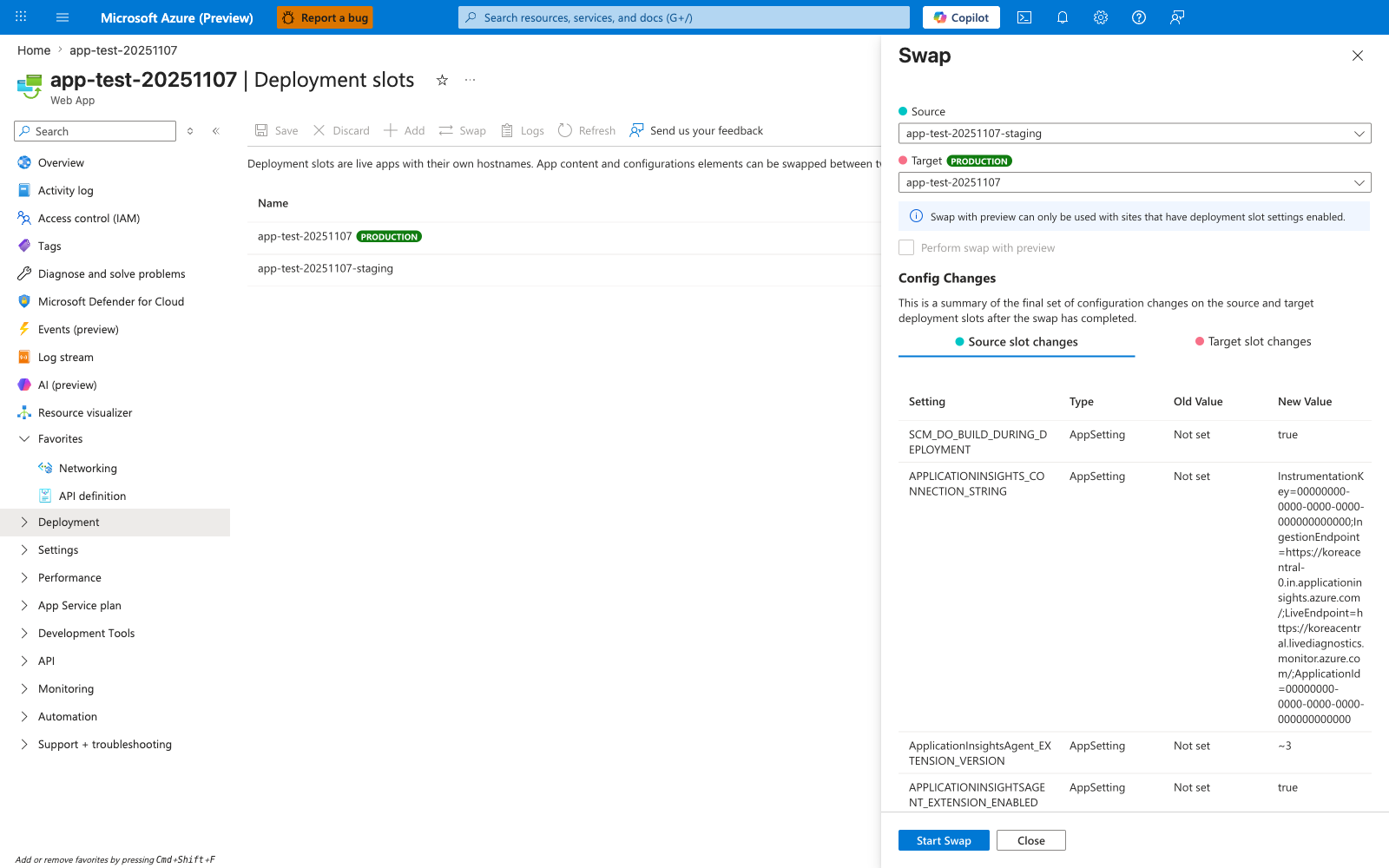
This is the Portal equivalent of the az webapp deployment slot swap command on the production app. The Source slot changes and Target slot changes tabs render the exact effective configuration each slot will have after the swap completes - this is the last opportunity to catch sticky-setting omissions before cutover. Notice the disabled Perform swap with preview checkbox: the banner explains the slot must have at least one slot-specific setting before preview mode unlocks, which is why marking APP_ENVIRONMENT and API_BASE_URL as --slot-settings in the Configure Slot-Specific Settings example is important even when the values look ordinary. Run this manual review against staging slot deployments before promoting; treat any Old Value to New Value transition in the production-bound row as a release decision, not a Portal click.
Swap with Preview
Authentication Limitation
Swap with preview cannot be used when App Service authentication (Easy Auth) is enabled on either slot. Disable authentication or use standard swap instead.
az webapp deployment slot swap \
  --resource-group $RG \
  --name $APP_NAME \
  --slot staging \
  --target-slot production \
  --action preview \
  --output json

az webapp deployment slot swap \
  --resource-group $RG \
  --name $APP_NAME \
  --slot staging \
  --target-slot production \
  --action swap \
  --output json
| Command/Parameter | Purpose |
|---|---|
az webapp deployment slot swap | Starts or completes a slot swap operation. |
--resource-group $RG | Targets the resource group that contains the app. |
--name $APP_NAME | Selects the web app whose slots are being swapped. |
--slot staging | Uses staging as the source slot. |
--target-slot production | Uses production as the destination slot. |
--action preview | Applies target-slot settings to staging and pauses before cutover. |
--action swap | Completes the pending preview swap after validation. |
--output json | Returns structured output for each swap stage. |
If validation fails, cancel the pending swap:
az webapp deployment slot swap \
  --resource-group $RG \
  --name $APP_NAME \
  --slot staging \
  --target-slot production \
  --action reset \
  --output json
| Command/Parameter | Purpose |
|---|---|
az webapp deployment slot swap | Manages a staged slot swap operation. |
--resource-group $RG | Targets the resource group that contains the app. |
--name $APP_NAME | Selects the web app whose swap is being canceled. |
--slot staging | Identifies the source slot that entered preview mode. |
--target-slot production | Identifies the destination slot for the canceled swap. |
--action reset | Cancels the preview swap and restores the original state. |
--output json | Returns structured output confirming the reset result. |
Auto-Swap
Auto-swap can shorten release flow for lower-risk workloads, but it is better suited to deterministic startup behavior and automated validation.
| Command/Parameter | Purpose |
|---|---|
az webapp deployment slot auto-swap | Enables automatic slot promotion after warm-up. |
--resource-group $RG | Targets the resource group that contains the app. |
--name $APP_NAME | Selects the web app to configure. |
--slot staging | Configures staging as the source slot that auto-swaps into production. |
Linux limitation
Microsoft Learn notes that auto-swap is not supported for web apps on Linux and Web App for Containers. Use manual slot swap for those scenarios.
Blue-Green Pattern with App Service Slots
In App Service, the blue environment is usually the current production slot and the green environment is the staging slot holding the candidate release.
- Deploy the new build to
staging. - Warm the slot and validate health checks.
- Swap
stagingintoproduction. - If regression appears, swap again to restore the previous version.
This pattern gives a fast rollback path without rebuilding or repackaging during the incident.
Do not duplicate operational runbooks
For deeper operational guidance such as traffic routing, rollback drills, and slot lifecycle management, use Deployment Slots Operations. This page stays focused on deployment execution patterns.
Advanced Topics
Verification Commands
az webapp show \
  --resource-group $RG \
  --name $APP_NAME \
  --query "{host:defaultHostName,state:state,slotSwapStatus:slotSwapStatus}" \
  --output json

curl --silent --show-error --fail \
  "https://$APP_NAME-staging.azurewebsites.net/health"
| Command/Parameter | Purpose |
|---|---|
az webapp show | Retrieves status details for the web app. |
--resource-group $RG | Targets the resource group that contains the app. |
--name $APP_NAME | Selects the web app to inspect. |
--query "{host:defaultHostName,state:state,slotSwapStatus:slotSwapStatus}" | Limits the output to hostname, state, and swap status. |
--output json | Returns the status in JSON format. |
curl | Sends an HTTP request to the staging slot health endpoint. |
--silent | Suppresses normal progress output. |
--show-error | Prints an error message when the request fails. |
--fail | Makes the command exit nonzero on HTTP error responses. |
"https://$APP_NAME-staging.azurewebsites.net/health" | Targets the staging slot health check endpoint. |