Container Deploy from Azure Container Registry
Use container deployment when you want App Service to run a custom Linux container image instead of a built-in runtime stack. The deployment unit becomes the container image, so your release process should manage registry access, image versioning, and health validation.
Main Content
Container Deployment Flow
flowchart TD
    A[Build container image] --> B[Push image to Azure Container Registry]
    B --> C[Create or update App Service with image reference]
    C --> D[Grant AcrPull access or registry credentials]
    D --> E[App Service pulls image]
    E --> F[Container starts and responds on app port]
    F --> G{Continuous deployment enabled?}
    G -- Yes --> H[Registry push triggers webhook-based redeploy]
    G -- No --> I[Manual image update or restart]
Prepare Azure Container Registry
az acr create \
  --resource-group $RG \
  --name $ACR_NAME \
  --sku Basic \
  --admin-enabled false \
  --output json

az acr build \
  --registry $ACR_NAME \
  --image sample-app:v1 \
  .
| Command/Parameter | Purpose |
|---|---|
az acr create | Creates an Azure Container Registry. |
--resource-group $RG | Places the registry in the selected resource group. |
--name $ACR_NAME | Sets the registry name. |
--sku Basic | Chooses the Basic pricing tier for the registry. |
--admin-enabled false | Disables admin username/password access in favor of stronger identity-based access. |
--output json | Returns structured output after registry creation. |
az acr build | Builds the container image in ACR. |
--registry $ACR_NAME | Chooses which registry performs the cloud build. |
--image sample-app:v1 | Tags the built image as sample-app:v1. |
. | Uses the current directory as the Docker build context. |
Create a Web App with a Container Image
az webapp create \
  --resource-group $RG \
  --plan $PLAN_NAME \
  --name $APP_NAME \
  --deployment-container-image-name "$ACR_NAME.azurecr.io/sample-app:v1" \
  --output json
| Command/Parameter | Purpose |
|---|---|
az webapp create | Creates the App Service web app. |
--resource-group $RG | Places the app in the selected resource group. |
--plan $PLAN_NAME | Places the app in the specified App Service Plan. |
--name $APP_NAME | Sets the web app name. |
--deployment-container-image-name "$ACR_NAME.azurecr.io/sample-app:v1" | Configures the app to pull and run the specified container image. |
--output json | Returns structured output after app creation. |
Portal view: Create Web App Container tab
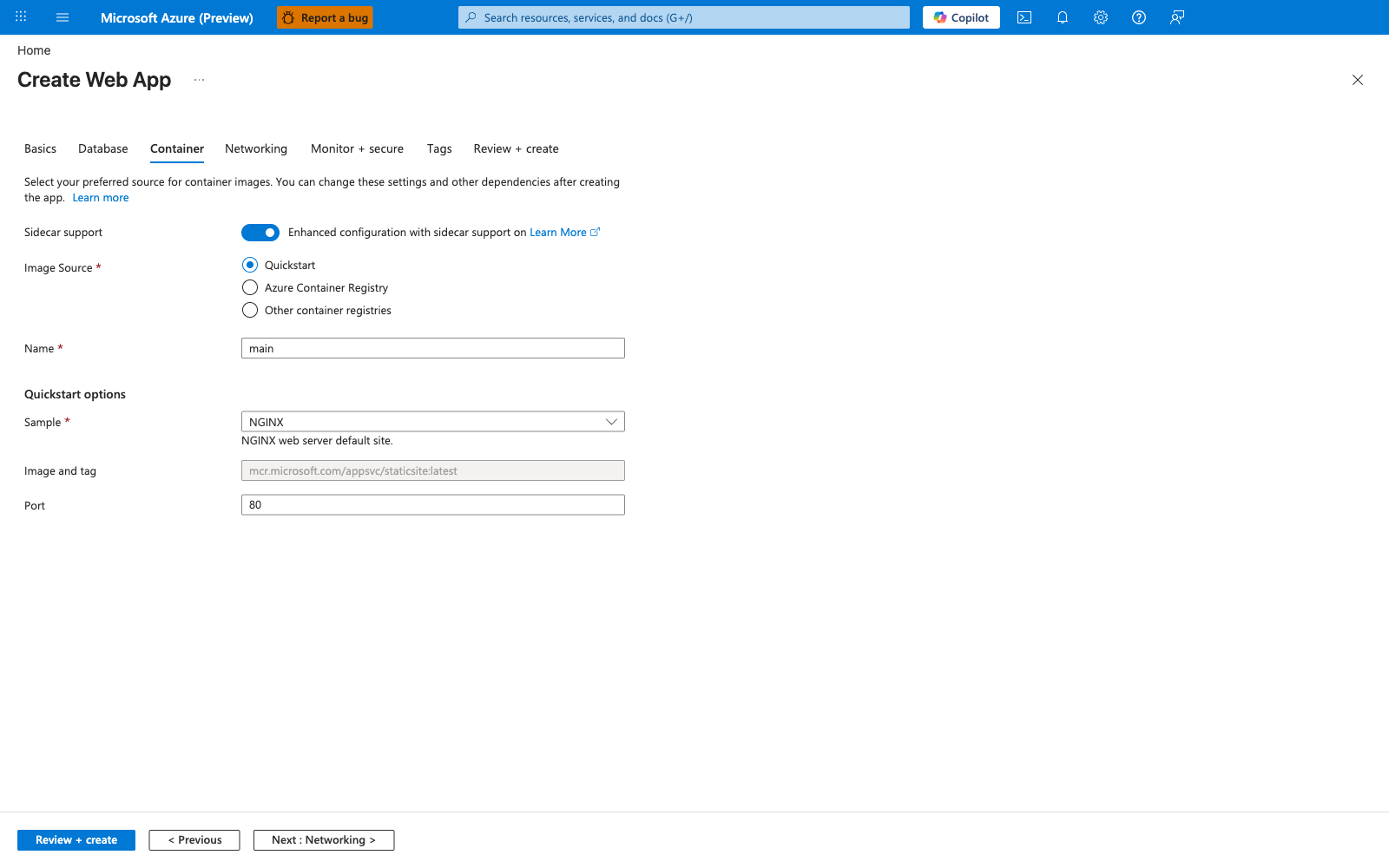
This is the click-driven equivalent of the az webapp create --deployment-container-image-name command shown above. The Sidecar support toggle defaults to ON in new app creation, which matches the Multi-Container Note guidance below - sidecar containers are the long-term direction and Docker Compose is on its way out. The default Quickstart image source with the mcr.microsoft.com/appsvc/staticsite:latest placeholder is intentional: it lets you create the app shell before the real ACR image is ready, but production setups should switch to Azure Container Registry immediately so the Configure Managed Identity Pull from ACR step below can grant AcrPull instead of leaving the wizard on the public quickstart image. The default Port: 80 aligns with the WEBSITES_PORT guidance in Runtime Settings to Remember - if your container listens on a different port, set it here or via app settings before the first deployment, not after.
Configure Managed Identity Pull from ACR
PRINCIPAL_ID=$(az webapp identity assign \
  --resource-group $RG \
  --name $APP_NAME \
  --query principalId \
  --output tsv)

ACR_RESOURCE_ID=$(az acr show \
  --resource-group $RG \
  --name $ACR_NAME \
  --query id \
  --output tsv)

az role assignment create \
  --assignee $PRINCIPAL_ID \
  --scope $ACR_RESOURCE_ID \
  --role AcrPull \
  --output json

az webapp config set \
  --resource-group $RG \
  --name $APP_NAME \
  --generic-configurations '{"acrUseManagedIdentityCreds": true}' \
  --output json
| Command/Parameter | Purpose |
|---|---|
PRINCIPAL_ID=$(...) | Captures the web app managed identity principal ID into a shell variable. |
az webapp identity assign | Enables a managed identity on the web app. |
--resource-group $RG | Targets the resource group that contains the app. |
--name $APP_NAME | Selects the web app that needs an identity. |
--query principalId | Returns only the managed identity principal ID. |
--output tsv | Formats the query result for shell variable assignment. |
ACR_RESOURCE_ID=$(...) | Captures the ACR resource ID into a shell variable. |
az acr show | Retrieves metadata about the registry. |
--resource-group $RG | Targets the resource group that contains the registry. |
--name $ACR_NAME | Selects the registry to inspect. |
--query id | Returns only the registry resource ID. |
--output tsv | Formats the query result for shell variable assignment. |
az role assignment create | Creates an RBAC role assignment. |
--assignee $PRINCIPAL_ID | Grants the role to the web app managed identity. |
--scope $ACR_RESOURCE_ID | Applies the role assignment at the registry scope. |
--role AcrPull | Grants image pull permissions on the registry. |
--output json | Returns structured output for the role assignment and final configuration commands. |
az webapp config set | Updates general web app configuration values. |
--resource-group $RG | Targets the resource group that contains the app. |
--name $APP_NAME | Selects the web app whose container pull settings are being updated. |
--generic-configurations '{"acrUseManagedIdentityCreds": true}' | Tells App Service to use managed identity credentials for ACR pulls. |
Prefer managed identity
Managed identity is the preferred production approach because it removes long-lived registry passwords from the deployment path.
Enable Continuous Deployment from ACR
CI_CD_URL=$(az webapp deployment container config \
  --resource-group $RG \
  --name $APP_NAME \
  --enable-cd true \
  --query CI_CD_URL \
  --output tsv)

az acr webhook create \
  --resource-group $RG \
  --registry $ACR_NAME \
  --name appservice-cd \
  --actions push \
  --uri $CI_CD_URL \
  --scope 'sample-app:v1' \
  --output json
| Command/Parameter | Purpose |
|---|---|
CI_CD_URL=$(...) | Captures the App Service webhook URL into a shell variable. |
az webapp deployment container config | Reads or updates App Service container deployment settings. |
--resource-group $RG | Targets the resource group that contains the app. |
--name $APP_NAME | Selects the web app to configure. |
--enable-cd true | Enables continuous deployment for container image updates. |
--query CI_CD_URL | Returns only the webhook URL that App Service exposes. |
--output tsv | Formats the URL for shell variable assignment. |
az acr webhook create | Creates a webhook in ACR. |
--resource-group $RG | Targets the resource group that contains the registry. |
--registry $ACR_NAME | Selects the registry that will emit webhook events. |
--name appservice-cd | Names the webhook resource. |
--actions push | Triggers the webhook when an image is pushed. |
--uri $CI_CD_URL | Sends webhook events to the App Service continuous deployment endpoint. |
--scope 'sample-app:v1' | Limits the webhook to pushes for sample-app:v1, so later immutable tags such as v2 require a scope update or a stable deployment tag strategy. |
--output json | Returns structured webhook creation output. |
Webhook dependency
App Service continuous deployment for containers depends on the webhook path remaining valid. Treat webhook configuration as part of the application release infrastructure, not as a one-time portal setting.
Update the Image on an Existing App
az webapp config container set \
  --resource-group $RG \
  --name $APP_NAME \
  --docker-custom-image-name "$ACR_NAME.azurecr.io/sample-app:v2" \
  --docker-registry-server-url "https://$ACR_NAME.azurecr.io" \
  --output json
| Command/Parameter | Purpose |
|---|---|
az webapp config container set | Updates container settings for an existing web app. |
--resource-group $RG | Targets the resource group that contains the app. |
--name $APP_NAME | Selects the web app to update. |
--docker-custom-image-name "$ACR_NAME.azurecr.io/sample-app:v2" | Points the app to the newer v2 image tag. |
--docker-registry-server-url "https://$ACR_NAME.azurecr.io" | Declares the registry endpoint where the image is hosted. |
--output json | Returns structured output after the configuration update. |
Multi-Container Note
App Service supports Docker Compose for multi-container scenarios, but Microsoft Learn currently positions sidecar containers as the long-term direction and notes Docker Compose retirement on March 31, 2027.
az webapp config container set \
  --resource-group $RG \
  --name $APP_NAME \
  --multicontainer-config-file ./docker-compose.yml \
  --output json
| Command/Parameter | Purpose |
|---|---|
az webapp config container set | Updates the app to use a multi-container configuration. |
--resource-group $RG | Targets the resource group that contains the app. |
--name $APP_NAME | Selects the web app to update. |
--multicontainer-config-file ./docker-compose.yml | Supplies the Docker Compose file that defines the multi-container app. |
--output json | Returns structured output after the configuration update. |
Plan for sidecar migration
If you are starting a new design, prefer App Service sidecar container patterns over Docker Compose. Use Docker Compose only when you are maintaining an existing multi-container deployment model.
Advanced Topics
Runtime Settings to Remember
- Set
WEBSITES_PORTif the container listens on a port other than 80. - Use
WEBSITES_ENABLE_APP_SERVICE_STORAGE=trueonly when the app requires persistent/homestorage. - For private endpoint registries, route image pulls through virtual network integration where required.
Verification Commands
az webapp config container show \
  --resource-group $RG \
  --name $APP_NAME \
  --output json

az webapp log tail \
  --resource-group $RG \
  --name $APP_NAME
| Command/Parameter | Purpose |
|---|---|
az webapp config container show | Displays the current container configuration for the app. |
--resource-group $RG | Targets the resource group that contains the app. |
--name $APP_NAME | Selects the web app to inspect. |
--output json | Returns the container configuration in JSON format. |
az webapp log tail | Streams live application and container logs. |
--resource-group $RG | Targets the resource group that contains the app. |
--name $APP_NAME | Selects the web app whose logs should be tailed. |