Deployment Slots Operations
Use deployment slots to deliver releases with minimal risk, perform validation before production exposure, and roll back quickly when needed. This guide covers slot lifecycle, swap patterns, and operational safeguards.
sequenceDiagram
    participant Dev as Release Engineer
    participant CI as CI/CD Pipeline
    participant Staging as Staging Slot
    participant Prod as Production Slot

    Dev->>CI: Trigger release
    CI->>Staging: Deploy package
    Staging->>Staging: Warm up
    Dev->>Staging: Validate health checks
    Dev->>CI: Approve promotion
    CI->>Prod: Swap staging to production
    Note over Staging,Prod: Near zero-downtime cutover
Prod->>Dev: ✅ New version livePrerequisites
- App Service Plan tier Standard or higher
- Existing Web App and production slot
- Health endpoint for smoke checks (for example
/health) - Variables set:
RGAPP_NAMEPLAN_NAME
When to Use
Procedure
Verify Tier Supports Slots
az appservice plan show \
  --resource-group $RG \
  --name $PLAN_NAME \
  --query "{sku:sku.name,tier:sku.tier}" \
  --output json
If needed, upgrade plan tier:
Create a Staging Slot
Clone configuration from production to reduce drift:
az webapp deployment slot create \
  --resource-group $RG \
  --name $APP_NAME \
  --slot staging \
  --configuration-source $APP_NAME \
  --output json
List slots:
az webapp deployment slot list \
  --resource-group $RG \
  --name $APP_NAME \
  --query "[].{name:name,state:state,host:defaultHostName}" \
  --output table
Portal view: Deployment slots blade
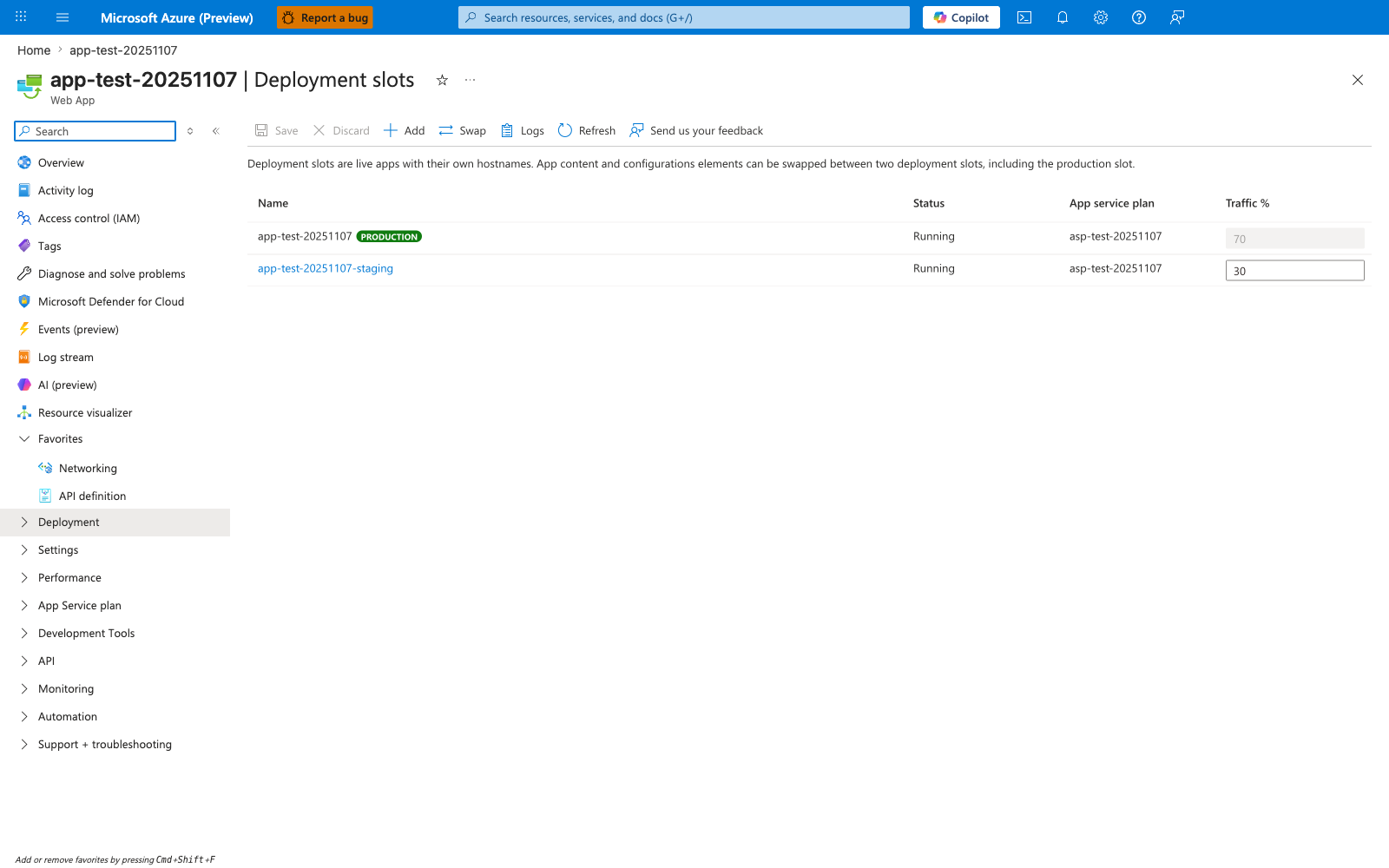
The Deployment slots blade confirms that the az webapp deployment slot create command produced the expected topology. Both rows share the same App service plan (asp-test-20251107) because slots run on the parent plan and consume its worker capacity — sizing the plan for production load alone will starve the staging slot during pre-swap validation. The green PRODUCTION badge on the parent slot is the platform's anchor for the swap target, and the editable Traffic % column (70 / 30) is the canary-routing surface used later in this guide. The toolbar Swap action is the manual equivalent of az webapp deployment slot swap, and Logs is where to look first if a swap fails the post-warm-up health probe.
Configure Slot-Specific Settings
For app settings and connection strings, nothing is slot-specific by default. They follow the code during a swap unless you explicitly mark them with the --slot-settings flag (or check the Deployment slot setting box in the Portal). A setting created on staging will move to production on swap, which can contaminate production with staging configuration.
Some other categories are already non-swapped by default on the platform side (for example, publishing endpoints, scaling settings, IP restrictions, Always On, and managed identities). Microsoft Learn maintains the authoritative list of which settings swap and which do not — consult it whenever the behavior is ambiguous for a given setting category.
Use sticky settings for any app-setting or connection-string value that must remain pinned to a specific slot (environment name, feature flags, downstream endpoint URLs, diagnostic keys):
az webapp config appsettings set \
  --resource-group $RG \
  --name $APP_NAME \
  --slot staging \
  --slot-settings \
    APP_ENVIRONMENT=staging \
    FEATURE_FLAG_NEW_CHECKOUT=true \
  --output json
Commonly slot-pinned categories:
- Environment identifiers (
APP_ENVIRONMENT,DEPLOYMENT_TIER) - Feature flags scoped to a specific environment
- External endpoint URLs that differ between staging and production
- Diagnostic and telemetry keys (Application Insights connection strings per environment)
- Connection strings to environment-specific data stores
Keep critical secrets slot-sticky
Connection strings, external endpoint URLs, and diagnostic keys should be configured as slot settings when values differ between environments. Forgetting to mark them as sticky is one of the most common causes of post-swap production incidents.
Configure Slot Warm-Up Before Swap
Slot swap is not instantaneous. Before the platform routes the new slot as production, it sends warm-up requests so the runtime can JIT, hydrate caches, open connection pools, and pass startup health checks. Configure the warm-up surface explicitly — relying on the default site root often misses critical initialization paths.
Windows: applicationInitialization in web.config
Ship a web.config in your deployment package that declares the URLs IIS should hit before completing a swap:
<configuration>
  <system.webServer>
    <applicationInitialization doAppInitAfterRestart="true">
      <add initializationPage="/health" />
      <add initializationPage="/api/warmup" />
    </applicationInitialization>
  </system.webServer>
</configuration>
Each initializationPage is hit on the target slot during swap, and the swap blocks until each warm-up request returns or times out. Use a lightweight readiness URL plus any expensive paths you want primed (cache load, lookup table hydration, DI container build).
Linux: WEBSITE_SWAP_WARMUP_PING_PATH app setting
Linux App Service does not honor web.config. Use the slot-swap-specific warm-up app settings on the slot being swapped so the platform pings the configured path before completing the swap:
az webapp config appsettings set \
  --resource-group $RG \
  --name $APP_NAME \
  --slot staging \
  --settings \
    WEBSITE_SWAP_WARMUP_PING_PATH=/health \
    WEBSITE_SWAP_WARMUP_PING_STATUSES=200,202 \
  --output json
WEBSITE_SWAP_WARMUP_PING_PATH— path the platform pings on the target slot before completing the swap. Without it, the platform falls back to probing the site root (/), which may not exercise the code paths you want primed.WEBSITE_SWAP_WARMUP_PING_STATUSES— comma-separated list of HTTP status codes that count as a successful warm-up. By default, every response code (including 5xx) is treated as valid, so if you want a failing endpoint to actually block the swap, set this explicitly to the codes you accept.
Make warm-up actually gate the swap
Because the default WEBSITE_SWAP_WARMUP_PING_STATUSES accepts every response code, a warm-up endpoint that returns 5xx will still pass the swap unless you restrict the acceptable codes via the setting above. Set WEBSITE_SWAP_WARMUP_PING_STATUSES so that real failures hold the swap. Also keep warm-up paths cheap, idempotent, and independent of swap-time configuration changes — for example, do not call downstream services that are themselves being swapped.
WEBSITE_WARMUP_PATH exists separately and applies to site restarts (not specifically to slot swap), so use the WEBSITE_SWAP_WARMUP_PING_* settings above to gate the swap itself.
Deploy to Staging and Validate
Example deployment with ZIP package:
az webapp deploy \
  --resource-group $RG \
  --name $APP_NAME \
  --slot staging \
  --src-path ./artifacts/release.zip \
  --type zip \
  --restart true \
  --output json
Run health check and smoke test:
Perform Standard Swap
az webapp deployment slot swap \
  --resource-group $RG \
  --name $APP_NAME \
  --slot staging \
  --target-slot production \
  --output json
Perform Swap with Preview
Use preview when additional verification is required before final cutover.
Authentication Limitation
Swap with preview cannot be used when App Service authentication (Easy Auth) is enabled on either slot. Disable authentication or use standard swap instead.
az webapp deployment slot swap \
  --resource-group $RG \
  --name $APP_NAME \
  --slot staging \
  --target-slot production \
  --action preview \
  --output json
If validation succeeds:
az webapp deployment slot swap \
  --resource-group $RG \
  --name $APP_NAME \
  --slot staging \
  --target-slot production \
  --action swap \
  --output json
If validation fails:
az webapp deployment slot swap \
  --resource-group $RG \
  --name $APP_NAME \
  --slot staging \
  --target-slot production \
  --action reset \
  --output json
Roll Back Quickly
Rollback is usually a reverse swap.
az webapp deployment slot swap \
  --resource-group $RG \
  --name $APP_NAME \
  --slot staging \
  --target-slot production \
  --output json
Use Traffic Routing for Canary Testing
Route a small percentage of production traffic to staging.
az webapp traffic-routing set \
  --resource-group $RG \
  --name $APP_NAME \
  --distribution staging=10 \
  --output json
Disable route split:
az webapp traffic-routing set \
  --resource-group $RG \
  --name $APP_NAME \
  --distribution staging=0 \
  --output json
Automate Slot Creation with Bicep
param location string
param webAppName string

resource webApp 'Microsoft.Web/sites@2022-09-01' existing = {
  name: webAppName
}

resource stagingSlot 'Microsoft.Web/sites/slots@2022-09-01' = {
  name: 'staging'
  parent: webApp
  location: location
  properties: {
    siteConfig: {
      appSettings: [
        {
          name: 'SLOT_NAME'
          value: 'staging'
        }
      ]
    }
  }
}
Verification
az webapp show \
  --resource-group $RG \
  --name $APP_NAME \
  --query "{host:defaultHostName,rampUpRules:experiments.rampUpRules,slotSwapStatus:slotSwapStatus}" \
  --output json
Sample output (PII-masked):
{
  "host": "app-shared-platform.azurewebsites.net",
  "rampUpRules": [
    {
      "actionHostName": "app-shared-platform-staging.azurewebsites.net",
      "reroutePercentage": 10
    }
  ],
  "slotSwapStatus": null
}
Operational Checklist
Before swap:
- Staging deployment completed successfully
- Health endpoint returns success
- Critical dependencies reachable
- Sticky settings validated
- Rollback owner and command prepared
After swap:
- Production health checks pass
- Error rate and latency are within thresholds
- Route split reset if canary test was used
- Incident channel observes no regression window alerts
Rollback / Troubleshooting
Slot not available
- Confirm plan is Standard/Premium tier
- Confirm slot count limit not exceeded
Swap fails due to unhealthy target
- Validate both slots are running
- Check health endpoint and startup logs
- Verify access restrictions do not block platform probes
Sticky setting not retained
- Ensure setting exists on both slots
- Reapply with
--slot-settings
Canary behavior seems inconsistent
- Browser may be pinned by
x-ms-routing-namecookie - Test using private browsing or clear cookies
Advanced Topics
Release Strategies
- Blue/green: full swap from staging to production
- Canary: partial traffic routing to staging first
- Ring-based: multiple slot environments with sequential promotion
Safe Deployment Gates
Use automated and manual gates before production swap:
- synthetic checks
- dependency checks
- performance regression threshold checks
- approver gate in CI/CD environment
Slot Design at Scale
- Standardize slot names (
staging,preprod,hotfix) - Keep slot configuration under IaC
- Periodically compare slot settings to detect drift
Enterprise Considerations
For critical workloads, require swap-with-preview plus automated smoke tests and a manual approval gate. Keep a documented rollback objective (for example, within 5 minutes).
Language-Specific Details
For language-specific operational guidance, see: - Node.js Guide - Python Guide - Java Guide - .NET Guide