Cost Optimization Operations
Control App Service spend without sacrificing reliability by right-sizing plans, tuning scaling behavior, and removing operational waste. This guide focuses on practical, language-agnostic cost controls.
flowchart TD
    A[Analyze Current Costs] --> B{Over-provisioned?}
    B -->|Yes| C[Right-size SKU]
    B -->|No| D{Scaling Efficient?}
    D -->|No| E[Tune Autoscale Rules]
    D -->|Yes| F{Unused Resources?}
    F -->|Yes| G[Remove/Consolidate]
    F -->|No| H[Monitor & Iterate]
    C --> H
    E --> H
G --> HPrerequisites
- Existing App Service Plan and Web App
- Baseline metrics (CPU, memory, latency, request volume)
- Cost Management access for budget and trend analysis
- Variables set:
RGAPP_NAMEPLAN_NAME
When to Use
Procedure
Establish Cost and Performance Baseline
Capture current plan characteristics:
az appservice plan show \
  --resource-group $RG \
  --name $PLAN_NAME \
  --query "{sku:sku.name,tier:sku.tier,workers:numberOfWorkers,capacity:sku.capacity}" \
  --output json
Capture platform metrics:
PLAN_ID=$(az appservice plan show \
  --resource-group $RG \
  --name $PLAN_NAME \
  --query id \
  --output tsv)

az monitor metrics list \
  --resource $PLAN_ID \
  --metric CpuPercentage MemoryPercentage \
  --interval PT1H \
  --output table
Portal view: Cost analysis blade
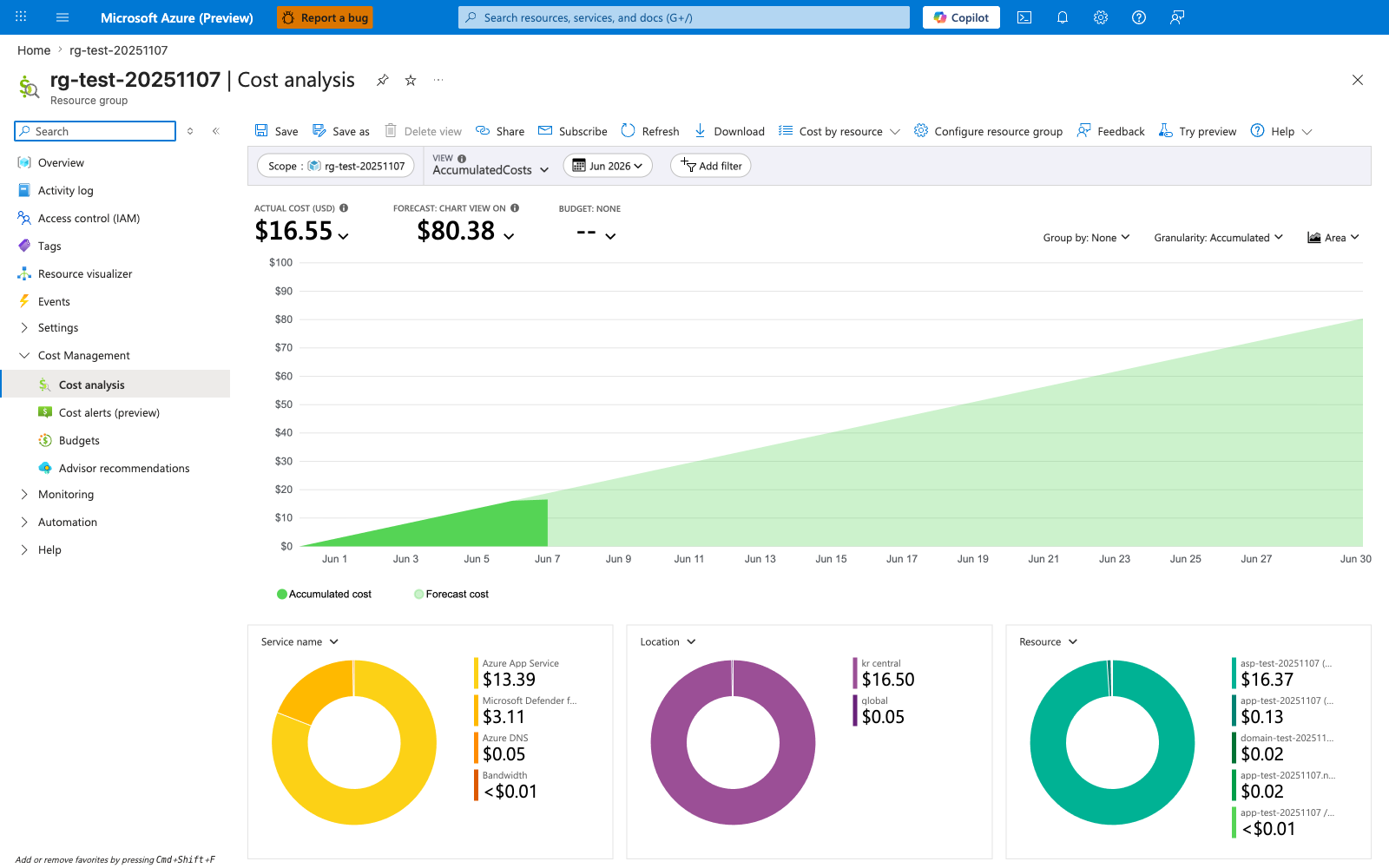
The Cost analysis blade is the canonical baseline view this section's CLI commands feed into. The three KPI tiles map directly to the cost-management loop in the decision flowchart above: ACTUAL COST (USD) is the measurement you optimize against, FORECAST is the projection that triggers a right-sizing review, and BUDGET: NONE is the visible gap that the "Set Budgets and Alerts" step further down closes. The Resource donut at the bottom shows the App Service plan (asp-test-20251107, $16.37) dominates the bill at roughly 99% of total spend — typical for App Service workloads and exactly why the plan SKU and worker count are the first levers to tune. Use the Scope, View, and date controls to switch between subscription, RG, and time windows, but anchor every optimization decision against this view so right-sizing changes can be measured against a real before-and-after rather than assumed.
Right-Size Plan Tier and Instance Count
General operating model:
- start from measured utilization, not assumptions
- tune for sustained workload, not rare spikes
- avoid overprovisioning in non-production environments
Scale up/down SKU when needed:
Adjust worker count:
az appservice plan update \
  --resource-group $RG \
  --name $PLAN_NAME \
  --number-of-workers 2 \
  --output json
Implement Autoscale to Match Demand
Create autoscale profile:
az monitor autoscale create \
  --resource-group $RG \
  --resource $PLAN_ID \
  --resource-type Microsoft.Web/serverfarms \
  --name "autoscale-$PLAN_NAME" \
  --min-count 1 \
  --max-count 5 \
  --count 2 \
  --output json
Add scale-out rule:
az monitor autoscale rule create \
  --resource-group $RG \
  --autoscale-name "autoscale-$PLAN_NAME" \
  --condition "Percentage CPU > 70 avg 10m" \
  --scale out 1 \
  --cooldown 10 \
  --output json
Add scale-in rule:
az monitor autoscale rule create \
  --resource-group $RG \
  --autoscale-name "autoscale-$PLAN_NAME" \
  --condition "Percentage CPU < 30 avg 20m" \
  --scale in 1 \
  --cooldown 20 \
  --output json
Avoid under-scaling for savings
Cost reductions that cause repeated incidents are not true savings. Align autoscale policies with SLOs before lowering baseline capacity.
Use Schedule-Based Profiles for Predictable Traffic
az monitor autoscale profile create \
  --resource-group $RG \
  --autoscale-name "autoscale-$PLAN_NAME" \
  --name "off-hours" \
  --min-count 1 \
  --max-count 2 \
  --count 1 \
  --recurrence "timezone=UTC days=Monday Tuesday Wednesday Thursday Friday hours=20 minutes=00" \
  --output json
Control Environment Sprawl
High-cost anti-patterns:
- unused deployment slots
- abandoned test plans
- oversized always-on environments
- duplicate monitoring resources without ownership
Audit web apps and plans:
az webapp list \
  --query "[].{name:name,resourceGroup:resourceGroup,state:state,plan:serverFarmId}" \
  --output table

az appservice plan list \
  --query "[].{name:name,resourceGroup:resourceGroup,sku:sku.name,workers:numberOfWorkers}" \
  --output table
Apply Reservations for Steady Production Capacity
When workloads are stable, evaluate App Service reservations (1-year or 3-year) for predictable baseline capacity savings.
Operational guidance:
- reserve steady baseline only
- leave burst capacity to autoscale
- review commitment annually against utilization trends
Set Budgets and Alerts
Use Cost Management budgets per environment or service group.
Recommended alert thresholds:
- 50% monthly budget (early awareness)
- 80% monthly budget (investigation)
- 100% monthly budget (incident level)
Verification
Check autoscale configuration:
az monitor autoscale show \
  --resource-group $RG \
  --name "autoscale-$PLAN_NAME" \
  --query "{enabled:enabled,profiles:profiles[].name}" \
  --output json
Check recent usage values:
az consumption usage list \
  --start-date 2026-04-01 \
  --end-date 2026-04-30 \
  --query "[].{instanceName:instanceName,cost:pretaxCost,currency:currency}" \
  --output table
Sample output (PII-masked):
InstanceName                Cost    Currency
------------------------  ------  --------
appservice-plan-shared    84.12   USD
monitoring-shared         11.44   USD
Rollback / Troubleshooting
Bill is higher than expected
- verify instance counts did scale down
- identify orphan resources and stale slots
- check if high-cost premium tiers are still required
Autoscale exists but no cost reduction
- min-count may be too high
- schedule profiles may be missing
- scale-in threshold may be too conservative
Latency increased after downsizing
- revert one step and reassess
- optimize slow endpoints and dependency usage
- split noisy and critical workloads into separate plans
Advanced Topics
Cost per Transaction Lens
Track unit economics:
- cost per 1,000 requests
- cost per successful transaction
- cost per environment
This gives better optimization signals than total monthly cost alone.
Shared vs Dedicated Plan Strategy
- shared plans improve utilization for compatible workloads
- dedicated plans isolate critical workloads from noisy neighbors
- choose based on reliability and governance requirements
FinOps Operating Rhythm
Adopt recurring review cadence:
- weekly anomaly review
- monthly right-sizing recommendations
- quarterly reservation and architecture review
Enterprise Considerations
Cost optimization is most effective when platform, application, and finance stakeholders review the same telemetry and targets. Couple spend dashboards with reliability indicators to avoid false savings.
Language-Specific Details
For language-specific operational guidance, see: - Node.js Guide - Python Guide - Java Guide - .NET Guide
See Also
- Operations Index
- Scaling Operations
- Security
- Manage costs for App Service (Microsoft Learn)
- Cost management best practices (Microsoft Learn)