Backup and Restore Operations
Protect production workloads with scheduled backups, restore drills, and disaster recovery procedures. This guide covers App Service backup capabilities and complementary operational patterns.
sequenceDiagram
    participant Op as Operator
    participant App as App Service
    participant Blob as Storage Account
    participant DB as Database (optional)

    Op->>App: Configure backup schedule
    App->>Blob: Store site content + config
    App->>DB: Snapshot (if connected)
    Note over Blob: Retention policy applies
    Op->>App: Trigger restore
    App->>Blob: Retrieve backup artifact
App->>App: Apply configurationPrerequisites
- App Service Plan tier Standard or higher
- Storage account and blob container for backup artifacts
- Permissions to manage storage and web app configuration
- Variables set:
RGAPP_NAMELOCATIONSTORAGE_ACCOUNT_NAME
When to Use
Procedure
Understand Backup Scope and Limits
App Service backup can include:
- site content
- app configuration
- optional connected database backups (when supported)
Operational notes:
- Backups are not a replacement for database-native point-in-time restore
- Validate maximum backup size and retention policy for your tier
- Keep backups in resilient storage settings aligned with your RPO
Create Storage Account and Backup Container
az storage account create \
  --resource-group $RG \
  --name $STORAGE_ACCOUNT_NAME \
  --location $LOCATION \
  --sku Standard_LRS \
  --kind StorageV2 \
  --output json

az storage container create \
  --name appservice-backups \
  --account-name $STORAGE_ACCOUNT_NAME \
  --auth-mode login \
  --output json
Generate Time-Bound SAS and Build Backup URL
SAS_TOKEN=$(az storage container generate-sas \
  --name appservice-backups \
  --account-name $STORAGE_ACCOUNT_NAME \
  --permissions rwl \
  --expiry 2027-01-01T00:00:00Z \
  --auth-mode login \
  --output tsv)

BACKUP_URL="https://${STORAGE_ACCOUNT_NAME}.blob.core.windows.net/appservice-backups?${SAS_TOKEN}"
Protect backup URLs
Container SAS URLs grant access to backup artifacts. Do not commit them to source control or chat logs. Rotate regularly.
Configure Scheduled Backups
az webapp config backup update \
  --resource-group $RG \
  --webapp-name $APP_NAME \
  --container-url "$BACKUP_URL" \
  --frequency 1d \
  --retention 30 \
  --retain-one true \
  --output json
Check schedule configuration:
az webapp config backup show \
  --resource-group $RG \
  --webapp-name $APP_NAME \
  --query "{enabled:enabled,schedule:backupSchedule,lastExecutionTime:lastExecutionTime,retentionPeriodInDays:retentionPeriodInDays}" \
  --output json
Portal view: Backups blade
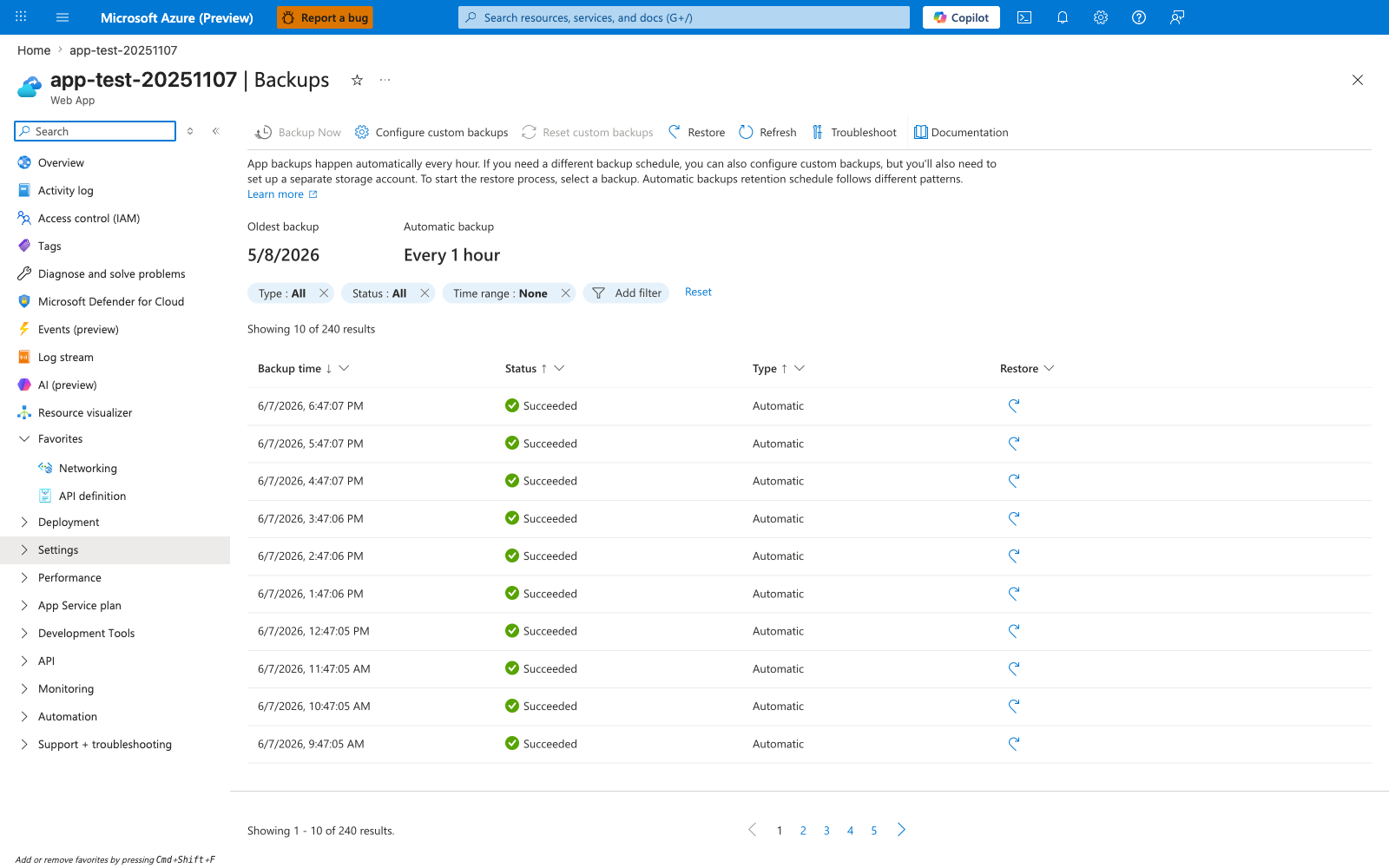
The Backups blade is where the schedule applied by az webapp config backup update becomes operationally visible. The two summary tiles confirm the platform is honoring the schedule — Oldest backup: 5/8/2026 proves the retention window is in effect, and Automatic backup: Every 1 hour matches a typical production cadence. The Status column with consistent green Succeeded rows is the single most important signal during a restore drill: this is the column that should never read Failed for the backup you intend to restore from. Note that the toolbar Backup Now action is disabled in this view because it requires a configured custom storage container — that gap is the same one the az webapp config backup update --container-url "$BACKUP_URL" command above closes, after which the Restore action on any successful row becomes the manual equivalent of az webapp config backup restore.
Trigger On-Demand Backup Before High-Risk Changes
az webapp config backup create \
  --resource-group $RG \
  --webapp-name $APP_NAME \
  --container-url "$BACKUP_URL" \
  --output json
List and Inspect Backups
az webapp config backup list \
  --resource-group $RG \
  --webapp-name $APP_NAME \
  --query "[].{id:backupId,name:blobName,created:created,status:status,sizeInBytes:sizeInBytes}" \
  --output table
Example output:
Name                    Created                     Status    SizeInBytes
----------------------  --------------------------  --------  -------------
backup_20260401.zip     2026-05-01T07:57:52.530731  Failed    0
backup_20260402.zip     2026-05-01T08:02:22.869192  Failed    0
Status in production
In a correctly configured environment, Status shows Succeeded and SizeInBytes reflects the actual backup size. Failed with SizeInBytes: 0 indicates the storage account blocked the write (check firewall and SAS token permissions).
Restore from a Backup
Restore to non-production target first whenever possible.
az webapp config backup restore \
  --resource-group $RG \
  --webapp-name $APP_NAME \
  --backup-id 116 \
  --container-url "$BACKUP_URL" \
  --overwrite true \
  --output json
Sample response:
ERROR: Error occurred while downloading meta data from the storage account.
This error can occur if there is a firewall configured in the storage account
used for restrictions. Please see https://aka.ms/manage-backup-requirements-and-restrictions
for more details. If there is no firewall please try to reset and reconfigure your backups.
Successful restore
When restore succeeds, the command returns JSON with "status": "InProgress" and a storageAccountUrl field. The app is temporarily unavailable while the restore runs. Monitor progress with az webapp show --query state.
Verification
- Confirm app state is
Running - Validate
/healthendpoint - Run smoke tests for critical user journeys
- Confirm app settings and identity bindings
- Validate connectivity to backing services
Commands:
az webapp show \
  --resource-group $RG \
  --name $APP_NAME \
  --query "{state:state,host:defaultHostName}" \
  --output json

curl --silent --show-error --fail \
  "https://$APP_NAME.azurewebsites.net/health"
Recovery Runbook Pattern
Recommended incident sequence:
- Declare incident and freeze deployments
- Capture forensic timeline and latest good backup ID
- Restore to staging/validation environment
- Validate functional and security controls
- Promote restored version to production
- Monitor for stabilization window
- Document lessons learned and adjust backup policy
Cross-Region Recovery Strategy
Strengthen disaster recovery posture:
- store backups in GRS/RA-GRS where policy allows
- maintain IaC templates for rapid environment recreation
- pair app backups with database-native backup strategy
- rehearse failover and failback quarterly
Rollback / Troubleshooting
Backup job fails
- Verify storage URL and SAS validity
- Confirm storage firewall settings allow access
- Confirm app tier supports backups
Restore fails or stalls
- Confirm backup artifact exists and is complete
- Retry with latest known-good backup
- Check activity logs for operation-level errors
Restored app is unhealthy
- Validate app settings and slot-specific configuration
- Confirm dependent services are reachable
- Check startup logs for runtime initialization issues
Advanced Topics
RPO/RTO Planning
- RPO: maximum acceptable data loss window
- RTO: maximum acceptable recovery time
Map backup frequency and restore practice cadence to business targets.
Backup Policy by Environment
Example model:
- dev: daily backups, short retention
- test: daily backups, medium retention
- production: hourly or daily backups plus strict restore drills
Security and Compliance Controls
- encrypt storage at rest (default)
- restrict storage network access where feasible
- rotate SAS tokens on schedule
- log backup/restore operations for audit
Enterprise Considerations
Treat backup success alone as insufficient. Include recurring restore drills with measured recovery times and explicit sign-off from service owners.
Language-Specific Details
For language-specific operational guidance, see: - Node.js Guide - Python Guide - Java Guide - .NET Guide
See Also
- Operations Index
- Deployment Slots
- Health and Recovery
- Back up and restore App Service apps (Microsoft Learn)
- Disaster recovery guidance (Microsoft Learn)