07 - Custom Domain and SSL on App Service
This final tutorial binds your Flask app to a custom domain and enables HTTPS certificates. It covers DNS validation, hostname binding, and certificate verification.
Infrastructure Context
Service: App Service (Linux, Standard S1) | Network: VNet integrated | VNet: ✅
This tutorial assumes a production-ready App Service deployment with VNet integration, private endpoints for backend services, and managed identity for authentication.
flowchart TD
    INET[Internet] -->|HTTPS| WA[Web App\nApp Service S1\nLinux Python 3.11]

    subgraph VNET["VNet 10.0.0.0/16"]
        subgraph INT_SUB["Integration Subnet 10.0.1.0/24\nDelegation: Microsoft.Web/serverFarms"]
            WA
        end
        subgraph PE_SUB["Private Endpoint Subnet 10.0.2.0/24"]
            PE_KV[PE: Key Vault]
            PE_SQL[PE: Azure SQL]
            PE_ST[PE: Storage]
        end
    end

    PE_KV --> KV[Key Vault]
    PE_SQL --> SQL[Azure SQL]
    PE_ST --> ST[Storage Account]

    subgraph DNS[Private DNS Zones]
        DNS_KV[privatelink.vaultcore.azure.net]
        DNS_SQL[privatelink.database.windows.net]
        DNS_ST[privatelink.blob.core.windows.net]
    end

    PE_KV -.-> DNS_KV
    PE_SQL -.-> DNS_SQL
    PE_ST -.-> DNS_ST

    WA -.->|System-Assigned MI| ENTRA[Microsoft Entra ID]
    WA --> AI[Application Insights]

    style WA fill:#0078d4,color:#fff
    style VNET fill:#E8F5E9,stroke:#4CAF50
    style DNS fill:#E3F2FD
How Custom Domains Work
flowchart TD
    Client[Client] --> DNS[Public DNS zone]
    DNS -->|CNAME www.contoso.example -> app.azurewebsites.net| App[App Service]
    DNS -->|TXT asuid.www = customDomainVerificationId| App
App Service validates domain ownership with the asuid TXT record before hostname binding is finalized.
How HTTPS Binding Works
flowchart TD
    ClientHttps[Client HTTPS request] --> Domain[Custom domain hostname]
    Domain -->|SNI certificate binding| App[App Service]
    ClientHttp[Client HTTP request] -->|301/302 redirect| ClientHttps
After certificate binding, App Service serves TLS for the custom hostname and redirects HTTP traffic to HTTPS when HTTPS-only is enabled.
Prerequisites
- Completed 06 - CI/CD
- A domain name you can manage in DNS
- Web app deployed and reachable via
*.azurewebsites.net - App Service Plan: Custom domains require a paid App Service plan (not the Free F1 tier). App Service Managed Certificates require Basic tier or higher.
Main Content
Add DNS records for domain ownership
Use your DNS provider to add records for verification and routing:
- TXT record for
asuidvalidation - CNAME record for subdomain mapping (for example
www)
Get verification ID:
az webapp show --resource-group $RG --name $APP_NAME --query customDomainVerificationId --output tsv
| Command | Purpose |
|---|---|
az webapp show --resource-group $RG --name $APP_NAME --query customDomainVerificationId --output tsv | Retrieves the domain verification ID required for the asuid TXT record. |
--query customDomainVerificationId | Extracts only the custom domain verification value from the response. |
--output tsv | Returns the verification ID as plain text for easy copy/paste into DNS. |
Bind custom hostname
CUSTOM_HOSTNAME="www.contoso.example"
az webapp config hostname add --resource-group $RG --webapp-name $APP_NAME --hostname $CUSTOM_HOSTNAME
| Command | Purpose |
|---|---|
CUSTOM_HOSTNAME="www.contoso.example" | Stores the custom hostname you want to bind to the web app. |
az webapp config hostname add --resource-group $RG --webapp-name $APP_NAME --hostname $CUSTOM_HOSTNAME | Adds the custom domain binding to the App Service app. |
--webapp-name $APP_NAME | Selects the target web app for the hostname binding. |
--hostname $CUSTOM_HOSTNAME | Specifies the exact custom domain name to add. |
Create managed certificate and bind SSL
az webapp config ssl create --resource-group $RG --name $APP_NAME --hostname $CUSTOM_HOSTNAME

THUMBPRINT=$(az webapp config ssl list --resource-group $RG --query "[?hostNames && contains(join(',', hostNames), '$CUSTOM_HOSTNAME')].thumbprint | [0]" --output tsv)

az webapp config ssl bind --resource-group $RG --name $APP_NAME --certificate-thumbprint $THUMBPRINT --ssl-type SNI
Preview Command
az webapp config ssl create is currently in Preview. Not all hostname configurations are eligible for managed certificates. See App Service TLS overview for eligibility requirements. The Azure Portal provides an alternative path for managed certificate creation.
| Command | Purpose |
|---|---|
az webapp config ssl create --resource-group $RG --name $APP_NAME --hostname $CUSTOM_HOSTNAME | Requests an App Service managed certificate for the custom hostname. |
--hostname $CUSTOM_HOSTNAME | Tells Azure which hostname the certificate should cover. |
THUMBPRINT=$(az webapp config ssl list --resource-group $RG --query "[?hostNames && contains(join(',', hostNames), '$CUSTOM_HOSTNAME')].thumbprint | [0]" --output tsv) | Captures the certificate thumbprint for the hostname that was just created. |
az webapp config ssl list | Lists SSL certificates available to the web app. |
--query "[?hostNames && contains(join(',', hostNames), '$CUSTOM_HOSTNAME')].thumbprint | [0]" | Filters the certificate list to the first thumbprint matching the custom hostname. |
az webapp config ssl bind --resource-group $RG --name $APP_NAME --certificate-thumbprint $THUMBPRINT --ssl-type SNI | Binds the selected certificate to the web app hostname. |
--certificate-thumbprint $THUMBPRINT | Identifies which certificate to bind. |
--ssl-type SNI | Uses SNI-based TLS binding for the hostname. |
Enforce HTTPS-only traffic
| Command | Purpose |
|---|---|
az webapp update --resource-group $RG --name $APP_NAME --https-only true | Forces the web app to redirect HTTP traffic to HTTPS. |
--https-only true | Enables the HTTPS-only setting on App Service. |
Validate certificate and endpoint health
| Command | Purpose |
|---|---|
curl -I https://$CUSTOM_HOSTNAME/health | Sends a HEAD request to confirm the custom domain and certificate are working. |
-I | Returns response headers only, which is useful for quick HTTPS validation. |
Masked certificate inventory example:
[
  {
    "hostNames": [
      "www.contoso.example"
    ],
    "thumbprint": "xxxxxxxx-xxxx-xxxx-xxxx-xxxxxxxxxxxx",
    "resourceGroup": "rg-flask-tutorial"
  }
]
Advanced Topics
Use Azure DNS and Traffic Manager for multi-region failover, and automate certificate lifecycle monitoring with alerts for expiration windows.
Run It in the Portal
Portal view: Custom domains blade (post-binding verification)
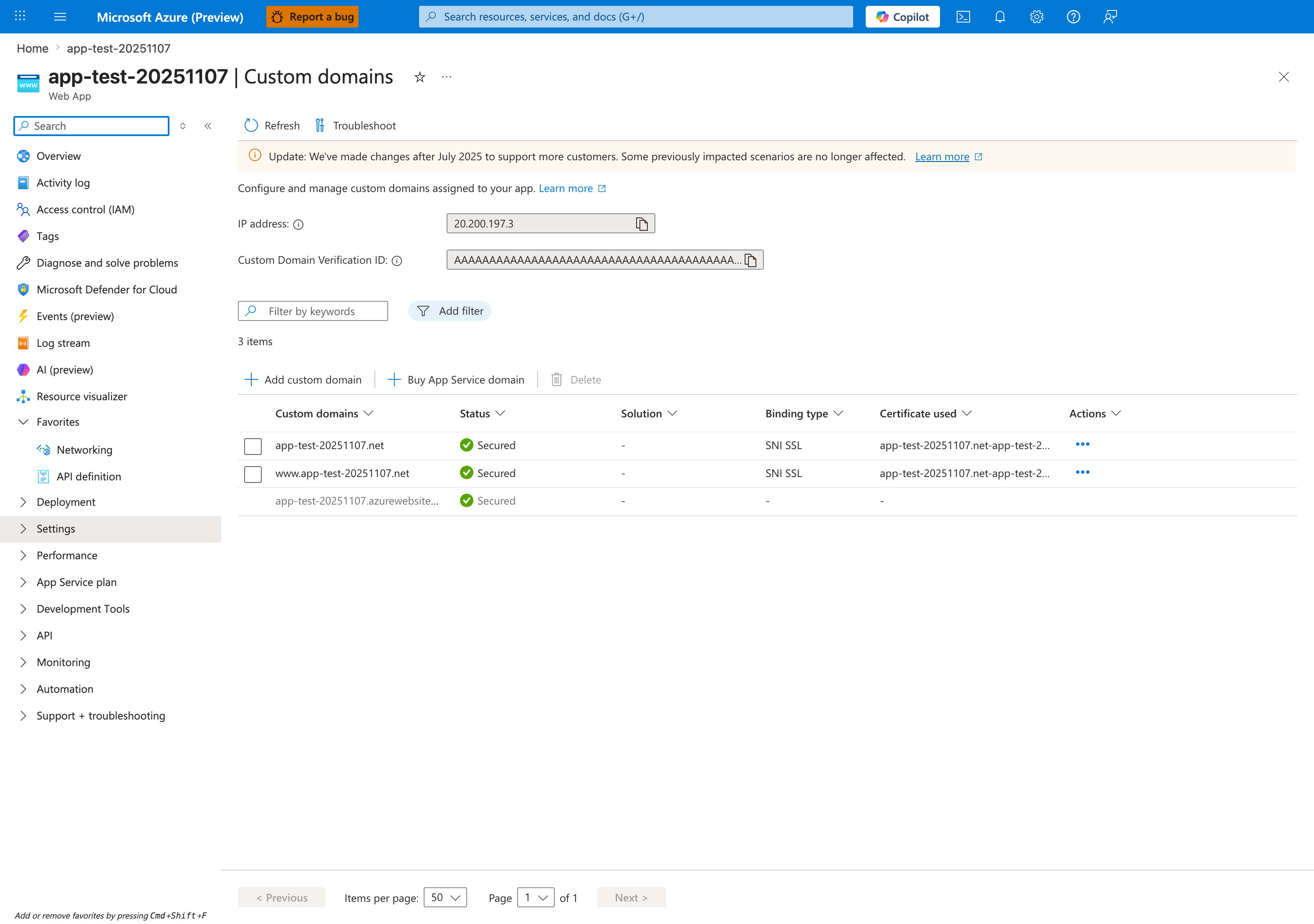
The Custom domains blade is the Portal verification surface for the az webapp config hostname add and az webapp config ssl bind steps in this tutorial. After DNS validation and certificate binding, the custom-hostname rows should show Status: Secured, Binding type: SNI SSL, and a populated Certificate used value, which is the end state visible for app-test-20251107.net and www.app-test-20251107.net in this screenshot. The IP address field at the top is the value you compare against the apex-domain A record during setup, and Add custom domain is the visible Portal entry point for the same hostname-binding flow. Use this blade after the CLI steps to confirm that the hostname rows, binding type, and certificate columns all reflect the expected custom-domain state.