06 - CI/CD with GitHub Actions for Flask App Service
This tutorial automates build and deployment for Flask using GitHub Actions. It uses actions/setup-python, pip dependency caching, and Azure Web App deployment.
Infrastructure Context
Service: App Service (Linux, Standard S1) | Network: VNet integrated | VNet: ✅
This tutorial assumes a production-ready App Service deployment with VNet integration, private endpoints for backend services, and managed identity for authentication.
flowchart TD
    INET[Internet] -->|HTTPS| WA[Web App\nApp Service S1\nLinux Python 3.11]

    subgraph VNET["VNet 10.0.0.0/16"]
        subgraph INT_SUB["Integration Subnet 10.0.1.0/24\nDelegation: Microsoft.Web/serverFarms"]
            WA
        end
        subgraph PE_SUB["Private Endpoint Subnet 10.0.2.0/24"]
            PE_KV[PE: Key Vault]
            PE_SQL[PE: Azure SQL]
            PE_ST[PE: Storage]
        end
    end

    PE_KV --> KV[Key Vault]
    PE_SQL --> SQL[Azure SQL]
    PE_ST --> ST[Storage Account]

    subgraph DNS[Private DNS Zones]
        DNS_KV[privatelink.vaultcore.azure.net]
        DNS_SQL[privatelink.database.windows.net]
        DNS_ST[privatelink.blob.core.windows.net]
    end

    PE_KV -.-> DNS_KV
    PE_SQL -.-> DNS_SQL
    PE_ST -.-> DNS_ST

    WA -.->|System-Assigned MI| ENTRA[Microsoft Entra ID]
    WA --> AI[Application Insights]

    style WA fill:#0078d4,color:#fff
    style VNET fill:#E8F5E9,stroke:#4CAF50
style DNS fill:#E3F2FDPrerequisites
- Completed 05 - Infrastructure as Code
- GitHub repository connected to Azure credentials (OIDC or service principal)
Main Content
Create workflow for build and deploy
Create .github/workflows/deploy.yml:
name: deploy-flask-appservice

on:
  push:
    branches: [ main ]

jobs:
  build-and-deploy:
    runs-on: ubuntu-latest
    steps:
      - name: Checkout
        uses: actions/checkout@v4

      - name: Setup Python
        uses: actions/setup-python@v5
        with:
          python-version: '3.11'
          cache: 'pip'
          cache-dependency-path: apps/python-flask/requirements.txt

      - name: Install dependencies
        run: |
          python -m pip install --upgrade pip
          pip install -r apps/python-flask/requirements.txt
          pip install -r apps/python-flask/requirements-dev.txt

      - name: Run tests if present
        working-directory: apps/python-flask
        run: |
          if [ -d tests ]; then
            pytest
          else
            echo "No tests directory yet; skipping pytest for this sample app."
          fi

      - name: Azure login
        uses: azure/login@v2
        with:
          client-id: ${{ secrets.AZURE_CLIENT_ID }}
          tenant-id: ${{ secrets.AZURE_TENANT_ID }}
          subscription-id: ${{ secrets.AZURE_SUBSCRIPTION_ID }}

      - name: Deploy to App Service
        uses: azure/webapps-deploy@v3
        with:
          app-name: app-flask-tutorial-abc123
          package: apps/python-flask
| YAML | Purpose |
|---|---|
name: deploy-flask-appservice | Names the GitHub Actions workflow. |
on: push: branches: [ main ] | Triggers the workflow whenever code is pushed to the main branch. |
jobs: build-and-deploy | Defines the CI/CD job that will build and deploy the app. |
runs-on: ubuntu-latest | Uses the latest Ubuntu GitHub-hosted runner. |
uses: actions/checkout@v4 | Checks out the repository contents into the runner. |
uses: actions/setup-python@v5 | Installs and configures Python on the runner. |
python-version: '3.11' | Pins the workflow to Python 3.11. |
cache: 'pip' | Enables dependency caching for pip packages. |
cache-dependency-path: apps/python-flask/requirements.txt | Uses the Python requirements file to calculate the cache key. |
python -m pip install --upgrade pip | Upgrades pip before installing dependencies. |
pip install -r apps/python-flask/requirements.txt | Installs the Flask app runtime dependencies in the workflow. |
pip install -r apps/python-flask/requirements-dev.txt | Installs the development dependencies required to run pytest. |
working-directory: apps/python-flask | Runs the validation step from the Flask sample app directory. |
if [ -d tests ]; then pytest ... fi | Runs pytest when the sample app has tests and skips the step cleanly when it does not. |
uses: azure/login@v2 | Authenticates the workflow to Azure. |
client-id, tenant-id, subscription-id | Reads Azure identity values from GitHub secrets. |
uses: azure/webapps-deploy@v3 | Deploys the application package to Azure App Service. |
app-name: app-flask-tutorial-abc123 | Identifies the target App Service app. |
package: apps/python-flask | Deploys the contents of the Flask sample app directory. |
Configure startup command and app settings once
az webapp config set --resource-group $RG --name $APP_NAME --startup-file "gunicorn --bind=0.0.0.0:$PORT src.app:app"
az webapp config appsettings set --resource-group $RG --name $APP_NAME --settings SCM_DO_BUILD_DURING_DEPLOYMENT=true
| Command | Purpose |
|---|---|
az webapp config set --resource-group $RG --name $APP_NAME --startup-file "gunicorn --bind=0.0.0.0:$PORT src.app:app" | Sets the startup command App Service should use after each deployment. |
--startup-file "gunicorn --bind=0.0.0.0:$PORT src.app:app" | Runs the Flask app with Gunicorn on the App Service-assigned port. |
az webapp config appsettings set --resource-group $RG --name $APP_NAME --settings SCM_DO_BUILD_DURING_DEPLOYMENT=true | Enables Oryx build automation for source-based deployments. |
--settings SCM_DO_BUILD_DURING_DEPLOYMENT=true | Tells App Service to install dependencies during deployment. |
Verify deployment from workflow run
| Command | Purpose |
|---|---|
curl https://$APP_NAME.azurewebsites.net/health | Calls the deployed health endpoint to confirm the workflow deployment succeeded. |
flowchart TD
    A[Push to main] --> B[setup-python]
    B --> C[pip cache restore]
    C --> D[pip install + tests]
    D --> E[azure login]
    E --> F[webapps deploy]
    F --> G[health check]
Advanced Topics
Split CI and CD jobs, gate deployment with required approvals, and add slot-based blue/green rollout with automatic rollback checks.
Run It in the Portal
Portal view: Deployment Center blade (GitHub Actions source configuration)
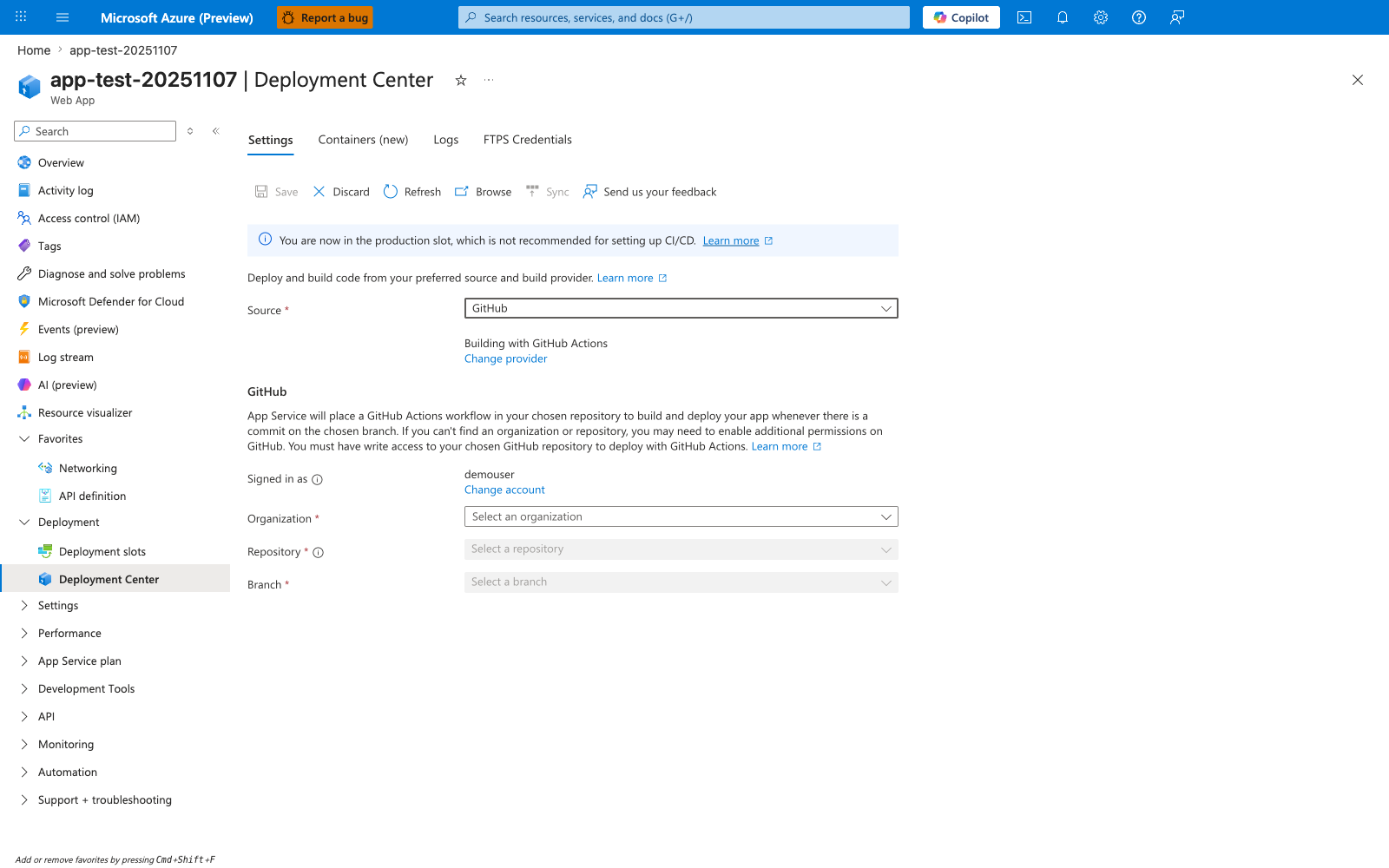
The Deployment Center blade is the Portal entry point for wiring an App Service app to GitHub. With Source: GitHub selected and Building with GitHub Actions, filling in Organization, Repository, and Branch and clicking Save causes App Service to generate a starter workflow in the selected repository. This tutorial takes the version-controlled path instead by keeping a hand-authored workflow under .github/workflows/ and using explicit azure/login@v2 and azure/webapps-deploy@v3 steps. The banner You are now in the production slot, which is not recommended for setting up CI/CD is still useful context when you later harden this flow with staging-slot promotion.