05 - Infrastructure as Code for Python App Service
This tutorial provisions Flask hosting infrastructure with Bicep for repeatable environments. It defines Python runtime settings, startup command, and worker-related app settings as code.
Infrastructure Context
Service: App Service (Linux, Standard S1) | Network: VNet integrated | VNet: ✅
This tutorial assumes a production-ready App Service deployment with VNet integration, private endpoints for backend services, and managed identity for authentication.
flowchart TD
    INET[Internet] -->|HTTPS| WA[Web App\nApp Service S1\nLinux Python 3.11]

    subgraph VNET["VNet 10.0.0.0/16"]
        subgraph INT_SUB["Integration Subnet 10.0.1.0/24\nDelegation: Microsoft.Web/serverFarms"]
            WA
        end
        subgraph PE_SUB["Private Endpoint Subnet 10.0.2.0/24"]
            PE_KV[PE: Key Vault]
            PE_SQL[PE: Azure SQL]
            PE_ST[PE: Storage]
        end
    end

    PE_KV --> KV[Key Vault]
    PE_SQL --> SQL[Azure SQL]
    PE_ST --> ST[Storage Account]

    subgraph DNS[Private DNS Zones]
        DNS_KV[privatelink.vaultcore.azure.net]
        DNS_SQL[privatelink.database.windows.net]
        DNS_ST[privatelink.blob.core.windows.net]
    end

    PE_KV -.-> DNS_KV
    PE_SQL -.-> DNS_SQL
    PE_ST -.-> DNS_ST

    WA -.->|System-Assigned MI| ENTRA[Microsoft Entra ID]
    WA --> AI[Application Insights]

    style WA fill:#0078d4,color:#fff
    style VNET fill:#E8F5E9,stroke:#4CAF50
    style DNS fill:#E3F2FD
flowchart TD
A[Define Bicep resources] --> B[Set linuxFxVersion PYTHON 3.11]
B --> C[Set gunicorn startup command]
C --> D[Apply app settings and workers]
D --> E[Deploy template]
E --> F[Validate runtime config]Prerequisites
- Completed 04 - Logging and Monitoring
- Azure CLI and Bicep available locally
Main Content
Define App Service runtime in Bicep
resource webApp 'Microsoft.Web/sites@2023-12-01' = {
  name: appName
  location: location
  kind: 'app,linux'
  properties: {
    serverFarmId: appServicePlan.id
    siteConfig: {
      linuxFxVersion: 'PYTHON|3.11'
      appCommandLine: 'gunicorn --bind=0.0.0.0:$PORT src.app:app'
      alwaysOn: true
    }
    httpsOnly: true
  }
}
| Code | Purpose |
|---|---|
resource webApp 'Microsoft.Web/sites@2023-12-01' = { ... } | Declares the App Service web app resource in Bicep. |
name: appName | Uses the appName parameter or variable as the site name. |
location: location | Deploys the site to the selected Azure region. |
kind: 'app,linux' | Marks the site as a Linux App Service app. |
serverFarmId: appServicePlan.id | Attaches the web app to the App Service plan resource. |
linuxFxVersion: 'PYTHON|3.11' | Configures the Python 3.11 runtime stack. |
appCommandLine: 'gunicorn --bind=0.0.0.0:$PORT src.app:app' | Sets Gunicorn as the startup command for the Flask app. |
alwaysOn: true | Keeps the app warm to avoid cold starts on supported tiers. |
httpsOnly: true | Forces HTTPS for incoming traffic. |
Configure worker and timeout related settings
resource webAppSettings 'Microsoft.Web/sites/config@2023-12-01' = {
  name: '${appName}/appsettings'
  properties: {
    SCM_DO_BUILD_DURING_DEPLOYMENT: 'true'
    PYTHON_ENABLE_GUNICORN_MULTIWORKERS: 'true'
    GUNICORN_CMD_ARGS: '--workers 2 --timeout 120'
    APP_ENV: 'production'
  }
}
| Code | Purpose |
|---|---|
resource webAppSettings 'Microsoft.Web/sites/config@2023-12-01' = { ... } | Declares the App Service app settings resource in Bicep. |
name: '${appName}/appsettings' | Targets the appsettings child resource for the web app. |
SCM_DO_BUILD_DURING_DEPLOYMENT: 'true' | Enables Oryx build automation during deployment. |
PYTHON_ENABLE_GUNICORN_MULTIWORKERS: 'true' | Turns on Gunicorn multi-worker support in App Service. |
GUNICORN_CMD_ARGS: '--workers 2 --timeout 120' | Passes worker count and timeout options to Gunicorn. |
APP_ENV: 'production' | Sets the application environment to production. |
Deploy Bicep template
az deployment group create \
  --resource-group $RG \
  --template-file ./infra/main.bicep \
  --parameters appName=$APP_NAME location=$LOCATION planName=$PLAN_NAME
| Command | Purpose |
|---|---|
az deployment group create | Starts a resource group-scoped ARM/Bicep deployment. |
--resource-group $RG | Deploys the template into the specified resource group. |
--template-file ./infra/main.bicep | Uses the Bicep file at ./infra/main.bicep as the deployment template. |
--parameters appName=$APP_NAME location=$LOCATION planName=$PLAN_NAME | Supplies runtime parameter values for the template deployment. |
Validate applied runtime settings
az webapp config show --resource-group $RG --name $APP_NAME
az webapp config appsettings list --resource-group $RG --name $APP_NAME
| Command | Purpose |
|---|---|
az webapp config show --resource-group $RG --name $APP_NAME | Retrieves the current runtime configuration for the web app. |
az webapp config appsettings list --resource-group $RG --name $APP_NAME | Lists the app settings currently applied to the web app. |
--resource-group $RG | Targets the tutorial resource group. |
--name $APP_NAME | Targets the selected App Service app. |
Masked output excerpt:
{
  "linuxFxVersion": "PYTHON|3.11",
  "appCommandLine": "gunicorn --bind=0.0.0.0:$PORT src.app:app",
  "id": "/subscriptions/<subscription-id>/resourceGroups/rg-flask-tutorial/providers/Microsoft.Web/sites/app-flask-tutorial-abc123/config/web"
}
Advanced Topics
Modularize Bicep by separating compute, monitoring, and networking modules, and use parameter files per environment for deterministic promotion.
CLI Alternative (No Bicep)
Use these commands when you need an imperative deployment path without changing the existing Bicep workflow.
Step 1: Set variables
RG="rg-flask-tutorial"
LOCATION="koreacentral"
PLAN_NAME="plan-flask-tutorial-s1"
APP_NAME="app-flask-tutorial-abc123"
VNET_NAME="vnet-flask-tutorial"
INTEGRATION_SUBNET_NAME="snet-appsvc-integration"
| Command | Purpose |
|---|---|
RG="rg-flask-tutorial" | Defines the resource group name for the imperative deployment path. |
LOCATION="koreacentral" | Sets the Azure region used by the CLI commands. |
PLAN_NAME="plan-flask-tutorial-s1" | Stores the App Service plan name. |
APP_NAME="app-flask-tutorial-abc123" | Stores the globally unique App Service app name. |
VNET_NAME="vnet-flask-tutorial" | Stores the virtual network name. |
INTEGRATION_SUBNET_NAME="snet-appsvc-integration" | Stores the delegated subnet name used for VNet integration. |
Step 2: Create resource group, plan, and app
az group create --name $RG --location $LOCATION
az appservice plan create --resource-group $RG --name $PLAN_NAME --is-linux --sku S1
az webapp create --resource-group $RG --plan $PLAN_NAME --name $APP_NAME --runtime "PYTHON|3.11"
| Command | Purpose |
|---|---|
az group create --name $RG --location $LOCATION | Creates the resource group for the App Service resources. |
az appservice plan create --resource-group $RG --name $PLAN_NAME --is-linux --sku S1 | Creates the Linux App Service plan. |
--is-linux | Chooses Linux workers for the hosting plan. |
--sku S1 | Selects the Standard S1 pricing tier. |
az webapp create --resource-group $RG --plan $PLAN_NAME --name $APP_NAME --runtime "PYTHON|3.11" | Creates the Python web app in the plan. |
--plan $PLAN_NAME | Attaches the app to the chosen App Service plan. |
--runtime "PYTHON|3.11" | Selects Python 3.11 as the runtime stack. |
Expected output
Step 3: Configure app settings and startup command
az webapp config appsettings set --resource-group $RG --name $APP_NAME --settings SCM_DO_BUILD_DURING_DEPLOYMENT=true PYTHON_ENABLE_GUNICORN_MULTIWORKERS=true GUNICORN_CMD_ARGS="--workers 2 --timeout 120" APP_ENV=production
az webapp config set --resource-group $RG --name $APP_NAME --startup-file "gunicorn --bind=0.0.0.0:$PORT src.app:app"
| Command | Purpose |
|---|---|
az webapp config appsettings set --resource-group $RG --name $APP_NAME --settings ... | Applies deployment, worker, timeout, and environment settings to the web app. |
--settings SCM_DO_BUILD_DURING_DEPLOYMENT=true ... APP_ENV=production | Sets Oryx build, multi-worker Gunicorn, timeout arguments, and production environment values. |
az webapp config set --resource-group $RG --name $APP_NAME --startup-file "gunicorn --bind=0.0.0.0:$PORT src.app:app" | Configures the startup command that launches the Flask app with Gunicorn. |
--startup-file "gunicorn --bind=0.0.0.0:$PORT src.app:app" | Defines the exact process App Service should start. |
Expected output
Step 4 (Optional): Add VNet integration
az network vnet create --resource-group $RG --name $VNET_NAME --location $LOCATION --address-prefixes 10.0.0.0/16
az network vnet subnet create --resource-group $RG --vnet-name $VNET_NAME --name $INTEGRATION_SUBNET_NAME --address-prefixes 10.0.1.0/24 --delegations Microsoft.Web/serverFarms
az webapp vnet-integration add --resource-group $RG --name $APP_NAME --vnet $VNET_NAME --subnet $INTEGRATION_SUBNET_NAME
| Command | Purpose |
|---|---|
az network vnet create --resource-group $RG --name $VNET_NAME --location $LOCATION --address-prefixes 10.0.0.0/16 | Creates the virtual network used for App Service integration. |
--address-prefixes 10.0.0.0/16 | Defines the VNet address space. |
az network vnet subnet create --resource-group $RG --vnet-name $VNET_NAME --name $INTEGRATION_SUBNET_NAME --address-prefixes 10.0.1.0/24 --delegations Microsoft.Web/serverFarms | Creates and delegates the integration subnet to App Service. |
--delegations Microsoft.Web/serverFarms | Allows App Service plans to use the subnet. |
az webapp vnet-integration add --resource-group $RG --name $APP_NAME --vnet $VNET_NAME --subnet $INTEGRATION_SUBNET_NAME | Connects the web app to the delegated subnet for outbound VNet access. |
--subnet $INTEGRATION_SUBNET_NAME | Chooses the subnet used for integration. |
Expected output
Step 5: Validate effective configuration
az webapp config show --resource-group $RG --name $APP_NAME --query "{linuxFxVersion:linuxFxVersion, appCommandLine:appCommandLine}" --output json
az webapp config appsettings list --resource-group $RG --name $APP_NAME --query "[?name=='APP_ENV' || name=='SCM_DO_BUILD_DURING_DEPLOYMENT']" --output json
| Command | Purpose |
|---|---|
az webapp config show --resource-group $RG --name $APP_NAME --query "{linuxFxVersion:linuxFxVersion, appCommandLine:appCommandLine}" --output json | Displays only the runtime stack and startup command from the web app configuration. |
--query "{linuxFxVersion:linuxFxVersion, appCommandLine:appCommandLine}" | Filters the response to the two runtime properties you want to validate. |
az webapp config appsettings list --resource-group $RG --name $APP_NAME --query "[?name=='APP_ENV' || name=='SCM_DO_BUILD_DURING_DEPLOYMENT']" --output json | Lists only the selected app settings needed for verification. |
--query "[?name=='APP_ENV' || name=='SCM_DO_BUILD_DURING_DEPLOYMENT']" | Filters the settings list to the named entries. |
--output json | Returns the validation result in JSON format. |
Expected output
Run It in the Portal
Portal view: Resource group overview (verifying Bicep deployment outputs)
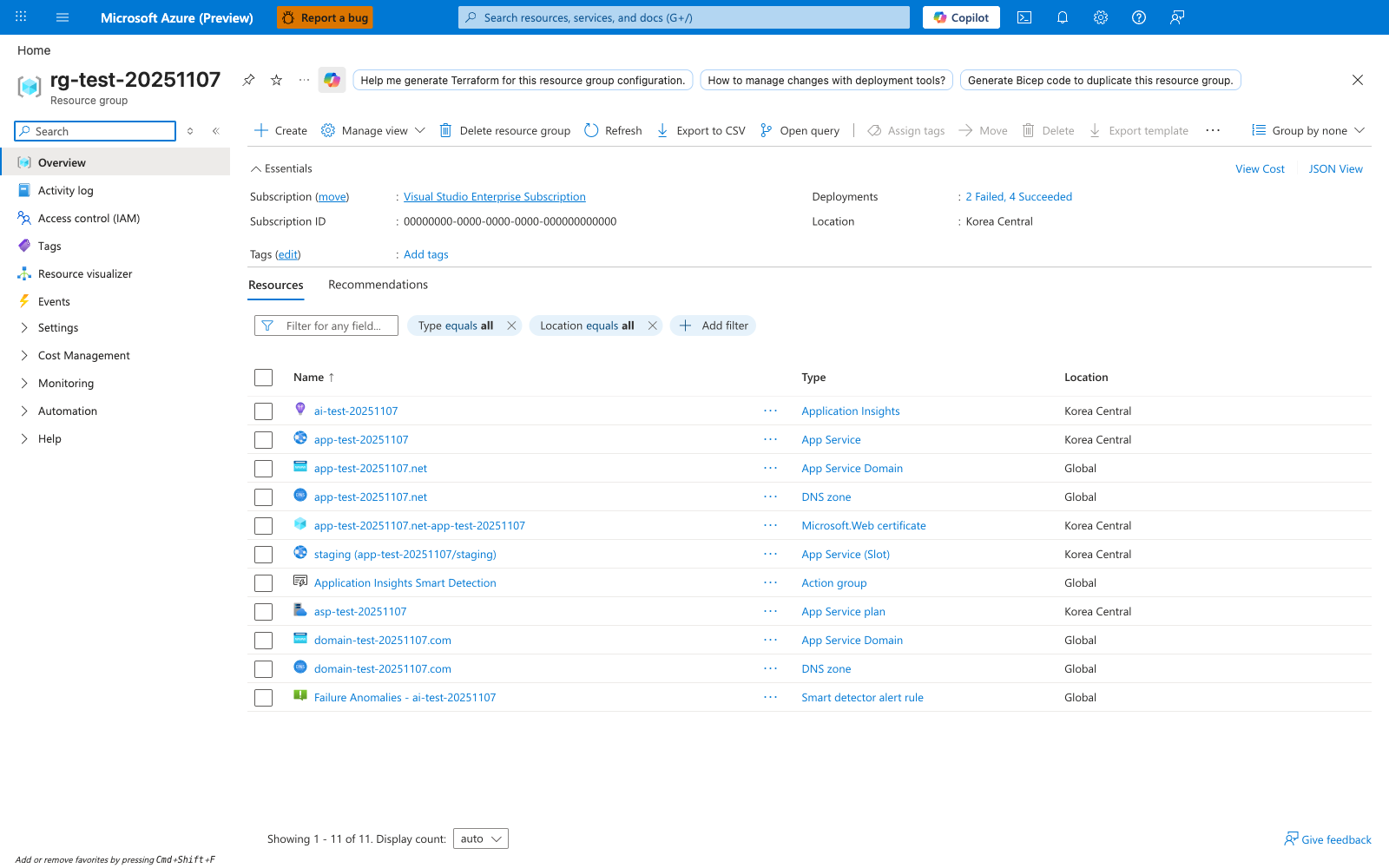
After running az deployment group create --template-file ./infra/main.bicep, the resource group overview is the Portal surface for checking what the deployment produced. The visible Resources tab shows how Azure inventories related resources as separate rows in one resource group, including App Service, App Service Plan, and Application Insights. For this tutorial, use the same blade to confirm that the web app and plan created by your Bicep deployment exist, then open the Deployments entry in Essentials if you need to inspect deployment history after a partial failure. The Export template button is also useful when you want to compare deployed ARM state with the Bicep source in your repository.