03 - Configure Flask App Settings on App Service
This guide standardizes runtime configuration for Flask on Azure App Service. You will set environment settings, separate dev/prod behavior, and secure secrets with Key Vault references.
Infrastructure Context
Service: App Service (Linux, Standard S1) | Network: VNet integrated | VNet: ✅
This tutorial assumes a production-ready App Service deployment with VNet integration, private endpoints for backend services, and managed identity for authentication.
flowchart TD
    INET[Internet] -->|HTTPS| WA[Web App\nApp Service S1\nLinux Python 3.11]

    subgraph VNET["VNet 10.0.0.0/16"]
        subgraph INT_SUB["Integration Subnet 10.0.1.0/24\nDelegation: Microsoft.Web/serverFarms"]
            WA
        end
        subgraph PE_SUB["Private Endpoint Subnet 10.0.2.0/24"]
            PE_KV[PE: Key Vault]
            PE_SQL[PE: Azure SQL]
            PE_ST[PE: Storage]
        end
    end

    PE_KV --> KV[Key Vault]
    PE_SQL --> SQL[Azure SQL]
    PE_ST --> ST[Storage Account]

    subgraph DNS[Private DNS Zones]
        DNS_KV[privatelink.vaultcore.azure.net]
        DNS_SQL[privatelink.database.windows.net]
        DNS_ST[privatelink.blob.core.windows.net]
    end

    PE_KV -.-> DNS_KV
    PE_SQL -.-> DNS_SQL
    PE_ST -.-> DNS_ST

    WA -.->|System-Assigned MI| ENTRA[Microsoft Entra ID]
    WA --> AI[Application Insights]

    style WA fill:#0078d4,color:#fff
    style VNET fill:#E8F5E9,stroke:#4CAF50
    style DNS fill:#E3F2FD
flowchart TD
A[Set App Settings] --> B[Read env vars in Flask]
B --> C[Separate local and production profiles]
C --> D[Add Key Vault references]
D --> E[List and validate effective settings]Prerequisites
- Completed 02 - First Deploy
- Deployed web app running in App Service
Main Content
Configure application settings in App Service
az webapp config appsettings set \
  --resource-group $RG \
  --name $APP_NAME \
  --settings FLASK_ENV=production APP_ENV=production LOG_LEVEL=INFO
| Command | Purpose |
|---|---|
az webapp config appsettings set | Creates or updates environment variables for the App Service app. |
--resource-group $RG | Targets the resource group that contains the web app. |
--name $APP_NAME | Selects the web app whose settings should be updated. |
--settings FLASK_ENV=production APP_ENV=production LOG_LEVEL=INFO | Sets production runtime values for Flask environment, app environment, and log level. |
In Flask code, read settings from environment variables:
import os

FLASK_ENV = os.getenv("FLASK_ENV", "production")
APP_ENV = os.getenv("APP_ENV", "production")
LOG_LEVEL = os.getenv("LOG_LEVEL", "INFO")
| Code | Purpose |
|---|---|
import os | Loads Python's standard library module for reading environment variables. |
os.getenv("FLASK_ENV", "production") | Reads FLASK_ENV and falls back to production when it is not set. |
os.getenv("APP_ENV", "production") | Reads the custom application environment setting with a safe default. |
os.getenv("LOG_LEVEL", "INFO") | Reads the configured log level and defaults to INFO. |
Use environment strategy for local vs cloud
Recommended pattern:
- Local development:
FLASK_ENV=development,APP_ENV=local - App Service:
FLASK_ENV=production,APP_ENV=production
Add Key Vault reference for secrets
KEYVAULT_NAME="kv-flask-tutorial"
SECRET_NAME="DbPassword"

az webapp config appsettings set \
  --resource-group $RG \
  --name $APP_NAME \
  --settings "DB_PASSWORD=@Microsoft.KeyVault(SecretUri=https://$KEYVAULT_NAME.vault.azure.net/secrets/$SECRET_NAME/)"
| Command | Purpose |
|---|---|
KEYVAULT_NAME="kv-flask-tutorial" | Stores the Key Vault name used to build the secret reference. |
SECRET_NAME="DbPassword" | Stores the Key Vault secret name. |
az webapp config appsettings set | Adds or updates an app setting on the web app. |
--resource-group $RG | Targets the correct resource group. |
--name $APP_NAME | Applies the setting to the selected web app. |
--settings "DB_PASSWORD=@Microsoft.KeyVault(...)" | Configures DB_PASSWORD as an App Service Key Vault reference instead of a plain-text secret. |
Validate effective settings
| Command | Purpose |
|---|---|
az webapp config appsettings list --resource-group $RG --name $APP_NAME | Lists the effective application settings currently configured on the web app. |
--resource-group $RG | Reads settings from the target resource group. |
--name $APP_NAME | Reads settings for the specified App Service app. |
Masked example:
[
  {
    "name": "DB_PASSWORD",
    "value": "@Microsoft.KeyVault(SecretUri=https://kv-flask-tutorial.vault.azure.net/secrets/DbPassword/)"
  },
  {
    "name": "WEBSITE_RUN_FROM_PACKAGE",
    "value": "1"
  }
]
Advanced Topics
Move from single-secret references to identity-based SDK retrieval for dynamic secret versioning and reduced configuration drift across environments.
Run It in the Portal
Portal view: Configuration > General settings blade (Portal counterpart to az webapp config set)
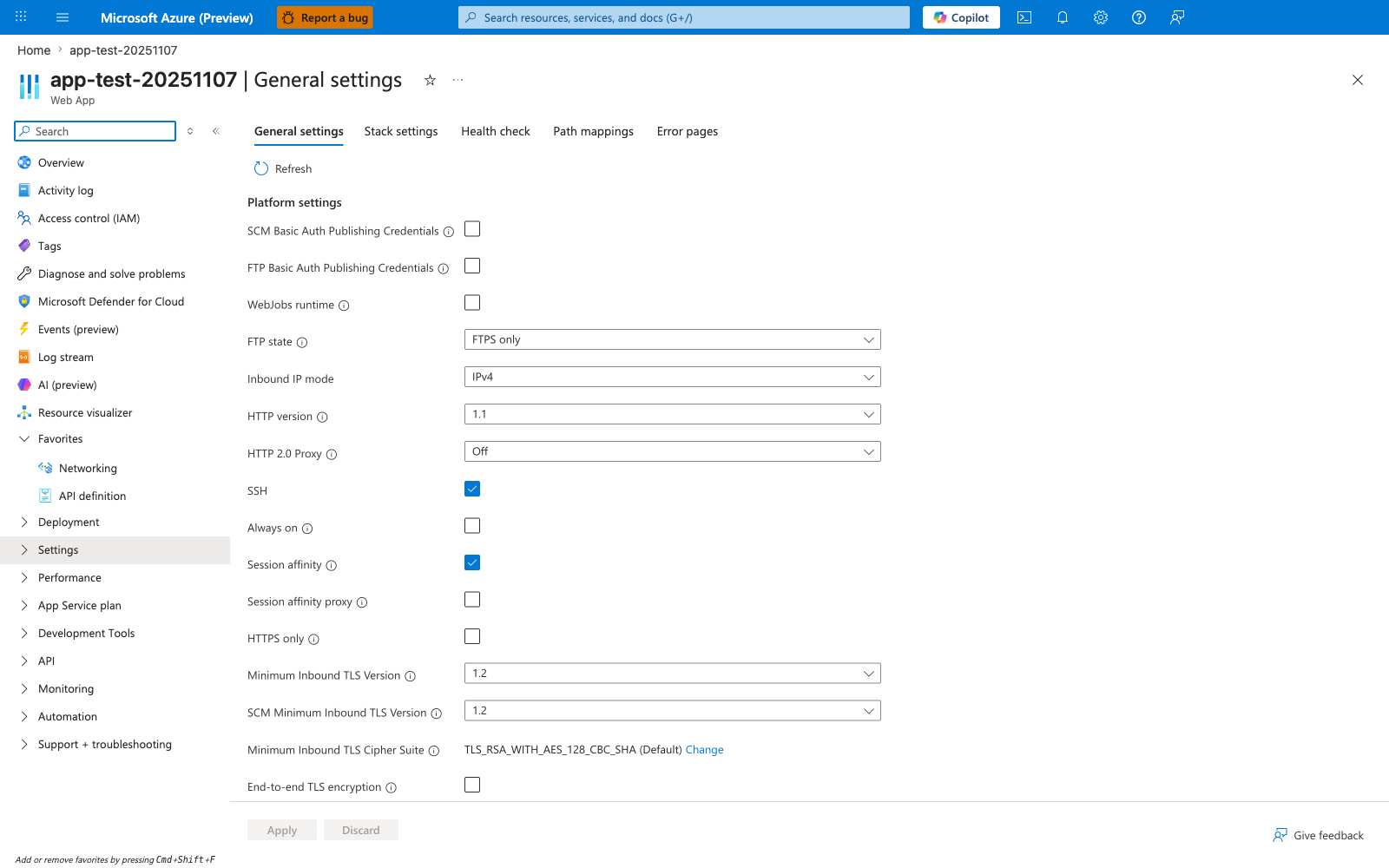
The Configuration > General settings blade is the Portal verification surface for the az webapp config set steps in this tutorial. In the visible Platform settings list, HTTPS only, Always on, FTP state, HTTP version, and Minimum Inbound TLS Version are the same runtime controls you configure from the CLI. This screenshot also makes the default state concrete: Always on and HTTPS only are both unchecked here, so you should not assume production-ready defaults after app creation. Use this blade after the CLI steps to confirm the runtime settings applied to the Flask app before moving on to app settings and connection strings.