Private Network Deployment
Use this recipe when the simple public az webapp up flow is no longer enough and your Flask app needs outbound private connectivity plus identity-based access to Azure services.
flowchart TD
    INET[Internet] --> WA[Web App\nApp Service Linux\nPython 3.11]

    subgraph VNET[Virtual Network]
        INT[Integration Subnet]
        PE[Private Endpoint Subnet]
    end

    WA --> INT
    PE --> ST[Storage Account]
    WA -.-> MI[System-Assigned Managed Identity]
    MI -.-> ENTRA[Microsoft Entra ID]

    style WA fill:#0078d4,color:#fff
Prerequisites
- Completed 01 - Local Run
- Existing Azure subscription and Azure CLI authentication
- App Service app already created or ready to create in a supported tier for VNet integration
- Permissions to create VNets, subnets, private endpoints, storage accounts, and managed identity assignments
Main Content
Step 1: Prepare deployment variables
RG="rg-flask-tutorial"
LOCATION="koreacentral"
APP_NAME="app-flask-tutorial-abc123"
VNET_NAME="vnet-flask-tutorial"
INTEGRATION_SUBNET_NAME="snet-appsvc-integration"
PE_SUBNET_NAME="snet-private-endpoints"
STORAGE_NAME="stflasktutorialabc123"
| Command/Parameter | Purpose |
RG="rg-flask-tutorial" | Defines the resource group that holds the App Service and networking resources. |
LOCATION="koreacentral" | Sets the Azure region for the VNet and storage resources. |
APP_NAME="app-flask-tutorial-abc123" | Identifies the target App Service app. |
VNET_NAME="vnet-flask-tutorial" | Names the virtual network used for private connectivity. |
INTEGRATION_SUBNET_NAME="snet-appsvc-integration" | Names the subnet delegated to App Service VNet integration. |
PE_SUBNET_NAME="snet-private-endpoints" | Names the subnet reserved for private endpoints. |
STORAGE_NAME="stflasktutorialabc123" | Sets a globally unique storage account name for the example backend. |
Step 2: Create the VNet and delegated integration subnet
az network vnet create --resource-group $RG --name $VNET_NAME --location $LOCATION --address-prefixes 10.0.0.0/16
az network vnet subnet create --resource-group $RG --vnet-name $VNET_NAME --name $INTEGRATION_SUBNET_NAME --address-prefixes 10.0.1.0/24 --delegations Microsoft.Web/serverFarms
| Command/Parameter | Purpose |
az network vnet create | Creates the virtual network that will host the deployment subnets. |
--resource-group $RG | Places the VNet in the selected resource group. |
--name $VNET_NAME | Sets the VNet name. |
--location $LOCATION | Creates the VNet in the selected Azure region. |
--address-prefixes 10.0.0.0/16 | Defines the overall CIDR range for the VNet. |
az network vnet subnet create | Creates a subnet inside the VNet. |
--vnet-name $VNET_NAME | Targets the subnet creation to the named VNet. |
--name $INTEGRATION_SUBNET_NAME | Names the delegated integration subnet. |
--address-prefixes 10.0.1.0/24 | Defines the CIDR range for the integration subnet. |
--delegations Microsoft.Web/serverFarms | Delegates the subnet to App Service so VNet integration can use it. |
Step 3: Create the private endpoint subnet
az network vnet subnet create --resource-group $RG --vnet-name $VNET_NAME --name $PE_SUBNET_NAME --address-prefixes 10.0.2.0/24 --disable-private-endpoint-network-policies true
| Command/Parameter | Purpose |
az network vnet subnet create | Creates the subnet that will host private endpoints. |
--resource-group $RG | Uses the same resource group as the VNet. |
--vnet-name $VNET_NAME | Creates the subnet inside the named VNet. |
--name $PE_SUBNET_NAME | Names the private endpoint subnet. |
--address-prefixes 10.0.2.0/24 | Defines the CIDR range for the private endpoint subnet. |
--disable-private-endpoint-network-policies true | Disables subnet policies that would block private endpoint NICs. |
Step 4: Integrate the web app with the VNet
az webapp vnet-integration add --resource-group $RG --name $APP_NAME --vnet $VNET_NAME --subnet $INTEGRATION_SUBNET_NAME
| Command/Parameter | Purpose |
az webapp vnet-integration add | Connects the web app to a delegated subnet for outbound private access. |
--resource-group $RG | Selects the resource group containing the app. |
--name $APP_NAME | Selects the target App Service app. |
--vnet $VNET_NAME | Chooses the virtual network used for integration. |
--subnet $INTEGRATION_SUBNET_NAME | Chooses the delegated integration subnet. |
Step 5: Assign managed identity to the web app
az webapp identity assign --resource-group $RG --name $APP_NAME
| Command/Parameter | Purpose |
az webapp identity assign | Enables a system-assigned managed identity on the web app. |
--resource-group $RG | Selects the resource group containing the app. |
--name $APP_NAME | Targets the specific App Service instance. |
Step 6: Create a private endpoint for Storage
az storage account create --resource-group $RG --name $STORAGE_NAME --location $LOCATION --sku Standard_LRS --kind StorageV2
STORAGE_ID="$(az storage account show --resource-group $RG --name $STORAGE_NAME --query id --output tsv)"
az network private-endpoint create --resource-group $RG --name pe-storage-blob --vnet-name $VNET_NAME --subnet $PE_SUBNET_NAME --private-connection-resource-id $STORAGE_ID --group-id blob --connection-name pe-storage-blob-connection
| Command/Parameter | Purpose |
az storage account create | Creates the storage account used in the private endpoint example. |
--resource-group $RG | Places the storage account in the selected resource group. |
--name $STORAGE_NAME | Sets the storage account name. |
--location $LOCATION | Creates the storage account in the selected region. |
--sku Standard_LRS | Uses standard locally redundant storage. |
--kind StorageV2 | Creates a general-purpose v2 storage account. |
STORAGE_ID="$(...)" | Stores the storage account resource ID in a shell variable. |
az storage account show | Retrieves the existing storage account metadata. |
--query id | Returns only the id field from the command output. |
--output tsv | Formats the ID as plain text for shell assignment. |
az network private-endpoint create | Creates a private endpoint for the storage account. |
--name pe-storage-blob | Names the private endpoint resource. |
--vnet-name $VNET_NAME | Places the private endpoint in the selected VNet. |
--subnet $PE_SUBNET_NAME | Uses the subnet reserved for private endpoints. |
--private-connection-resource-id $STORAGE_ID | Points the private endpoint at the storage account resource. |
--group-id blob | Connects the endpoint to the Blob service subresource. |
--connection-name pe-storage-blob-connection | Names the private link connection object. |
Verification
az webapp vnet-integration list --resource-group $RG --name $APP_NAME --output table
az webapp identity show --resource-group $RG --name $APP_NAME --output json
az network private-endpoint list --resource-group $RG --output table
| Command/Parameter | Purpose |
az webapp vnet-integration list | Lists the current VNet integration attached to the web app. |
--resource-group $RG | Selects the app resource group. |
--name $APP_NAME | Targets the web app being validated. |
--output table | Formats the VNet integration results for quick inspection. |
az webapp identity show | Displays the managed identity configuration for the app. |
--output json | Returns the identity details as JSON. |
az network private-endpoint list | Lists private endpoints in the resource group. |
Troubleshooting
- If VNet integration fails, confirm the integration subnet is delegated to
Microsoft.Web/serverFarms. - If private endpoint creation fails, confirm the private endpoint subnet has network policies disabled.
- If managed identity authentication fails, confirm the identity is enabled and RBAC or access policies are configured on the target service.
Run It in the Portal
Portal view: Access Restrictions blade (public reachability before separate inbound hardening)
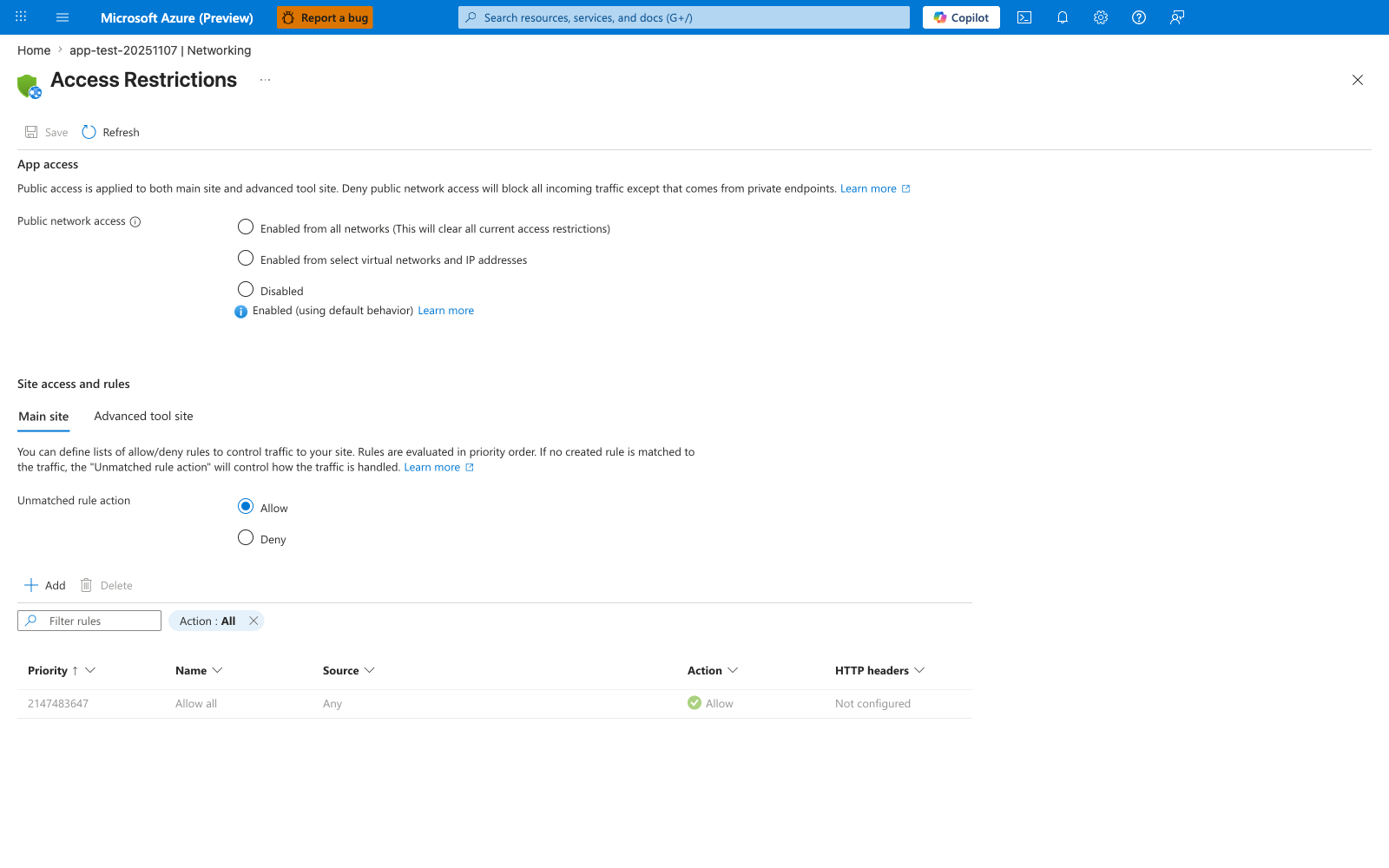
The Access Restrictions blade is the Portal surface that shows whether this app is still publicly reachable while you work through the recipe's VNet integration, managed identity, and storage private endpoint steps. In the visible default state, Public network access is open and the rules table contains only Allow all, so this screenshot works as a before-state reminder that those outbound/private-connectivity steps do not automatically change inbound access. Use this blade only as a public-reachability check around the recipe, not as evidence that the recipe itself has already added access-restriction rules.
See Also
Sources