Private Endpoints
Connect a Flask app on App Service to Azure SQL, Azure Cache for Redis, and Key Vault through private endpoints while keeping standard service hostnames.
flowchart TD
    A[Flask app on App Service with VNet integration] --> B[Private DNS zones]
    B --> C[Private Endpoint SQL]
    B --> D[Private Endpoint Redis]
    B --> E[Private Endpoint Key Vault]
    C --> F[Private backend connectivity]
    D --> F
E --> FPrerequisites
- App Service Plan tier that supports VNet integration
- Virtual network with integration subnet and private endpoint subnet
- Azure SQL, Redis, and Key Vault resources where private endpoint is allowed
Main Content
1) Prepare subnet layout for app and private endpoints
Use separate subnets:
snet-appservice-integrationfor App Service VNet integrationsnet-private-endpointsfor private endpoint NICs
2) Enable VNet integration for the Flask app
az webapp vnet-integration add \
  --resource-group "$RG" \
  --name "$APP_NAME" \
  --vnet "$VNET_NAME" \
  --subnet "snet-appservice-integration" \
  --output json
3) Create private endpoint for Azure SQL
az network private-endpoint create \
  --resource-group "$RG" \
  --name "pe-sql-python" \
  --vnet-name "$VNET_NAME" \
  --subnet "snet-private-endpoints" \
  --private-connection-resource-id "/subscriptions/<subscription-id>/resourceGroups/<sql-rg>/providers/Microsoft.Sql/servers/<sql-server>" \
  --group-id sqlServer \
  --connection-name "pe-sql-python-conn" \
  --output json
4) Create private endpoint for Redis and Key Vault
az network private-endpoint create \
  --resource-group "$RG" \
  --name "pe-redis-python" \
  --vnet-name "$VNET_NAME" \
  --subnet "snet-private-endpoints" \
  --private-connection-resource-id "/subscriptions/<subscription-id>/resourceGroups/<redis-rg>/providers/Microsoft.Cache/Redis/<redis-name>" \
  --group-id redisCache \
  --connection-name "pe-redis-python-conn" \
  --output json

az network private-endpoint create \
  --resource-group "$RG" \
  --name "pe-kv-python" \
  --vnet-name "$VNET_NAME" \
  --subnet "snet-private-endpoints" \
  --private-connection-resource-id "/subscriptions/<subscription-id>/resourceGroups/<kv-rg>/providers/Microsoft.KeyVault/vaults/<kv-name>" \
  --group-id vault \
  --connection-name "pe-kv-python-conn" \
  --output json
5) Configure app settings as Flask environment variables
az webapp config appsettings set \
  --resource-group "$RG" \
  --name "$APP_NAME" \
  --settings \
    SQL_SERVER_FQDN="<sql-server>.database.windows.net" \
    SQL_DATABASE_NAME="<db-name>" \
    REDIS_HOST="<redis-name>.redis.cache.windows.net" \
    REDIS_PORT="6380" \
    KEY_VAULT_URI="https://<kv-name>.vault.azure.net/" \
  --output json
6) Use managed identity and DefaultAzureCredential in Flask code
import os
import pyodbc
import redis
from azure.identity import DefaultAzureCredential

credential = DefaultAzureCredential()

sql_token = credential.get_token("https://database.windows.net/.default").token
token_bytes = sql_token.encode("utf-16-le")

conn_string = (
    "Driver={ODBC Driver 18 for SQL Server};"
    f"Server=tcp:{os.environ['SQL_SERVER_FQDN']},1433;"
    f"Database={os.environ['SQL_DATABASE_NAME']};"
    "Encrypt=yes;TrustServerCertificate=no;"
)

sql_conn = pyodbc.connect(conn_string, attrs_before={1256: token_bytes})

redis_client = redis.Redis(
    host=os.environ["REDIS_HOST"],
    port=int(os.environ["REDIS_PORT"]),
    ssl=True,
)
7) Validate private DNS zone links
Confirm the VNet is linked to these private DNS zones:
privatelink.database.windows.netprivatelink.redis.cache.windows.netprivatelink.vaultcore.azure.net
8) Add CI validation for private endpoint readiness
- name: Validate private endpoint status
  run: |
    az network private-endpoint list \
      --resource-group "$RG" \
      --output table
Private endpoint without DNS is incomplete
Most connectivity failures come from DNS mismatch, not Flask application code. Validate private zone links and effective DNS resolution from app runtime.
Verification
- Confirm VNet integration is listed for the app.
- Confirm private endpoints are approved.
- Confirm backend hostnames resolve to private IP addresses from app runtime.
Troubleshooting
SQL or Redis connection timeout
- Review NSG rules and user-defined routes on integration subnet.
- Confirm private endpoint status is
Approved. - Confirm backend firewall allows private endpoint traffic.
Hostname resolves to public IP
- Check private DNS zone links to the integration VNet.
- Verify no custom DNS server is overriding private zone resolution.
Managed identity auth failure
- Verify system-assigned identity is enabled on the web app.
- Confirm SQL permissions for managed identity principal and Key Vault access policy or RBAC.
Run It in the Portal
Portal view: Networking blade (app-side precondition for backend private endpoints)
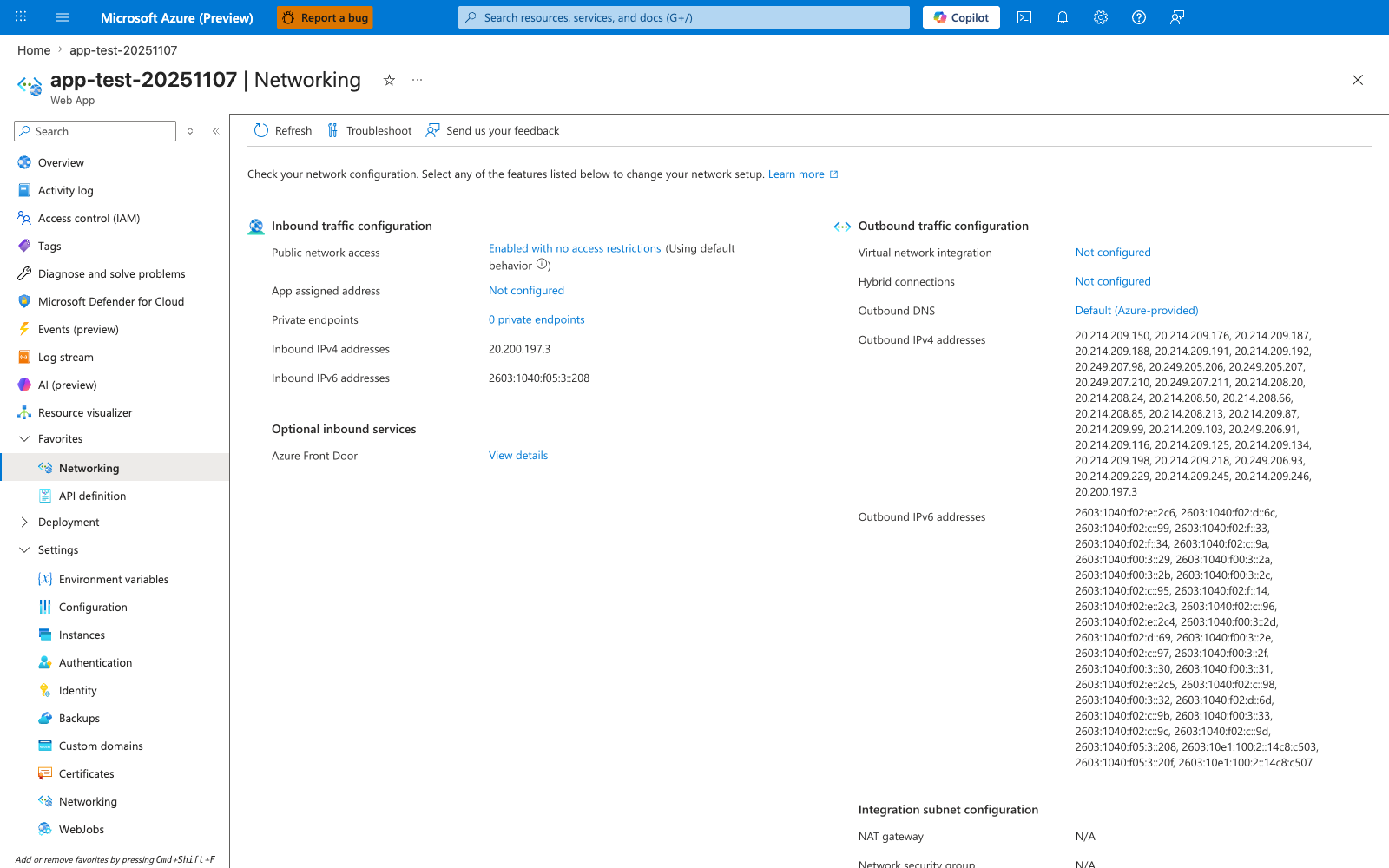
This web-app Networking blade is a supporting before-state for the recipe rather than the place where the SQL, Redis, and Key Vault private endpoints themselves are listed. The visible Virtual network integration: Not configured row is the app-side prerequisite the recipe changes before private DNS for those backend services can work, while Private endpoints: 0 private endpoints also makes clear the screenshot is not showing downstream private endpoints attached to other resources. Use this capture as the pre-integration checkpoint before running the recipe's VNet and backend private-endpoint steps.