Managed Identity
Use managed identity to access Azure resources from Flask without storing passwords, client secrets, or connection strings.
Architecture
flowchart TD
    Client[Client] --> App[App Service]
    App --> KV[(Azure Key Vault)]
    App --> Storage[(Azure Storage)]
    App --> Cosmos[(Azure Cosmos DB)]
    App --> Sql[(Azure SQL Database)]
    App -.-> MI[Managed Identity]
    MI -.-> Entra[Microsoft Entra ID]
Solid arrows show runtime data flow. Dashed arrows show identity and authentication.
How RBAC Connects Identity to Resources
A managed identity alone does not grant access. Azure RBAC binds three elements into a role assignment:
flowchart TD
    P[Principal<br/>Who: Managed Identity or Service Principal] --> RA[Role Assignment<br/>Unique GUID per binding]
    RD[Role Definition<br/>What: Key Vault Secrets User, Storage Blob Data Reader, etc.] --> RA
    S[Scope<br/>Where: Subscription, Resource Group, or Resource] --> RA
    RA --> ACCESS[Access Granted]

style RA fill:#f5c542,stroke:#333,color:#000| Element | Question it answers | Example |
|---|---|---|
| Principal | Who needs access? | App Service's managed identity |
| Role Definition | What permission? | Key Vault Secrets User, Storage Blob Data Reader |
| Scope | On which resource? | A specific Key Vault, Storage account, or resource group |
| Role Assignment | The binding itself | Unique GUID — one per (principal + role + scope) combination |
Azure RBAC enforces a uniqueness constraint: only one role assignment can exist for the same (principal, role definition, scope) triple. Attempting to create a duplicate with a different assignment GUID results in a RoleAssignmentExists conflict.
Prerequisites
- App Service web app (Linux) with Python runtime
azure-identitypackage- Target resource role assignments (Key Vault, Storage, Cosmos DB, SQL, etc.)
Step-by-Step Guide
Step 1: Enable identity and assign minimum roles
az webapp identity assign --resource-group "$RG" --name "$APP_NAME"

az role assignment create \
  --assignee-object-id "<principal-object-id>" \
  --assignee-principal-type ServicePrincipal \
  --role "Key Vault Secrets User" \
  --scope "/subscriptions/<subscription-id>/resourceGroups/$RG/providers/Microsoft.KeyVault/vaults/<vault-name>"
Use least privilege and scope assignments to the smallest required resource.
Step 2: Use DefaultAzureCredential in Flask
import os
from flask import Flask, jsonify
from azure.identity import DefaultAzureCredential
from azure.keyvault.secrets import SecretClient
from azure.storage.blob import BlobServiceClient

app = Flask(__name__)
credential = DefaultAzureCredential()


@app.get("/api/identity/keyvault")
def read_secret():
    vault_url = os.environ["KEYVAULT_URL"]
    client = SecretClient(vault_url=vault_url, credential=credential)
    secret = client.get_secret("app-config")
    return jsonify({"secret_name": secret.name, "retrieved": True})


@app.get("/api/identity/storage")
def list_containers():
    account_url = os.environ["STORAGE_ACCOUNT_URL"]
    blob_client = BlobServiceClient(account_url=account_url, credential=credential)
    names = [c["name"] for c in blob_client.list_containers(results_per_page=5)]
    return jsonify({"containers": names})
Complete Example
# requirements.txt
Flask==3.0.3
azure-identity==1.17.1
azure-keyvault-secrets==4.8.0
azure-storage-blob==12.22.0
az webapp config appsettings set \
  --resource-group "$RG" \
  --name "$APP_NAME" \
  --settings \
    KEYVAULT_URL="https://<vault-name>.vault.azure.net/" \
    STORAGE_ACCOUNT_URL="https://<storage-account>.blob.core.windows.net/"
Troubleshooting
ManagedIdentityCredential authentication unavailable:- Identity may be disabled or app not restarted after enablement.-
403 Forbiddenfrom Azure SDK: - Role assignment missing or not propagated yet.- Works locally but fails in Azure:
- Validate
DefaultAzureCredentialchain differences and required environment settings.
- Identity may be disabled or app not restarted after enablement.-
Advanced Topics
- Use user-assigned managed identity for shared identity across multiple apps.
- Set explicit client ID for user-assigned identity:
- Add SDK retries and timeout configuration for production resiliency.
Run It in the Portal
Portal view: Identity blade (canonical managed-identity enablement surface)
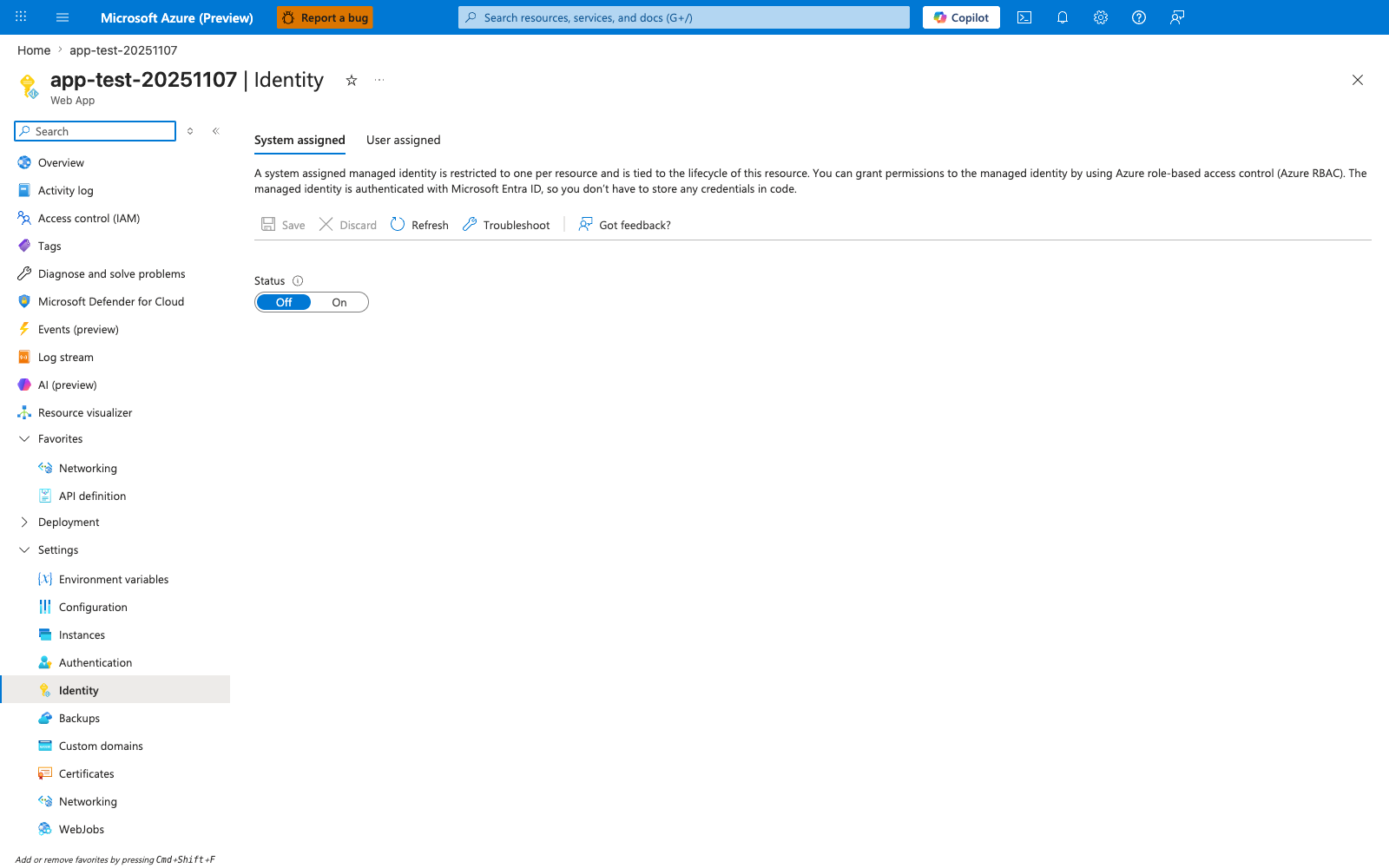
The Identity blade is the canonical Portal surface for the managed-identity flow this recipe walks through. With System assigned active and the Status toggle moved from Off to On, App Service creates the Entra ID principal that the recipe then uses to grant downstream RBAC roles for Storage, Key Vault, SQL, or any other Entra-aware service. The descriptive header on this blade restates the lifecycle guarantee the recipe relies on — the identity is tied to the resource — and the User assigned tab is the alternative path the recipe covers for identities shared across multiple apps. Use this blade as step 1 of the recipe before issuing any downstream role assignments via the CLI.