Cosmos DB with azure-cosmos SDK
Integrate Flask with Azure Cosmos DB (NoSQL API) using passwordless authentication through Managed Identity.
Architecture
flowchart TD
    Client[Client] --> App[App Service]
    App --> Cosmos[(Azure Cosmos DB)]
    App -.-> MI[Managed Identity]
    MI -.-> Entra[Microsoft Entra ID]
Solid arrows show runtime data flow. Dashed arrows show identity and authentication.
Prerequisites
- Azure Cosmos DB account (NoSQL API), database, and container
- App Service managed identity enabled
- RBAC role assignment on Cosmos DB data plane (for example,
Cosmos DB Built-in Data Contributor) - Python dependency:
azure-cosmos
Step-by-Step Guide
Step 1: Configure Cosmos DB and app settings
az webapp config appsettings set \
  --resource-group "$RG" \
  --name "$APP_NAME" \
  --settings \
    COSMOS_ENDPOINT="https://$COSMOS_ACCOUNT.documents.azure.com:443/" \
    COSMOS_DATABASE="appdb" \
    COSMOS_CONTAINER="items"
Step 2: Use DefaultAzureCredential in Flask
import os
from flask import Flask, jsonify, request
from azure.identity import DefaultAzureCredential
from azure.cosmos import CosmosClient, PartitionKey

app = Flask(__name__)

credential = DefaultAzureCredential()
client = CosmosClient(os.environ["COSMOS_ENDPOINT"], credential=credential)
database = client.get_database_client(os.environ["COSMOS_DATABASE"])
container = database.get_container_client(os.environ["COSMOS_CONTAINER"])


@app.post("/api/cosmos/items")
def create_item():
    payload = request.get_json(force=True)
    item = {
        "id": payload["id"],
        "pk": payload.get("pk", payload["id"]),
        "name": payload.get("name", "unnamed")
    }
    created = container.upsert_item(item)
    return jsonify(created), 201


@app.get("/api/cosmos/items/<item_id>")
def read_item(item_id: str):
    item = container.read_item(item=item_id, partition_key=item_id)
    return jsonify(item)
Complete Example
# Optional bootstrap for local development if container does not exist yet
from azure.cosmos.exceptions import CosmosResourceNotFoundError

def ensure_container():
    db_name = os.environ["COSMOS_DATABASE"]
    container_name = os.environ["COSMOS_CONTAINER"]
    try:
        client.create_database_if_not_exists(id=db_name)
        db = client.get_database_client(db_name)
        db.create_container_if_not_exists(
            id=container_name,
            partition_key=PartitionKey(path="/pk")
        )
    except CosmosResourceNotFoundError:
        pass
Troubleshooting
403 Forbiddenon data operations:- Verify Cosmos DB data-plane role assignment (control-plane RBAC is not enough).-
401 Unauthorized: - Confirm managed identity is enabled and token audience is correct for Cosmos SDK.- High latency/timeouts:
- Place App Service and Cosmos DB in the same region and review indexing/pagination.
- Verify Cosmos DB data-plane role assignment (control-plane RBAC is not enough).-
Advanced Topics
- Use
preferred_locationsinCosmosClientfor multi-region read optimization. - Use optimistic concurrency with ETag (
if_match) for safe updates. - Tune query RU cost and add composite indexes for heavy query workloads.
Run It in the Portal
Portal view: Identity blade (system-assigned identity for Cosmos DB RBAC)
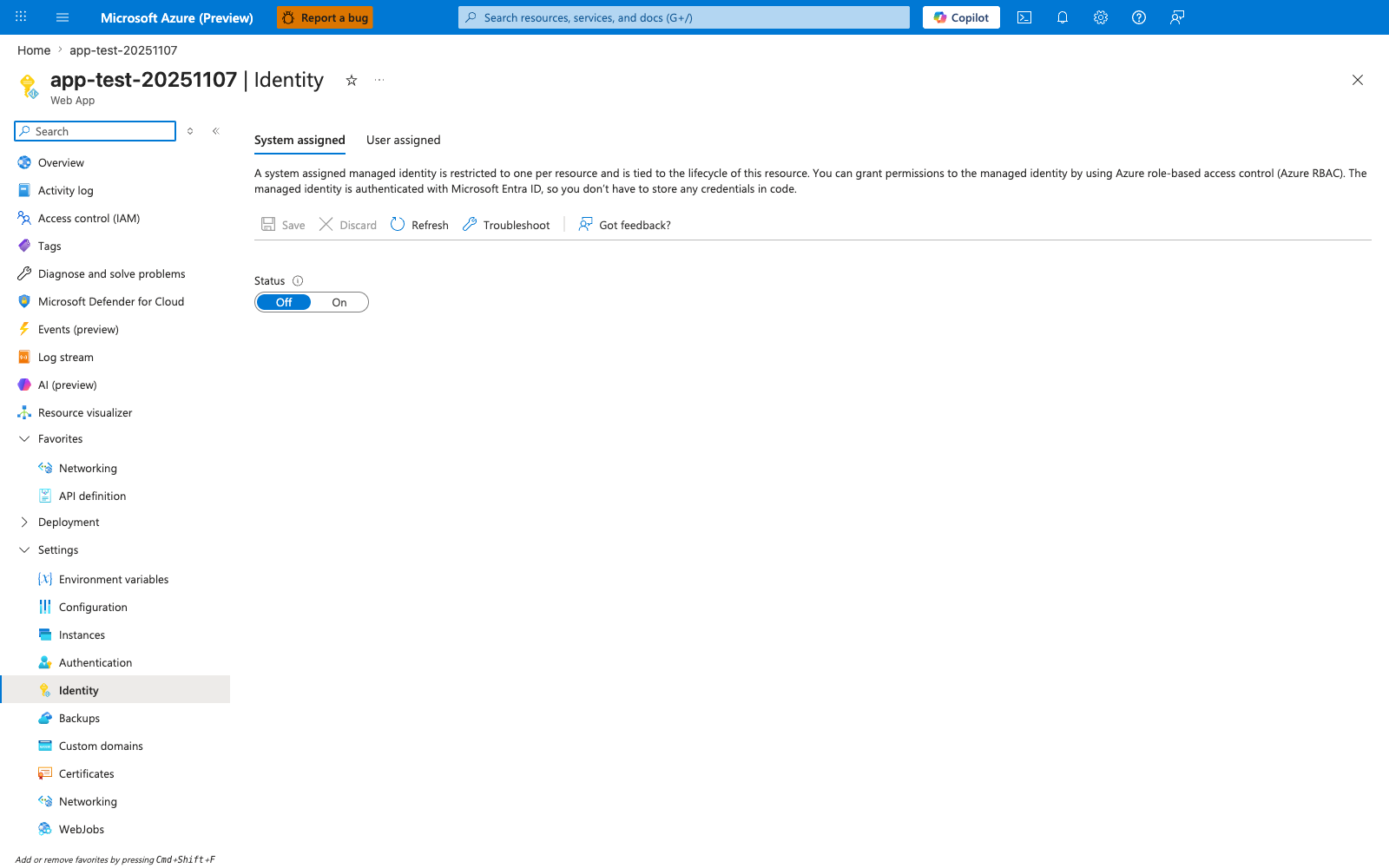
This Identity blade is the Portal starting point for the Cosmos DB recipe's passwordless connection pattern. With System assigned active and the Status toggle moved from Off to On, App Service generates an Entra ID principal that you then grant the Cosmos Built-in Data Contributor role to via az cosmosdb sql role assignment create. The descriptive header restates the lifecycle guarantee the recipe relies on: the identity is tied to the App Service resource, so it disappears when the app is deleted. Use this blade to confirm the identity is enabled before running the data-plane RBAC assignment shown in the recipe.