Python Guide
This guide walks from local Flask development to production-ready deployment and operations on Azure App Service.
Main Content
flowchart TD
    A[01 Local Run] --> B[02 First Deploy]
    B --> C[03 Configuration]
    C --> D[04 Logging & Monitoring]
    D --> E[05 Infrastructure as Code]
    E --> F[06 CI/CD]
F --> G[07 Custom Domain & SSL]- 01 - Local Run
- 02 - First Deploy
- 03 - Configuration
- 04 - Logging and Monitoring
- 05 - Infrastructure as Code
- 06 - CI/CD
- 07 - Custom Domain and SSL
Network Architecture by Tier
Azure App Service offers three main hosting tiers, each with distinct networking capabilities. Choose your tier based on isolation, integration, and compliance requirements.
Basic Tier (B1) — Simple Public Endpoint
graph TB
    Internet[Internet] -->|Public Endpoint| AppSvc["App Service<br/>(Basic B1, Linux)"]
    AppSvc -->|Python 3.11<br/>Gunicorn| App[Web App]
    AppSvc --> Identity["System-Assigned<br/>Managed Identity"]
    AppSvc -->|Code Deploy| Deploy[SCM/Kudu]
    AppSvc --> Insights[Application Insights]
    style AppSvc fill:#e1f5ff
style Insights fill:#fff3e0- Single public endpoint (no VNet integration)
- No private endpoints
- Best for: Development, non-production workloads
Standard/Premium Tier (S1/P1v3) — VNet Integrated
graph TB
    Internet[Internet] -->|Public Endpoint| AppSvc["App Service<br/>(Standard S1 or Premium P1v3)"]
    AppSvc --> Slots["Deployment Slots<br/>(Staging + Prod)"]
    AppSvc -->|Outbound| VNet["VNet"]
    VNet -->|Integration Subnet<br/>delegated| IntSubnet["Integration Subnet"]
    IntSubnet --> AppSvc
    VNet -->|PE Subnet| PESubnet["Private Endpoints Subnet"]
    PESubnet -->|Private Endpoint| SQL["Azure SQL"]
    PESubnet -->|Private Endpoint| KV["Key Vault"]
    PESubnet -->|Private Endpoint| Storage["Storage Account"]
    AppSvc --> Identity["System-Assigned<br/>Managed Identity"]
    AppSvc --> Autoscale["Autoscale Enabled"]
    AppSvc --> Insights["Application Insights<br/>+ Log Analytics"]
    KV -->|Private DNS| KVDNS["Private DNS<br/>vault.azure.net"]
    SQL -->|Private DNS| SQLDNS["Private DNS<br/>database.windows.net"]
    Storage -->|Private DNS| StorageDNS["Private DNS<br/>blob.core.windows.net"]
    style AppSvc fill:#e1f5ff
    style VNet fill:#f3e5f5
style Insights fill:#fff3e0- VNet integration for outbound connections to private endpoints
- Deployment slots for safe testing and rollback
- Private DNS zones for dependent services
- Autoscale to handle traffic spikes
- Best for: Production workloads requiring VNet isolation
Isolated Tier (ASE v3) — Full Network Isolation
graph TB
    OnPrem["On-Premises"]
    VPN["VPN/ExpressRoute"]
    OnPrem -.->|Optional Connectivity| VPN
    VPN -.->|Optional Connectivity| VNet["VNet"]
    ASESubnet["ASE Subnet<br/>/24 or larger"]
    VNet -->|Contains| ASESubnet
    ASESubnet -->|ILB<br/>Private Only| ILB["Internal Load Balancer"]
    ILB --> AppSvc["App Service Environment v3"]
    AppSvc --> App[Web App]
    AppSvc --> Identity["System-Assigned<br/>Managed Identity"]
    VNet -->|PE Subnet| PESubnet["Private Endpoints Subnet"]
    PESubnet -->|Private Endpoint| SQL["Azure SQL"]
    PESubnet -->|Private Endpoint| KV["Key Vault"]
    PESubnet -->|Private Endpoint| Storage["Storage Account"]
    AppSvc --> Insights["Application Insights<br/>+ Log Analytics"]
    KV -->|Private DNS| KVDNS["Private DNS<br/>vault.azure.net"]
    SQL -->|Private DNS| SQLDNS["Private DNS<br/>database.windows.net"]
    Storage -->|Private DNS| StorageDNS["Private DNS<br/>blob.core.windows.net"]
    style AppSvc fill:#e1f5ff
    style VNet fill:#f3e5f5
    style ILB fill:#c8e6c9
style Insights fill:#fff3e0- Dedicated, isolated environment inside a VNet
- Internal Load Balancer (ILB) — no public internet access by default
- All services on private endpoints within the same VNet
- Optional ExpressRoute or VPN for on-premises connectivity
- Best for: Regulatory/compliance requirements, full network isolation
Which tier to choose?
Start with Basic (B1) for development. Use Standard (S1) or Premium (P1v3) for production workloads needing VNet integration, deployment slots, and autoscale. Choose Isolated (ASE v3) only when regulatory or compliance requirements mandate full network isolation.
Advanced Topics
Use the Python-specific recipes for service integrations and production patterns.
Run It in the Portal
Portal view: App Service Plan overview (Pricing tier surfaces here)
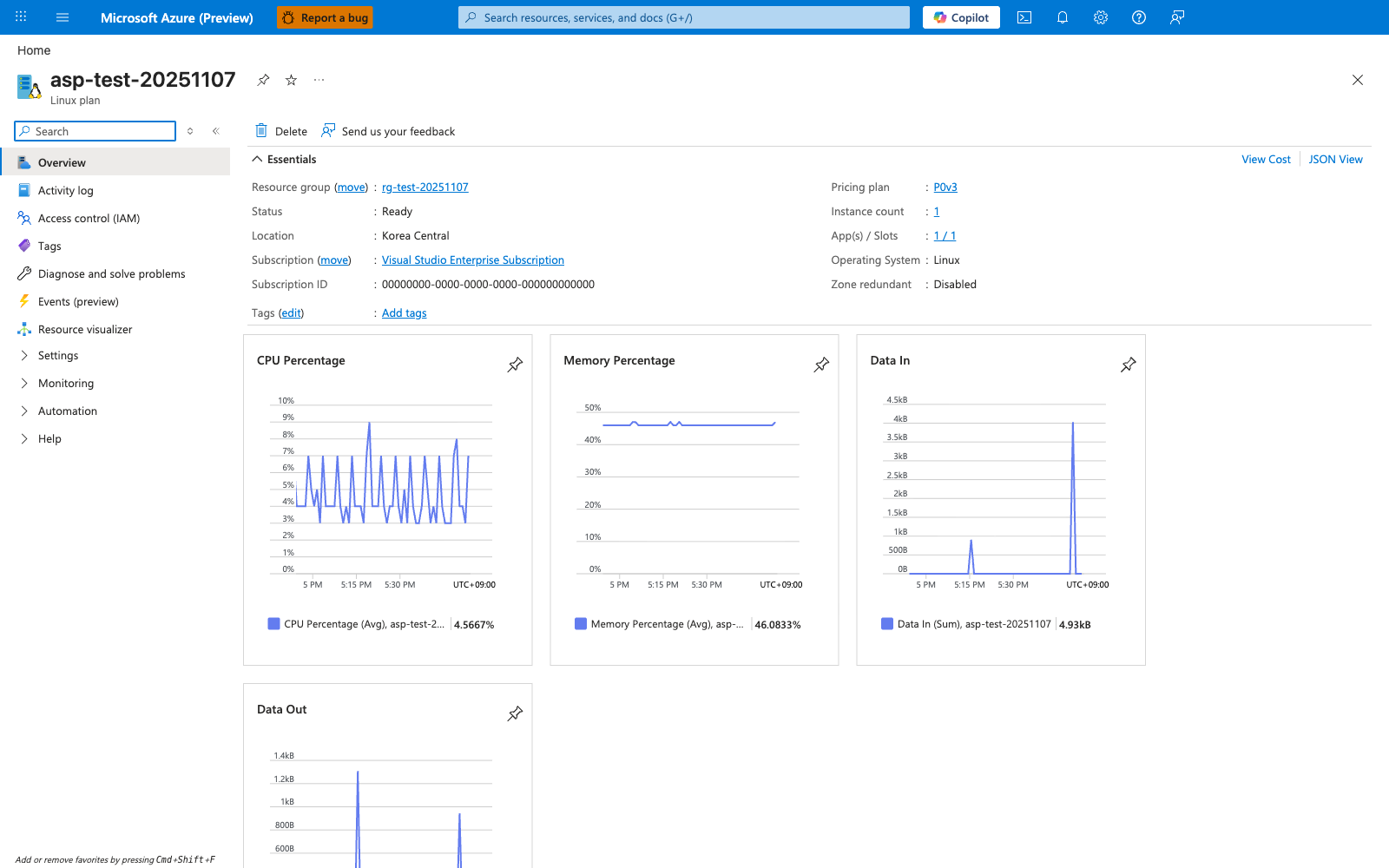
The App Service Plan overview blade makes the hosting tier concrete by showing the plan identity, Pricing tier: Premium0 V3, Operating system: Linux, and Status: Ready in one view. For this guide's tier architecture, the most relevant visible fields are the plan SKU and operating system because they tell you which Linux plan the app is running on. The hosted apps list at the bottom shows app-test-20251107 and its staging slot attached to the same plan. The CPU Percentage and Memory Percentage charts on the right show that this blade is also the plan-level view for shared compute usage.