03. Configuration
Time estimate: 20 minutes
Manage environment variables, secrets, and identity for your Node.js application in Azure.
Infrastructure Context
Service: App Service (Linux, Standard S1) | Network: VNet integrated | VNet: ✅
This tutorial assumes a production-ready App Service deployment with VNet integration, private endpoints for backend services, and managed identity for authentication.
flowchart TD
    INET[Internet] -->|HTTPS| WA["Web App\nApp Service S1\nLinux Node 20 LTS"]

    subgraph VNET["VNet 10.0.0.0/16"]
        subgraph INT_SUB["Integration Subnet 10.0.1.0/24\nDelegation: Microsoft.Web/serverFarms"]
            WA
        end
        subgraph PE_SUB["Private Endpoint Subnet 10.0.2.0/24"]
            PE_KV[PE: Key Vault]
            PE_SQL[PE: Azure SQL]
            PE_ST[PE: Storage]
        end
    end

    PE_KV --> KV[Key Vault]
    PE_SQL --> SQL[Azure SQL]
    PE_ST --> ST[Storage Account]

    subgraph DNS[Private DNS Zones]
        DNS_KV[privatelink.vaultcore.azure.net]
        DNS_SQL[privatelink.database.windows.net]
        DNS_ST[privatelink.blob.core.windows.net]
    end

    PE_KV -.-> DNS_KV
    PE_SQL -.-> DNS_SQL
    PE_ST -.-> DNS_ST

    WA -.->|System-Assigned MI| ENTRA[Microsoft Entra ID]
    WA --> AI[Application Insights]

    style WA fill:#0078d4,color:#fff
    style VNET fill:#E8F5E9,stroke:#4CAF50
    style DNS fill:#E3F2FD
flowchart TD
A[Define config needs] --> B[Set App Settings]
B --> C[Set Connection Strings]
C --> D[Enable Managed Identity]
D --> E[Mark slot-sticky values]
E --> F[Verify via /info and logs]Prerequisites
- Application deployed to Azure (02. Deploy Application)
- Azure CLI logged in and source loaded:
source infra/.deploy-output.env
What you'll learn
- How to manage Application Settings (standard environment variables)
- How to use typed Connection Strings for databases
- Managed Identity basics for passwordless access
- Slot-sticky settings for multi-environment deployments
App Settings (Standard Environment Variables)
In App Service, Application Settings are injected into your Node.js app as standard environment variables available via process.env.
List Current Settings
| Command/Code | Purpose |
|---|---|
az webapp config appsettings list ... --output table | Lists the current App Service application settings in table form |
Example output:
Name                                SlotSetting    Value
----------------------------------  -------------  ----------
NODE_ENV                            False          production
LOG_LEVEL                           False          info
TELEMETRY_MODE                      False          basic
SCM_DO_BUILD_DURING_DEPLOYMENT      False          true
WEBSITE_NODE_DEFAULT_VERSION        False          ~20
WEBSITE_HTTPLOGGING_RETENTION_DAYS  False          7
Add or Update Settings
az webapp config appsettings set \
  --resource-group $RG \
  --name $APP_NAME \
  --settings LOG_LEVEL=debug CUSTOM_VAR=value \
  --output json
| Command/Code | Purpose |
|---|---|
az webapp config appsettings set ... | Adds or updates application settings for the web app |
LOG_LEVEL=debug | Raises the application log verbosity |
CUSTOM_VAR=value | Demonstrates storing a custom environment variable |
Verification
After setting a value, it should be reflected in the app's environment. You can verify this by checking the /info endpoint of the sample app if available, or using Log Stream to see logs influenced by these settings.
Connection Strings (Typed Secrets)
Connection Strings are similar to App Settings but allow for specific types (SQLServer, MySQL, etc.). These are exposed as environment variables with a prefix.
az webapp config connection-string set \
  --resource-group $RG \
  --name $APP_NAME \
  --connection-string-type Custom \
  --settings DATABASE_URL="mongodb://example.com" \
  --output json
| Command/Code | Purpose |
|---|---|
az webapp config connection-string set ... | Creates or updates a typed connection string in App Service |
--connection-string-type Custom | Stores the connection string as a custom value |
DATABASE_URL="mongodb://example.com" | Sets the sample database connection string value |
In Node.js, this is accessed as process.env.CUSTOMCONNSTR_DATABASE_URL.
Managed Identity Basics
Instead of storing database passwords or API keys in App Settings, you can use System Assigned Managed Identity to give your application its own identity in Azure AD (Entra ID).
Enable Managed Identity
| Command/Code | Purpose |
|---|---|
az webapp identity assign ... --output json | Enables a system-assigned managed identity and returns its details |
For detailed security setup and authentication, see Security & Authentication (Easy Auth).
Slot-Sticky Settings
Deployment Slots (e.g., production vs staging) often require different configurations (e.g., pointing to a development database).
- Standard Setting: Swaps along with the code.
- Slot-Sticky Setting: Stays with the slot during a swap.
Create a Slot-Sticky Setting
az webapp config appsettings set \
  --resource-group $RG \
  --name $APP_NAME \
  --slot-settings \
    ENVIRONMENT_NAME=production \
  --output json
| Command/Code | Purpose |
|---|---|
az webapp config appsettings set ... --slot-settings ... | Creates settings that stay with the slot during swaps |
ENVIRONMENT_NAME=production | Stores an environment-specific slot-sticky value |
Verification
- Check values in the Azure Portal under your App Service → Configuration.
- Restart the app after significant configuration changes to ensure they are picked up:
| Command/Code | Purpose |
|---|---|
az webapp restart --name $APP_NAME --resource-group $RG --output json | Restarts the web app so configuration changes are fully applied |
Next Steps
- 04. Logging & Monitoring - Track your app's health and performance.
- Security Operations - Go deeper into authentication and managed identity.
Advanced Options
Coming Soon
- Key Vault Integration for secrets
- App Configuration service for dynamic settings
Run It in the Portal
Portal view: Configuration > General settings blade (Portal counterpart to az webapp config set)
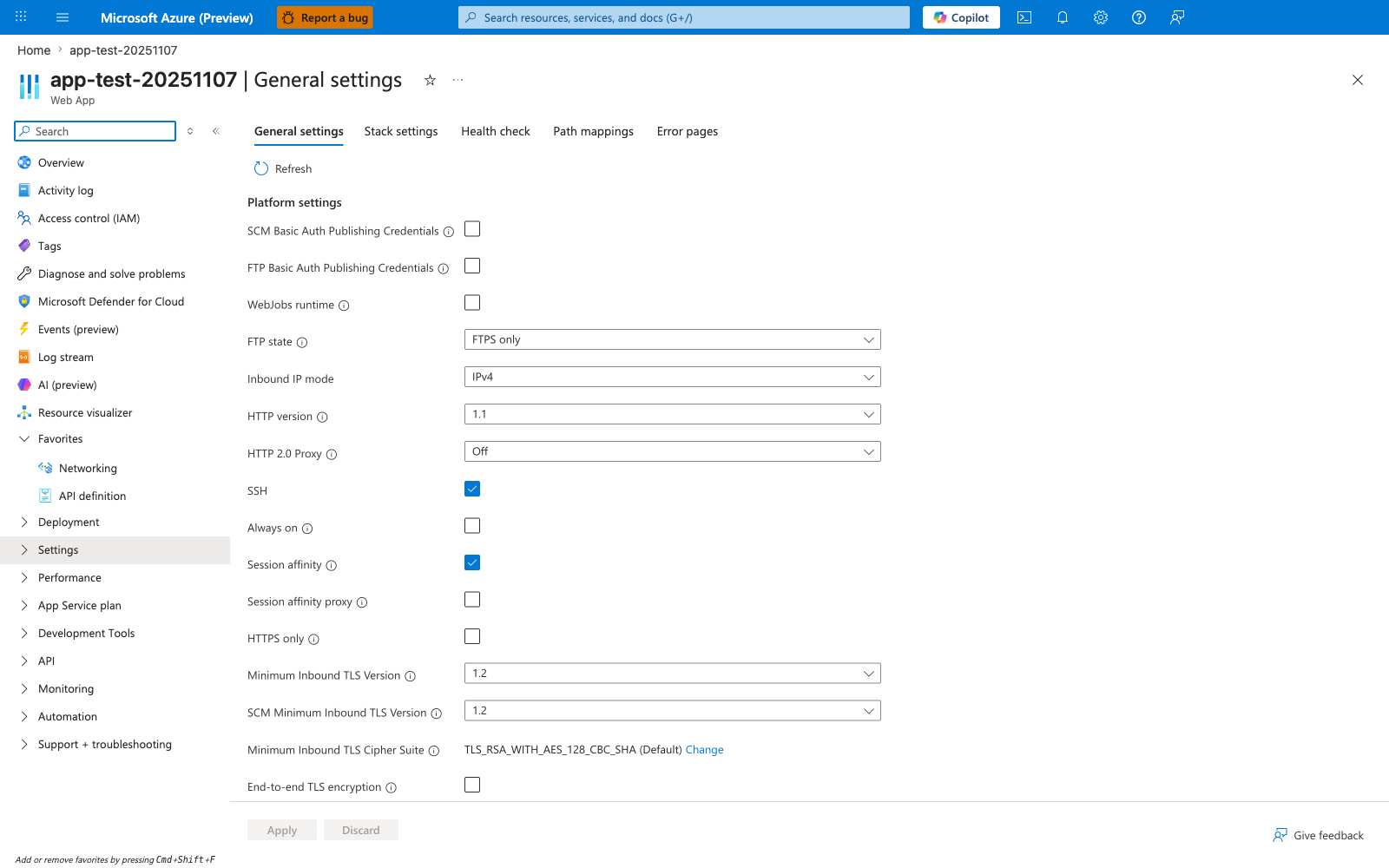
The Configuration > General settings blade is the Portal verification surface for the az webapp config set steps in this Node.js tutorial. In the visible Platform settings list, HTTPS only, Always on, WebJobs runtime, Session affinity, and Minimum Inbound TLS Version are the same runtime controls you configure from the CLI. This screenshot also makes the default state concrete: Always on and HTTPS only are both unchecked here, so you should not assume production-ready defaults after az webapp up first creates the Express app. Use this blade after the CLI steps to confirm the runtime settings applied to the Node.js app.