Private Network Deploy
Use this recipe after 02. First Deploy when the app must reach Azure services through VNet integration, private endpoints, and managed identity.
flowchart TD
    INTERNET[Internet users] -->|HTTPS| APP[App Service\nNode.js 20 LTS]

    subgraph VNET[Virtual Network]
        subgraph INT[Integration subnet\nDelegated to Microsoft.Web/serverFarms]
            APP
        end
        subgraph PE[Private endpoint subnet]
            PE_STORAGE[Private Endpoint: Storage]
            PE_KV[Private Endpoint: Key Vault]
        end
    end

    APP -.->|System-assigned identity| ENTRA[Microsoft Entra ID]
    PE_STORAGE --> STORAGE[Storage Account]
    PE_KV --> KV[Key Vault]
    APP --> DNS[Private DNS zones]

    style APP fill:#0078d4,color:#fff
    style VNET fill:#E8F5E9,stroke:#4CAF50
    style DNS fill:#E3F2FD
Overview
flowchart TD
    A[Prepare network variables] --> B[Create VNet and subnets]
    B --> C[Add App Service VNet integration]
    C --> D[Enable managed identity]
    D --> E[Create private endpoints and DNS links]
    E --> F[Grant RBAC and configure app settings]
    F --> G[Validate connectivity]
Prerequisites
- Completed 02. First Deploy
- Azure CLI authenticated with permission to manage networking and RBAC
- Existing Node.js App Service app
- App Service plan tier that supports VNet integration
Main Content
Step 1: Set advanced deployment variables
RG="rg-express-tutorial"
LOCATION="koreacentral"
APP_NAME="app-express-tutorial-abc123"
VNET_NAME="vnet-express-tutorial"
INTEGRATION_SUBNET_NAME="snet-appsvc-integration"
PE_SUBNET_NAME="snet-private-endpoints"
STORAGE_NAME="stexpresstutorialabc123"
KEY_VAULT_NAME="kv-express-tutorial-abc123"
| Command/Parameter | Purpose |
RG="rg-express-tutorial" | Reuses the resource group that contains the deployed app. |
LOCATION="koreacentral" | Sets the Azure region for the networking resources. |
APP_NAME="app-express-tutorial-abc123" | Identifies the target App Service app. |
VNET_NAME="vnet-express-tutorial" | Names the virtual network used for private connectivity. |
INTEGRATION_SUBNET_NAME="snet-appsvc-integration" | Names the delegated subnet used by App Service VNet integration. |
PE_SUBNET_NAME="snet-private-endpoints" | Names the subnet reserved for private endpoints. |
STORAGE_NAME="stexpresstutorialabc123" | Sets the storage account name used in the example. |
KEY_VAULT_NAME="kv-express-tutorial-abc123" | Sets the Key Vault name used in the example. |
Step 2: Create the VNet and required subnets
az network vnet create --resource-group $RG --name $VNET_NAME --location $LOCATION --address-prefixes 10.0.0.0/16
az network vnet subnet create --resource-group $RG --vnet-name $VNET_NAME --name $INTEGRATION_SUBNET_NAME --address-prefixes 10.0.1.0/24 --delegations Microsoft.Web/serverFarms
az network vnet subnet create --resource-group $RG --vnet-name $VNET_NAME --name $PE_SUBNET_NAME --address-prefixes 10.0.2.0/24 --disable-private-endpoint-network-policies true
| Command/Parameter | Purpose |
az network vnet create | Creates the virtual network for the advanced deployment. |
--resource-group $RG | Places the VNet in the selected resource group. |
--name $VNET_NAME | Sets the VNet name. |
--location $LOCATION | Creates the VNet in the selected Azure region. |
--address-prefixes 10.0.0.0/16 | Defines the VNet CIDR range. |
az network vnet subnet create | Creates a subnet inside the VNet. |
--vnet-name $VNET_NAME | Targets the named VNet. |
--name $INTEGRATION_SUBNET_NAME | Names the delegated integration subnet. |
--address-prefixes 10.0.1.0/24 | Defines the integration subnet CIDR range. |
--delegations Microsoft.Web/serverFarms | Delegates the subnet to App Service. |
--name $PE_SUBNET_NAME | Names the private endpoint subnet. |
--address-prefixes 10.0.2.0/24 | Defines the private endpoint subnet CIDR range. |
--disable-private-endpoint-network-policies true | Disables policies that block private endpoint NICs. |
Step 3: Integrate the web app with the VNet
az webapp vnet-integration add --resource-group $RG --name $APP_NAME --vnet $VNET_NAME --subnet $INTEGRATION_SUBNET_NAME
| Command/Parameter | Purpose |
az webapp vnet-integration add | Routes outbound app traffic through the delegated integration subnet. |
--resource-group $RG | Selects the resource group containing the app. |
--name $APP_NAME | Targets the web app to integrate. |
--vnet $VNET_NAME | Chooses the virtual network used for integration. |
--subnet $INTEGRATION_SUBNET_NAME | Chooses the delegated integration subnet. |
Step 4: Enable system-assigned managed identity
az webapp identity assign --resource-group $RG --name $APP_NAME
| Command/Parameter | Purpose |
az webapp identity assign | Enables a system-assigned managed identity for the web app. |
--resource-group $RG | Selects the resource group containing the app. |
--name $APP_NAME | Targets the App Service app receiving the identity. |
Step 5: Create backend services and private endpoints
az storage account create --resource-group $RG --name $STORAGE_NAME --location $LOCATION --sku Standard_LRS --kind StorageV2
az keyvault create --resource-group $RG --name $KEY_VAULT_NAME --location $LOCATION --sku standard
STORAGE_ID="$(az storage account show --resource-group $RG --name $STORAGE_NAME --query id --output tsv)"
KEY_VAULT_ID="$(az keyvault show --resource-group $RG --name $KEY_VAULT_NAME --query id --output tsv)"
az network private-endpoint create --resource-group $RG --name pe-storage-blob --vnet-name $VNET_NAME --subnet $PE_SUBNET_NAME --private-connection-resource-id $STORAGE_ID --group-id blob --connection-name pe-storage-blob-connection
az network private-endpoint create --resource-group $RG --name pe-keyvault --vnet-name $VNET_NAME --subnet $PE_SUBNET_NAME --private-connection-resource-id $KEY_VAULT_ID --group-id vault --connection-name pe-keyvault-connection
| Command/Parameter | Purpose |
az storage account create | Creates a storage account that the app will reach through a private endpoint. |
--resource-group $RG | Places the storage account in the selected resource group. |
--name $STORAGE_NAME | Sets the storage account name. |
--location $LOCATION | Creates the storage account in the selected region. |
--sku Standard_LRS | Uses standard locally redundant storage. |
--kind StorageV2 | Creates a general-purpose v2 storage account. |
az keyvault create | Creates a Key Vault for secret access over private networking. |
--name $KEY_VAULT_NAME | Sets the Key Vault name. |
--sku standard | Uses the standard Key Vault service tier. |
STORAGE_ID="$(...)" | Stores the storage account resource ID in a shell variable. |
az storage account show | Reads the storage account metadata. |
--query id | Returns only the resource ID. |
--output tsv | Formats the ID as plain text for shell assignment. |
KEY_VAULT_ID="$(...)" | Stores the Key Vault resource ID in a shell variable. |
az keyvault show | Reads the Key Vault metadata. |
az network private-endpoint create | Creates a private endpoint in the dedicated subnet. |
--name pe-storage-blob | Names the storage private endpoint. |
--vnet-name $VNET_NAME | Places the endpoint in the selected VNet. |
--subnet $PE_SUBNET_NAME | Uses the subnet reserved for private endpoints. |
--private-connection-resource-id $STORAGE_ID | Connects the endpoint to the storage account resource. |
--group-id blob | Targets the Blob service subresource. |
--connection-name pe-storage-blob-connection | Names the storage private link connection object. |
--name pe-keyvault | Names the Key Vault private endpoint. |
--private-connection-resource-id $KEY_VAULT_ID | Connects the endpoint to the Key Vault resource. |
--group-id vault | Targets the Key Vault private link subresource. |
--connection-name pe-keyvault-connection | Names the Key Vault private link connection object. |
Step 6: Create private DNS zones and link them to the VNet
az network private-dns zone create --resource-group $RG --name privatelink.blob.core.windows.net
az network private-dns zone create --resource-group $RG --name privatelink.vaultcore.azure.net
az network private-dns link vnet create --resource-group $RG --zone-name privatelink.blob.core.windows.net --name link-storage-dns --virtual-network $VNET_NAME --registration-enabled false
az network private-dns link vnet create --resource-group $RG --zone-name privatelink.vaultcore.azure.net --name link-keyvault-dns --virtual-network $VNET_NAME --registration-enabled false
az network private-endpoint dns-zone-group create --resource-group $RG --endpoint-name pe-storage-blob --name storage-zone-group --private-dns-zone privatelink.blob.core.windows.net --zone-name blob
az network private-endpoint dns-zone-group create --resource-group $RG --endpoint-name pe-keyvault --name keyvault-zone-group --private-dns-zone privatelink.vaultcore.azure.net --zone-name vault
| Command/Parameter | Purpose |
az network private-dns zone create | Creates a private DNS zone for private endpoint name resolution. |
--resource-group $RG | Places the DNS zone in the selected resource group. |
--name privatelink.blob.core.windows.net | Creates the private DNS zone for Azure Storage blob endpoints. |
--name privatelink.vaultcore.azure.net | Creates the private DNS zone for Key Vault endpoints. |
az network private-dns link vnet create | Links a private DNS zone to the VNet. |
--zone-name privatelink.blob.core.windows.net | Selects the storage private DNS zone. |
--name link-storage-dns | Names the storage DNS VNet link. |
--virtual-network $VNET_NAME | Links the storage DNS zone to the App Service VNet. |
--registration-enabled false | Disables auto-registration because private endpoint records are service-managed. |
--zone-name privatelink.vaultcore.azure.net | Selects the Key Vault private DNS zone. |
--name link-keyvault-dns | Names the Key Vault DNS VNet link. |
az network private-endpoint dns-zone-group create | Associates a private endpoint with a private DNS zone. |
--endpoint-name pe-storage-blob | Targets the storage private endpoint. |
--name storage-zone-group | Names the storage DNS zone group resource. |
--private-dns-zone privatelink.blob.core.windows.net | Attaches the storage private DNS zone. |
--zone-name blob | Uses the blob zone group label. |
--endpoint-name pe-keyvault | Targets the Key Vault private endpoint. |
--name keyvault-zone-group | Names the Key Vault DNS zone group resource. |
--private-dns-zone privatelink.vaultcore.azure.net | Attaches the Key Vault private DNS zone. |
--zone-name vault | Uses the Key Vault zone group label. |
PRINCIPAL_ID="$(az webapp identity show --resource-group $RG --name $APP_NAME --query principalId --output tsv)"
az role assignment create --assignee-object-id $PRINCIPAL_ID --assignee-principal-type ServicePrincipal --role "Storage Blob Data Contributor" --scope $STORAGE_ID
az role assignment create --assignee-object-id $PRINCIPAL_ID --assignee-principal-type ServicePrincipal --role "Key Vault Secrets User" --scope $KEY_VAULT_ID
az webapp config appsettings set --resource-group $RG --name $APP_NAME --settings STORAGE_ACCOUNT_URL="https://$STORAGE_NAME.blob.core.windows.net" KEY_VAULT_URI="https://$KEY_VAULT_NAME.vault.azure.net/"
| Command/Parameter | Purpose |
PRINCIPAL_ID="$(...)" | Retrieves the managed identity object ID used for role assignments. |
az webapp identity show | Reads the managed identity details for the web app. |
--query principalId | Returns only the managed identity principal ID. |
--output tsv | Formats the principal ID as plain text for shell assignment. |
az role assignment create | Creates an RBAC role assignment for the managed identity. |
--assignee-object-id $PRINCIPAL_ID | Targets the app's managed identity object ID. |
--assignee-principal-type ServicePrincipal | Tells Azure RBAC that the assignee is a service principal. |
--role "Storage Blob Data Contributor" | Grants blob data access without secrets. |
--scope $STORAGE_ID | Applies the storage role at the storage account scope. |
--role "Key Vault Secrets User" | Grants secret read access in Key Vault. |
--scope $KEY_VAULT_ID | Applies the Key Vault role at the vault scope. |
az webapp config appsettings set | Writes environment variables into App Service configuration. |
--settings | Passes the app settings to store. |
STORAGE_ACCOUNT_URL="https://$STORAGE_NAME.blob.core.windows.net" | Stores the storage hostname that private DNS resolves privately. |
KEY_VAULT_URI="https://$KEY_VAULT_NAME.vault.azure.net/" | Stores the Key Vault URI used by the app. |
Step 8: Use managed identity in Node.js and validate
const { DefaultAzureCredential } = require("@azure/identity");
const { BlobServiceClient } = require("@azure/storage-blob");
const { SecretClient } = require("@azure/keyvault-secrets");

const credential = new DefaultAzureCredential();

const blobServiceClient = new BlobServiceClient(process.env.STORAGE_ACCOUNT_URL, credential);
const secretClient = new SecretClient(process.env.KEY_VAULT_URI, credential);
| Command/Code | Purpose |
new DefaultAzureCredential() | Uses the App Service managed identity in Azure without storing credentials in code. |
new BlobServiceClient(process.env.STORAGE_ACCOUNT_URL, credential) | Connects to Azure Storage through the standard blob hostname and managed identity. |
new SecretClient(process.env.KEY_VAULT_URI, credential) | Connects to Key Vault through the standard vault hostname and managed identity. |
az webapp vnet-integration list --resource-group $RG --name $APP_NAME --output table
az network private-endpoint list --resource-group $RG --output table
| Command/Parameter | Purpose |
az webapp vnet-integration list | Confirms the app is attached to the expected VNet subnet. |
--resource-group $RG | Selects the app resource group. |
--name $APP_NAME | Targets the web app being validated. |
--output table | Formats the validation output for quick inspection. |
az network private-endpoint list | Confirms the private endpoints are provisioned in the resource group. |
Verification
az webapp vnet-integration list shows the expected VNet and delegated subnet.az network private-endpoint list shows private endpoints in a healthy state.- The app can use
DefaultAzureCredential to reach Storage and Key Vault without secrets. - Storage and Key Vault hostnames resolve through the linked private DNS zones.
Troubleshooting
Private endpoint exists but the app still uses public resolution
- Confirm the private DNS zones are linked to the same VNet used for App Service integration.
- Verify the private endpoint DNS zone groups were created successfully.
Managed identity requests return 403
- Wait a few minutes for RBAC propagation.
- Verify the role assignments target the correct
principalId and resource scope.
App cannot connect after VNet integration
- Confirm the integration subnet is delegated to
Microsoft.Web/serverFarms. - Review NSG and route table rules if your VNet uses custom egress controls.
Run It in the Portal
Portal view: Access Restrictions blade (public reachability before separate inbound hardening)
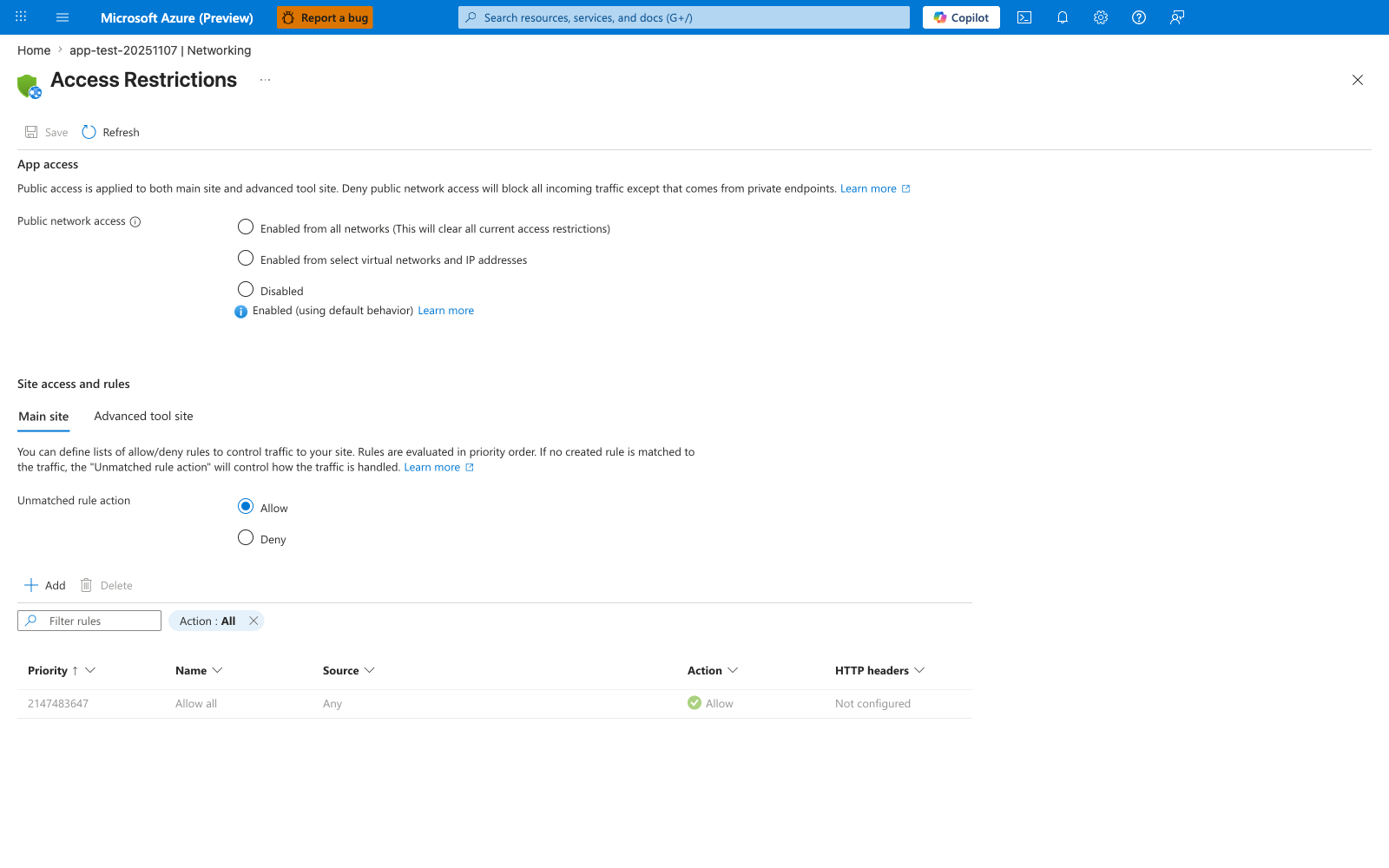
The Access Restrictions blade is the Portal surface that shows whether this app is still publicly reachable while you work through the recipe's VNet integration, managed identity, and storage private endpoint steps. In the visible default state, Public network access is open and the rules table contains only Allow all, so this screenshot works as a before-state reminder that those outbound/private-connectivity steps do not automatically change inbound access. Use this blade only as a public-reachability check around the recipe, not as evidence that the recipe itself has already added access-restriction rules.
See Also
Sources