Private Endpoints
Connect an Express app on App Service to SQL, Redis, and Key Vault over private endpoints while preserving standard Azure service DNS names.
flowchart TD
    A[Express app on App Service with VNet integration] --> B[Private DNS zones]
    B --> C[Private Endpoint SQL]
    B --> D[Private Endpoint Redis]
    B --> E[Private Endpoint Key Vault]
    C --> F[Private backend connectivity]
    D --> F
E --> FPrerequisites
- App Service Plan tier that supports VNet integration
- Virtual network with integration and private endpoint subnets
- Azure SQL, Redis, and Key Vault resources ready for private endpoint
Main Content
1) Prepare subnet and DNS architecture
Recommended layout:
snet-appservice-integrationfor VNet integrationsnet-private-endpointsfor private endpoint NICs- Private DNS zones linked to the VNet
2) Enable VNet integration for the app
az webapp vnet-integration add \
  --resource-group "$RG" \
  --name "$APP_NAME" \
  --vnet "$VNET_NAME" \
  --subnet "snet-appservice-integration" \
  --output json
3) Create private endpoint for Azure SQL
az network private-endpoint create \
  --resource-group "$RG" \
  --name "pe-sql-node" \
  --vnet-name "$VNET_NAME" \
  --subnet "snet-private-endpoints" \
  --private-connection-resource-id "/subscriptions/<subscription-id>/resourceGroups/<sql-rg>/providers/Microsoft.Sql/servers/<sql-server>" \
  --group-id sqlServer \
  --connection-name "pe-sql-node-conn" \
  --output json
4) Create private endpoints for Redis and Key Vault
az network private-endpoint create \
  --resource-group "$RG" \
  --name "pe-redis-node" \
  --vnet-name "$VNET_NAME" \
  --subnet "snet-private-endpoints" \
  --private-connection-resource-id "/subscriptions/<subscription-id>/resourceGroups/<redis-rg>/providers/Microsoft.Cache/Redis/<redis-name>" \
  --group-id redisCache \
  --connection-name "pe-redis-node-conn" \
  --output json

az network private-endpoint create \
  --resource-group "$RG" \
  --name "pe-kv-node" \
  --vnet-name "$VNET_NAME" \
  --subnet "snet-private-endpoints" \
  --private-connection-resource-id "/subscriptions/<subscription-id>/resourceGroups/<kv-rg>/providers/Microsoft.KeyVault/vaults/<kv-name>" \
  --group-id vault \
  --connection-name "pe-kv-node-conn" \
  --output json
5) Configure environment variables for Express app
az webapp config appsettings set \
  --resource-group "$RG" \
  --name "$APP_NAME" \
  --settings \
    SQL_SERVER_FQDN="<sql-server>.database.windows.net" \
    SQL_DATABASE_NAME="<db-name>" \
    REDIS_HOST="<redis-name>.redis.cache.windows.net" \
    REDIS_PORT="6380" \
    KEY_VAULT_URI="https://<kv-name>.vault.azure.net/" \
  --output json
6) Use process.env, @azure/identity, mssql, and ioredis
const sql = require("mssql");
const Redis = require("ioredis");
const { DefaultAzureCredential } = require("@azure/identity");

const credential = new DefaultAzureCredential();

async function openSqlConnection() {
  const tokenResponse = await credential.getToken("https://database.windows.net/.default");
  return sql.connect({
    server: process.env.SQL_SERVER_FQDN,
    database: process.env.SQL_DATABASE_NAME,
    options: {
      encrypt: true,
    },
    authentication: {
      type: "azure-active-directory-access-token",
      options: {
        token: tokenResponse.token,
      },
    },
  });
}

const redisClient = new Redis({
  host: process.env.REDIS_HOST,
  port: Number(process.env.REDIS_PORT),
  tls: {},
});
7) Link required private DNS zones
Ensure links exist for:
privatelink.database.windows.netprivatelink.redis.cache.windows.netprivatelink.vaultcore.azure.net
8) Add CI networking validation step
- name: Validate private endpoint state
  run: |
    az network private-endpoint list \
      --resource-group "$RG" \
      --output table
Private endpoint setup requires DNS correctness
Most incidents are caused by missing or incorrect private DNS links. Validate name resolution before debugging Express application code.
Verification
- Confirm app has VNet integration.
- Confirm each private endpoint is in
Approvedstate. - Confirm SQL, Redis, and Key Vault hostnames resolve to private IP addresses.
Troubleshooting
SQL login timeout or socket errors
- Verify NSG allows outbound 1433 from integration subnet.
- Confirm SQL private endpoint approval and firewall settings.
- Check token acquisition with managed identity.
Redis connection reset or timeout
- Confirm private DNS resolves Redis hostname to private IP.
- Verify Redis TLS port 6380 is reachable.
Key Vault calls fail intermittently
- Validate route table and DNS path for
vault.azure.netvia private link. - Check App Service managed identity permissions on Key Vault.
Run It in the Portal
Portal view: Networking blade (app-side precondition for backend private endpoints)
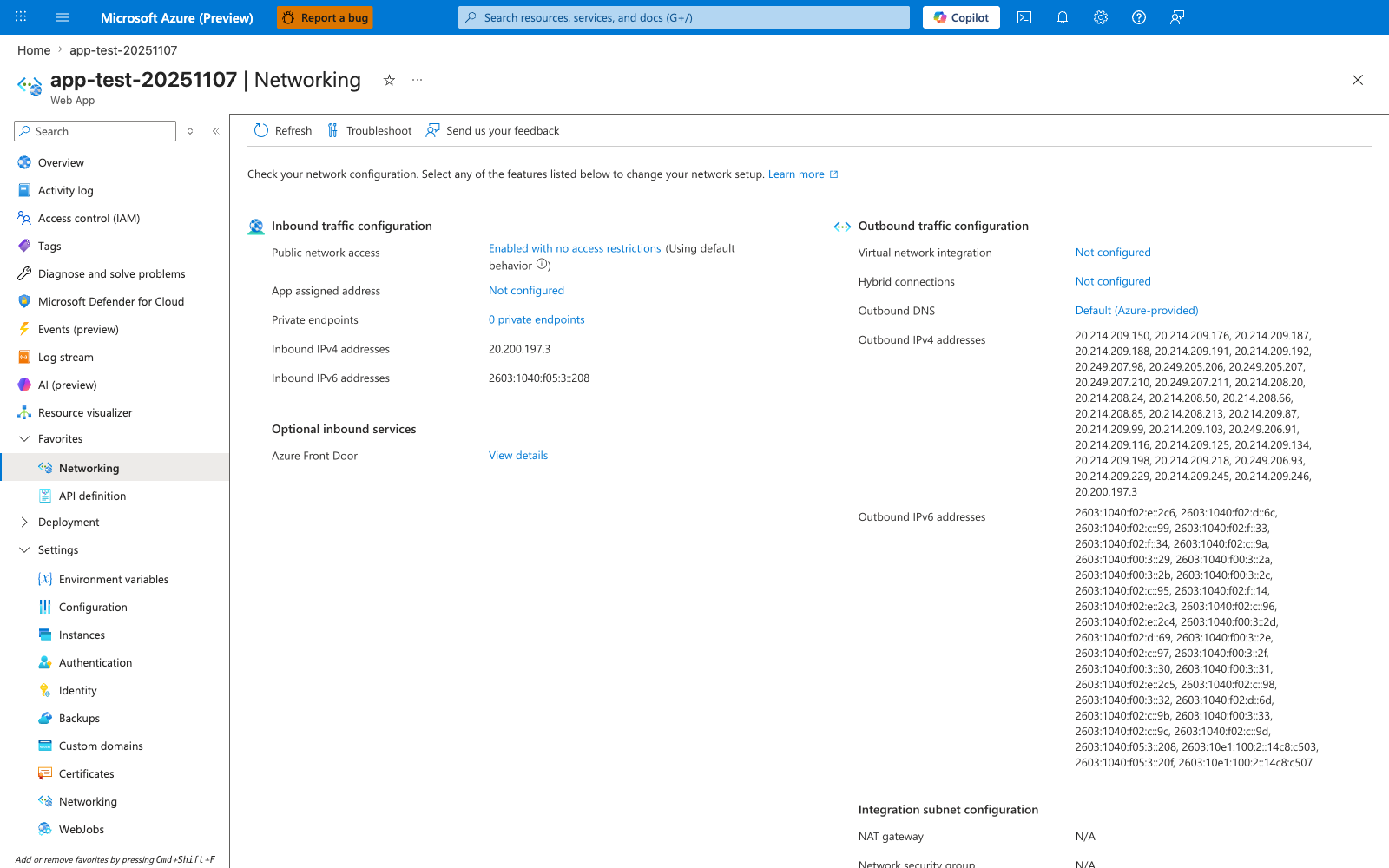
This web-app Networking blade is a supporting before-state for the recipe rather than the place where the SQL, Redis, and Key Vault private endpoints themselves are listed. The visible Virtual network integration: Not configured row is the app-side prerequisite the recipe changes before private DNS for those backend services can work, while Private endpoints: 0 private endpoints also makes clear the screenshot is not showing downstream private endpoints attached to other resources. Use this capture as the pre-integration checkpoint before running the recipe's VNet and backend private-endpoint steps for the Node.js app.