mTLS Client Certificates
Use Express middleware to parse X-ARR-ClientCert, validate the forwarded client certificate with X509Certificate, and attach a client certificate to outbound HTTPS calls through https.Agent.
flowchart TD
    Client[Client certificate] --> FE[App Service front end]
    FE --> Header[X-ARR-ClientCert]
    Header --> Express[Express middleware]
    Express --> Allowlist[Subject or fingerprint allowlist]
Express --> Agent[https.Agent with client certificate]Prerequisites
- Node.js 20 or later on Azure App Service
clientCertEnabled=trueon the site- A private certificate loaded for outbound calls when required
package.json dependencies:
What You'll Build
- Express middleware that parses
X-ARR-ClientCert - Validation by SHA-1 thumbprint or subject CN
- Outbound HTTPS call using the App Service-provided PKCS#12 file from
/var/ssl/private/
Steps
1. Add middleware and routes
const crypto = require('crypto');
const fs = require('fs');
const https = require('https');
const express = require('express');

const app = express();
const port = process.env.PORT || 3000;

const allowedCommonNames = new Set(
  (process.env.ALLOWED_CLIENT_CERT_COMMON_NAMES || 'api-client.contoso.com')
    .split(',')
    .map((value) => value.trim())
    .filter(Boolean)
);

const allowedThumbprints = new Set(
  (process.env.ALLOWED_CLIENT_CERT_THUMBPRINTS || '')
    .split(',')
    .map((value) => value.trim().toUpperCase())
    .filter(Boolean)
);

function parseClientCertificate(req) {
  const headerValue = req.header('X-ARR-ClientCert');
  if (!headerValue) {
    return null;
  }

  const pem = [
    '-----BEGIN CERTIFICATE-----',
    headerValue,
    '-----END CERTIFICATE-----',
    ''
  ].join('\n');

  const certificate = new crypto.X509Certificate(pem);
  const fingerprint = certificate.fingerprint.replace(/:/g, '').toUpperCase();
  const commonNameMatch = certificate.subject.match(/CN=([^,]+)/);
  const commonName = commonNameMatch ? commonNameMatch[1] : null;

  return {
    pem,
    fingerprint,
    commonName,
    validFrom: certificate.validFrom,
    validTo: certificate.validTo
  };
}

function requireKnownClientCertificate(req, res, next) {
  if (req.path === '/health') {
    return next();
  }

  const clientCertificate = parseClientCertificate(req);
  if (!clientCertificate) {
    return res.status(403).json({ error: 'client certificate header missing' });
  }

  if (allowedThumbprints.size > 0 && allowedThumbprints.has(clientCertificate.fingerprint)) {
    req.clientCertificate = clientCertificate;
    return next();
  }

  if (clientCertificate.commonName && allowedCommonNames.has(clientCertificate.commonName)) {
    req.clientCertificate = clientCertificate;
    return next();
  }

  return res.status(403).json({ error: 'client certificate is not allowlisted' });
}

app.use(requireKnownClientCertificate);

app.get('/health', (_req, res) => {
  res.json({ status: 'ok' });
});

app.get('/cert-info', (req, res) => {
  res.json(req.clientCertificate);
});

app.get('/outbound-mtls', async (_req, res, next) => {
  try {
    const pfxPath = process.env.OUTBOUND_CLIENT_CERT_PATH || '/var/ssl/private/<thumbprint>.p12';
    const pfxPassword = process.env.OUTBOUND_CLIENT_CERT_PASSWORD || '';
    const targetUrl = new URL(process.env.REMOTE_API_URL || 'https://api.contoso.com/health');

    const agent = new https.Agent({
      pfx: fs.readFileSync(pfxPath),
      passphrase: pfxPassword || undefined,
      rejectUnauthorized: true
    });

    const responseBody = await new Promise((resolve, reject) => {
      const request = https.get(
        targetUrl,
        { agent },
        (response) => {
          let body = '';
          response.on('data', (chunk) => { body += chunk; });
          response.on('end', () => resolve({ statusCode: response.statusCode, body }));
        }
      );

      request.on('error', reject);
    });

    res.json(responseBody);
  } catch (error) {
    next(error);
  }
});

app.use((error, _req, res, _next) => {
  res.status(500).json({ error: error.message });
});

app.listen(port, () => {
  console.log(`Server listening on ${port}`);
});
2. Configure environment variables
az webapp config appsettings set \
  --resource-group $RG \
  --name $APP_NAME \
  --settings \
    ALLOWED_CLIENT_CERT_COMMON_NAMES="api-client.contoso.com,partner-gateway.contoso.com" \
    ALLOWED_CLIENT_CERT_THUMBPRINTS="" \
    OUTBOUND_CLIENT_CERT_PATH="/var/ssl/private/<thumbprint>.p12" \
    OUTBOUND_CLIENT_CERT_PASSWORD="<certificate-password>" \
    REMOTE_API_URL="https://api.contoso.com/health" \
  --output json
3. Test with curl
curl --include \
  --cert ./client.pem \
  --key ./client.key \
  "https://$APP_NAME.azurewebsites.net/cert-info"
Verification
/cert-inforeturns the certificate fingerprint or CN for an allowlisted caller- A caller without an allowlisted certificate receives
403 /outbound-mtlssucceeds only when the PKCS#12 file exists under/var/ssl/private/, the password is correct, and the downstream service trusts the certificate
Next Steps / Clean Up
- Replace CN-only checks with issuer and SAN validation
- Centralize certificate validation in a dedicated middleware module
- Remove or lock down diagnostics endpoints after rollout validation
Run It in the Portal
Portal view: Configuration > General settings > Incoming client certificates section
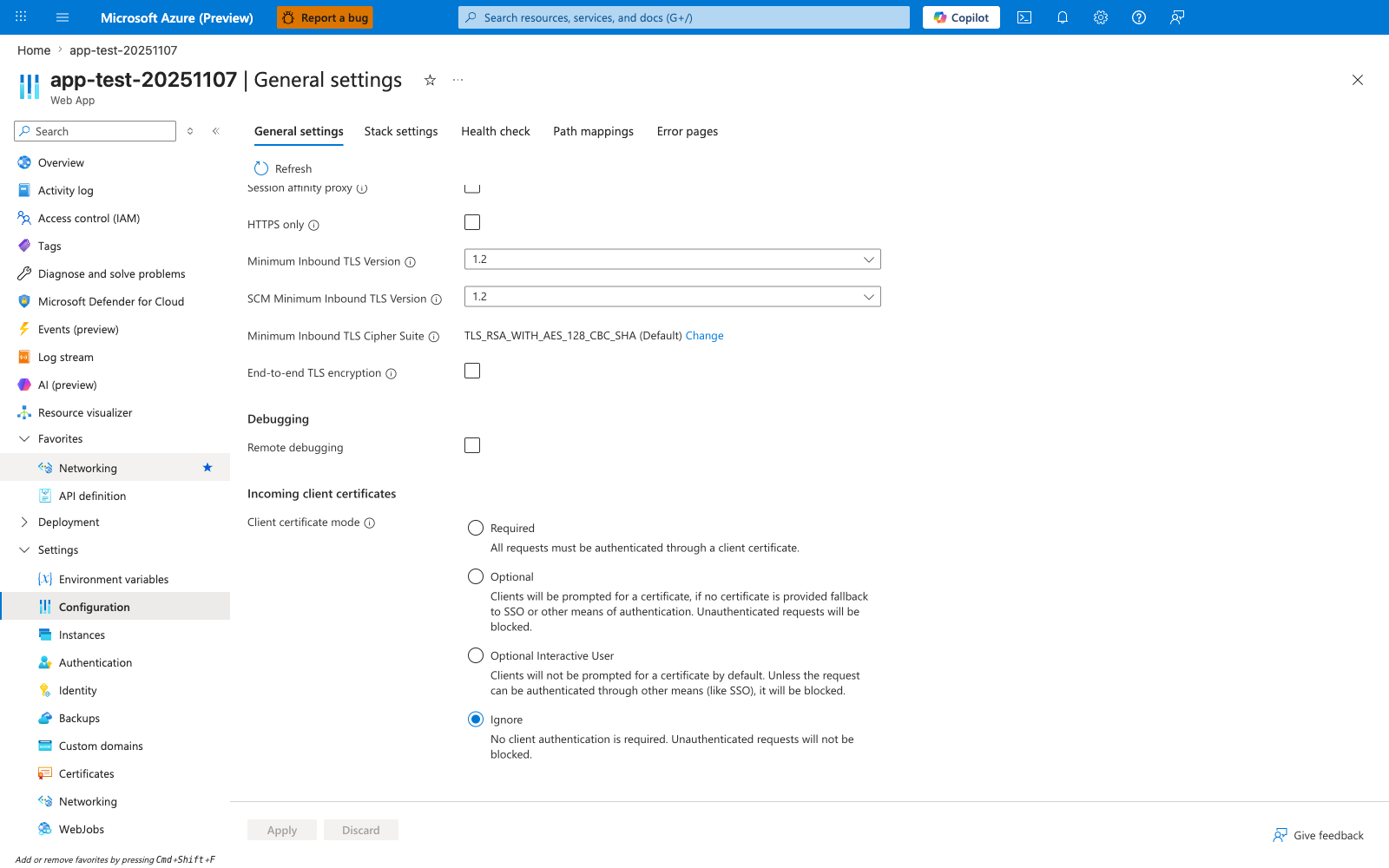
The Configuration > General settings blade scrolled to Incoming client certificates is the Portal surface that shows the four platform modes this recipe depends on before Express middleware can consume X-ARR-ClientCert. The visible Client certificate mode radios — Required, Optional, Optional Interactive User, and Ignore — are the settings the app-side certificate parsing logic must align with, and the screenshot clearly shows Ignore as the current default state. Use this blade as the verification point that the intended client-certificate mode is set before testing the Node.js middleware against incoming certificate-bearing requests.