Managed Identity for App Service
Managed Identity provides an automatically managed identity for Azure App Service to access other Azure resources like Key Vault, Storage, and SQL databases without needing secret management.
Overview
Azure provides two types of managed identities:
| Identity Type | Usage Case | Life Cycle |
|---|---|---|
| System-Assigned | Simple use case, one app per identity. | Tied to the resource life cycle. |
| User-Assigned | Shared identity across multiple resources or for complex RBAC setups. | Independent life cycle, must be manually deleted. |
Architecture
flowchart TD
    App[App Service] --> Sql[Azure SQL Database]
    App --> Kv[Azure Key Vault]
    App --> Storage[Azure Storage]
    App -.-> MI[Managed Identity]
    MI -.-> Entra[Microsoft Entra ID]
How to read this diagram: Solid arrows show runtime data flow. Dashed arrows show identity and authentication.
How RBAC Connects Identity to Resources
A managed identity alone does not grant access. Azure RBAC binds three elements into a role assignment:
flowchart TD
    P[Principal<br/>Who: Managed Identity or Service Principal] --> RA[Role Assignment<br/>Unique GUID per binding]
    RD[Role Definition<br/>What: Key Vault Secrets User, Storage Blob Data Reader, etc.] --> RA
    S[Scope<br/>Where: Subscription, Resource Group, or Resource] --> RA
    RA --> ACCESS[Access Granted]

style RA fill:#f5c542,stroke:#333,color:#000| Element | Question it answers | Example |
|---|---|---|
| Principal | Who needs access? | App Service's managed identity |
| Role Definition | What permission? | Key Vault Secrets User, Storage Blob Data Reader |
| Scope | On which resource? | A specific Key Vault, Storage account, or resource group |
| Role Assignment | The binding itself | Unique GUID — one per (principal + role + scope) combination |
Azure RBAC enforces a uniqueness constraint: only one role assignment can exist for the same (principal, role definition, scope) triple. Attempting to create a duplicate with a different assignment GUID results in a RoleAssignmentExists conflict.
Enable System-Assigned Identity
To enable identity on an existing App Service:
CLI Output Example
{
  "principalId": "xxxxxxxx-xxxx-xxxx-xxxx-xxxxxxxxxxxx",
  "tenantId": "xxxxxxxx-xxxx-xxxx-xxxx-xxxxxxxxxxxx",
  "type": "SystemAssigned"
}
The principalId is the unique identifier for this identity used in RBAC role assignments.
Grant Access to Resources
Once the identity is enabled, grant it access to the target resource using the Role Based Access Control (RBAC) model.
1. Storage Account
Grant the Storage Blob Data Contributor role to read and write blobs:
az role assignment create \
  --assignee $PRINCIPAL_ID \
  --role "Storage Blob Data Contributor" \
  --scope /subscriptions/<sub-id>/resourceGroups/<rg-name>/providers/Microsoft.Storage/storageAccounts/<account-name>
2. Key Vault
Grant the Key Vault Secrets User role to retrieve secrets:
az role assignment create \
  --assignee $PRINCIPAL_ID \
  --role "Key Vault Secrets User" \
  --scope /subscriptions/<sub-id>/resourceGroups/<rg-name>/providers/Microsoft.KeyVault/vaults/<vault-name>
3. Azure SQL
For Azure SQL, you must use Azure AD authentication. Add the managed identity as a user in the database:
CREATE USER [my-app-name] FROM EXTERNAL PROVIDER;
ALTER ROLE db_datareader ADD MEMBER [my-app-name];
ALTER ROLE db_datawriter ADD MEMBER [my-app-name];
Node.js SDK Usage
Use the @azure/identity package to authenticate with Azure services seamlessly:
const { DefaultAzureCredential } = require('@azure/identity');
const { BlobServiceClient } = require('@azure/storage-blob');

// The credential automatically picks up the managed identity on App Service
const credential = new DefaultAzureCredential();

// Use the credential with any Azure SDK client
const blobClient = new BlobServiceClient(
  `https://${storageAccount}.blob.core.windows.net`,
  credential
);
Local Development
DefaultAzureCredential works across different environments without code changes. In order of priority, it attempts to authenticate via:
- Environment Variables (AZURE_CLIENT_ID, etc.)
- Managed Identity (when running in Azure)
- Azure CLI (when running locally)
- VS Code Azure Account
For local development, run az login to allow the credential to use your CLI identity.
Verification
To verify that the identity is working:
- Use the Kudu console to check the identity endpoint:
curl $MSI_ENDPOINT -H "Secret: $MSI_SECRET" -v
- Check the app's environment variables for
IDENTITY_ENDPOINTandIDENTITY_HEADER.
Troubleshooting
- RBAC Propagation Delay: Role assignments can take up to 10 minutes to take effect. If you get a 403 error immediately after granting access, wait a few minutes.
- Wrong Identity on App: If using multiple identities, ensure
AZURE_CLIENT_IDis set to the client ID of the user-assigned identity you wantDefaultAzureCredentialto use. - Environment Conflicts: Ensure you don't have conflicting Azure credentials in your local environment variables.
Advanced Topics
- User-Assigned Identity Setup: Use
az identity createand thenaz webapp identity assign --identities <id>. - Token Exchange: You can manually request tokens for non-Azure AD resources using the identity endpoint if needed.
Run It in the Portal
Portal view: Identity blade (canonical managed-identity enablement surface)
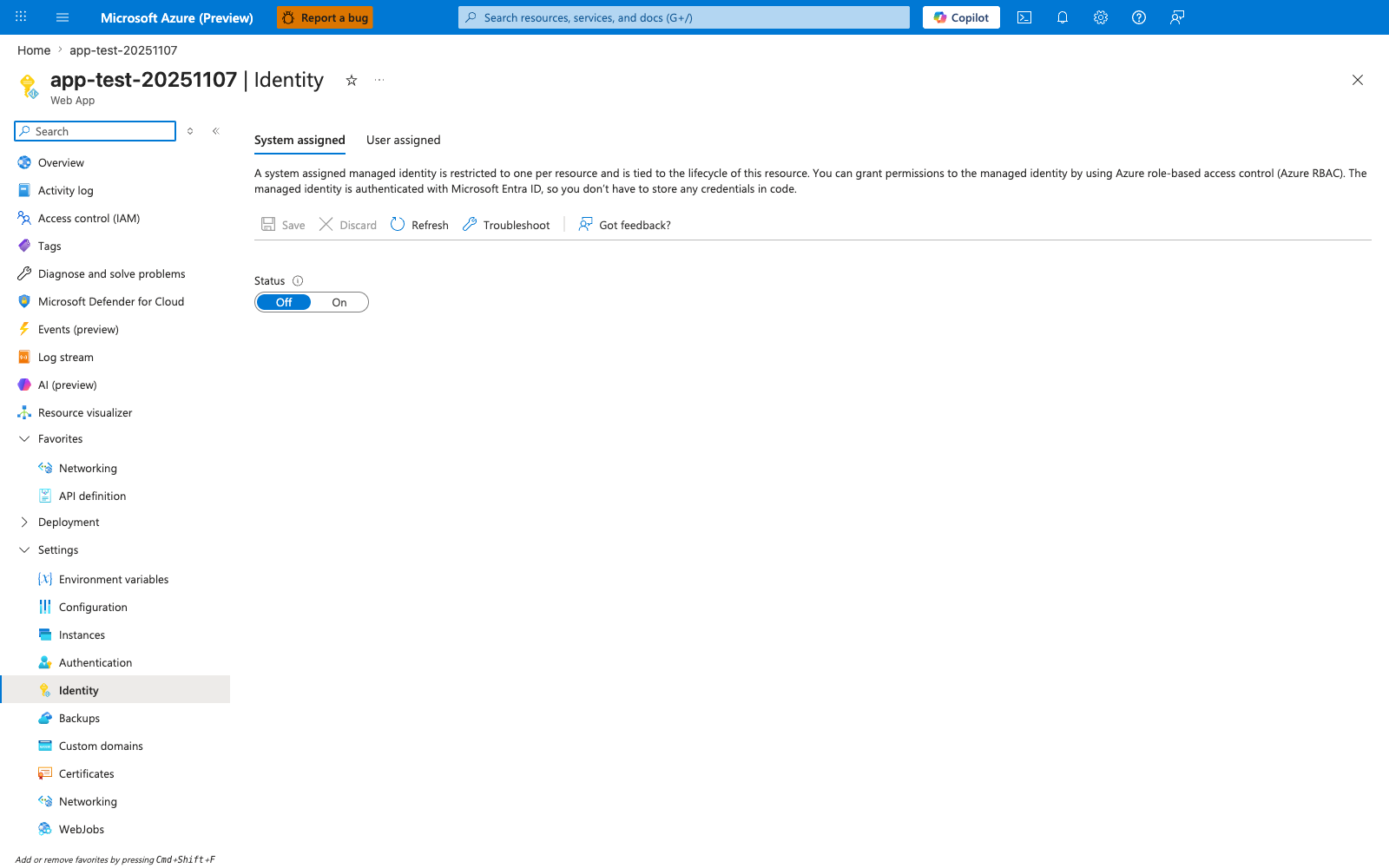
The Identity blade is the canonical Portal surface for the managed-identity flow this recipe walks through. With System assigned active and the Status toggle moved from Off to On, App Service creates the Entra ID principal that the recipe then uses with the @azure/identity DefaultAzureCredential to grant downstream RBAC roles for Storage, Key Vault, SQL, or any other Entra-aware service. The descriptive header on this blade restates the lifecycle guarantee the recipe relies on — the identity is tied to the resource — and the User assigned tab is the alternative path for identities shared across multiple apps. Use this blade as step 1 of the recipe before issuing any downstream role assignments via the CLI.