Deployment Slots Validation
Use staging slots to validate deployments before production swap, with health checks and automated safeguards in GitHub Actions.
flowchart TD
    A[Deploy to staging slot] --> B[Apply slot-sticky settings]
    B --> C[Run /health and /info checks]
    C --> D[Run /readyz validation]
    D --> E{Checks pass?}
    E -- Yes --> F[Swap to production]
E -- No --> G[Fix and redeploy staging]Prerequisites
- App Service plan supports deployment slots
- Production app already running
- CI/CD pipeline can deploy to specific slot
Main content
1) Create staging slot
az webapp deployment slot create \
  --resource-group "$RG" \
  --name "$APP_NAME" \
  --slot "staging" \
  --output json
2) Configure slot-sticky settings
Mark environment-specific values so they do not swap:
az webapp config appsettings set \
  --resource-group "$RG" \
  --name "$APP_NAME" \
  --slot "staging" \
  --slot-settings NODE_ENV=staging FEATURE_FLAG_USE_BETA=true \
  --output json
3) Deploy artifact to staging slot
az webapp deploy \
  --resource-group "$RG" \
  --name "$APP_NAME" \
  --slot "staging" \
  --src-path "release.zip" \
  --type zip \
  --output json
4) Add explicit health endpoint checks
curl --fail --silent "https://$APP_NAME-staging.azurewebsites.net/health"
curl --fail --silent "https://$APP_NAME-staging.azurewebsites.net/info"
5) Add version-aware validation endpoint
app.get('/readyz', (req, res) => {
  res.json({
    status: 'ready',
    environment: process.env.NODE_ENV || 'production',
    buildVersion: process.env.BUILD_VERSION || 'unknown'
  });
});
6) Swap staging to production
az webapp deployment slot swap \
  --resource-group "$RG" \
  --name "$APP_NAME" \
  --slot "staging" \
  --target-slot "production" \
  --output json
7) Optional auto-swap configuration
az webapp deployment slot auto-swap \
  --resource-group "$RG" \
  --name "$APP_NAME" \
  --slot "staging" \
  --auto-swap-slot "production" \
  --output json
Linux Limitation
Auto-swap is not supported for web apps on Linux and Web App for Containers. Use manual swap or CI/CD-triggered swap instead. See Deployment Slots for details.
Use auto-swap only when health checks and deployment confidence are high.
8) GitHub Actions staged deployment example
name: Staged Deployment

on:
  push:
    branches: [ main ]

jobs:
  deploy-staging:
    runs-on: ubuntu-latest
    steps:
      - uses: actions/checkout@v4
      - name: Deploy to staging slot
        uses: azure/webapps-deploy@v3
        with:
          app-name: ${{ secrets.AZURE_WEBAPP_NAME }}
          slot-name: 'staging'
          publish-profile: ${{ secrets.AZURE_WEBAPP_PUBLISH_PROFILE_STAGING }}
          package: .

  validate:
    needs: deploy-staging
    runs-on: ubuntu-latest
    steps:
      - name: Check staging health
        run: curl --fail --silent "https://${{ secrets.AZURE_WEBAPP_NAME }}-staging.azurewebsites.net/health"

  swap:
    needs: validate
    runs-on: ubuntu-latest
    steps:
      - name: Azure Login
        uses: azure/login@v2
        with:
          creds: ${{ secrets.AZURE_CREDENTIALS }}
      - name: Swap slots
        run: |
          az webapp deployment slot swap \
            --resource-group ${{ secrets.AZURE_RESOURCE_GROUP }} \
            --name ${{ secrets.AZURE_WEBAPP_NAME }} \
            --slot staging \
            --target-slot production \
            --output none
Validate before swap, always
A successful deployment is not the same as a healthy runtime. Require endpoint validation and telemetry checks before production swap.
Verification
- Staging serves expected build version.
- Production remains stable before swap.
- Swap completes without config leakage.
- Post-swap
/healthremains healthy.
Troubleshooting
Staging healthy, production fails after swap
- Check slot-sticky config alignment.
- Verify hostnames/certs for slot-specific behavior.
- Confirm staging used production-like dependencies where required.
Swap operation blocked
Validate no pending restart/operation exists and check App Service Activity Log for conflicts.
Auto-swap caused unexpected release
Disable auto-swap and enforce manual approval stage in GitHub Actions for high-risk environments.
Run It in the Portal
Portal view: Deployment slots with Swap dialog (validated promotion)
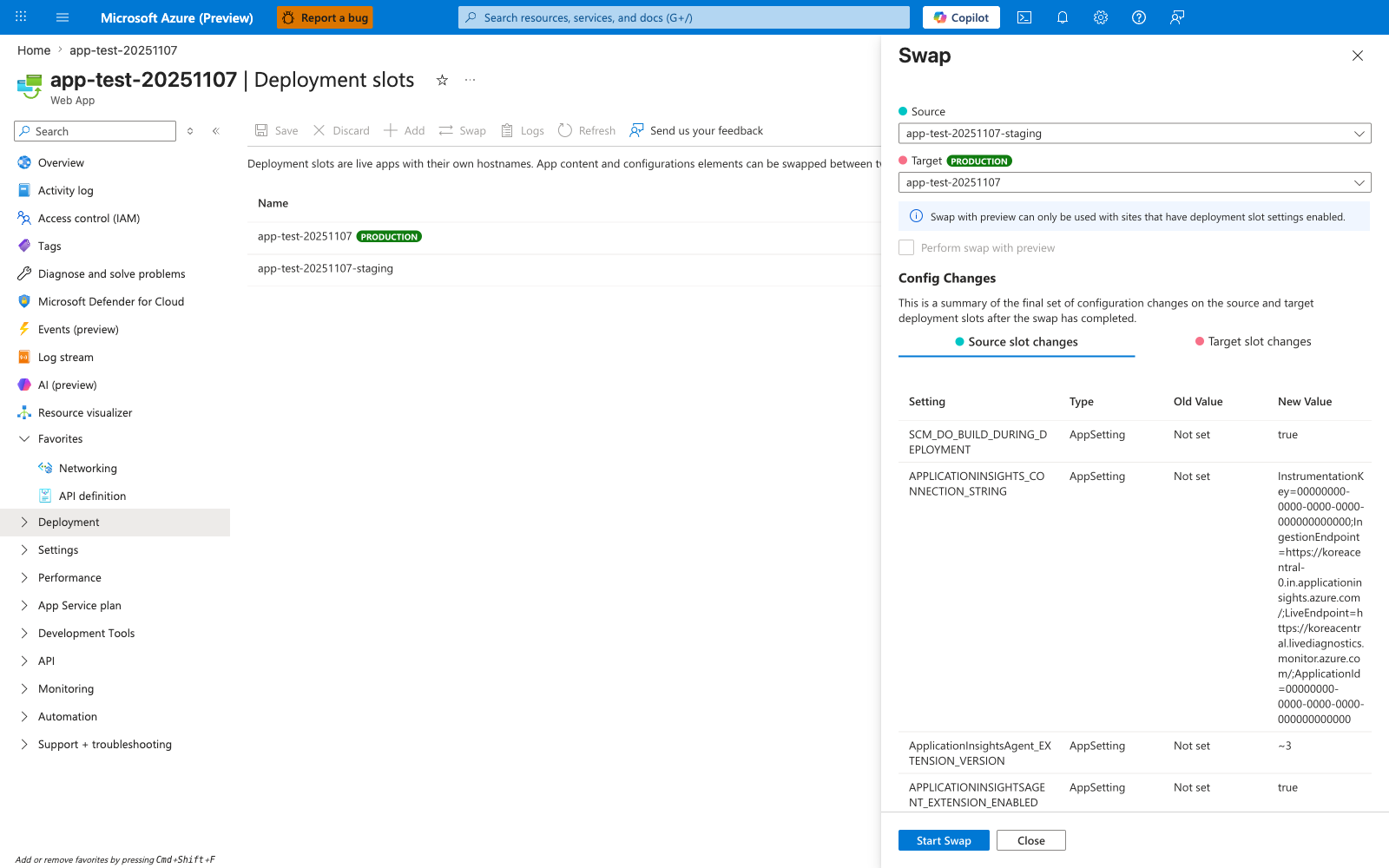
The Deployment slots blade with the Swap panel open is the Portal counterpart to the az webapp deployment slot swap command this recipe drives from CI. The Source: app-test-20251107-staging and Target: app-test-20251107 selectors mirror the staging-to-production promotion direction the recipe validates against. The Config Changes table at the bottom previews how slot-sticky settings will move during the swap, including the APPLICATIONINSIGHTS_CONNECTION_STRING and SCM_DO_BUILD_DURING_DEPLOYMENT rows visible here — the same delta you should inspect before clicking Start Swap. Use this Portal view as the manual checkpoint complementing the automated pre-swap validation calls (health probe, smoke test) the recipe issues against the Node.js staging slot.
See Also
- Tutorial: 06. CI/CD
- Tutorial: 03. Configuration
- For platform details, see Azure App Service Guide