Node.js Runtime Details
Quick lookup for the Node.js runtime environment on Azure App Service (Linux).
graph TD
    A[Client HTTPS Request] --> B[App Service Front End]
    B --> C[Node Worker on process.env.PORT]
    C --> D[Express/Node Application]
    D --> E[App Insights and Logs]
    F[Oryx Build Engine] --> C
Supported Node.js Versions
App Service supports current LTS versions. Check available versions via CLI:
| Command/Code | Purpose |
|---|---|
az webapp list-runtimes --linux --output table | Lists the Linux runtime stacks available in Azure App Service |
| Version | Status |
|---|---|
| Node.js 20 (LTS) | Current |
| Node.js 18 (LTS) | Supported |
| Node.js 16 (LTS) | Maintenance/Retired |
Oryx Build System
Oryx is the default build engine for App Service.
Build Behavior
- Detects Node.js: Looks for
package.jsonin the root directory. - Installs Dependencies: Runs
npm installoryarn install. - Build Step: Runs
npm run buildif the script exists inpackage.json. - Pruning: Runs
npm prune --productionto reduce deployment size (can be customized).
Customizing Oryx
Set these App Settings: * SCM_DO_BUILD_DURING_DEPLOYMENT: true or false. * ENABLE_ORYX_BUILD: true (default). * POST_BUILD_COMMAND: Custom command to run after the build completes.
Network & Port Binding
PORT Environment Variable
CRITICAL: You MUST bind to process.env.PORT.
const PORT = process.env.PORT || 3000;
server.listen(PORT, () => {
    console.log(`Server listening on port ${PORT}`);
});
| Command/Code | Purpose |
|---|---|
const PORT = process.env.PORT || 3000; | Uses the App Service-assigned port in Azure and 3000 locally |
server.listen(PORT, ...) | Starts the Node.js server on the selected port |
console.log(`Server listening on port ${PORT}`); | Writes a startup message that confirms the listening port |
Protocol Handling
- App Service handles HTTPS termination at the front-end.
- The application receives requests via HTTP on the assigned
PORT. - Check
X-Forwarded-ProtoandX-Forwarded-Forheaders for original request info.
Startup & Shutdown
Startup Command
By default, the platform detects how to start your application by looking for npm start, yarn start, or node server.js (in that order).
Checking and Setting Startup Command
Use the Azure CLI to inspect or update the startup configuration:
# Check current runtime and startup command
az webapp config show \
  --name $APP_NAME \
  --resource-group $RG \
  --query "{runtime:linuxFxVersion, startup:appCommandLine}" \
  --output json

# Set a custom startup command
az webapp config set \
  --name $APP_NAME \
  --resource-group $RG \
  --startup-file "node dist/server.js"
| Command/Code | Purpose |
|---|---|
az webapp config show ... --query "{runtime:linuxFxVersion, startup:appCommandLine}" --output json | Shows the configured runtime stack and startup command |
az webapp config set ... --startup-file "node dist/server.js" | Sets a custom startup command for the app |
Common Startup Commands: * node server.js - Direct execution (fastest startup) * npm start - Uses your package.json start script * pm2 start ecosystem.config.js --no-daemon - Use PM2 for process management (only if advanced features like clustering are required)
Graceful Shutdown (SIGTERM)
App Service sends a SIGTERM signal to your process when restarting, scaling down, or deploying. Your application should catch this signal to finish active requests and close database connections.
// Example: Graceful shutdown handler
process.on('SIGTERM', () => {
  console.log('SIGTERM received: shutting down gracefully');

  server.close(() => {
    console.log('HTTP server closed');
    process.exit(0);
  });

  // Force exit after 10 seconds if graceful shutdown fails
  setTimeout(() => {
    console.error('Forced shutdown due to timeout');
    process.exit(1);
  }, 10000);
});
| Command/Code | Purpose |
|---|---|
process.on('SIGTERM', ...) | Registers a graceful shutdown handler for platform restarts and scale events |
server.close(() => { ... }) | Stops accepting new HTTP connections and closes the server cleanly |
process.exit(0) | Exits successfully after cleanup completes |
setTimeout(() => { ... }, 10000) | Forces the process to exit if graceful shutdown takes too long |
Why this matters: * Prevents dropped HTTP connections during deployments * Ensures database connection pools are closed correctly * Allows background tasks to finish or checkpoint * Note: The platform waits for a grace period before sending SIGKILL.
Health Check Configuration
App Service can monitor your application's health and automatically remove unhealthy instances from the load balancer.
# Enable health check path
az webapp config set \
  --name $APP_NAME \
  --resource-group $RG \
  --generic-configurations '{"healthCheckPath": "/health"}'
| Command/Code | Purpose |
|---|---|
az webapp config set ... --generic-configurations '{"healthCheckPath": "/health"}' | Configures App Service to probe the /health endpoint |
Platform Behavior: * Probing: The platform probes your health path every 1 minute. * Isolation: After a certain number of failed probes, the instance is marked unhealthy and removed from the load balancer. * Recovery: If the instance remains unhealthy, the platform may restart it (Auto-Heal).
Process & Runtime Behavior
Instance Resources
- Single Process: By default, Node.js runs as a single process. You typically don't need
clustermode unless you are on a high-core SKU and have high-CPU workloads. - Memory Limits: Based on your App Service Plan SKU. Exceeding limits will cause the platform to restart the container.
- Ephemeral Filesystem: The local filesystem is ephemeral except for
/home. Any files written outside of/homeare lost during restarts.
Environment & Networking
process.env.PORT: Set by the platform to a random port. Your app must listen on this port.- Host Binding: Bind to
0.0.0.0(all interfaces) rather than127.0.0.1orlocalhostto ensure the platform's reverse proxy can reach your process. - Timezone: Defaults to UTC. Set the
WEBSITE_TIMEZONEapp setting to change it.
Cold Start Optimization
Cold starts occur when an app scales out or starts after being idle.
- Always On: Enable "Always On" (Standard tier and above) to keep the container loaded.
- Dependency Management: Minimize the number of dependencies. Large
node_modulesincrease container startup time. - Lazy Loading: Use dynamic
import()for heavy modules that aren't needed during initial startup. - Pre-warming: Use health checks to ensure the instance is fully initialized before receiving traffic.
package.json Requirements
-
enginesfield: Specify the Node.js version to guide Oryx.Command/Code Purpose engines.nodeTells Oryx and other tooling which Node.js version range the app expects * scripts.start: The primary way App Service knows how to run your app.* Dependencies: Ensure all required modules are listed in dependencies.
Package Managers
- npm: Default, uses
package-lock.jsonif present. - yarn: Uses
yarn.lockif present. - pnpm: Not natively supported by Oryx without a custom build script.
Advanced Topics
Coming Soon
- [Custom Node.js versions]
- [Bun/Deno support]
Run It in the Portal
Portal view: Environment variables blade (runtime app settings managed here)
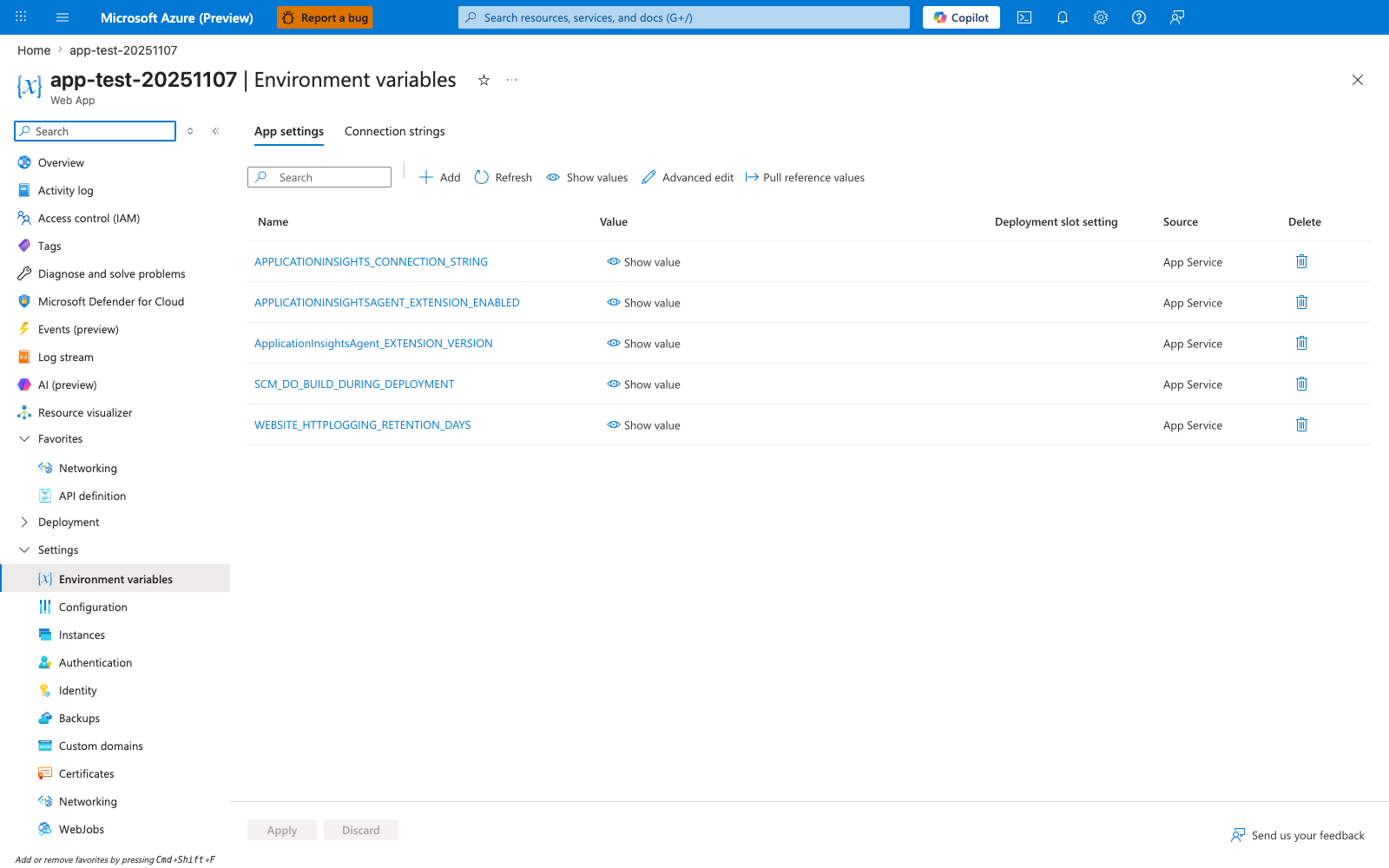
The Environment variables blade with the App settings tab selected is the Portal view of the runtime settings table for this Node.js app. In this screenshot, the visible row SCM_DO_BUILD_DURING_DEPLOYMENT appears alongside other App Service-managed entries in the same Name, Value, Deployment slot setting, and Source layout. The Show value, Advanced edit, and Pull reference values actions in the toolbar make this the same surface where those settings are inspected in the Portal. The highlighted Environment variables entry in the left navigation confirms the exact blade readers should open when checking runtime configuration.